1. บทนำ
This manual provides detailed instructions for the setup, operation, and maintenance of your MOBAPAD Huben2 Wireless Switch Controller Pro. Please read this manual thoroughly before using the product to ensure optimal performance and longevity.
2. ข้อมูลด้านความปลอดภัย
- ควรเก็บตัวควบคุมให้ห่างจากน้ำและของเหลวอื่นๆ
- อย่าให้ตัวควบคุมสัมผัสกับอุณหภูมิที่สูงหรือต่ำเกินไป
- หลีกเลี่ยงการทำตกหรือให้ตัวควบคุมได้รับแรงกระแทกรุนแรง
- Do not attempt to disassemble or repair the controller yourself. Contact customer support for assistance.
- ใช้เฉพาะสายชาร์จที่ให้มาหรือสาย USB-C ที่ผ่านการรับรองสำหรับการชาร์จเท่านั้น
3. เนื้อหาบรรจุภัณฑ์
ตรวจสอบว่ามีรายการทั้งหมดอยู่ในแพ็คเกจของคุณ:
- MOBAPAD Huben2 Wireless Controller Pro
- สายชาร์จ USB-C
- Wireless Dongle (2.4G)
- PU Travel Case
- Replaceable D-pad (Cross/Circle)
- คู่มือการใช้งาน (เอกสารนี้)
4. เค้าโครงของตัวควบคุม
Familiarize yourself with the buttons and features of your Huben2 controller.

รูปที่ 4.1 : ด้านหน้า view of the MOBAPAD Huben2 Wireless Controller Pro. Shows the joysticks, face buttons (A, B, X, Y), D-pad, and central function buttons.
- แท่งอนาล็อกซ้าย/ขวา: Capacitive joysticks with 4,096-step precision.
- ปุ่ม A/B/X/Y: Omron mechanical face buttons.
- แผ่น D: Replaceable cross or circle D-pad.
- L1/R1 (ปุ่มไหล่): Standard shoulder buttons.
- L2/R2 (ทริกเกอร์): Dual-mode triggers (Hall Effect and Microswitch).
- ปุ่ม M1/M2/M3/M4: Four programmable back buttons.
- ปุ่มโฮม: Powers on/off and returns to system home screen.
- ปุ่มจับภาพหน้าจอ: จับภาพหน้าจอ
- ปุ่มบวก/ลบ: Standard system menu buttons.
- ปุ่มเทอร์โบ: เปิด/ปิดฟังก์ชั่นเทอร์โบ
- พอร์ต USB-C: สำหรับการชาร์จและการเชื่อมต่อแบบมีสาย

รูปที่ 4.2: ด้านหลัง view showing the four programmable M1, M2, M3, M4 back buttons.
5. การตั้งค่า
5.1 การชาร์จคอนโทรลเลอร์
Before first use, fully charge the controller. Connect the provided USB-C cable to the controller's USB-C port and the other end to a USB power source (e.g., console, PC, or USB wall adapter). The charging indicator will show the charging status.
- A full charge provides approximately 15 hours of gameplay.

Figure 5.1: The controller features a 1000mAh battery for extended gameplay.
5.2 โหมดการเชื่อมต่อ
The Huben2 controller supports three connection methods:

Figure 5.2: The controller supports 2.4G wireless, Bluetooth, and wired connections across various platforms.
- 2.4G Wireless (via Dongle):
- Compatible with Windows PC, Steam, and Android TV.
- เสียบตัวรับสัญญาณไร้สาย 2.4G เข้ากับพอร์ต USB บนอุปกรณ์ของคุณ
- เปิดตัวควบคุม มันควรจะเชื่อมต่อกับดองเกิลโดยอัตโนมัติ
- บลูทูธไร้สาย:
- Compatible with Nintendo Switch, Nintendo Switch 2, Android, and iOS devices.
- บนอุปกรณ์ของคุณ ให้ไปที่การตั้งค่าบลูทูธ แล้วเปิดใช้งานบลูทูธ
- บนตัวควบคุม ให้กดปุ่มจับคู่บลูทูธค้างไว้ (ดูแผนผังตัวควบคุมเพื่อดูตำแหน่งที่แน่นอน) จนกว่าไฟแสดงสถานะจะกะพริบอย่างรวดเร็ว
- Select "MOBAPAD Huben2" from the list of available devices on your system to pair.
- For Nintendo Switch, the controller can wake the console from sleep mode after initial pairing and firmware update via the Mobapad app.
- การเชื่อมต่อแบบมีสาย:
- Compatible with Windows PC and Android TV.
- Connect the controller to your device using the USB-C cable. The controller will be recognized automatically.
6. คู่มือการใช้งาน
6.1 เปิด/ปิดเครื่อง
- เปิดเครื่อง: กดปุ่ม Home
- หมดแรง: Press and hold the Home button for 3-5 seconds. The controller will also power off automatically after a period of inactivity.
6.2 โหมดทริกเกอร์คู่
The L2 and R2 triggers feature dual modes for different gaming experiences:

Figure 6.1: Visual representation of the 2mm Microswitch Trigger and 10mm Hall Linear Trigger modes.
- Microswitch Trigger (2mm): Provides a short, tactile click for rapid input, ideal for FPS games.
- Hall Effect Linear Trigger (10mm): Offers analog input with a longer travel distance, suitable for racing or simulation games.
- โหมดการสลับ: Use the physical switches located near the L2/R2 triggers to toggle between modes.
6.3 Customizable Features (Back Buttons, Macros, App Support)
The Huben2 controller offers extensive customization options:
- ปุ่มย้อนกลับที่ตั้งโปรแกรมได้ (M1-M4): Assign single button presses or complex macros to the four back buttons using the dedicated Mobapad PC/mobile application.
- Rapid-Fire Turbo Mode: Activate turbo functionality for any button. Refer to the Mobapad app or controller manual for specific button combinations to enable/disable.
- Mobapad App: Download the official Mobapad application for Windows or mobile devices to:
- Adjust joystick dead zones and response curves.
- ปรับระดับความแรงของการสั่นสะเทือนได้ตามต้องการ
- สร้างและจัดการมาโคร
- อัปเดตเฟิร์มแวร์ตัวควบคุม
6.4 HD Rumble and ALPS Linear Motors
The controller features dual ALPS linear motors for precise HD Rumble feedback, reacting to in-game sound and motion with 0ms startup time.
6.5 การควบคุมการเคลื่อนที่ 6 แกน
The integrated 6-axis motion sensor provides precise motion control for compatible games.

Figure 6.2: The controller's internal 6-axis sensing motors enable precise motion control.
6.6 Replaceable D-pad and Faceplate
The controller allows for customization of the D-pad and faceplate.
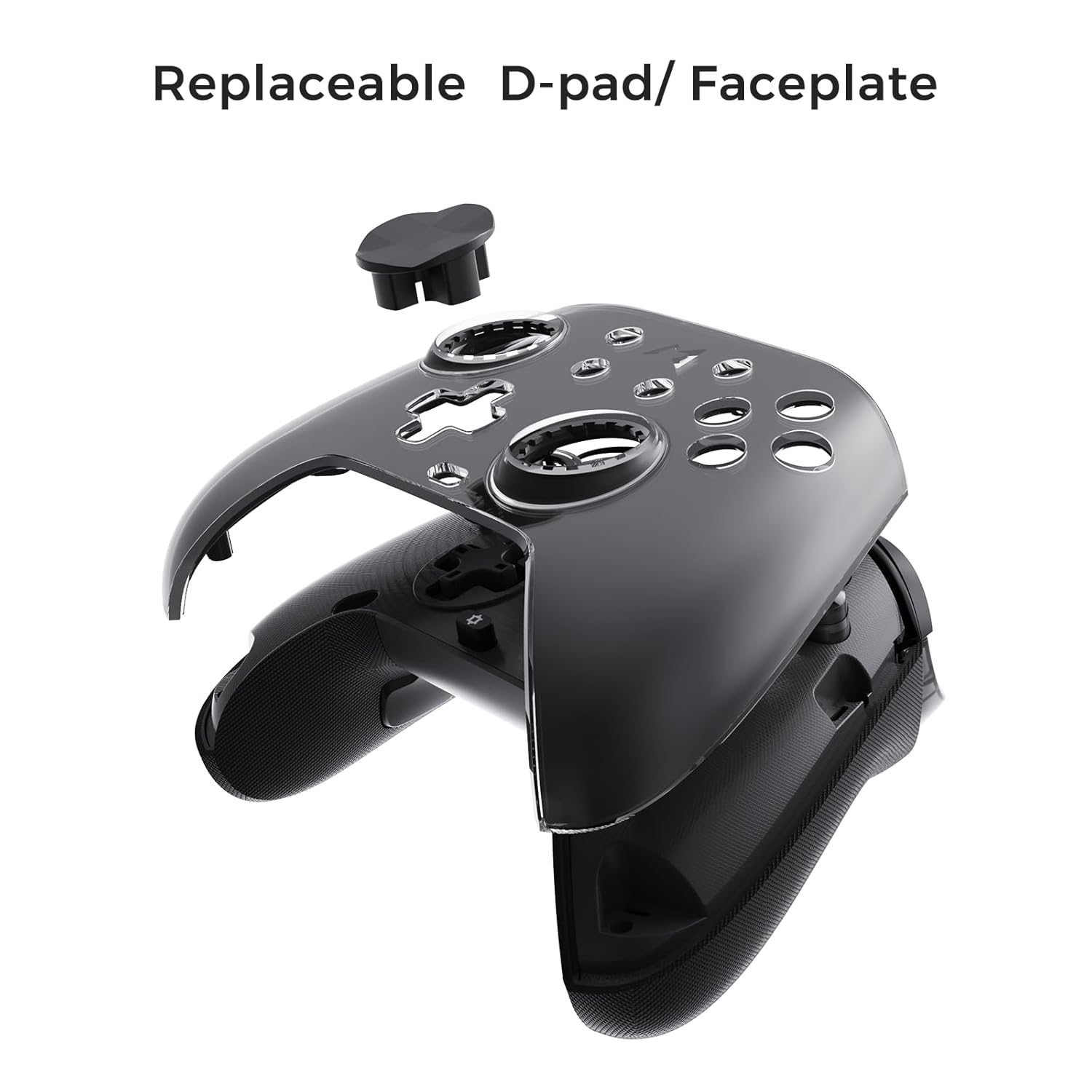
Figure 6.3: The D-pad and faceplate can be replaced for customization or preference.
- To replace the D-pad, gently remove the magnetic faceplate and then lift out the D-pad. Insert the desired D-pad (cross or circle) and reattach the faceplate.
7. การบำรุงรักษา
- การทำความสะอาด: ใช้ผ้านุ่มและแห้งเช็ดทำความสะอาดคอนโทรลเลอร์ สำหรับคราบสกปรกฝังแน่น ให้เช็ดเบาๆampชุบผ้าด้วยน้ำ ห้ามใช้สารเคมีรุนแรงหรือน้ำยาทำความสะอาดที่มีฤทธิ์กัดกร่อน
- พื้นที่จัดเก็บ: Store the controller in a cool, dry place, away from direct sunlight and extreme temperatures. When not in use for extended periods, store it in the provided PU travel case.
- การดูแลแบตเตอรี่ เพื่อยืดอายุการใช้งานแบตเตอรี่ ควรหลีกเลี่ยงการปล่อยประจุแบตเตอรี่จนหมดบ่อยๆ ควรชาร์จเป็นประจำ แม้จะไม่ได้ใช้งานบ่อยก็ตาม
8 การแก้ไขปัญหา
| ปัญหา | สาเหตุที่เป็นไปได้ | สารละลาย |
|---|---|---|
| คอนโทรลเลอร์เปิดไม่ติด | แบตเตอรี่อ่อน | ชาร์จคอนโทรลเลอร์อย่างน้อย 30 นาที |
| ตัวควบคุมไม่เชื่อมต่อแบบไร้สาย | Not in pairing mode; out of range; interference; incorrect mode selected. | Ensure controller is in pairing mode. Move closer to the device. Check for other wireless devices causing interference. Verify correct connection mode (2.4G or Bluetooth). |
| Input lag or dropped connections. | Wireless interference; low battery; outdated firmware. | Reduce distance to device. Charge controller. Update firmware via Mobapad app. Try wired connection. |
| ปุ่มกดหรือจอยสติ๊กไม่ตอบสนอง | Software glitch; physical obstruction; calibration issue. | Restart the controller and the connected device. Check for physical debris. Calibrate joysticks via Mobapad app. |
| HD Rumble ไม่ทำงาน | Feature disabled in game/system settings; low battery. | Ensure rumble is enabled in game and system settings. Charge controller. |
If you encounter issues not listed here, please refer to the official MOBAPAD support webเว็บไซต์หรือติดต่อฝ่ายบริการลูกค้า
9. ข้อมูลจำเพาะ
| คุณสมบัติ | รายละเอียด |
|---|---|
| หมายเลขรุ่น | Mobapad Huben2 H6 |
| การเชื่อมต่อ | 2.4G ไร้สาย, บลูทูธ, แบบมีสาย (USB-C) |
| ความเข้ากันได้ | Nintendo Switch, Nintendo Switch 2, Windows, Steam, Android, iOS |
| จอยสติ๊ก | Capacitive, 4,096-step precision, 1000Hz polling rate |
| ทริกเกอร์ | Dual Mode: 2mm Omron Microswitch, 10mm Hall Effect Linear |
| ปุ่ม | Omron Mechanical Face Buttons, Programmable Back Buttons (M1-M4) |
| การสั่นสะเทือน | Dual ALPS Linear Motors (HD Rumble) |
| การควบคุมการเคลื่อนไหว | ไจโรสโคปแบบแกน 6 |
| ความจุของแบตเตอรี่ | ลิเธียมไอออน 1000mAh |
| อายุการใช้งานแบตเตอรี่ | สูงสุด 15 ชั่วโมง (โดยประมาณ) |
| ขนาด | 6.3 x 4.13 x 2.76 นิ้ว |
| น้ำหนัก | 1.87 ปอนด์ |
10. การรับประกันและการสนับสนุน
MOBAPAD products are designed and manufactured to the highest quality standards. For warranty information, technical support, or customer service inquiries, please visit the official MOBAPAD website or contact their authorized support channels. Please retain your proof of purchase for warranty claims.
Webเว็บไซต์: Visit the MOBAPAD Store on Amazon


