การแนะนำ
The MOBAPAD Huben2 is a versatile wireless controller designed for use with Nintendo Switch, PC, Android, and iOS devices. It features advanced components such as ALPS linear motors for precise haptic feedback, Omron mechanical buttons for tactile response, and capacitive joysticks for enhanced accuracy. This manual provides detailed instructions for setting up, operating, and maintaining your Huben2 controller.

ด้านหน้า view of the MOBAPAD Huben2 Wireless Controller in white, showcasing การออกแบบตามหลักสรีรศาสตร์และเค้าโครงปุ่ม
การตั้งค่า
1. เนื้อหาบรรจุภัณฑ์
- MOBAPAD Huben2 Wireless Controller
- สาย USB-C
- 2.4G Wireless Dongle (if included with your model)
- Travel Case (if included with your model)
- คู่มือการใช้งาน (เอกสารนี้)
2. การชาร์จคอนโทรลเลอร์
Before first use, fully charge the controller. Connect the included USB-C cable to the controller's charging port and the other end to a USB power source (e.g., computer, wall adapter). The charging indicator will show the charging status and turn off when fully charged. A full charge provides approximately 15 hours of battery life.

The controller features a 1000mAh battery, providing up to 15 hours of gameplay on a single charge.
3. โหมดการเชื่อมต่อ
The Huben2 controller supports three primary connection methods:

Visual representation of the three connection modes: 2.4G for Windows/Android TV, Bluetooth for Switch/Switch 2/iOS/Android, and Wired for Windows/Android TV.
- 2.4G Wireless (via Dongle): Insert the 2.4G dongle into a USB port on your device. The controller will automatically connect.
- บลูทูธ: For Nintendo Switch, Switch 2, Android, and iOS devices.
- นินเทนโดสวิตช์: Navigate to the 'Controllers' menu on your Switch, then select 'Change Grip/Order'. Press and hold the pairing button on the Huben2 controller until the indicator lights flash. The Switch will detect and pair with the controller.
- แอนดรอยด์/iOS: Enable Bluetooth on your mobile device. Press and hold the pairing button on the Huben2 controller. Select "MOBAPAD Huben2" from the list of available Bluetooth devices.
- แบบมีสาย (USB-C): Connect the controller directly to your device using the provided USB-C cable. The controller will be recognized as a wired input device.
คำแนะนำการใช้งาน
1. เค้าโครงปุ่มและฟังก์ชั่น
Familiarize yourself with the controller's button layout. The Huben2 features standard gaming buttons, including A/B/X/Y, D-pad, L/R, ZL/ZR, Home, Capture, Plus, Minus, and four programmable back buttons (M1, M2, M3, M4).

A user demonstrating gameplay with the MOBAPAD Huben2 controller, highlighting its ergonomic design during use.
2. Dual Trigger Modes
The Huben2 offers two distinct trigger modes for L2/R2 buttons, switchable via a physical mechanism:
- Microswitch Trigger (2mm travel): Provides a short, tactile click, ideal for rapid inputs in shooting games.
- Hall Linear Trigger (10mm travel): Offers a smooth, analog response, suitable for racing games or precise acceleration control.
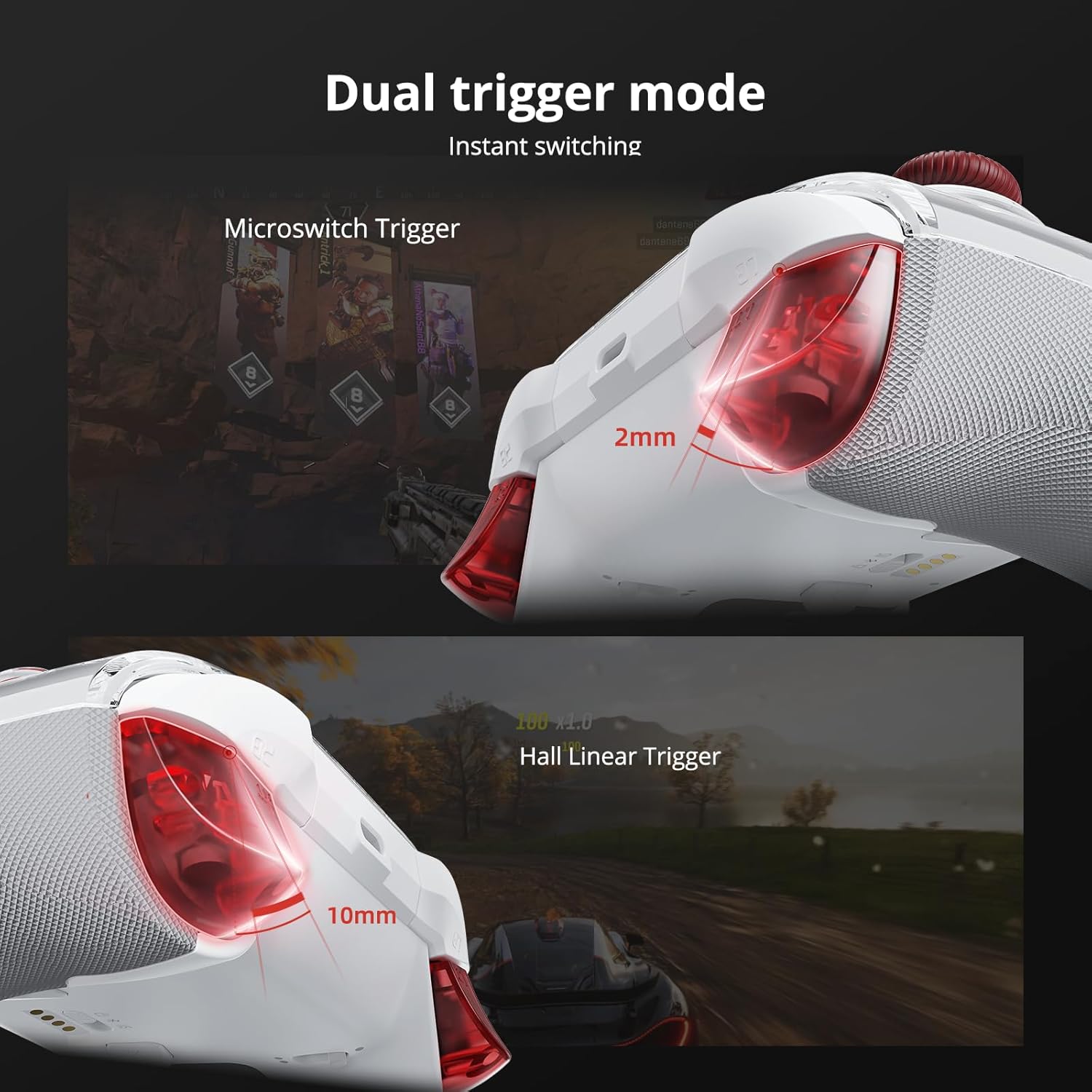
รายละเอียด view of the dual trigger mechanism, showing the short travel of the microswitch trigger and the longer, linear travel of the Hall effect trigger.
3. Capacitive Joysticks
The controller is equipped with capacitive thumbsticks that provide 4,096-step precision and a 1ms response rate, designed to minimize drift and enhance control accuracy.

แผนภาพภายในแสดงasing the technology behind the Mobapad capacitive joysticks, emphasizing their precision.
4. Omron Mechanical Buttons
The face buttons (A/B/X/Y) utilize Omron mechanical switches, offering a distinct tactile feel and rapid actuation for competitive gaming.

ภาพตัดขวาง view revealing the Omron mechanical buttons, highlighting their internal structure.
5. 6-Axis Motion Control
The integrated 6-axis motion sensor provides precise tilt and rotation control, enhancing gameplay in compatible titles.

Visual representation of the controller's 6-axis motion sensing capabilities.
6. ปุ่มย้อนกลับที่ตั้งโปรแกรมได้ (M1-M4)
The four rear buttons (M1, M2, M3, M4) can be programmed for custom macros or remapped to other functions using the MOBAPAD PC/mobile application. Refer to the application's guide for detailed programming instructions.

Close-up of the controller's underside, highlighting the four customizable back buttons.
7. ฟังก์ชั่นเทอร์โบ
The controller includes a Turbo function for rapid, repeated button presses. Activate and configure the Turbo function via the dedicated button or the companion application.

Detail of the controller's Turbo function button.
8. Customization via Application
Further customization options, including macro programming, vibration intensity adjustment, and stick sensitivity tuning, are available through the MOBAPAD PC/mobile application. Download the application from the official MOBAPAD webเว็บไซต์หรือแอปสโตร์ของอุปกรณ์ของคุณ
การซ่อมบำรุง
- การทำความสะอาด: ใช้ผ้าแห้งนุ่มๆ เช็ดทำความสะอาดตัวควบคุม หลีกเลี่ยงการใช้สารทำความสะอาดที่มีฤทธิ์กัดกร่อนหรือตัวทำละลาย
- พื้นที่จัดเก็บ: Store the controller in a cool, dry place, away from direct sunlight and extreme temperatures. Use the included travel case for protection during transport.
- การดูแลแบตเตอรี่ เพื่อยืดอายุการใช้งานแบตเตอรี่ ควรหลีกเลี่ยงการปล่อยประจุแบตเตอรี่จนหมดบ่อยๆ ควรชาร์จเป็นประจำ แม้จะไม่ได้ใช้งานเป็นเวลานานก็ตาม
- แผ่นปิดด้านหน้าถอดได้: The controller features a removable magnetic faceplate. Handle with care when detaching or reattaching.

An exploded diagram illustrating the removable faceplate and internal structure of the controller.
การแก้ไขปัญหา
- ตัวควบคุมไม่ได้เชื่อมต่อ:
- ตรวจสอบให้แน่ใจว่าได้ชาร์จคอนโทรลเลอร์แล้ว
- Verify the correct connection mode (2.4G, Bluetooth, Wired) is selected for your device.
- สำหรับบลูทูธ โปรดตรวจสอบให้แน่ใจว่าอุปกรณ์ของคุณเปิดใช้งานบลูทูธแล้ว และตัวควบคุมอยู่ในโหมดจับคู่
- Try restarting both the controller and the device you are connecting to.
- ความล่าช้าในการป้อนข้อมูลหรือไม่ตอบสนอง:
- Ensure the controller is within range of the wireless receiver (2.4G or Bluetooth).
- ลดการรบกวนจากอุปกรณ์ไร้สายอื่น ๆ
- For wired connection, ensure the USB-C cable is securely connected.
- Update controller firmware via the MOBAPAD application.
- การดริฟท์ของก้านควบคุม:
- While capacitive joysticks are designed to prevent drift, if issues occur, try recalibrating them using the MOBAPAD application.
- อายุการใช้งานแบตเตอรี่สั้น:
- โปรดตรวจสอบให้แน่ใจว่าได้ชาร์จแบตเตอรี่คอนโทรลเลอร์จนเต็มก่อนใช้งาน
- Reduce vibration intensity via the MOBAPAD application to conserve battery.
- ประสิทธิภาพของแบตเตอรี่อาจลดลงเมื่อใช้งานเป็นเวลานาน
ข้อมูลจำเพาะ
| คุณสมบัติ | รายละเอียด |
|---|---|
| หมายเลขรุ่น | Mobapad Huben2 H6 |
| การเชื่อมต่อ | 2.4G ไร้สาย, บลูทูธ, USB-C แบบมีสาย |
| ความเข้ากันได้ | Nintendo Switch, Switch 2, iOS, Windows, Android |
| จอยสติ๊ก | Capacitive, 4,096-step precision, 1ms response |
| ปุ่ม | Omron Mechanical Buttons |
| ทริกเกอร์ | Dual Mode (Microswitch / Hall Linear) |
| การสั่นสะเทือน | Dual ALPS Linear Motors (HD Rumble) |
| การควบคุมการเคลื่อนไหว | ไจโรสโคปแบบแกน 6 |
| ปุ่มที่สามารถตั้งโปรแกรมได้ | 4 Rear Macro Buttons (M1-M4) |
| แบตเตอรี่ | 1 Lithium Ion (included), 1000mAh, approx. 15-hour life |
| ขนาดสินค้า | 4.33 x 2.95 x 6.3 นิ้ว |
| น้ำหนักสินค้า | 1.87 ปอนด์ |
| ผู้ผลิต | Mobapad |
การรับประกันและการสนับสนุน
For warranty information and technical support, please refer to the official MOBAPAD webหรือติดต่อฝ่ายบริการลูกค้า เก็บหลักฐานการซื้อไว้เพื่อใช้ในการเคลมประกัน
แหล่งข้อมูลออนไลน์: เยี่ยมชม MOBAPAD Store on Amazon สำหรับข้อมูลผลิตภัณฑ์เพิ่มเติมและการอัปเดตต่างๆ

