1. บทนำ
This manual provides detailed instructions for the SONRU Wireless Earbuds S57 and the SONRU 120W USB C Car Charger. Please read this manual thoroughly before using the products to ensure proper operation and to maximize their lifespan. Keep this manual for future reference.
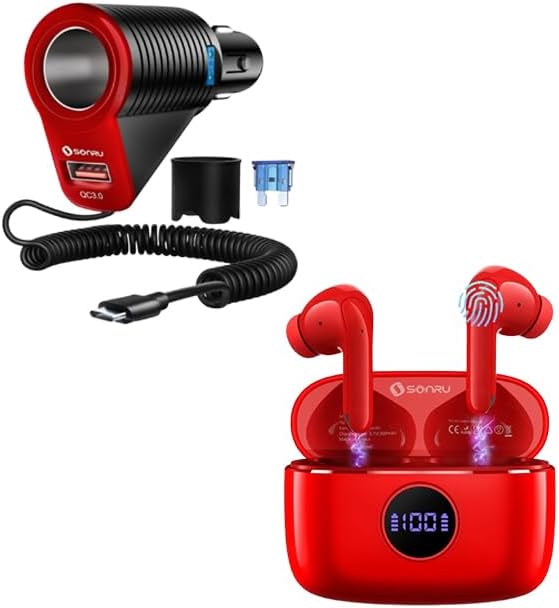
Image 1.1: SONRU Wireless Earbuds S57 and 120W USB C Car Charger. This image displays both the red wireless earbuds in their charging case and the red and black car charger with its coiled USB-C cable.
2. สินค้าหมดview
2.1 SONRU Wireless Earbuds S57
The SONRU S57 Wireless Earbuds are designed for high-fidelity audio and comfortable wear. They feature Bluetooth 5.3 connectivity, 13mm speakers, and smart touch controls.
- ระบบเสียงสเตอริโอไฮไฟ: Equipped with 13mm speakers and a triple-layer composite diaphragm for clear highs, powerful bass, and balanced mids.
- Bluetooth 5.3: Ensures faster and more stable signal transmission for a reliable wireless connection up to 33 feet.
- การออกแบบตามหลักสรีรศาสตร์: In-ear curved design with S-M-L earbud sizes for a secure and comfortable fit during various activities.
- การควบคุมแบบสัมผัสอัจฉริยะ: Allows for easy management of music, calls, volume, and voice assistant directly from the earbuds.
- จอแสดงผล LED: The charging case features a digital LED display to show the charge level of both the case and the earbuds.
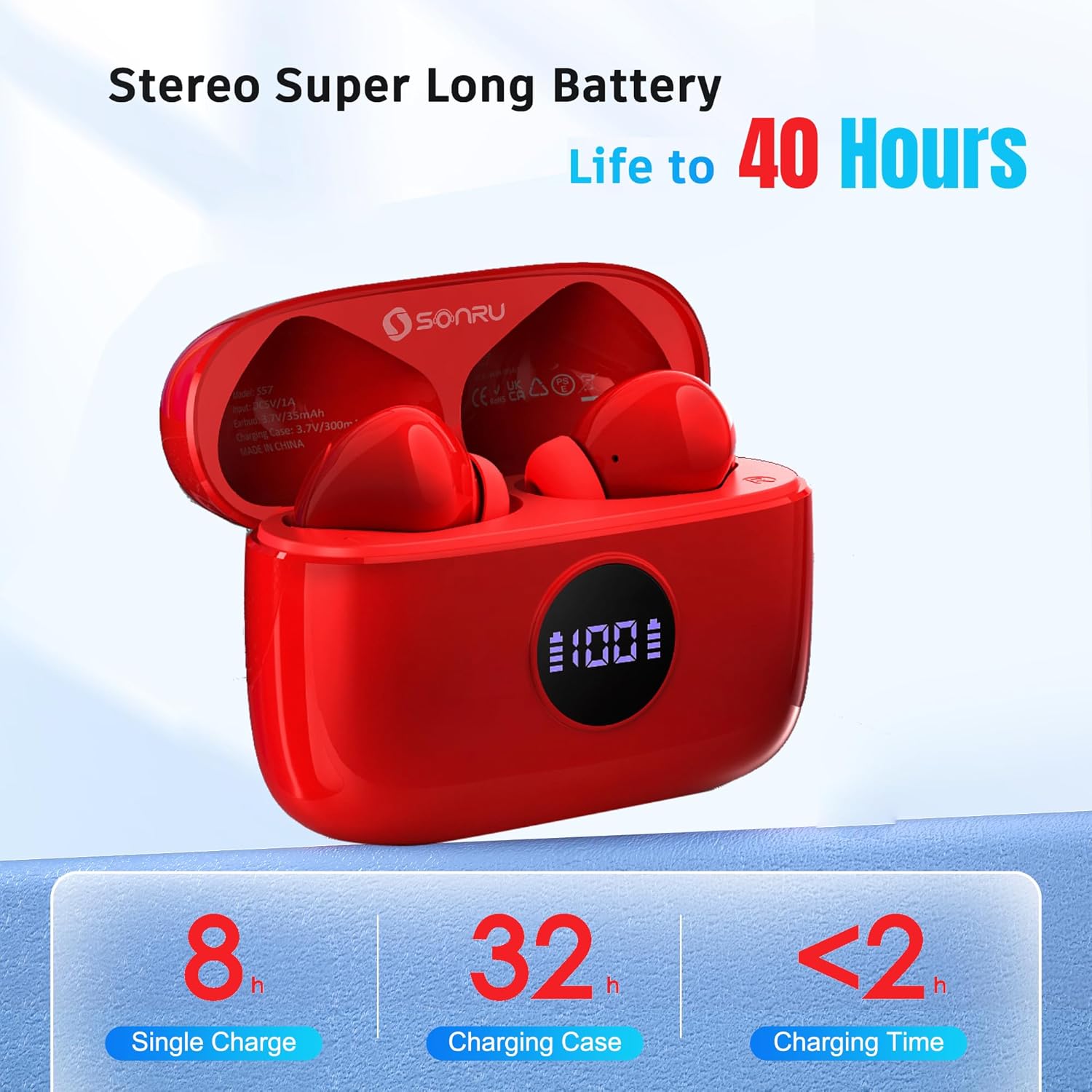
Image 2.1: Internal components of the SONRU S57 Earbud, highlighting the 13mm speaker driver and Bluetooth 5.3 chip for Hi-Fi stereo sound.

Image 2.2: Dimensions of the SONRU S57 earbuds and their charging case, illustrating their compact and lightweight design.
2.2 SONRU 120W USB C Car Charger
The SONRU 120W USB C Car Charger is a 3-in-1 adapter designed to provide fast charging for multiple devices in your vehicle.
- กำลังขับสูง: Delivers up to 120W total power.
- หลายพอร์ต: Features a USB-A port (18W QC3.0) and a USB-C port (30W PD), along with a car lighter socket.
- สายเคเบิลในตัว: Includes a coiled USB-C cable for convenience.

Image 2.3: The SONRU 120W USB C Car Charger connected to a car's cigarette lighter socket, simultaneously charging a smartphone via its integrated USB-C cable and another device via the USB-A port.
3. การตั้งค่าและการจับคู่
3.1 Initial Charging (Earbuds)
- ใส่หูฟังเอียร์บัดทั้งสองข้างลงในกล่องชาร์จ
- เชื่อมต่อเคสชาร์จเข้ากับแหล่งจ่ายไฟโดยใช้สาย USB-C
- จอแสดงผล LED บนกล่องชาร์จจะแสดงเปอร์เซ็นต์แบตเตอรี่tage, flashing from 1 to 100 during charging. The L&R bars will flash when the earbuds are charging.
- ตรวจสอบให้แน่ใจว่าหูฟังและกล่องชาร์จเต็มแล้วก่อนใช้งานครั้งแรก

Image 3.1: The SONRU S57 charging case displaying its digital battery percentage and individual earbud charging status indicators.
3.2 Bluetooth Pairing (Earbuds)
The S57 earbuds feature one-step automatic pairing.
- เปิดกล่องชาร์จ หูฟังจะเปิดอัตโนมัติและเข้าสู่โหมดจับคู่
- บนอุปกรณ์ของคุณ (สมาร์ทโฟน แท็บเล็ต แล็ปท็อป) ให้เปิดใช้งาน Bluetooth
- ค้นหา available Bluetooth devices and select "S57" from the list.
- Once connected, the earbuds will automatically pair with your device whenever you take them out of the charging case.

Image 3.2: A smartphone screen showing the "S57" earbuds successfully connected via Bluetooth, demonstrating the one-step auto-pairing feature.
3.3 การติดตั้งเครื่องชาร์จในรถยนต์
- Insert the SONRU 120W USB C Car Charger firmly into your vehicle's 12V/24V cigarette lighter socket.
- Ensure a secure connection. The charger is now ready to power your devices.
4. คู่มือการใช้งาน
4.1 การสวมหูฟัง
- Select the ear tip size (S, M, L) that provides the most comfortable and secure fit for your ears.
- Gently insert the earbuds into your ear canals, rotating them slightly until they feel snug and stable.

Image 4.1: A person wearing the SONRU S57 earbuds, demonstrating their ergonomic design for comfortable and secure placement in the ear.
4.2 Smart Touch Controls (Earbuds)
The S57 earbuds feature intuitive touch controls on the outer surface of each earbud.
| การกระทำ | ควบคุม |
|---|---|
| เล่น/หยุดเพลง | แตะครั้งเดียวที่หูฟังเอียร์บัดข้างใดข้างหนึ่ง |
| เพลงถัดไป | แตะสองครั้งที่หูฟังด้านขวา |
| เพลงก่อนหน้า | แตะสองครั้งที่หูฟังด้านซ้าย |
| เพิ่มระดับเสียง | แตะสามครั้งที่หูฟังด้านขวา |
| ลดระดับเสียง | แตะสามครั้งที่หูฟังข้างซ้าย |
| รับสาย/วางสาย | แตะครั้งเดียวที่หูฟังเอียร์บัดข้างใดข้างหนึ่ง |
| ปฏิเสธการรับสาย | กดหูฟังเอียร์บัดข้างใดข้างหนึ่งค้างไว้ |
| เปิดใช้งานผู้ช่วยเสียง | กดค้างที่หูฟังข้างใดข้างหนึ่ง (เมื่อไม่ได้กำลังสนทนา) |

Image 4.2: A visual representation of the touch control functions on the SONRU S57 earbuds, including play/pause, volume adjustment, track skipping, call management, and voice assistant activation.
4.3 การใช้งานที่ชาร์จในรถยนต์
Once installed, the car charger can be used to power and charge your devices.
- พอร์ต USB-C: Use the integrated coiled USB-C cable or plug your own USB-C cable into the port for fast charging compatible devices (up to 30W).
- พอร์ต USB-A: Plug your USB-A charging cable into this port for Quick Charge 3.0 compatible devices (up to 18W).
- Car Lighter Socket: This port can be used to power other 12V/24V car accessories.
5. แบตเตอรี่และการชาร์จ
5.1 Earbuds Battery Life
- ค่าบริการต่อครั้ง: เล่นได้นานสูงสุด 8 ชั่วโมง
- ด้วยเคสชาร์จ: Up to 40 hours of total music playback (using the 300mAh battery capacity of the charging case).
5.2 การชาร์จเคส
The charging case can be fully recharged in less than 2 hours.
- Connect the charging case to a USB power adapter using a USB-C cable.
- The digital LED display will indicate the charging progress.
6. ข้อมูลจำเพาะ
6.1 SONRU Wireless Earbuds S57
- เวอร์ชันบลูทูธ: 5.3
- ขนาดลำโพง: 13มม.
- Playback Time (Earbuds): สูงสุด 8 ชั่วโมง (ชาร์จครั้งเดียว)
- Total Playback Time (with Case): นานถึง 40 ชั่วโมง
- ความจุแบตเตอรี่กรณีชาร์จ: 300mAh
- เวลาในการชาร์จ (เคส): ไม่เกิน 2 ชั่วโมง
- ระยะสัญญาณไร้สาย: Approximately 33 feet (10 meters) without interference
6.2 SONRU 120W USB C Car Charger
- กำลังขับทั้งหมด: 120วัตต์
- เอาต์พุต USB-A: 18W (Quick Charge 3.0)
- เอาท์พุต USB-C: 30W (Power Delivery)
- อินพุต Voltage: 12V / 24V DC
7. การบำรุงรักษา
7.1 การทำความสะอาด
- ควรทำความสะอาดหูฟัง ขั้วต่อชาร์จ และเคสชาร์จเป็นประจำด้วยผ้าแห้งเนื้อนุ่มที่ไม่เป็นขุย
- ห้ามใช้สารเคมีรุนแรง น้ำยาทำความสะอาด หรือสารซักฟอกชนิดเข้มข้น
- Ensure all components are dry before placing earbuds back into the case or connecting to power.
7.2 พื้นที่จัดเก็บ
- Store the products in a cool, dry place away from extreme temperatures and direct sunlight.
- Keep the earbuds in their charging case when not in use to protect them and keep them charged.
8 การแก้ไขปัญหา
8.1 Earbuds Pairing Issues
- หูฟังไม่เชื่อมต่อ: Ensure Bluetooth is enabled on your device and the earbuds are out of the charging case. Try turning Bluetooth off and on again on your device.
- มีหูฟังเพียงข้างเดียวที่ใช้งานได้: ใส่หูฟังทั้งสองข้างกลับเข้าไปในกล่องชาร์จ ปิดฝา รอสักครู่ แล้วเปิดฝาและลองจับคู่ใหม่อีกครั้ง
- Cannot find "S57" in Bluetooth list: Ensure the earbuds are charged. Try resetting your device's Bluetooth settings or restarting your device.
8.2 ปัญหาเกี่ยวกับเสียง
- ไม่มีเสียง: ตรวจสอบระดับเสียงทั้งบนอุปกรณ์ของคุณและหูฟัง ตรวจสอบให้แน่ใจว่าหูฟังจับคู่กันอย่างถูกต้องแล้ว
- Low sound quality: Ensure the earbuds are clean and properly seated in your ears. Try moving closer to your connected device to avoid interference.
8.3 ปัญหาการชาร์จ
- หูฟังไม่ชาร์จในกรณี: Ensure the charging contacts on both the earbuds and the case are clean and dry. Verify the case has sufficient power.
- กล่องชาร์จไม่ชาร์จ: Ensure the USB-C cable and power adapter are working correctly. Check the connection to the charging port.
- Car charger not working: Ensure the car charger is firmly seated in the cigarette lighter socket. Check your vehicle's fuse for the cigarette lighter if no power is detected.
9. การรับประกันและการสนับสนุน
SONRU products are designed for reliability and performance. For warranty information, technical support, or customer service inquiries, please refer to the contact information provided with your purchase or visit the official SONRU webเว็บไซต์.
โปรดเก็บหลักฐานการซื้อของคุณไว้เพื่อเรียกร้องการรับประกัน


