1. บทนำ
This manual provides essential information for the safe and efficient operation of your Smart Tech 24HA20V3CUK 24-inch HD Smart Android LED TV. Please read this manual thoroughly before using the product and retain it for future reference. This television combines a compact design with smart features, offering High Definition visuals and extensive connectivity options, including a 12-volt power input for versatile use.

This image shows the front of the Smart Tech 24-inch Android TV, highlighting its 24-inch screen size, Android TV operating system, HD Ready resolution, and support for services like Freeview and Netflix, along with Dolby Audio.
2. ข้อมูลด้านความปลอดภัย
2.1 ข้อควรระวังเพื่อความปลอดภัยทั่วไป
- อย่านำโทรทัศน์ไปวางไว้กลางฝนหรือความชื้น เพื่อป้องกันไฟไหม้หรือไฟฟ้าช็อต
- อย่าเปิดทีวีasinก. ส่งต่อการบริการทั้งหมดให้กับบุคลากรที่มีคุณสมบัติเหมาะสม
- ตรวจสอบให้แน่ใจว่ามีการระบายอากาศที่เหมาะสม อย่าปิดกั้นช่องระบายอากาศ
- ปกป้องสายไฟจากการถูกเหยียบหรือถูกหนีบ
- ถอดปลั๊กทีวีในระหว่างที่มีพายุฝนฟ้าคะนองหรือเมื่อไม่ได้ใช้งานเป็นเวลานาน
2.2 การจัดวาง
- วางทีวีบนพื้นผิวที่มั่นคงและเรียบเพื่อป้องกันไม่ให้ทีวีล้ม
- Avoid direct sunlight, heat sources, and extreme temperatures.
- ควรวางทีวีให้ห่างจากสนามแม่เหล็กแรงสูง
2.3 การทำความสะอาด
- ควรถอดปลั๊กทีวีทุกครั้งก่อนทำความสะอาด
- ใช้ผ้าแห้งนุ่มๆ เช็ดทำความสะอาดหน้าจอและตัวเครื่อง ห้ามใช้น้ำยาทำความสะอาดหรือสเปรย์กระป๋อง
3. เนื้อหาบรรจุภัณฑ์
ตรวจสอบว่ารายการทั้งหมดที่ระบุไว้ด้านล่างนี้รวมอยู่ในแพ็คเกจของคุณ:
- Smart Tech 24HA20V3CUK 24-inch HD Smart Android LED TV
- รีโมทคอนโทรล (ต้องใช้แบตเตอรี่ AA 2 ก้อน ไม่รวมอยู่ด้วย)
- ขาตั้งทีวี (ฐานและสกรู)
- Power Adapter (12-volt charger included)
- คู่มือการใช้งาน (เอกสารนี้)
4. การตั้งค่า
4.1 การแกะกล่อง
นำทีวีและอุปกรณ์เสริมทั้งหมดออกจากบรรจุภัณฑ์อย่างระมัดระวัง เก็บวัสดุบรรจุภัณฑ์ไว้สำหรับการขนส่งหรือจัดเก็บในอนาคต
4.2 การติดตั้งขาตั้ง
Place the TV face down on a soft, clean surface to prevent screen damage. Align the stand base with the mounting holes on the bottom of the TV. Secure the stand using the provided screws. Ensure the stand is firmly attached before placing the TV upright.
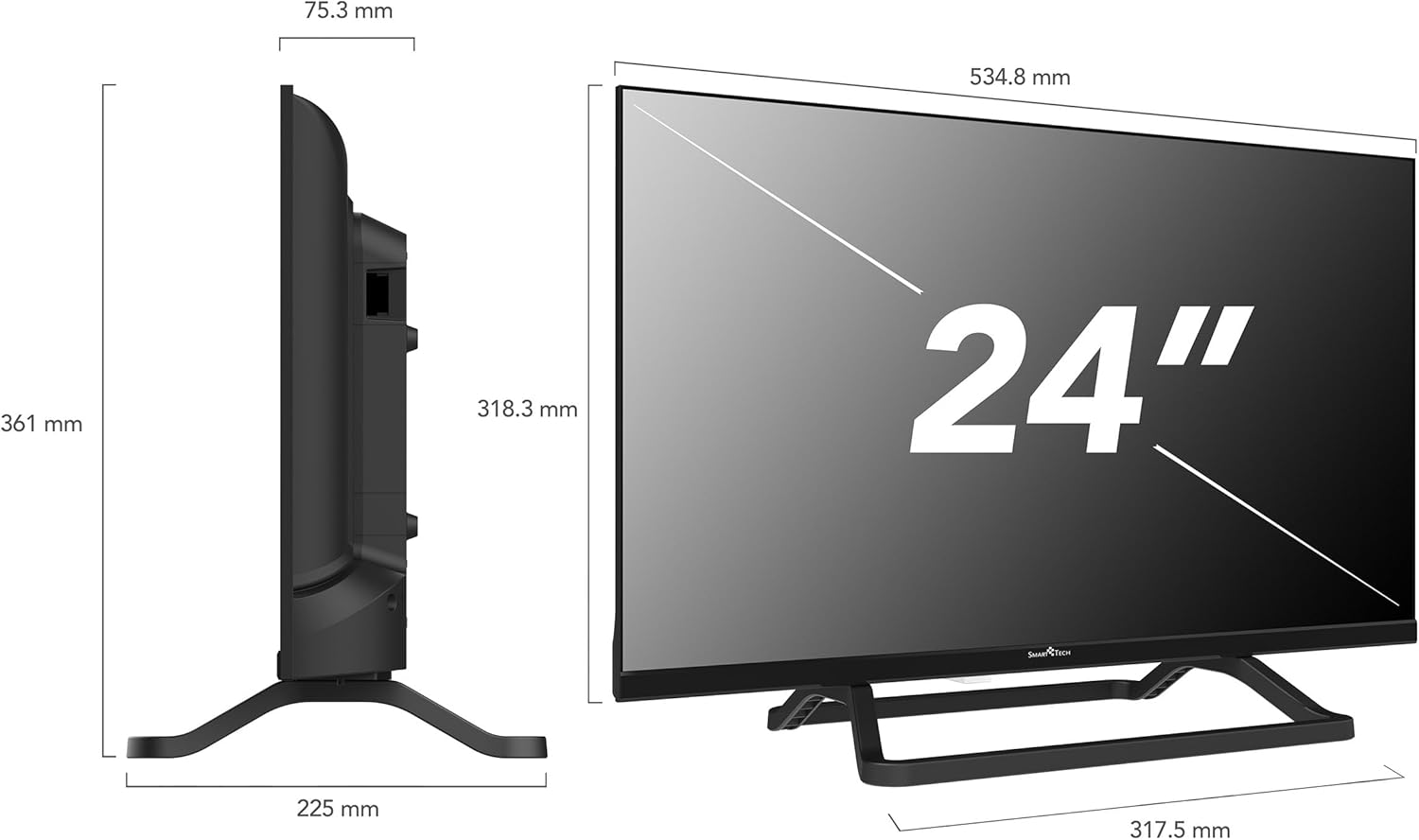
This technical diagram provides precise measurements of the Smart Tech 24-inch TV, including its overall height, width, and depth, as well as the screen dimensions. These details are useful for planning placement and installation.
4.3 การต่อสายไฟ
Connect the provided 12-volt power adapter to the TV's DC input port and then to a suitable 12-volt power source. For home use, connect the adapter to a standard AC outlet using an appropriate AC-DC converter (if not integrated with the 12V charger). The 12-volt input makes this TV ideal for use in caravans, campers, and other mobile applications.
4.4 การเชื่อมต่ออุปกรณ์ภายนอก
Your TV offers multiple connection options for external devices:
- พอร์ต HDMI (x3): เชื่อมต่อเครื่องเล่นบลูเรย์ เครื่องเล่นเกม กล่องรับสัญญาณ หรืออุปกรณ์อื่นๆ ที่รองรับ HDMI
- พอร์ต USB (x2): เชื่อมต่ออุปกรณ์จัดเก็บข้อมูล USB สำหรับการเล่นสื่อหรืออัปเดตซอฟต์แวร์
- อินพุต AV มินิ: สำหรับอุปกรณ์รุ่นเก่าที่ใช้คอมโพสิตวิดีโอและเสียงสเตอริโอ
- แจ็คหูฟัง: เชื่อมต่อหูฟังเพื่อการฟังแบบส่วนตัว
- เอาต์พุตเสียงออปติคัล: สำหรับเชื่อมต่อกับระบบเสียงภายนอก
- พอร์ต RJ45 (อีเธอร์เน็ต): สำหรับการเชื่อมต่ออินเตอร์เน็ตแบบใช้สาย
- สล็อต CI: สำหรับโมดูลการเข้าถึงแบบมีเงื่อนไข (CAM) เพื่อถอดรหัสช่องทีวีแบบชำระเงิน
- DVB-T2/DVB-S2 Tuners: For terrestrial and satellite antenna connections.

ภาพนี้ให้รายละเอียด view of the rear panel of the Smart Tech TV, highlighting its comprehensive range of connectors. These include a CI Slot, two USB ports, DVB-T2 and DVB-S2 tuners, three HDMI inputs, an earphone jack, a Mini AV input, an Optical audio output, and an RJ45 Ethernet port for wired network connectivity.
4.5 ตัวช่วยการตั้งค่าเริ่มต้น
เมื่อเปิดเครื่องครั้งแรก ทีวีจะแนะนำขั้นตอนการตั้งค่าเริ่มต้นให้คุณ ซึ่งโดยทั่วไปจะประกอบด้วย:
- การเลือกภาษา
- การเชื่อมต่อเครือข่าย (Wi-Fi หรือ Ethernet)
- Google account sign-in (optional, for full Android TV features).
- Channel scanning (for terrestrial or satellite broadcasts).
- Time zone and date settings.
5. การใช้งานทีวี
5.1 การควบคุมระยะไกล
The remote control allows you to navigate the TV's functions. Insert 2 AA batteries into the remote control, ensuring correct polarity.

The remote control for the Smart Tech TV is shown, featuring a microphone button for 'Hey Google' voice control. It also includes dedicated one-click access buttons for popular streaming applications like Netflix, YouTube, Prime Video, and Freeview Play, simplifying navigation.
5.2 ฟังก์ชั่นทีวีพื้นฐาน
- พลัง: กดปุ่มเปิด/ปิดเพื่อเปิดหรือปิดทีวี
- ปริมาณ: ใช้ปุ่ม VOL +/- เพื่อปรับระดับเสียง
- ช่อง: ใช้ปุ่ม CH +/- เพื่อเปลี่ยนช่อง
- ป้อนข้อมูล: Press the INPUT button to select different input sources (HDMI, AV, Tuner).
- การนำทาง: ใช้ปุ่มลูกศรและปุ่ม OK เพื่อเลื่อนดูเมนูต่างๆ
5.3 Android TV Interface and Smart Features
Your TV runs on Android TV, providing access to a wide range of applications and services.

The Smart TV home screen is displayed, featuring a user-friendly interface with quick access to popular streaming applications such as Netflix, YouTube, Prime Video, and Disney+. A Google Play movie banner is also visible, indicating access to a wide range of digital content.
- หน้าจอหลัก: Access your favorite apps, live TV, and recommended content.
- แอปสตรีมมิ่ง: Pre-installed apps like Netflix, YouTube, and Prime Video are readily available. You can download more from the Google Play Store.
- ผู้ช่วย Google: Use the voice control button on your remote to search for content, control smart home devices, and get information.
- Chromecast ในตัว: แสดงเนื้อหาจากสมาร์ทโฟน แท็บเล็ต หรือคอมพิวเตอร์ของคุณไปยังทีวีได้โดยตรง
- Wi-Fi/อีเธอร์เน็ต: Connect to your home network for internet access and smart features.

This image presents a collage illustrating the main features of the Smart Tech TV. These include a modern bezel-less design, a triple tuner for versatile signal reception, High Definition resolution, built-in Google Cast functionality, Dolby Audio for enhanced sound, and the Android operating system for smart TV capabilities.
6. การบำรุงรักษา
6.1 การทำความสะอาดทีวี
- หน้าจอ: เช็ดหน้าจอเบาๆ ด้วยผ้านุ่มที่ไม่เป็นขุย สำหรับรอยฝังแน่น ให้เช็ดเบาๆampเทน้ำหรือน้ำยาทำความสะอาดหน้าจอชนิดพิเศษลงบนผ้า (อย่าฉีดลงบนหน้าจอโดยตรง)
- คณะรัฐมนตรี: Use a soft, dry cloth to clean the TV cabinet. Avoid abrasive cleaners or solvents.
6.2 การอัปเดตซอฟต์แวร์
The TV may receive automatic software updates via the internet. Ensure your TV is connected to the internet to receive the latest features and security patches.
7 การแก้ไขปัญหา
หากคุณประสบปัญหาเกี่ยวกับทีวี โปรดดูปัญหาทั่วไปและวิธีแก้ไขต่อไปนี้:
| ปัญหา | สาเหตุที่เป็นไปได้ / วิธีแก้ไข |
|---|---|
| ไม่มีไฟฟ้า | Check if the power cord is securely connected. Ensure the power outlet or 12V source is active. |
| ไม่มีภาพแต่มีเสียง | ตรวจสอบแหล่งสัญญาณเข้า ตรวจสอบให้แน่ใจว่าอุปกรณ์ภายนอกเปิดอยู่และเชื่อมต่ออย่างถูกต้อง |
| ไม่มีเสียงแต่มีภาพ | Check the volume level. Ensure Mute is not activated. Check audio settings and external audio connections. |
| รีโมตคอนโทรลไม่ทำงาน | เปลี่ยนแบตเตอรี่ ตรวจสอบให้แน่ใจว่าไม่มีสิ่งกีดขวางระหว่างรีโมทและเซ็นเซอร์อินฟราเรดของทีวี |
| ไม่สามารถเชื่อมต่อ Wi-Fi ได้ | Ensure your Wi-Fi router is on and within range. Re-enter the Wi-Fi password. Try restarting the TV and router. |
| แอปสมาร์ททีวีโหลดไม่ขึ้น | Check your internet connection. Try clearing the app's cache or reinstalling the app. Ensure TV software is up to date. |
8. ข้อมูลจำเพาะ
| คุณสมบัติ | ข้อมูลจำเพาะ |
|---|---|
| ยี่ห้อ | สมาร์ทเทค |
| หมายเลขรุ่น | 24HA20V3CUK |
| ขนาดหน้าจอ | 24 นิ้ว (60 ซม.) |
| เทคโนโลยีการแสดงผล | นำ |
| ปณิธาน | เอชดี (1366 x 768p) |
| อัตราการรีเฟรช | 60 เฮิรตซ์ |
| ระบบปฏิบัติการ | แอนดรอยด์ |
| คุณสมบัติพิเศษ | Chromecast, Integrated Speaker, Flat Screen |
| เทคโนโลยีการเชื่อมต่อ | อีเธอร์เน็ต, HDMI, USB, Wi-Fi |
| พอร์ต HDMI | 3 |
| พอร์ต USB | 2 |
| อัตราส่วนภาพ | 16:9 น. |
| สี | สีดำ |
| แหล่งจ่ายไฟ | 12 Volts (charger included) |
| ระดับประสิทธิภาพการใช้พลังงาน | E |
| การใช้พลังงาน (SDR) | 18.0 W / 18 kWh/1000h |
| ผู้ผลิต | โชคด่วน |
สำหรับข้อมูลผลิตภัณฑ์โดยละเอียดและฉลากประหยัดพลังงาน โปรดดูที่ฐานข้อมูล EPREL: https://eprel.ec.europa.eu/qr/2066097

This image displays the energy label for the Smart Tech 24HA20V3CUK TV, indicating its energy efficiency class E and power consumption of 18 kWh per 1000 hours.
9. การรับประกันและการสนับสนุน
Your Smart Tech TV comes with a standard manufacturer's warranty. Please refer to the warranty card included with your product for specific terms and conditions. For technical support or service inquiries, please contact your retailer or the manufacturer's customer service.
ผู้ผลิต: โชคด่วน
ติดต่อด้านการปฏิบัติตามกฎระเบียบ: Compliance Contact, LEGY UT 2, 2119 SZENTIMREKLOS, HUNGARY
อีเมล: info@expressluck.hu
Webเว็บไซต์: www.smarttech-tv.com


