1. บทนำ
Thank you for choosing the Dierya DK68 65% Wireless Mechanical Gaming Keyboard. This manual provides detailed instructions on how to set up, operate, and maintain your keyboard, ensuring optimal performance and longevity. The DK68 features a compact 65% layout, tri-mode connectivity (Bluetooth 5.0, 2.4G wireless, and USB-C wired), customizable RGB backlighting, and durable mechanical switches.
2. เนื้อหาบรรจุภัณฑ์
กรุณาตรวจสอบแพ็คเกจสำหรับรายการต่อไปนี้:
- คีย์บอร์ดเกมมิ่งเชิงกลไร้สาย Dierya DK68
- สาย USB-C
- ตัวดึงกุญแจ
- คู่มือการใช้งาน (เอกสารนี้)
3. สินค้าหมดview
The Dierya DK68 is a compact 68-key mechanical keyboard designed for both gaming and productivity. It offers a minimalist design while retaining essential functionality through FN key combinations. The keyboard supports multiple connection types and features vibrant RGB lighting.

Image: The Dierya DK68 Wireless Mechanical Gaming Keyboard in white, showcasinด้วยการออกแบบที่กะทัดรัดและไฟแบ็คไลท์ RGB

ภาพ: โอเวอร์view of the Dierya DK68's key features, including BT5.0/2.4G/Wired connectivity, 60% compact layout, RGB Backlit, 3000mAh battery, Mechanical Switches, Double-Shot Keycaps, Full N-Key Rollover (NKRO), and Detachable Cable.

Image: Illustration of the keyboard's tri-mode connection options: Type-C wired, Bluetooth 5.0, and 2.4GHz wireless, compatible with Windows, Mac, iOS, Android, Xbox, PC, Laptop, and Tablet devices.
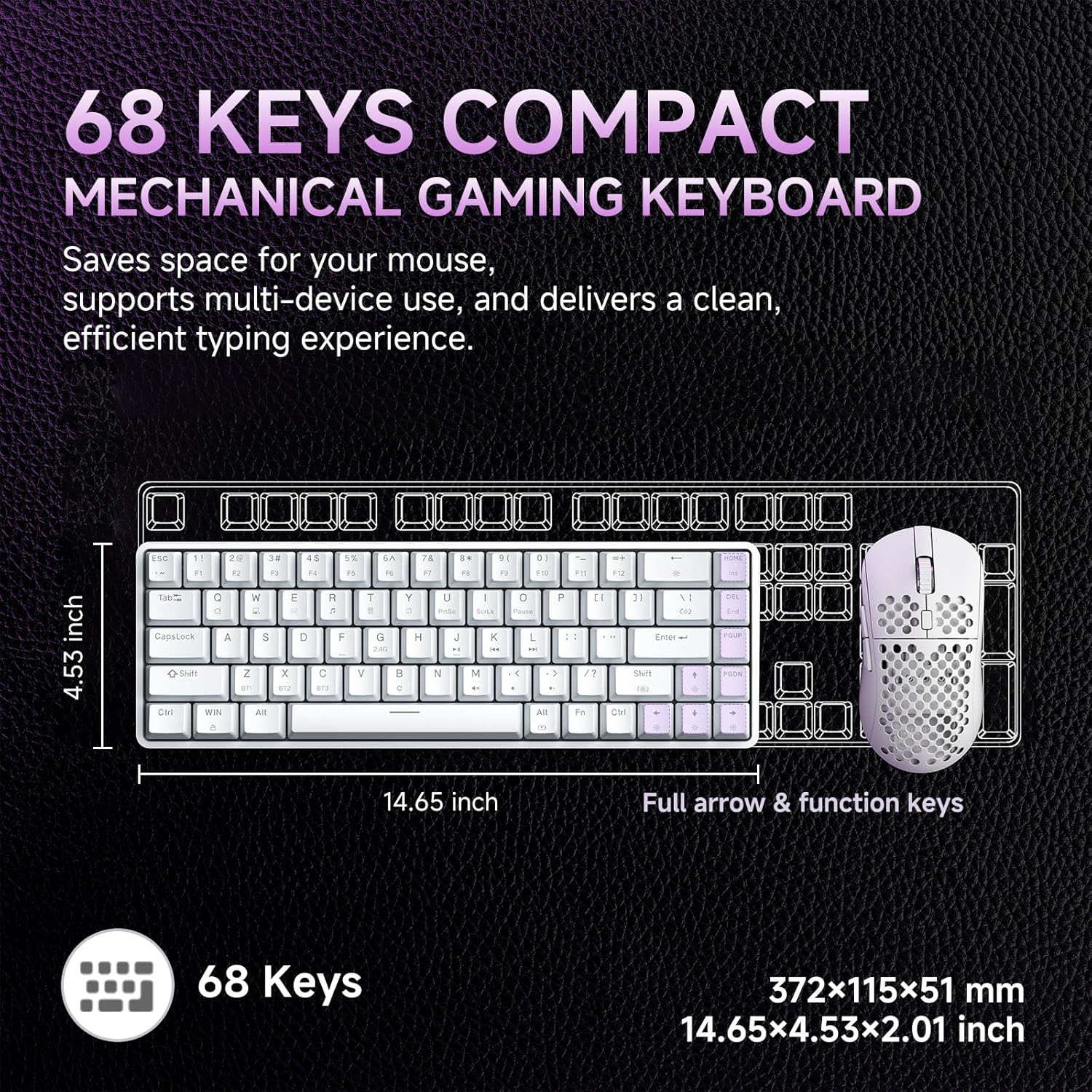
Image: Diagram showing the compact 68-key layout of the Dierya DK68, highlighting its dimensions (14.65 inches length, 4.53 inches width) and its space-saving design.

ภาพ: ระยะใกล้ view of the mechanical blue switches, detailing their clicky feel, tactile feedback, 60gf actuation force, 2.3mm travel, and 50 million keystroke lifespan. The image also indicates pre-lubed switches.

Image: Visual representation of the keyboard's 3000 mAh high-capacity lithium battery, showing usage times: 12 hours with light on, 333 hours with light off, 3 minutes auto stop, and Type-C charging.

Image: Diagram illustrating the FN key combinations for controlling the vibrant RGB backlighting, including turning the light on/off (Fn + Backspace), switching light colors (Fn + Shift), switching light modes (Fn + |), and adjusting brightness/speed (Fn + Arrow keys).

Image: Details of the keyboard's design, including OEM double-shot keycaps for durability, two-stage feet for dual tilt options, and anti-slip pads for secure positioning.

Image: A detailed diagram showing the exact dimensions of the Dierya DK68 keyboard: 372 x 115 x 51 mm (14.65 x 4.53 x 2.01 inches) and a weight of 820g.
4. การตั้งค่า
4.1 การเชื่อมต่อแบบมีสาย
- เชื่อมต่อสาย USB-C ที่ให้มาเข้ากับพอร์ต USB-C ของแป้นพิมพ์
- เชื่อมต่อปลายอีกด้านหนึ่งของสาย USB-C เข้ากับพอร์ต USB ที่ว่างอยู่บนคอมพิวเตอร์ของคุณ
- ระบบของคุณจะตรวจจับแป้นพิมพ์โดยอัตโนมัติและพร้อมใช้งาน
4.2 การเชื่อมต่อไร้สาย 2.4G
- ค้นหาตัวรับสัญญาณ USB 2.4G (โดยปกติจะอยู่ในช่องเก็บของบนแป้นพิมพ์)
- เสียบตัวรับสัญญาณ USB 2.4G เข้ากับพอร์ต USB ที่ว่างอยู่บนคอมพิวเตอร์ของคุณ
- เปิดใช้งานแป้นพิมพ์ แป้นพิมพ์จะเชื่อมต่อกับตัวรับสัญญาณโดยอัตโนมัติ
4.3 การเชื่อมต่อบลูทูธ
The keyboard supports Bluetooth 5.0 and can connect to up to three devices.
- เปิดคีย์บอร์ด
- กดค้างไว้ เอฟเอ็น + ซี, เอฟเอ็น + เอ็กซ์, หรือ เอฟเอ็น + ซี กดปุ่มค้างไว้ 3-5 วินาทีเพื่อเข้าสู่โหมดจับคู่บลูทูธสำหรับ BT1, BT2 หรือ BT3 ตามลำดับ ไฟแบ็คไลท์ของปุ่มที่เกี่ยวข้องจะกะพริบอย่างรวดเร็ว
- On your device (PC, Mac, tablet, smartphone), enable Bluetooth and search for new devices.
- Select "Dierya DK68" from the list of available devices to pair.
- Once paired, the key's backlight will stop flashing and remain steadily lit for a few seconds.
- หากต้องการสลับระหว่างอุปกรณ์บลูทูธที่จับคู่แล้ว ให้กด เอฟเอ็น + ซี, เอฟเอ็น + เอ็กซ์, หรือ เอฟเอ็น + ซี สั้นๆ
4.4 การชาร์จคีย์บอร์ด
Connect the USB-C cable to the keyboard and a power source (e.g., computer USB port, USB wall adapter). The keyboard has a 3000 mAh battery. A low battery indicator may flash, and the backlight may dim when charging is required. The backlight will indicate charging status and turn off or change color when fully charged.
5. คู่มือการใช้งาน
5.1 การรวมปุ่ม FN
The DK68 utilizes FN key combinations to access various functions due to its compact layout:
- FN + แบ็คสเปซ: Turn RGB backlight on/off.
- เอฟเอ็น + |: Switch between different RGB lighting modes (21 effects available).
- FN + Shift: Adjust RGB lighting colors.
- เอฟเอ็น + ↑: เพิ่มความสว่างของแสงไฟด้านหลัง
- เอฟเอ็น + ↓: ลดความสว่างของแสงไฟด้านหลัง
- เอฟเอ็น + ←: ลดความเร็วไฟแบ็คไลท์
- เอฟเอ็น + →: เพิ่มความเร็วไฟแบ็คไลท์
- FN + Z/X/C: Switch between Bluetooth devices BT1/BT2/BT3.
- FN + Q/W/E/R/T/Y: (Specific media or function keys, refer to keycaps for exact labels if present).
5.2 การปรับแต่งแสง RGB
The keyboard offers 16.8 million colors and 21 lighting effects. Use the FN key combinations described above to cycle through modes, adjust colors, and control brightness and speed. For advanced customization, including macro programming and custom shortcut keys, download the official Dierya software from the manufacturer's webเว็บไซต์.
6. การบำรุงรักษา
To ensure the longevity and performance of your Dierya DK68 keyboard, follow these maintenance guidelines:
- การทำความสะอาด: Use a soft, dry cloth to wipe the keyboard surface. For deeper cleaning, use a can of compressed air to remove dust and debris from between the keycaps.
- การถอดปุ่มกด: Use the provided keycap puller to carefully remove keycaps for cleaning or replacement. Gently pull straight up to avoid damaging the switch.
- การบำรุงรักษาสวิตช์: The mechanical switches are designed for durability. Avoid spilling liquids on the keyboard. If a switch feels inconsistent, it may require cleaning or replacement.
- พื้นที่จัดเก็บ: When not in use for extended periods, store the keyboard in a cool, dry place away from direct sunlight and extreme temperatures.
7 การแก้ไขปัญหา
If you encounter issues with your Dierya DK68 keyboard, refer to the following common solutions:
- Keyboard Not Responding (Wired): ตรวจสอบให้แน่ใจว่าสาย USB-C เชื่อมต่อกับทั้งคีย์บอร์ดและคอมพิวเตอร์อย่างแน่นหนา ลองใช้พอร์ต USB หรือสายอื่น
- ปัญหาการเชื่อมต่อไร้สาย 2.4G: Ensure the 2.4G receiver is properly plugged in and the keyboard is turned on. Try plugging the receiver into a different USB port. Ensure there are no strong interferences nearby.
- การจับคู่บลูทูธล้มเหลว: Make sure the keyboard is in pairing mode (key flashing). Ensure Bluetooth is enabled on your device and it's within range. Try unpairing and re-pairing the device.
- กุญแจไม่สามารถลงทะเบียนได้: Check for physical obstructions under the keycap. If using wireless, ensure the battery is charged. Try connecting via USB-C to rule out wireless issues.
- ไฟแบ็คไลท์ RGB ไม่ทำงาน: Ensure the backlight is turned on (FN + Backspace). Adjust brightness (FN + ↑/↓). If issues persist, try resetting the keyboard (if a reset function is available, consult the manufacturer's webเว็บไซต์).
- แบตเตอรี่หมดเร็ว: Reduce backlight brightness or turn off RGB when not needed. Ensure the keyboard is fully charged.
For further assistance, please contact Dierya customer support.
8. ข้อมูลจำเพาะ
| คุณสมบัติ | รายละเอียด |
|---|---|
| ยี่ห้อ | Dierya |
| หมายเลขรุ่น | ดีเค68 |
| สี | สีขาว |
| คำอธิบายแป้นพิมพ์ | คีย์บอร์ดเกมมิ่งไร้สาย |
| เทคโนโลยีการเชื่อมต่อ | Bluetooth/2.4G/Type-C |
| อุปกรณ์ที่รองรับ | แล็ปท็อป, พีซี, แท็บเล็ต |
| ขนาด (กว้าง x ยาว x สูง) | 31.3 x 10.4 x 4.4 ซม. (14.65 x 4.53 x 2.01 นิ้ว) |
| น้ำหนัก | 820 กรัม |
| ความจุของแบตเตอรี่ | 3000 มิลลิแอมป์ |
| อายุการใช้งานแบตเตอรี่ (ปิดไฟ) | นานถึง 90 ชั่วโมง |
| อายุการใช้งานแบตเตอรี่ (เปิด RGB) | นานถึง 8 ชั่วโมง |
| เวลาสแตนด์บาย | 360 ชั่วโมง |
| แสงไฟแบ็คไลท์ | RGB (21 เอฟเฟกต์ 16.8 ล้านสี) |
| ประเภทสวิตซ์ | Mechanical (Blue/Red options) |
| เปลี่ยนอายุการใช้งาน | 60 ล้านคีย์สโตรก |
| วัสดุ | พลาสติก |
| ส่วนประกอบที่รวมอยู่ | สาย USB, อุปกรณ์ถอดคีย์แคป |
9. การรับประกันและการสนับสนุน
The Dierya DK68 keyboard typically comes with a manufacturer's warranty. Please refer to the warranty card included with your purchase or visit the official Dierya webเว็บไซต์สำหรับข้อกำหนดและเงื่อนไขการรับประกันโดยละเอียด
For technical support, troubleshooting assistance, or any product-related inquiries, please contact Dierya customer service through their official webไซต์หรือข้อมูลการติดต่อที่ให้ไว้ในบรรจุภัณฑ์ผลิตภัณฑ์ของคุณ


