1. บทนำ
This manual provides essential information for the safe and efficient operation of your FASTWD Android 15 Tablet 11-inch. Please read this manual thoroughly before using the device and retain it for future reference. This tablet features an 11-inch 2K display, Android 15 operating system, Octa-Core processor, 36GB RAM, 256GB ROM (expandable up to 1TB), 4G LTE, and 5G WiFi connectivity.
2. ข้อมูลด้านความปลอดภัย
- อย่าให้แท็บเล็ตถูกอุณหภูมิที่สูงหรือต่ำเกินไป แสงแดดโดยตรง หรือความชื้นสูง
- หลีกเลี่ยงการทำแท็บเล็ตตกหรือได้รับแรงกระแทกรุนแรง
- ใช้เฉพาะเครื่องชาร์จและอุปกรณ์เสริมที่ได้รับอนุมัติเท่านั้นเพื่อป้องกันความเสียหายและเพื่อความปลอดภัย
- เก็บแท็บเล็ตให้ห่างจากน้ำและของเหลวอื่นๆ
- อย่าพยายามถอดประกอบหรือซ่อมแซมแท็บเล็ตด้วยตนเอง โปรดติดต่อฝ่ายบริการลูกค้าเพื่อขอความช่วยเหลือ
- กำจัดแบตเตอรี่และอุปกรณ์ตามระเบียบข้อบังคับท้องถิ่น
3. เนื้อหาบรรจุภัณฑ์
Upon opening your FASTWD Android 15 Tablet package, please verify that all the following items are included:
- FASTWD Tablet
- แป้นพิมพ์บลูทูธ
- หนู
- เคสป้องกัน
- ปากกาสไตลัส
- สายเคเบิล Type-C
- เครื่องชาร์จ
- คู่มือการใช้งาน

Image: The FASTWD Android 15 Tablet displayed with its full set of accessories, including the keyboard, mouse, protective case, stylus, and charging components.
4. อุปกรณ์โอเวอร์view
The FASTWD Android 15 Tablet features a sleek metal body with an 11-inch 2K INCell display. It is designed for both productivity and entertainment.
4.1 ลักษณะทางกายภาพ
- แสดง: 11-inch 2K UHD INCell display with 120Hz refresh rate.
- กล้องถ่ายรูป: 8MP front camera, 13MP rear camera with LED flash.
- พอร์ต: พอร์ต USB Type-C สำหรับการชาร์จและถ่ายโอนข้อมูล
- ช่องใส่การ์ด: Dual SIM card slot, also supports MicroSD card expansion up to 1TB.
- วิทยากร: สี่ amplitude speakers for enhanced audio.

Image: A visual representation of the FASTWD tablet's slim design, 11-inch screen, and Type-C charging port.
5. การตั้งค่า
5.1 การเปิดเครื่องครั้งแรก
- Press and hold the Power button located on the side of the tablet until the FASTWD logo appears.
- ทำตามคำแนะนำบนหน้าจอเพื่อเลือกภาษา ภูมิภาค และเชื่อมต่อกับเครือข่าย Wi-Fi
- ลงชื่อเข้าใช้ด้วยบัญชี Google ของคุณหรือสร้างบัญชีใหม่เพื่อเข้าถึง Google Play Store และบริการอื่นๆ
5.2 การติดตั้งซิมการ์ดและการ์ด MicroSD
Your tablet supports dual SIM cards for 4G LTE connectivity and a MicroSD card for expanded storage.
- ค้นหาถาดใส่การ์ด SIM/MicroSD ที่ด้านข้างของแท็บเล็ต
- ใช้เครื่องมือถอดซิมที่ให้มา ค่อยๆ ดันเข้าไปในรูเล็กๆ ข้างถาดจนกระทั่งซิมหลุดออกมา
- Place your Nano-SIM card(s) and/or MicroSD card into the designated slots on the tray. Ensure they are correctly oriented.
- ค่อยๆ ใส่ถาดกลับเข้าไปในแท็บเล็ตจนกระทั่งได้ยินเสียงคลิกเข้าที่

ภาพ: รายละเอียด view of the tablet's SIM card tray, showing slots for two SIM cards and one MicroSD card.
6. คู่มือการใช้งาน
The FASTWD tablet runs on Android 15, offering an intuitive and customizable user experience.
6.1 การนำทางพื้นฐาน
- ปัดขึ้น: เข้าถึงลิ้นชักแอป
- เลื่อนลง: เปิดแผงการแจ้งเตือนและเมนูการตั้งค่าด่วน
- แตะ: เลือกสินค้าหรือเปิดแอพพลิเคชั่น
- กดแบบยาว: เข้าถึงเมนูบริบทหรือย้ายไอคอน
- บีบเพื่อซูม: Adjust zoom level in apps like browser or gallery.
6.2 คุณสมบัติของ Android 15
Android 15 introduces several enhancements for privacy, security, and user experience:
- Improved Privacy Controls: Granular permissions for apps, allowing you to authorize access more precisely.
- การเพิ่มประสิทธิภาพ AI: Intelligent AI features for improved performance and battery life.
- การนำทางด้วยท่าทาง: New touch control gestures for a more fluid interaction.
- Global Dark Mode: System-wide dark theme for reduced eye strain and power consumption.
- Face Recognition Unlock: ปลดล็อกแท็บเล็ตของคุณอย่างปลอดภัยโดยใช้การจดจำใบหน้า
- การควบคุมโดยผู้ปกครอง: Manage screen time and app access for children.
- หน้าจอแยก: Use two applications simultaneously side-by-side.
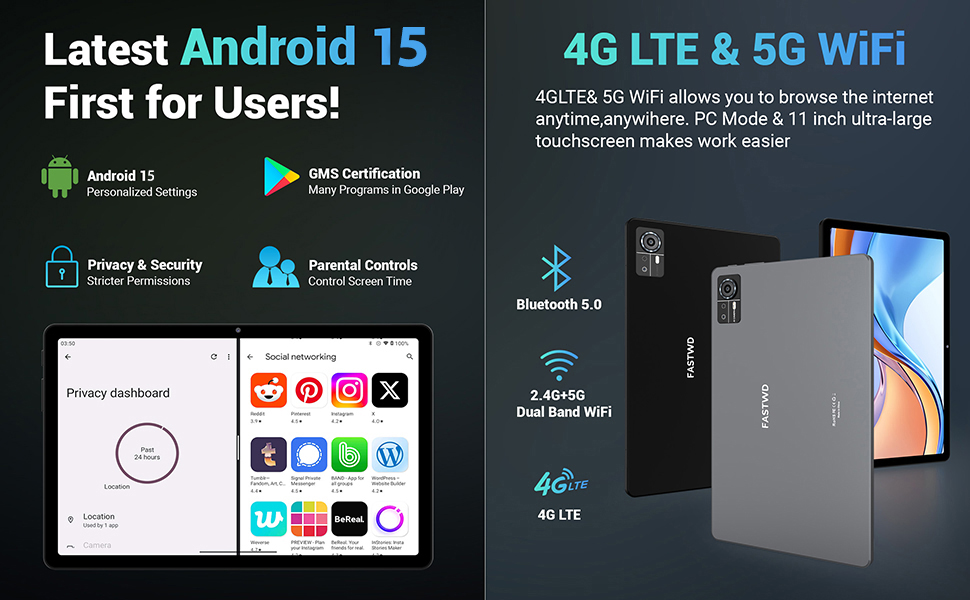
Image: A visual guide to key Android 15 features such as easy app pairing, storage management, quick Bluetooth connection, face recognition unlock, double-tap to wake, and parental control settings.
7. การเชื่อมต่อ
Your FASTWD tablet offers versatile connectivity options for internet access and peripheral devices.
7.1 การเชื่อมต่อ Wi-Fi
- ไปที่ การตั้งค่า > เครือข่ายและอินเตอร์เน็ต > ไวไฟ.
- สลับ Wi-Fi On.
- เลือกเครือข่ายที่คุณต้องการจากรายการและป้อนรหัสผ่านหากได้รับแจ้ง
- The tablet supports dual-band 2.4G/5G Wi-Fi for stable and fast connections.
7.2 4G LTE Mobile Data
With a compatible SIM card installed, you can access 4G LTE mobile data.
- Ensure your SIM card is correctly installed (refer to Section 5.2).
- ไปที่ การตั้งค่า > เครือข่ายและอินเตอร์เน็ต > เครือข่ายมือถือ.
- เปิดใช้งาน ข้อมูลมือถือ and configure APN settings if required by your carrier.
7.3 การจับคู่บลูทูธ
Connect Bluetooth accessories like the included keyboard and mouse.
- ไปที่ การตั้งค่า > อุปกรณ์ที่เชื่อมต่อ > บลูทูธ.
- สลับบลูทูธ On.
- ใส่อุปกรณ์เสริมบลูทูธของคุณเข้าสู่โหมดจับคู่
- Select the accessory from the list of available devices and follow any on-screen prompts to complete pairing.
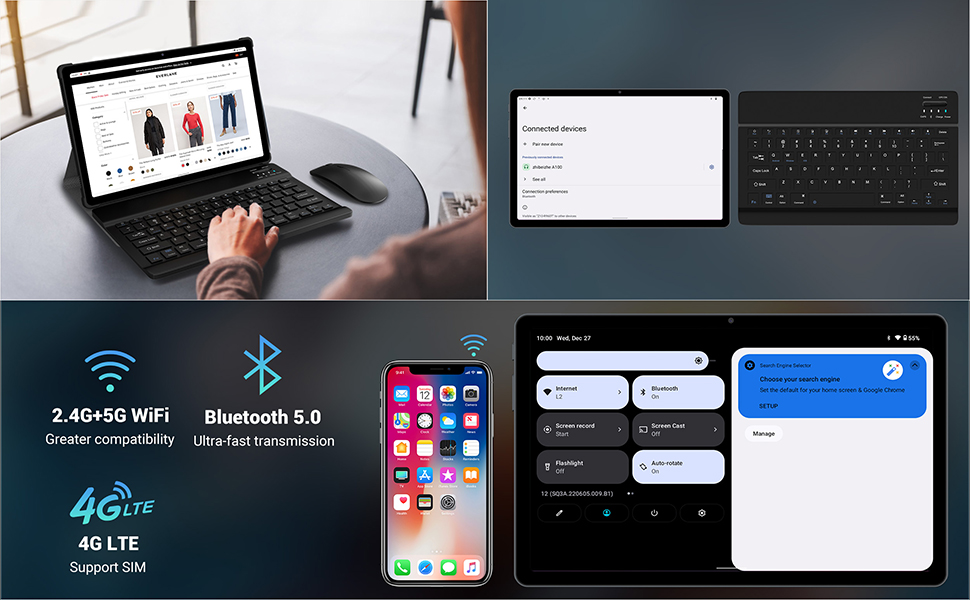
Image: The FASTWD tablet connected to its keyboard and mouse, illustrating its 2.4G+5G WiFi, Bluetooth 5.0, and 4G LTE SIM support for comprehensive connectivity.
8. กล้องถ่ายรูป
The tablet is equipped with an 8MP front camera and a 13MP rear camera for photos and video calls.
- เปิด กล้อง แอปพลิเคชัน.
- แตะปุ่มชัตเตอร์เพื่อถ่ายภาพ
- สลับระหว่างกล้องด้านหน้าและด้านหลังโดยใช้ไอคอนสลับกล้อง
- AI post-processing technology enhances photo quality, making images more realistic.

ภาพ: รายละเอียด view of the tablet's rear camera, highlighting its 13MP sensor and AI Camera branding.
9. การจัดการแบตเตอรี่
The tablet features a 9580mAh battery for extended usage and supports 12W fast charging.
9.1 การชาร์จแท็บเล็ต
- Connect the Type-C cable to the tablet's charging port.
- Plug the other end of the cable into the provided charger, and then into a power outlet.
- ไอคอนแบตเตอรี่บนหน้าจอจะแสดงสถานะการชาร์จ
9.2 การเพิ่มประสิทธิภาพแบตเตอรี่
- ปรับความสว่างหน้าจอให้อยู่ในระดับที่สบายตา
- ปิดแอปพลิเคชันที่ไม่ได้ใช้งานซึ่งทำงานอยู่เบื้องหลัง
- เปิดใช้งานโหมดประหยัดแบตเตอรี่ใน การตั้งค่า > แบตเตอรี่.
- ปิดใช้งาน Wi-Fi, Bluetooth หรือ GPS เมื่อไม่ได้ใช้งาน

Image: The FASTWD tablet connected to a Type-C charger, illustrating its 9580 mAh battery and 12W fast charging capability.
10. การจัดเก็บ
The tablet comes with 256GB of internal storage (ROM) and supports expansion up to 1TB via a MicroSD card.
10.1 การจัดการพื้นที่จัดเก็บข้อมูล
- หากต้องการตรวจสอบการใช้งานพื้นที่จัดเก็บข้อมูล ให้ไปที่ การตั้งค่า > พื้นที่จัดเก็บ.
- คุณสามารถเพิ่มพื้นที่ว่างได้โดยการถอนการติดตั้งแอปที่ไม่ใช้งาน หรือลบไฟล์เก่าๆ files, or moving media to a MicroSD card.
10.2 RAM Management
The tablet features 36GB RAM (12GB LPDDR4 + 24GB expandable virtual memory) for smooth multitasking.
- The system automatically manages RAM for optimal performance.
- You can activate additional virtual RAM in the settings if needed for demanding applications.
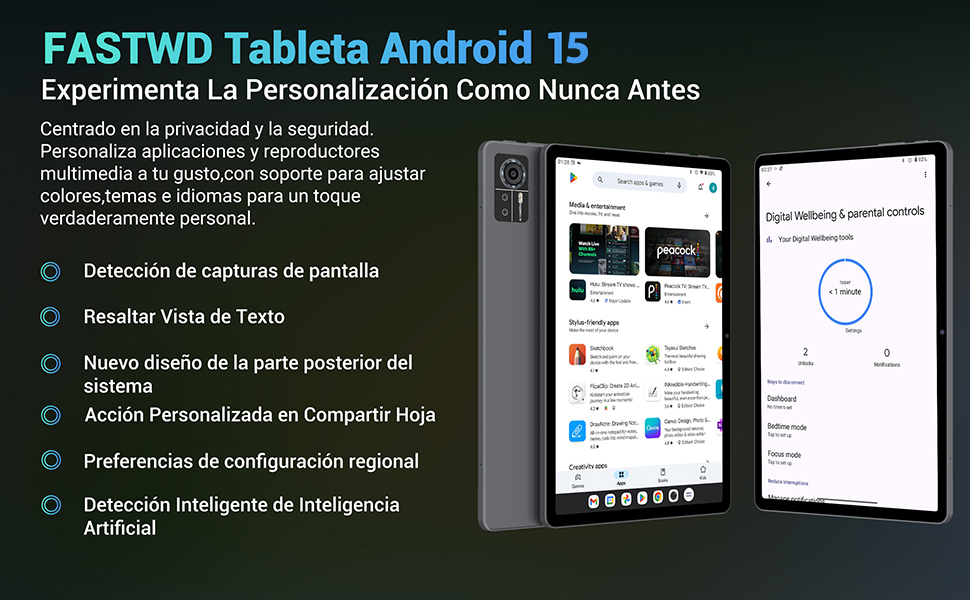
Image: An illustration highlighting the tablet's 36GB RAM (12+24GB), 256GB ROM, and 1TB MicroSD expansion capabilities, alongside its Octa-core processor.
11. การบำรุงรักษา
11.1 การทำความสะอาด
- ใช้ผ้านุ่มที่ไม่เป็นขุยในการทำความสะอาดหน้าจอและตัวเครื่องแท็บเล็ต
- อย่าใช้สารเคมีที่รุนแรงหรือวัสดุที่มีฤทธิ์กัดกร่อน
11.2 การอัปเดตซอฟต์แวร์
- ตรวจสอบการอัปเดตระบบเป็นประจำใน การตั้งค่า > ระบบ > การอัพเดทระบบ เพื่อให้มั่นใจถึงประสิทธิภาพและความปลอดภัยที่เหมาะสมที่สุด
12 การแก้ไขปัญหา
หากคุณประสบปัญหาเกี่ยวกับแท็บเล็ตของคุณ โปรดดูวิธีแก้ไขทั่วไปต่อไปนี้:
| ปัญหา | สารละลาย |
|---|---|
| แท็บเล็ตไม่สามารถเปิดเครื่องได้ | ตรวจสอบให้แน่ใจว่าแบตเตอรี่ชาร์จเต็มแล้ว เสียบที่ชาร์จและรอสักครู่ก่อนลองเปิดเครื่องอีกครั้ง หากไม่ตอบสนอง ให้บังคับรีสตาร์ทโดยกดปุ่มเปิด/ปิดค้างไว้ 10-15 วินาที |
| Applications crash or freeze | Close background applications. Clear the cache of the problematic app (Settings > Apps > [App Name] > Storage & cache > Clear cache). Restart the tablet. |
| การเชื่อมต่อ Wi-Fi ไม่ดี | Ensure you are within range of the Wi-Fi router. Restart your router and the tablet. Forget the network and reconnect. |
| ตรวจไม่พบซิมการ์ด | Ensure the SIM card is correctly inserted into the tray. Restart the tablet. Verify the SIM card is active with your mobile carrier. |
| แบตเตอรี่หมดเร็ว | Reduce screen brightness. Disable unused connectivity features (Wi-Fi, Bluetooth, GPS). Close background apps. Check for apps consuming excessive battery in Settings > Battery. |
13. ข้อมูลจำเพาะ
Detailed technical specifications for the FASTWD Android 15 Tablet 11-inch (Model M986):
| คุณสมบัติ | ข้อมูลจำเพาะ |
|---|---|
| ยี่ห้อ | ฟาสต์ ดับเบิ้ลยู |
| ชื่อรุ่น | FASTWD Android 15 Tablet 11 Pulgadas |
| ระบบปฏิบัติการ | แอนดรอยด์ 15 |
| ความเร็วของโปรเซสเซอร์ | 2 GHz Octa-Core |
| แรม | 36 GB (12GB LPDDR4 + 24GB expandable) |
| หน่วยความจำภายใน (ROM) | 256GB |
| พื้นที่เก็บข้อมูลแบบขยายได้ | Up to 1 TB via MicroSD card |
| ขนาดหน้าจอ | 11 Pulgadas (Inches) |
| ความละเอียดหน้าจอ | 2560 x 1440 pixels (2K UHD INCell) |
| อัตราการรีเฟรช | 120 เฮิรตซ์ |
| กล้องหลัง | 13 MP |
| กล้องหน้า | 8 MP |
| ความจุของแบตเตอรี่ | 9580 มิลลิแอมป์ |
| Battery Life (average) | 8 Hours (video playback) |
| การชาร์จไฟ | 12W Fast Charging, Type-C Interface |
| การเชื่อมต่อ | 4G LTE (Cellular), 5G Wi-Fi (802.11ac), Bluetooth 5.0 |
| ขนาด | 29.7 x 19.6 x 4 ซม. |
| น้ำหนัก | 1.36 กก. |
| คุณสมบัติพิเศษ | Gaming Tablet, Face Recognition, Parental Control, GPS (Beidou, Galileo, Glonass, GPS) |
14. การรับประกันและการสนับสนุน
FASTWD offers two years of premium after-sales service and long-term technical support for your tablet.
- ระยะเวลารับประกัน: 2 ปีนับจากวันที่ซื้อ
- การสนับสนุนด้านเทคนิค: For any issues or inquiries, please contact the FASTWD after-sales team through your Amazon purchase platform.
- Our support team aims to respond within 24 hours.


