1. บทนำ
This manual provides essential information for setting up, operating, and maintaining your Thunderobot Storm 17 5060 Gaming Laptop. Please read this guide thoroughly to ensure proper usage and to maximize your product's performance and longevity. Keep this manual for future reference.
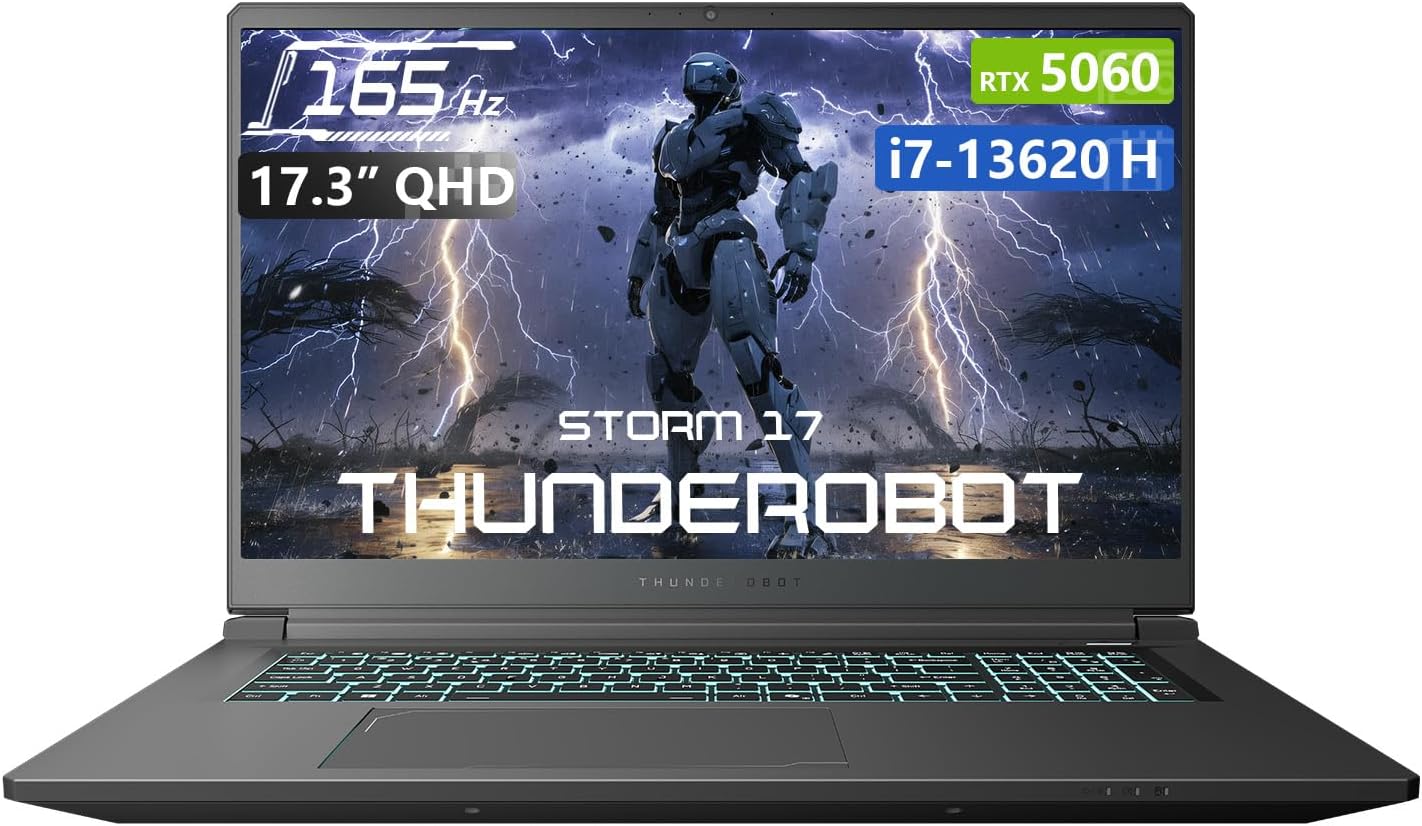
รูปที่ 1.1 : ด้านหน้า view of the Thunderobot Storm 17 5060 Gaming Laptop.
2. สินค้าหมดview
The Thunderobot Storm 17 5060 is a high-performance gaming laptop designed for immersive experiences. It features advanced components and a robust cooling system.
2.1 คุณสมบัติหลัก
- แสดง: 17.3-inch QHD (2560x1440) display with a 165Hz refresh rate, 100% sRGB color accuracy, and 1000:1 contrast ratio for crisp visuals.
- โปรเซสเซอร์: Intel Core i7-13620H processor, featuring 10 cores and 16 threads, with a base frequency of 1.80GHz and a max turbo frequency of up to 4.9GHz.
- กราฟิก: NVIDIA GeForce RTX 5060 dedicated graphics card for high-fidelity gaming and creative tasks.
- หน่วยความจำ: 16GB DDR5 RAM, providing fast multitasking capabilities.
- พื้นที่จัดเก็บ: 1TB PCIe M.2 SSD for rapid boot times and ampพื้นที่เก็บข้อมูล
- ระบบระบายความร้อน : Advanced thermal design with ultra-thin 0.2mm copper fins (245pcs) and dual 12V turbofans (60mm, 164 LCP blades, 19.8CFM) for efficient heat dissipation. Features four omnidirectional outlets and a dual-zone air duct.
- การเชื่อมต่อ: Multiple ports including 3x USB 3.0 Type-A, 1x USB Type-C, 1x HDMI, 1x RJ-45 Ethernet, and 1x Audio Port. Supports Wi-Fi 6 and Bluetooth.
- แป้นพิมพ์: RGB Backlit Keyboard with a full-size numeric keypad.
- แบตเตอรี่: 53Wh battery with support for 100W PD fast charging.
2.2 ส่วนประกอบด้านภาพ

รูปที่ 2.1: ประสิทธิภาพเมื่อview highlighting the RTX 5060 graphics and Intel Core i7-13620H processor capabilities.

รูปที่ 2.2: รายละเอียด view of the 17.3-inch QHD 165Hz display specifications.
Figure 2.3: Diagram illustrating the various ports and slots on the Thunderobot Storm 17 laptop.

Figure 2.4: Illustration of the Direct-Flow Cooling Technology with pure copper heat pipes, high-speed fans, and four air outlets.
วิดีโอ 2.1: จบview of the THUNDEROBOT Series Display, showcasing visual features and design.
Video 2.2: THUNDEROBOT Gaming Gear showcase, featuring various peripherals and laptops in a gaming setup.
Video 2.3: THUNDEROBOT Storm 17 product highlights, demonstrating key features and design elements.
3. การตั้งค่า
3.1 การแกะกล่องและการตรวจสอบเบื้องต้น
Carefully remove the laptop and its accessories from the packaging. Verify that all components listed in the "What's in the Box" section are present and undamaged. The box should contain:
- THUNDEROBOT Storm 17 Laptop
- อะแดปเตอร์แปลงไฟและสายเคเบิล
- คู่มือการใช้งาน (เอกสารนี้)
หากมีสินค้าใดสูญหายหรือเสียหาย โปรดติดต่อฝ่ายบริการลูกค้าทันที
3.2 การเชื่อมต่ออะแดปเตอร์ไฟฟ้า
- ต่อสายไฟเข้ากับอะแดปเตอร์แปลงไฟ
- เสียบอะแดปเตอร์แปลงไฟเข้ากับเต้ารับไฟฟ้าที่มีสายดิน
- Connect the DC-in plug from the adapter to the DC-in port on the laptop. The DC-in port is typically located on the side or rear of the laptop.
แนะนำให้ชาร์จแบตเตอรี่แล็ปท็อปให้เต็มก่อนใช้งานครั้งแรก
3.3 การเปิดเครื่องครั้งแรกและการตั้งค่า Windows
- เปิดฝาแล็ปท็อป
- กดปุ่มเปิด/ปิด ซึ่งโดยปกติจะอยู่บนแผงแป้นพิมพ์
- ทำตามคำแนะนำบนหน้าจอเพื่อดำเนินการตั้งค่า Windows 11 Home ให้เสร็จสมบูรณ์ ซึ่งรวมถึงการเลือกภูมิภาค ภาษา การเชื่อมต่อกับเครือข่าย Wi-Fi และการสร้างบัญชีผู้ใช้
4. คู่มือการใช้งาน
4.1 การจัดการพลังงาน
- เปิดเครื่อง: กดปุ่มเปิด/ปิด
- โหมดสลีป: Close the lid or press the power button briefly. You can also select "Sleep" from the Windows Start menu.
- ปิดระบบ: เลือก "ปิดเครื่อง" จากเมนูเริ่มของ Windows
- เริ่มต้นใหม่อีกครั้ง: เลือก "รีสตาร์ท" จากเมนูเริ่มของ Windows
4.2 คีย์บอร์ดและทัชแพด
The laptop features an RGB backlit keyboard and a precision touchpad.
- การควบคุมแบ็คไลท์: ใช้ Fn + Spacebar combination to cycle through different backlight modes or turn it off.
- ปุ่มกดตัวเลข: The full-size numeric keypad is integrated for convenient data entry.
- ทัชแพด: รองรับการใช้งานท่าทางสัมผัสหลายนิ้วสำหรับการนำทาง โปรดดูการตั้งค่าของ Windows สำหรับการปรับแต่งเพิ่มเติม

Figure 4.1: The RGB backlit keyboard of the Storm 17 laptop.
4.3 การเชื่อมต่อภายนอก
เชื่อมต่ออุปกรณ์ภายนอกโดยใช้พอร์ตที่มีอยู่:
- พอร์ต USB Type-A: สำหรับเชื่อมต่ออุปกรณ์ USB เช่น เมาส์ คีย์บอร์ด และไดรฟ์ภายนอก
- พอร์ต USB Type-C: สำหรับเชื่อมต่ออุปกรณ์ USB-C ที่รองรับ
- พอร์ต HDMI: เชื่อมต่อกับจอภาพภายนอกหรือทีวีเพื่อการแสดงผลที่กว้างขึ้น
- พอร์ตอีเทอร์เน็ต RJ-45: สำหรับการเชื่อมต่อเครือข่ายแบบมีสาย
- พอร์ตเสียง: สำหรับการเชื่อมต่อหูฟังหรือลำโพงภายนอก
4.4 การเชื่อมต่อแบบไร้สาย
- ไวไฟ 6: Connect to wireless networks for internet access. Manage Wi-Fi settings through Windows.
- บลูทูธ: Pair with Bluetooth-enabled devices such as headphones, speakers, or game controllers. Manage Bluetooth settings through Windows.
4.5 Control Center Software
The Thunderobot Control Center software allows you to customize various laptop settings for optimal performance and user experience. This includes:
- System Performance Modes: Switch between performance, entertainment, and low-noise modes based on your usage. Note: System mode switching requires the device to be connected to a power source.
- LED Keyboard Customization: ปรับเอฟเฟกต์แสง RGB และสีต่างๆ ได้
- FlexiCharger: Manage battery charging settings to extend battery lifespan.
- Flexikey: Customize key and mouse functions.

Figure 4.2: Interface of the Thunderobot Control Center software.
5. การบำรุงรักษา
5.1 การทำความสะอาดแล็ปท็อปของคุณ
- ใช้ผ้านุ่มไม่เป็นขุย งampล้างออกด้วยน้ำหรือน้ำยาทำความสะอาดหน้าจอโดยเฉพาะเพื่อทำความสะอาดหน้าจอ
- For the keyboard and chassis, use a soft cloth. A can of compressed air can help remove dust from between keys and vents.
- หลีกเลี่ยงการใช้สารเคมีรุนแรง ตัวทำละลาย หรือวัสดุที่มีฤทธิ์กัดกร่อน
5.2 การดูแลแบตเตอรี่
- หลีกเลี่ยงการปล่อยแบตเตอรี่จนหมดบ่อยครั้ง
- หากต้องเก็บแล็ปท็อปไว้เป็นเวลานาน ควรชาร์จแบตเตอรี่ให้มีระดับประมาณ 50-60% และเก็บไว้ในที่แห้งและเย็น
- Utilize the FlexiCharger feature in the Control Center to optimize battery health.
5.3 การอัปเดตซอฟต์แวร์และไดรเวอร์
อัปเดตระบบปฏิบัติการและไดรเวอร์ของคุณเป็นประจำเพื่อให้มั่นใจถึงประสิทธิภาพและความปลอดภัยที่เหมาะสมที่สุด
- การอัปเดต Windows: ไปที่ การตั้งค่า > Windows Update เพื่อตรวจสอบและติดตั้งการอัพเดต
- การอัปเดตไดรเวอร์: Visit the official Thunderobot support website for the latest drivers for your Storm 17 model. NVIDIA graphics drivers can also be updated via the GeForce Experience application.
5.4 การจัดการความร้อน
To maintain optimal cooling performance:
- Ensure the laptop's vents are unobstructed. Avoid placing the laptop on soft surfaces like beds or carpets during heavy use.
- ควรทำความสะอาดฝุ่นออกจากช่องระบายอากาศเป็นระยะๆ โดยใช้ลมเป่าอัดแรงดันสูง
- Use the "One-click forced cooling" feature in the Control Center during intensive tasks if needed.
6 การแก้ไขปัญหา
This section addresses common issues you might encounter with your Thunderobot Storm 17 laptop.
6.1 No Power or Laptop Not Turning On
- ตรวจสอบให้แน่ใจว่าอะแดปเตอร์ไฟฟ้าเชื่อมต่อกับแล็ปท็อปและเต้ารับไฟฟ้าที่ใช้งานได้แน่นหนา
- ตรวจสอบว่าเต้ารับไฟฟ้าใช้งานได้โดยเสียบอุปกรณ์อื่น
- หากแบตเตอรี่หมดเกลี้ยง ให้เสียบชาร์จแล็ปท็อปอย่างน้อย 30 นาที ก่อนที่จะลองเปิดเครื่องอีกครั้ง
6.2 ปัญหาการแสดงผล
- ไม่มีภาพบนหน้าจอ: เชื่อมต่อจอภาพภายนอกเข้ากับพอร์ต HDMI เพื่อตรวจสอบว่าปัญหาอยู่ที่จอแสดงผลภายในของแล็ปท็อปหรือไม่
- ภาพสั่นไหวหรือบิดเบี้ยว: อัปเดตไดรเวอร์การ์ดจอ ตรวจสอบการเชื่อมต่อสายเคเบิลจอแสดงผลหากใช้จอภาพภายนอก
- ความละเอียดหรืออัตราการรีเฟรชไม่ถูกต้อง: Adjust display settings in Windows (การตั้งค่า > ระบบ > การแสดงผล).
6.3 ปัญหาด้านประสิทธิภาพ
- ประสิทธิภาพช้า: Close unnecessary applications. Check for background processes consuming high CPU/RAM in Task Manager. Ensure the laptop is in a high-performance mode via the Control Center (when plugged in).
- ความร้อนสูงเกินไป: Ensure vents are clear. Use the forced cooling feature. Consider using a laptop cooling pad.
- Game stuttering: Update graphics drivers. Lower in-game graphics settings. Ensure the laptop is using the dedicated RTX 5060 GPU for games.
6.4 Connectivity Issues (Wi-Fi, Bluetooth, USB)
- Wi-Fi ไม่เชื่อมต่อ: Restart your router and modem. Check Wi-Fi settings in Windows. Ensure Wi-Fi is enabled.
- อุปกรณ์บลูทูธไม่จับคู่: Ensure the Bluetooth device is in pairing mode. Check Bluetooth settings in Windows. Restart the laptop.
- อุปกรณ์ USB ไม่ได้รับการรู้จัก: Try a different USB port. Ensure the device drivers are installed.
For persistent issues, refer to the Thunderobot support webเว็บไซต์หรือติดต่อฝ่ายบริการลูกค้า
7. ข้อมูลจำเพาะ
The following table outlines the key technical specifications for the Thunderobot Storm 17 5060 Gaming Laptop:
| คุณสมบัติ | รายละเอียด |
|---|---|
| ชื่อรุ่น | พายุ 17 |
| ขนาดหน้าจอ | 17.3 นิ้ว |
| ความละเอียดหน้าจอ | 2560 x 1600 พิกเซล (QHD) |
| ความละเอียดหน้าจอสูงสุด | ขนาด 2560x1440 |
| โปรเซสเซอร์ | Intel Core i7-13620H (สูงสุด 4.9 GHz) |
| แรม | 16GB DDR5 (4800 เมกะเฮิรตซ์) |
| ฮาร์ดไดรฟ์ | SSD 1TB (PCIE x 4) |
| โคโปรเซสเซอร์กราฟิก | GeForce RTX 5060 (Dedicated) |
| ระบบปฏิบัติการ | วินโดวส์ 11 โฮม |
| ประเภทไร้สาย | 802.11ax (ไวไฟ 6) |
| พอร์ต USB 3.0 | 4 (3x Type-A, 1x Type-C) |
| น้ำหนักสินค้า | 11 ปอนด์ |
| ขนาดสินค้า | 15.59 x 10.86 x 1.05 นิ้ว |
| สี | สีเทา |
| คุณสมบัติพิเศษ | ปุ่มกดตัวเลข |
8. การรับประกันและการสนับสนุน
8.1 การรับประกันสินค้า
แล็ปท็อป Thunderobot ทุกเครื่องมาพร้อมกับ... รับประกัน 12 เดือน from the date of purchase. This warranty covers manufacturing defects and provides expert support, thorough diagnostics, and genuine parts for necessary repairs. Additionally, a รับประกัน 90 วัน เรามีบริการนี้สำหรับชิ้นส่วนอะไหล่ทุกชิ้นที่เปลี่ยนภายใต้การรับประกัน เพื่อให้การซ่อมแซมเป็นไปอย่างราบรื่น ความพึงพอใจของคุณคือสิ่งที่เรามุ่งมั่น
8.2 การสนับสนุนลูกค้า
For technical assistance, warranty claims, or general inquiries, please visit the official Thunderobot support webโปรดเยี่ยมชมเว็บไซต์หรือติดต่อฝ่ายบริการลูกค้า โปรดเตรียมใบเสร็จรับเงินและหมายเลขซีเรียลของผลิตภัณฑ์ให้พร้อมเมื่อต้องการขอความช่วยเหลือ
คุณสามารถค้นหาข้อมูลเพิ่มเติมและทรัพยากรสนับสนุนได้ที่ Thunderobot Store on Amazon.

รูปที่ 8.1: เกินview of Thunderobot's warranty and service commitment.


