1. บทนำ
This manual provides essential information for the setup, operation, and maintenance of your Thunderobot Zero 18 Pro 5080 Gaming Laptop. Please read this manual thoroughly before using the device to ensure proper functionality and to maximize your user experience. Keep this manual for future reference.
2. คุณสมบัติหลัก
2.1. Performance Hardware
The Thunderobot Zero 18 Pro is equipped with high-performance components designed for demanding applications and gaming.
- โปรเซสเซอร์: Intel Core Ultra 9 275HX (24 คอร์, 24 เธรด, ความเร็วสูงสุด 5.40 GHz)
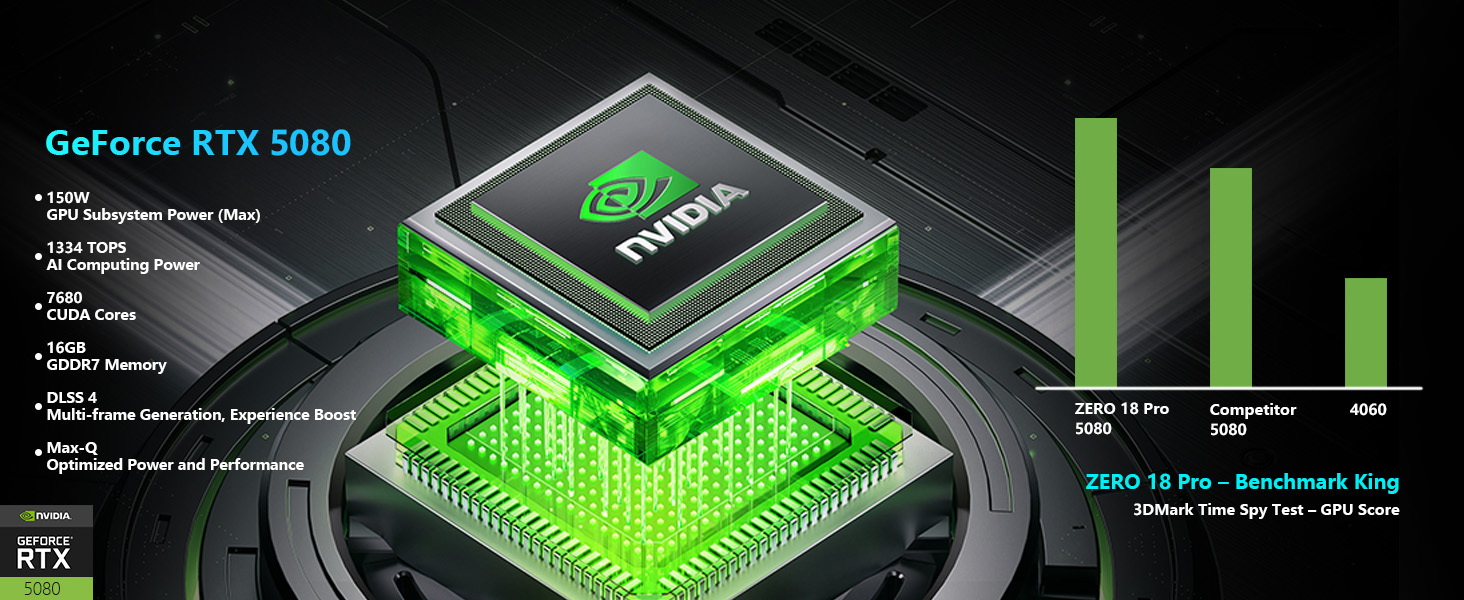
- กราฟิก: การ์ดจอ NVIDIA GeForce RTX 5080
- หน่วยความจำ: แรม DDR32 5GB
- พื้นที่จัดเก็บ: SSD PCIe M.1 ขนาด 2TB
ภาพ: รายละเอียด view of the Intel Core Ultra 9 275HX processor and NVIDIA GeForce RTX 5080 graphics card, highlighting their specifications and capabilities.
2.2. เทคโนโลยีการแสดงผล
The laptop features an advanced display for clear and fluid visuals.
- ขนาด: 18-inch QHD+ (2560x1600)
- อัตราการรีเฟรช: 240เฮิรตซ์
- เทคโนโลยี: Bionic Hummingbird Eye-Care Display with Anti-Glare and Anti-Reflection properties.
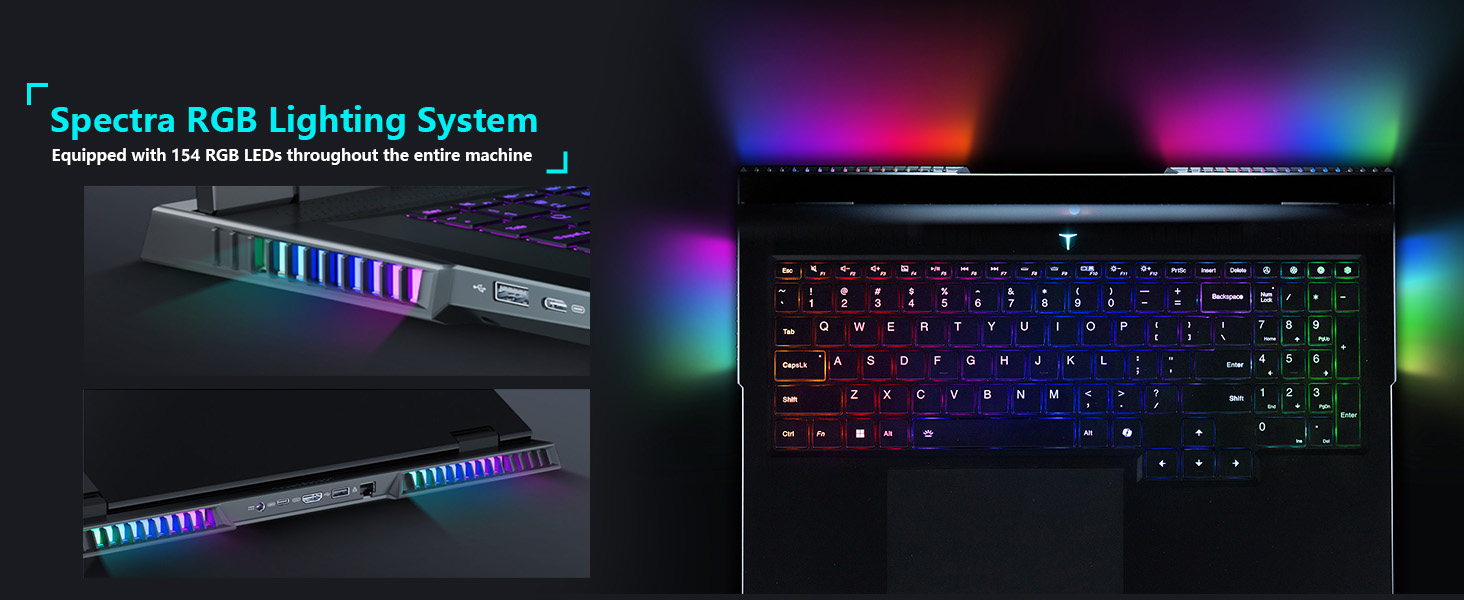
Image: The 18-inch Bionic Hummingbird Eye-Care Display showcasing its QHD+ resolution, 240Hz refresh rate, and anti-glare features.
วิดีโอ: จบแล้วview of the THUNDEROBOT Series Display features, including refresh rate and resolution.
2.3. ระบบระบายความร้อน
The laptop incorporates an advanced cooling system to maintain optimal performance during intensive use.
- แฟนๆ: 3 Night Owl fans with high air volume.
- ท่อระบายความร้อน: 7 high-efficiency heat pipes.
- ครีบ: 338 pieces of 0.075mm ultra-thin copper fins.
- Power Release: Up to 270W total power release.
ภาพ: ภายใน view illustrating the laptop's heat dissipation architecture, including fans and heat pipes.
2.4. Keyboard and Lighting
The laptop features a customizable keyboard and integrated lighting.
- แป้นพิมพ์: Per-Key RGB Backlit Keyboard with numeric keypad.
- ระบบไฟส่องสว่าง : "Spectra" RGB Lighting System with 154 RGB light beads.
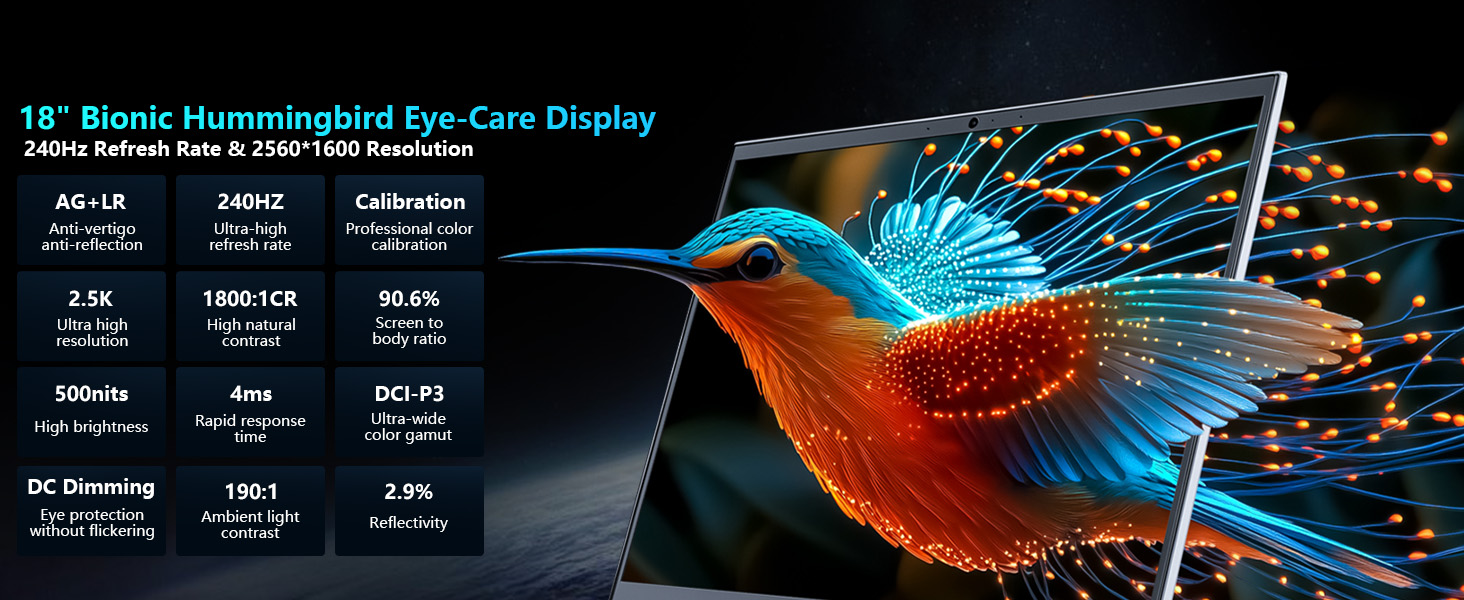
Image: Close-up of the laptop keyboard, highlighting the Per-Key RGB backlighting and dedicated mode switching keys.
Video: Demonstration of the Thunderobot RGB lighting features and customization options.
2.5. การเชื่อมต่อ
The Zero 18 Pro offers a range of ports for external devices and network connectivity.
- พอร์ต USB: 3 x Superspeed USB Type-A, 2 x Superspeed USB Type-C (Thunderbolt 5 compatible).
- เอาท์พุตวิดีโอ: 1 x HDMI 2.1.
- เครือข่าย: 1 x RJ-45 (Ethernet), Wi-Fi 6E.
- เสียง: 1 x Audio Port.
- ไร้สาย: บลูทูธ.
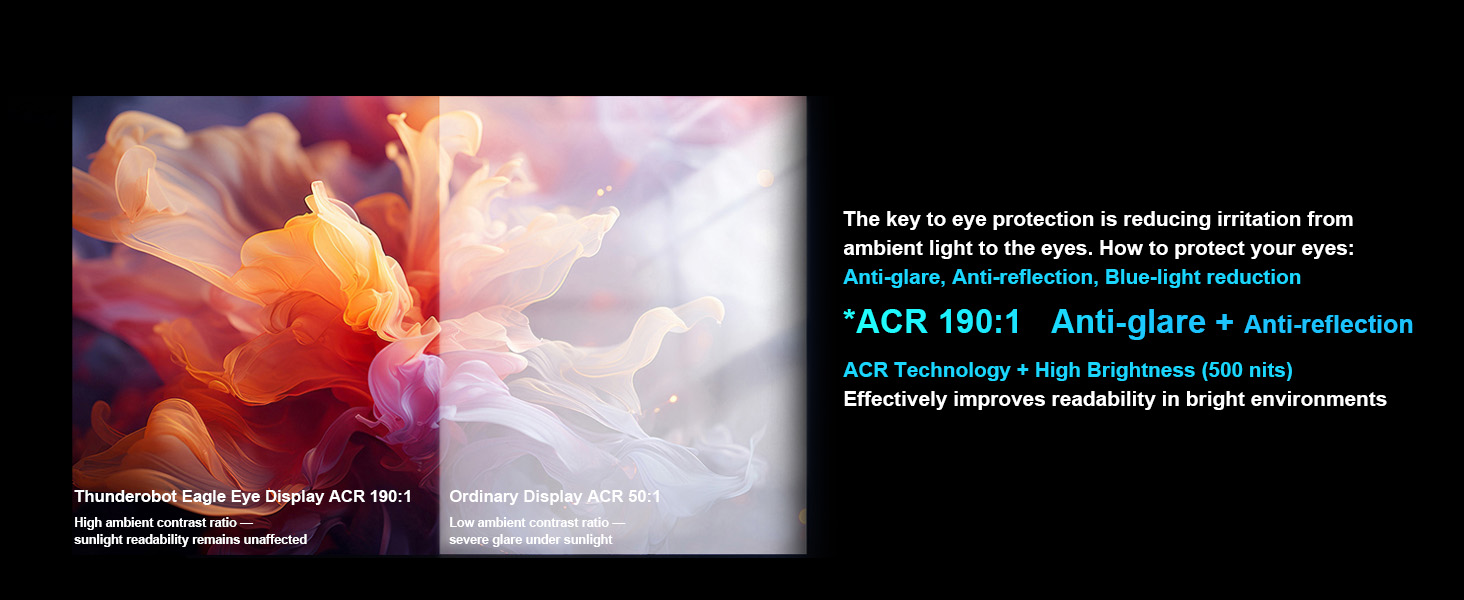
Image: Diagram illustrating the location and types of ports available on the Thunderobot Zero 18 Pro laptop.
3. คู่มือการติดตั้ง
3.1. การแกะกล่องและการตรวจสอบเบื้องต้น
- ถอดแล็ปท็อปและอุปกรณ์เสริมทั้งหมดออกจากบรรจุภัณฑ์อย่างระมัดระวัง
- ตรวจสอบว่ามีส่วนประกอบทั้งหมดตามที่ระบุไว้ในส่วน 'สิ่งที่มีอยู่ในกล่อง' ครบถ้วน
- ตรวจสอบแล็ปท็อปว่ามีความเสียหายทางกายภาพหรือไม่ หากพบความเสียหาย โปรดติดต่อฝ่ายสนับสนุนลูกค้าทันที
3.2. การเชื่อมต่อพลังงาน
- Connect the AC adapter to the power port on the laptop.
- เสียบสายไฟเข้ากับเต้ารับไฟฟ้าที่มีสายดิน
- แนะนำให้ชาร์จแบตเตอรี่ให้เต็มก่อนใช้งานครั้งแรก
3.3. การบูตครั้งแรกและการตั้งค่าระบบปฏิบัติการ
- เปิดฝาแล็ปท็อปและกดปุ่มเปิด/ปิด
- Follow the on-screen instructions to complete the Windows 11 Home setup process. This includes selecting your region, language, and setting up user accounts.
- Connect to a Wi-Fi network when prompted to ensure the operating system can download necessary updates.
4. คู่มือการใช้งาน
4.1. เปิด/ปิดเครื่อง
- เปิดเครื่อง: กดปุ่มเปิด/ปิดที่อยู่บนแผงแป้นพิมพ์
- หมดแรง: คลิกปุ่มเริ่มใน Windows จากนั้นเลือกเปิด/ปิดเครื่อง > ปิดเครื่อง
- โหมดสลีป: Close the laptop lid or click the Start button, then select Power > Sleep.
4.2. ฟังก์ชันแป้นพิมพ์
The keyboard features Per-Key RGB backlighting and dedicated function keys.
- ปุ่มฟังก์ชัน (Fn): ถือไว้ Fn key and press the corresponding F-key (F1-F12) for special functions like volume control, brightness adjustment, or toggling Wi-Fi.
- การปรับแต่ง RGB: Use the pre-installed control software to customize the Per-Key RGB lighting effects and colors.
- Performance Mode Switching: Dedicated keys (Fn+Space) allow quick switching between performance profiles (e.g., Quiet, Balance, Turbo).
4.3. AI Intelligent Control Center
The AI Intelligent Control Center software provides comprehensive control over your laptop's performance, lighting, and system settings.
- การปรับแต่งประสิทธิภาพ: Adjust CPU/GPU power limits and fan speeds.
- การปรับแสงอัจฉริยะ: Customize RGB lighting zones (keyboard, strip, logo) with various effects.
- การปรับเปลี่ยนอย่างครอบคลุม: Access system monitoring, power plans, and other advanced settings.
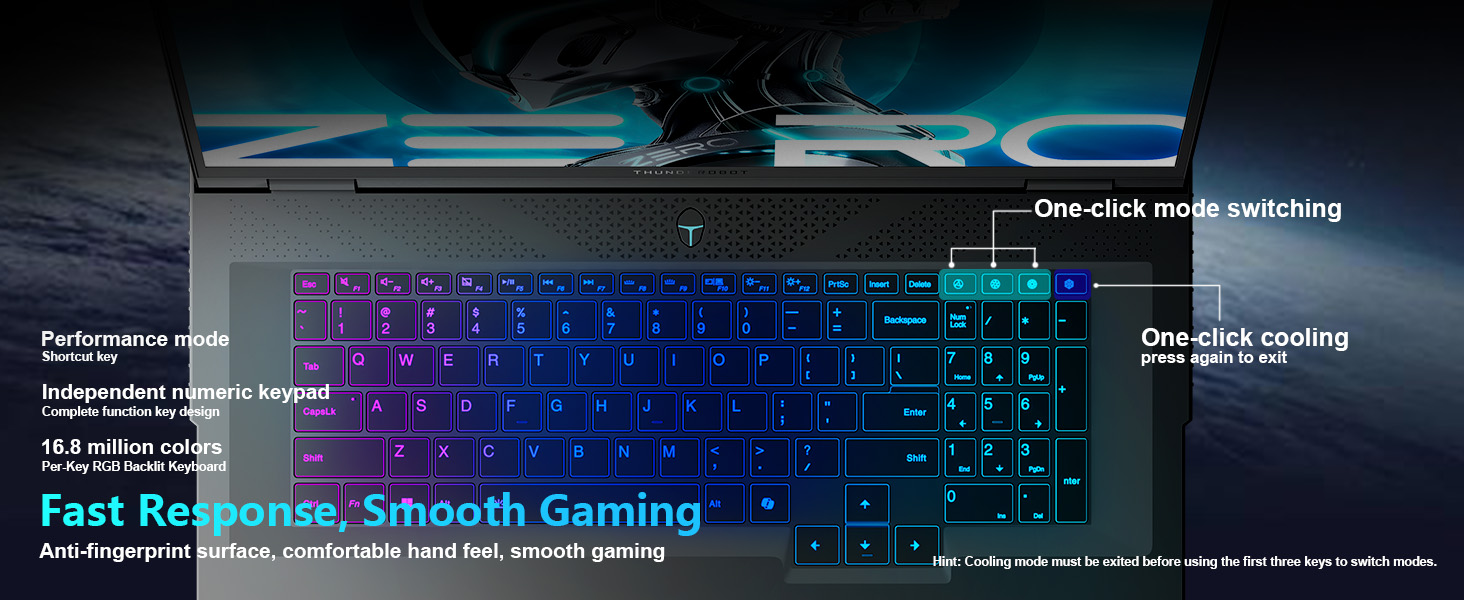
Image: Screenshot of the AI Intelligent Control Center, showing options for system, lighting, and settings adjustments.
วิดีโอ: รายละเอียดโดยละเอียดview of the THUNDEROBOT Zero 18 Pro, showcasing its design, features, and the AI Intelligent Control Center.
5. การบำรุงรักษา
5.1. การทำความสะอาด
- หน้าจอ: ใช้ผ้านุ่มไม่เป็นขุยค่อยๆ งampล้างออกด้วยน้ำหรือน้ำยาทำความสะอาดหน้าจอ หลีกเลี่ยงสารเคมีรุนแรง
- แป้นพิมพ์และตัวเครื่อง: Use a soft cloth to wipe surfaces. A can of compressed air can remove dust from between keys and vents.
- ช่องระบายอากาศ: Regularly check and clean the cooling vents to prevent dust buildup, which can hinder airflow and lead to overheating.
5.2. การอัปเดตซอฟต์แวร์
- ตรวจสอบและติดตั้งการอัปเดต Windows เป็นประจำเพื่อให้มั่นใจถึงความเสถียรและความปลอดภัยของระบบ
- Update graphics drivers (NVIDIA GeForce) and other device drivers through the manufacturer's webเว็บไซต์หรือซอฟต์แวร์เฉพาะทาง
- Keep the AI Intelligent Control Center software updated for new features and performance optimizations.
5.3. การดูแลแบตเตอรี่
- หลีกเลี่ยงการปล่อยแบตเตอรี่จนหมดบ่อยครั้ง
- หากต้องเก็บแล็ปท็อปไว้เป็นเวลานาน ควรชาร์จแบตเตอรี่ให้มีระดับประมาณ 50-60% และเก็บไว้ในที่แห้งและเย็น
- ใช้เฉพาะอะแดปเตอร์ AC ของแท้ที่มาพร้อมกับแล็ปท็อปเท่านั้น
6 การแก้ไขปัญหา
6.1. แล็ปท็อปไม่สามารถเปิดเครื่องได้
- ตรวจสอบให้แน่ใจว่าอะแดปเตอร์ AC เชื่อมต่อกับแล็ปท็อปและเต้ารับไฟฟ้าที่ใช้งานได้แน่นหนา
- ตรวจสอบว่าเต้ารับไฟฟ้าใช้งานได้หรือไม่โดยเสียบอุปกรณ์อื่นเข้าไป
- หากแบตเตอรี่หมด ให้ชาร์จอย่างน้อย 30 นาทีก่อนลองเปิดเครื่อง
6.2. ปัญหาการแสดงผล (ไม่มีภาพ, กะพริบ)
- ตรวจสอบให้แน่ใจว่าแล็ปท็อปเปิดอยู่และไม่ได้อยู่ในโหมดพักเครื่อง
- Adjust screen brightness using the function keys (Fn + F-keys).
- If an external monitor is connected, try disconnecting it or switching display modes (Fn + F-key, usually F7 or F8).
- อัพเดตไดร์เวอร์กราฟิก
6.3. ความร้อนสูงเกินไป
- ตรวจสอบให้แน่ใจว่าช่องระบายความร้อนไม่มีสิ่งกีดขวาง
- ทำความสะอาดฝุ่นออกจากช่องระบายอากาศโดยใช้ลมอัด
- Use the AI Intelligent Control Center to set the cooling mode to a higher fan speed (e.g., Turbo mode).
- Ensure the laptop is used on a hard, flat surface to allow proper airflow.
6.4. ปัญหาการเชื่อมต่อ Wi-Fi
- ตรวจสอบให้แน่ใจว่าได้เปิดใช้งาน Wi-Fi แล้ว (ตรวจสอบจากปุ่มฟังก์ชันหรือการตั้งค่าของ Windows)
- รีสตาร์ทเราเตอร์และโมเด็มของคุณ
- Update your Wi-Fi adapter drivers.
- ลองเชื่อมต่อกับเครือข่าย Wi-Fi อื่นเพื่อแยกแ1ยะปัญหา
7. ข้อมูลจำเพาะ
| คุณสมบัติ | รายละเอียด |
|---|---|
| ยี่ห้อ | ธันเดอร์บอท |
| ชื่อรุ่น | ZERO 18 โปร |
| ขนาดหน้าจอ | 18 นิ้ว |
| ความละเอียดหน้าจอ | 2560 x 1600 พิกเซล (QHD+) |
| โปรเซสเซอร์ | Intel Core Ultra 9 275HX (up to 5.4 GHz) |
| แรม | แรม 32GB DDR5 |
| ความเร็วหน่วยความจำ | 4800 เมกะเฮิรตซ์ |
| ฮาร์ดไดรฟ์ | SSD 1 TB (PCIe x 4) |
| โคโปรเซสเซอร์กราฟิก | GeForce RTX 5080 (Dedicated) |
| ระบบปฏิบัติการ | วินโดวส์ 11 โฮม |
| ประเภทไร้สาย | 802.11ax (ไวไฟ 6E) |
| พอร์ต USB 3.0 | 3 |
| น้ำหนักสินค้า | 15 ปอนด์ |
| ขนาดสินค้า | 16.04 x 11.78 x 1.41 นิ้ว |
| สี | สีดำ |
| แหล่งพลังงาน | เครื่องปรับอากาศและแบตเตอรี่ |
| คุณสมบัติพิเศษ | ปุ่มกดตัวเลข |
8. การรับประกันและการสนับสนุน
Every Thunderobot laptop includes a 12-month warranty. This warranty offers expert support, thorough diagnostics, and genuine parts if a repair is needed. Additionally, a 90-day warranty is provided on all warranty replacement parts, ensuring hassle-free repairs. Your satisfaction is our commitment.
Image: Graphic detailing Thunderobot's warranty and service policy, including 12-month laptop warranty and 90-day replacement parts warranty.
8.1. การติดต่อฝ่ายสนับสนุน
For technical assistance, warranty claims, or service inquiries, please refer to the contact information provided in your product packaging or visit the official Thunderobot support webเว็บไซต์.


