1. บทนำ
This manual provides detailed instructions for the installation, operation, maintenance, and troubleshooting of your AINAVI 10.25 inch Car Multimedia Player, Model 3S-NBT-168. Please read this manual thoroughly before installation and use to ensure proper functionality and to maximize your user experience.

Image 1.1: AINAVI 10.25 inch Car Multimedia Player displaying the main menu interface.
2. ความเข้ากันได้
The AINAVI 10.25 inch Car Multimedia Player (Model 3S-NBT-168) is designed for specific BMW models equipped with the NBT system and a 6-pin LVDS connector. Verify your vehicle's system before purchase and installation.
- BMW 3 Series F30/F31/F34 (2013-2016) with NBT System
- BMW 4 Series F32/F33/F36 (2013-2016) with NBT System
- BMW M3 F80 (2014-2019) with NBT System
- BMW M4 F82/F83 (2014-2019) with NBT System
สำคัญ: หน่วยนี้เป็น ไม่ compatible with CIC systems (4-pin LVDS) or CCC systems (10-pin LVDS).

Image 2.1: Visual representation of compatible BMW 3 and 4 Series dashboards with the multimedia player installed.
3. เนื้อหาบรรจุภัณฑ์
ตรวจสอบว่ารายการทั้งหมดที่ระบุไว้ด้านล่างนี้รวมอยู่ในแพ็คเกจของคุณ:
- 10.25" Head Unit (1 unit)
- ISO Wiring Harness Cable (1 unit)
- Audio Extension Cable (1 unit)
- สาย USB (1 ชิ้น)
- Installation Instruction (1 unit)
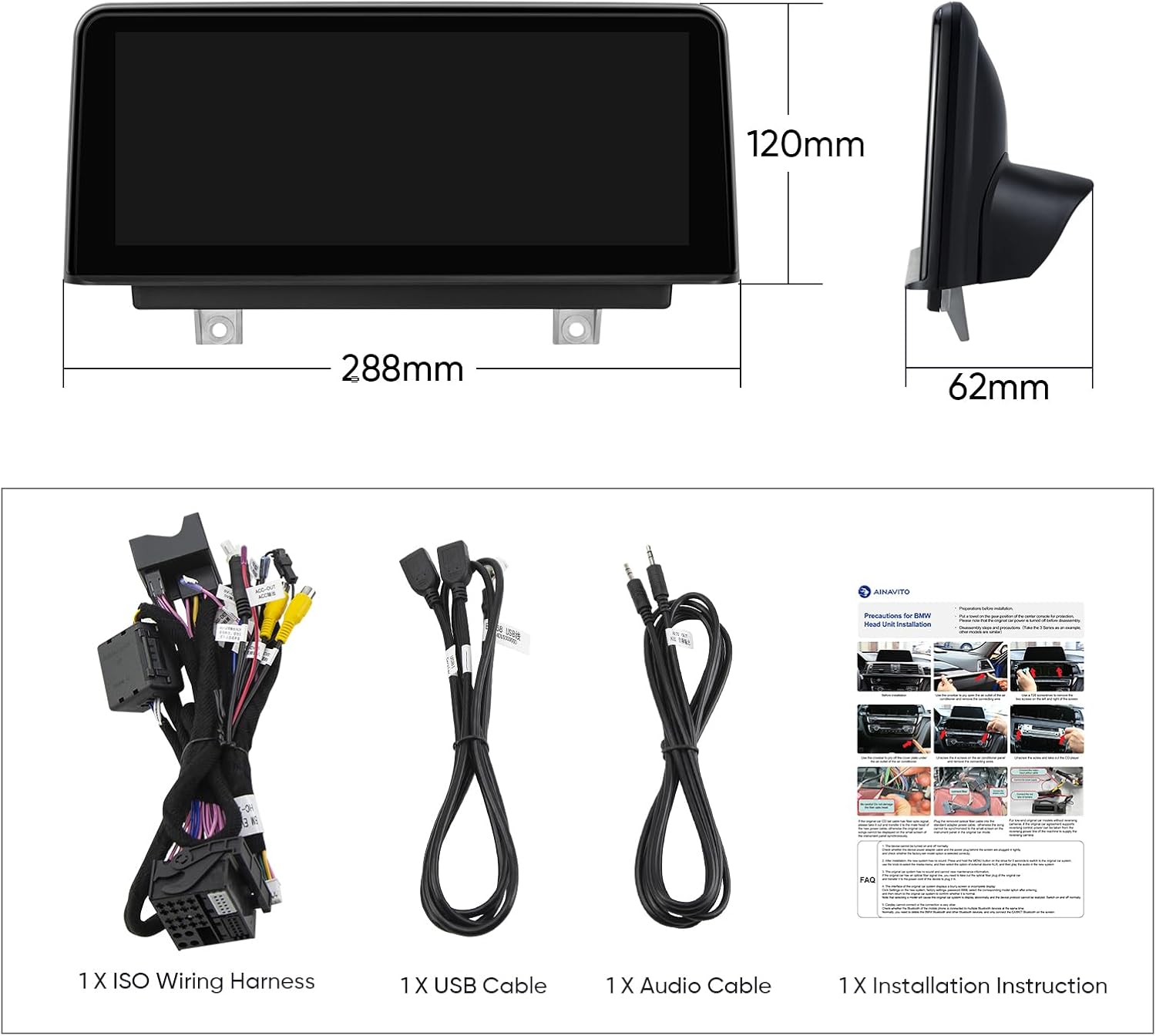
Image 3.1: Contents of the product package, including the head unit, wiring harness, USB cable, audio cable, and installation instructions.
4. การตั้งค่าและการติดตั้ง
Professional installation is recommended. Refer to the included installation instruction manual for detailed, step-by-step guidance. The following outlines key considerations:
4.1. Pre-Installation Check: Identify iDrive System
Before proceeding with installation, it is crucial to confirm your BMW vehicle has the original NBT system. This unit is not compatible with CIC or CCC systems. To identify your system:
- Remove the original screen on your BMW car.
- Check the LVDS port. An NBT system uses a 6-pin LVDS plug.

Image 4.1: Guide to identifying your BMW's iDrive system (NBT, CIC, CCC) by checking the LVDS connector type.
4.2. ขั้นตอนการติดตั้งทั่วไป
The included installation instruction manual provides specific diagrams and steps for your vehicle. Ensure the vehicle's power is disconnected before beginning installation. Connect the provided wiring harness and cables according to the instructions, paying close attention to the LVDS connection.
5. คู่มือการใช้งาน
The AINAVI multimedia player offers a dual-system operation, retaining original BMW functions while adding advanced features.
5.1. การสลับระบบ
The unit allows seamless switching between the original BMW vehicle system and the new Linux-based system (which supports CarPlay/Android Auto). This ensures all original factory features remain accessible.

Image 5.1: The multimedia player displaying both the original BMW menu and the CarPlay interface, illustrating system switching.
5.2. Wireless Apple CarPlay and Wired Android Auto
The unit features built-in Wireless Apple CarPlay and Wired Android Auto. Connect your smartphone via Bluetooth for wireless CarPlay or use a USB cable for wired Android Auto to access navigation, calls, messages, and music directly on the display.

Image 5.2: Visual explanation of Wireless Apple CarPlay and Wired Android Auto connectivity.
5.3. Retained Original BMW System Features
The multimedia player is designed to retain and be compatible with various original BMW features:
- iDrive Knob control
- ฟังก์ชันบลูทูธดั้งเดิม
- วิทยุดั้งเดิม
- OEM rear camera
- ระบบเรดาร์
- การควบคุมพวงมาลัย
- เครื่องเล่นซีดีแบบดั้งเดิม
- ต้นฉบับ Ampระบบ lifier
Vehicle information such as speed, fuel level, oil pressure, and safety warnings are displayed on the new screen.

ภาพที่ 5.3: อดีตamples of original BMW features that are retained and supported by the AINAVI multimedia player.
5.4.บลูทูธ 5.1
The unit incorporates Bluetooth 5.1 (v2.1 + EDR, v5.1 Low Energy) for increased transmission rate and effective working distance. It supports audio streaming, automatic phone book transfer, and hands-free calling.
5.5. Dual WiFi Band Connecting
The system supports both 2.4GHz and 5GHz WiFi bands, providing a more reliable and faster internet connection for online features.
5.6. การใช้งานหน้าจอสัมผัส
The 10.25 inch 1280x480 HD IPS Touch Screen offers intuitive control over the multimedia system. Its Grade-A IPS technology ensures excellent visual clarity and responsiveness.

Image 5.4: The 10.25 inch 1280x480 HD IPS Touch Screen, highlighting its visual quality and touch functionality.
6. การบำรุงรักษา
To ensure the longevity and optimal performance of your AINAVI Car Multimedia Player, follow these maintenance guidelines:
- การทำความสะอาดหน้าจอ: ใช้ผ้านุ่มไม่เป็นขุยเช็ดหน้าจอเบาๆ สำหรับรอยเปื้อนฝังแน่น ให้เช็ดเบาๆampชุบผ้าด้วยน้ำหรือน้ำยาทำความสะอาดเฉพาะหน้าจอ หลีกเลี่ยงสารเคมีรุนแรงหรือวัสดุที่มีฤทธิ์กัดกร่อน
- การดูแลทั่วไป: Keep the unit free from dust and debris. Avoid exposing the unit to extreme temperatures or direct sunlight for extended periods.
- การอัปเดตซอฟต์แวร์: Periodically check for available software updates from AINAVI to ensure the system runs efficiently and has the latest features.
7 การแก้ไขปัญหา
ส่วนนี้จะกล่าวถึงปัญหาทั่วไปที่คุณอาจพบ สำหรับปัญหาที่ไม่ได้ระบุไว้ในที่นี้ โปรดติดต่อฝ่ายสนับสนุนลูกค้า
- หน่วยไม่เปิดเครื่อง:
- ตรวจสอบการเชื่อมต่อไฟฟ้าทั้งหมดเพื่อให้แน่ใจว่ายึดแน่นหนาดี
- Verify the vehicle's fuse related to the stereo system.
- Ensure the unit is correctly installed according to the instruction manual.
- Screen Bugging/Display Issues:
- Ensure the LVDS cable is properly connected and not damaged.
- เริ่มการทำงานของเครื่องอีกครั้งโดยการปิดและเปิดสวิตช์กุญแจรถยนต์
- If the issue persists, a factory reset might be necessary (consult support for guidance).
- CarPlay/Android Auto ไม่เชื่อมต่อ:
- For Wireless CarPlay, ensure Bluetooth is enabled on your iPhone and paired with the unit.
- For Wired Android Auto, ensure you are using a high-quality USB cable and that Android Auto is enabled on your phone.
- Check your phone's compatibility with CarPlay/Android Auto.
- Cannot Switch Speed Units (MPH to KM/H) or Temperature (F to C):
- Access the system settings menu on the multimedia player.
- Look for 'Unit Settings' or 'Regional Settings' to change measurement units. Refer to the detailed installation instruction manual for specific menu navigation.
- ไม่มีเสียง:
- Check the audio extension cable connection.
- Ensure the volume is not muted or set too low on both the unit and the original car stereo system.
- Verify that the correct audio input source is selected.
8. ข้อมูลจำเพาะ
| คุณสมบัติ | ข้อมูลจำเพาะ |
|---|---|
| หมายเลขรุ่น | 3S-NBT-168 |
| ขนาดจอแสดงผล | 10.25 นิ้ว |
| ปณิธาน | 1280x480 HD IPS |
| ระบบปฏิบัติการ | ลินุกซ์ |
| การเชื่อมต่อ | Bluetooth 5.1, Dual-band Wi-Fi (2.4GHz & 5GHz), Wireless/Wired CarPlay & Android Auto |
| คุณสมบัติพิเศษ | Highest Level QLED, Works with Original Sound System, Retains iDrive, Steering Wheel Control, OEM Camera |
| โหมดเอาต์พุตเสียง | สเตอริโอ |
| ประเภทการติดตั้ง | แผงหน้าปัด |
| น้ำหนักสินค้า | 4 ปอนด์ |
| ขนาดแพ็คเกจ | 12.72 x 11.22 x 5.27 นิ้ว |
9. การรับประกัน
The AINAVI 10.25 inch Car Multimedia Player (Model 3S-NBT-168) comes with a รับประกัน 12 เดือน นับจากวันที่ซื้อ การรับประกันนี้ครอบคลุมข้อบกพร่องจากการผลิตและการทำงานผิดปกติภายใต้การใช้งานปกติ โปรดเก็บหลักฐานการซื้อไว้เพื่อขอรับสิทธิ์การรับประกัน
10. การสนับสนุนลูกค้า
For installation assistance, technical support, or any inquiries regarding your AINAVI product, please contact our customer support team:
- ผ่านทางอเมซอน: Navigate to your order details on Amazon, click on the seller's name (HomeCar), and then select "Ask a question." Provide pictures or videos of your technical or installation questions for a prompt response.
- สายด่วน: +1 (833) 858-5016 (เวลาทำการ: 01:00 น. ถึง 00:00 น. PST)
- อีเมล: info@ainavi.com

Image 10.1: Visual guide for contacting customer support through the Amazon platform.

ภาพที่ 10.2: จบแล้วview of customer support options, including phone and email.


