การแนะนำ
Welcome to your new NIMO 15.6" FHD Laptop N151. This manual provides essential information to help you get started, operate, maintain, and troubleshoot your device. Please read through these instructions carefully to ensure optimal performance and longevity of your laptop.
การตั้งค่า
1. การแกะกล่องและการตรวจสอบเบื้องต้น
นำสินค้าทั้งหมดออกจากบรรจุภัณฑ์อย่างระมัดระวัง ตรวจสอบให้แน่ใจว่ามีส่วนประกอบต่อไปนี้:
- แล็ปท็อป Nimo N151 จำนวน 1 เครื่อง
- 1 x ที่ชาร์จเร็ว Type-C 65W PD
- 1 x คู่มือผู้ใช้ (เอกสารนี้)
- ระบบปฏิบัติการ Windows 11 Home (ติดตั้งมาแล้ว)
Inspect the laptop for any physical damage. If any components are missing or damaged, contact customer support immediately.
2. Charging the Laptop
Before first use, fully charge your laptop. Connect the provided Type-C 65W PD Fast Charger to the Type-C charging port on your laptop and then to a power outlet. The charge LED indicator will illuminate.

Image: The NIMO laptop connected to its Type-C PD fast charger, illustrating the charging process.
3. การเปิดเครื่องและการตั้งค่าเริ่มต้น
Press the power button located on the keyboard. The laptop will boot up and guide you through the initial Windows 11 Home setup process. Follow the on-screen instructions to configure your language, region, network, and user account.
การใช้งานแล็ปท็อปของคุณ
แสดง
Your NIMO laptop features a 15.6-inch Full HD (1920x1080) Anti-Glare IPS display. This display offers clear visuals and reduced eye strain, suitable for various tasks from work to entertainment.

Image: The NIMO laptop's 15.6-inch FHD IPS display, highlighting its narrow bezels and vibrant visual capabilities.
Keyboard and Fingerprint Sensor
The laptop is equipped with a backlit keyboard for comfortable typing in various lighting conditions and a numeric keypad for efficient data entry. A fingerprint sensor is integrated for secure and quick login.

Image: Close-up of the NIMO laptop's backlit keyboard, showcasing the fingerprint sensor and numeric keypad.
Webลูกเบี้ยว
2MP webcam is integrated for video calls and online meetings.
พอร์ตและการเชื่อมต่อ
The NIMO N151 offers a variety of ports for versatile connectivity:
- พอร์ต USB 3.0: เพื่อการถ่ายโอนข้อมูลความเร็วสูง
- พอร์ต USB 2.0: สำหรับเชื่อมต่ออุปกรณ์ต่อพ่วง
- พอร์ต HDMI: สำหรับเชื่อมต่อกับจอแสดงผลภายนอก
- พอร์ต Type-C: One for charging (PD Fast Charger) and one for multifunction use.
- ช่องเสียบการ์ด Micro SD: สำหรับการขยายพื้นที่เก็บข้อมูลหรือการถ่ายโอน files.
- แจ็คเสียบหูฟังแบบรวม: สำหรับอินพุต/เอาต์พุตเสียง
- สล็อตล็อคเคนซิงตัน: เพื่อความปลอดภัยทางกายภาพ
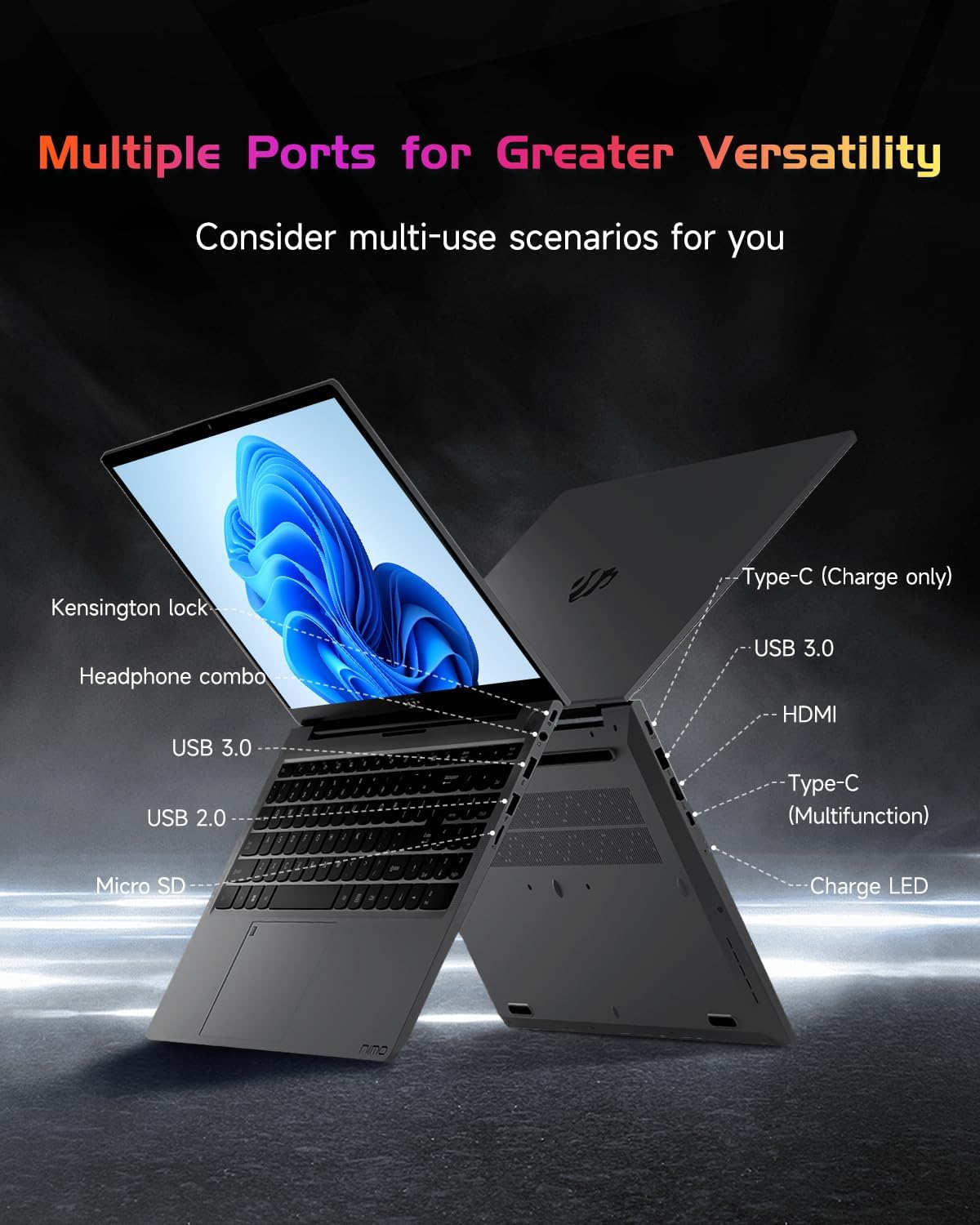
ภาพ: โปรด้านข้างfile of the NIMO laptop, displaying its array of ports for diverse connectivity needs.
Stay connected with integrated Wi-Fi 6 for fast wireless internet and Bluetooth 5.2 for connecting wireless accessories.
หน่วยประมวลผลและประสิทธิภาพ
Powered by the Intel Alder Lake-N100 12th Gen processor, the NIMO N151 delivers reliable performance for multitasking, streaming, and everyday computing tasks. It comes with 16GB DDR4 RAM and a 256GB PCIe SSD for fast startups and seamless operation.

Image: A visual representation of the Intel Alder Lake-N100 12th Gen processor, highlighting its role in the laptop's performance.
ระบบปฏิบัติการ
The laptop comes pre-installed with Windows 11 Home, offering a modern and intuitive user experience.
การซ่อมบำรุง
การดูแลทั่วไป
- Keep the laptop in a clean, dry environment away from extreme temperatures.
- Avoid spilling liquids on the keyboard or screen.
- ใช้ผ้าเนื้อนุ่มที่ไม่เป็นขุยเช็ดทำความสะอาดหน้าจอและภายนอก ห้ามใช้สารเคมีรุนแรง
- ตรวจสอบให้แน่ใจว่ามีการระบายอากาศที่เหมาะสมโดยไม่ปิดกั้นช่องระบายอากาศ
การดูแลแบตเตอรี่
To prolong battery life, avoid fully discharging the battery frequently. It is recommended to keep the battery charge between 20% and 80% when possible.
การแก้ไขปัญหา
ปัญหาทั่วไปและแนวทางแก้ไข
- แล็ปท็อปไม่สามารถเปิดเครื่องได้: Ensure the charger is properly connected and the battery has sufficient charge. Try holding the power button for 10-15 seconds to perform a hard reset.
- หน้าจอว่างเปล่า: Connect an external monitor to check if the display is the issue. Restart the laptop.
- ปัญหาการเชื่อมต่อ Wi-Fi: ตรวจสอบว่าเปิดใช้งาน Wi-Fi ในการตั้งค่า Windows แล้วหรือไม่ รีสตาร์ทเราเตอร์และแล็ปท็อปของคุณ
- ประสิทธิภาพช้า: Close unnecessary applications, check for malware, and ensure Windows is up to date.
For persistent issues, refer to the online support resources or contact NIMO customer service.
ข้อมูลจำเพาะ
| คุณสมบัติ | รายละเอียด |
|---|---|
| ยี่ห้อ | นีโม |
| ชื่อรุ่น | นิโม N151 |
| ขนาดหน้าจอ | 15.6 นิ้ว |
| ความละเอียดหน้าจอ | 1920 x 1080 พิกเซล (FHD) |
| โปรเซสเซอร์ | Intel Pentium Quad Core N100 (up to 3.4 GHz) |
| แรม | แรม 16GB DDR4 |
| ความเร็วหน่วยความจำ | 3200 เมกะเฮิรตซ์ |
| ฮาร์ดไดรฟ์ | SSD ขนาด 256 GB (PCIe) |
| โคโปรเซสเซอร์กราฟิก | กราฟิกแบบบูรณาการ |
| ระบบปฏิบัติการ | วินโดวส์ 11 โฮม |
| ประเภทไร้สาย | 802.11a/b/g/n/ac (Wi-Fi 6) |
| บลูทูธ | บลูทูธ 5.2 |
| พอร์ต USB 2.0 | 1 |
| พอร์ต USB 3.0 | 3 |
| อายุการใช้งานแบตเตอรี่โดยเฉลี่ย | 5 ชั่วโมง |
| น้ำหนักสินค้า | 3.8 ปอนด์ |
| ขนาดสินค้า | 14.07 x 8.98 x 0.76 นิ้ว |
| คุณสมบัติพิเศษ | คีย์บอร์ดเรืองแสง, เครื่องอ่านลายนิ้วมือ, ระบบเสียง HD, ช่องเสียบการ์ดหน่วยความจำ, แป้นตัวเลข |
การรับประกันและการสนับสนุน
แล็ปท็อป NIMO ของคุณได้รับการคุ้มครองโดย การรับประกันจากผู้ผลิต 2 ปี, ensuring peace of mind for your purchase. Additionally, NIMO offers a 90-Day Hassle-Free Return Policy.
For technical assistance, warranty claims, or returns, please contact NIMO customer support through their official channels. Refer to the contact information provided with your product or on the NIMO webเว็บไซต์.
วิดีโอสินค้า
รับชมวิดีโออย่างเป็นทางการเหล่านี้เพื่อรับข้อมูลโดยละเอียดview and demonstration of your NIMO laptop's features.
NIMO 15.6 Laptop Comprehensive Introduction
Video: A detailed introduction to the NIMO 15.6" FHD Laptop, showcasing การออกแบบและฟังก์ชันหลัก
NIMO Laptop: Perfect for Work and Study, Anytime, Anywhere
Video: This video highlights the NIMO laptop's versatility for both work and study environments, emphasizing its portability.
NIMO 15.6 FHD Laptop for Students Home Work
Video: A demonstration of the NIMO 15.6" FHD Laptop's suitability for students and home-based work tasks.
Efficiency Meets Convenience: Nimo Laptop
Video: This video showcases the NIMO laptop's efficiency and convenient features for daily use.
NIMO Laptop UGC
Video: User-generated content featuring the NIMO laptop, demonstrating real-world usage scenarios.
NIMO 15.6 FHD Laptop Promotion Video
Video: A promotional video for the NIMO 15.6" FHD Laptop, showcasing คุณสมบัติและประโยชน์ของมัน


