1. บทนำ
This manual provides detailed instructions for the installation, operation, and maintenance of your SINOVCLE 7-inch Wireless CarPlay & Android Auto Portable Car Stereo. Please read this manual thoroughly before using the device to ensure proper functionality and safety. Keep this manual for future reference.
2. สินค้าหมดview
2.1 เนื้อหาบรรจุภัณฑ์
ตรวจสอบว่ามีรายการทั้งหมดอยู่ในแพ็คเกจ:
- Car Stereo Display
- Mounting Hardware (High Freedom Stand)
- คู่มือการใช้งาน
- Reversing Camera (Optional, if included in your package)
- 64G TF Card (Optional, if included in your package)
- 1 USB Cigarette Lighter Power Plug
- AV IN Input Cable
- สาย AUX

Image: Contents of the SINOVCLE Portable Car Stereo package, including the main unit, mounting stand, cables, and optional accessories.
2.2 คุณสมบัติหลัก
- หน้าจอสัมผัส IPS ขนาด 7 นิ้ว: Provides a clear display with 1024x600 resolution.
- CarPlay/Android Auto แบบไร้สายและแบบมีสาย: ผสานการทำงานอย่างราบรื่นกับสมาร์ทโฟนของคุณเพื่อการนำทาง ฟังเพลง และการสื่อสาร
- Bluetooth 5.0: Supports hands-free calling and wireless audio streaming.
- การนำทาง GPS: Utilizes online maps from your connected smartphone for real-time navigation.
- ลิงค์มิเรอร์: Displays your smartphone screen directly on the device.
- FM Transmitter: Transmits audio to your vehicle's FM radio for sound output through car speakers.
- เอาต์พุต AUX: Connects directly to your car's AUX input for audio output.
- Backup Camera Input (AVIN): Supports connection to a reversing camera for parking assistance.
- พอดีสากล: Compatible with a wide range of vehicles (12V-30V DC power supply).
- พอร์ตชาร์จ USB: Dedicated USB port on the power plug for phone charging.

Image: The SINOVCLE 7-inch Portable Car Stereo display unit along with its suction cup mount, backup camera, AUX cable, and 64GB TF card.
3. คำแนะนำในการตั้งค่า
3.1 การติดตั้งอุปกรณ์
Attach the provided mounting hardware to the back of the car stereo display. Secure the mount to your dashboard or windshield using the suction cup. Adjust the screen angle for optimal viewing. The mount allows for 360-degree adjustment.
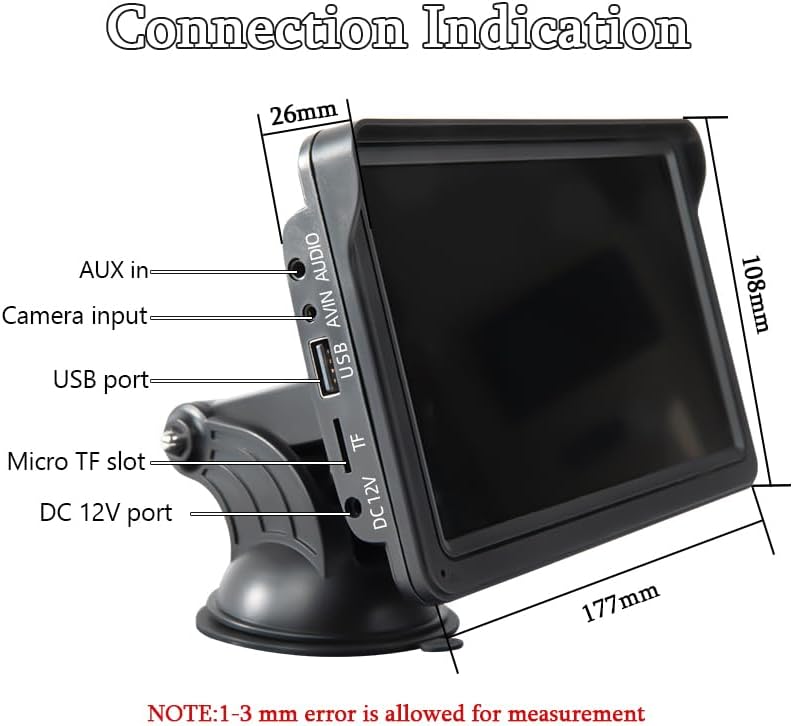
Image: Illustrations demonstrating the 360-degree adjustability of the screen mount, allowing for various viewมุมและตำแหน่ง
3.2 การเชื่อมต่อสายไฟ
This device is powered via the cigarette lighter power plug. Insert the power plug into your vehicle's cigarette lighter socket. The device will power on automatically. The power supply voltage range is 12V to 30V DC, making it suitable for most vehicle models.

Image: The car stereo installed on a dashboard, showing the power cable connected to the cigarette lighter socket, which includes a dedicated USB port for phone charging.
3.3 Connecting a Backup Camera (Optional)
If you have a backup camera, connect its video output to the AVIN (Reversing camera input) port on the car stereo using a 2.5mm to RCA adapter cable. Ensure the camera is properly installed and powered according to its own instructions.

Image: The car stereo displaying a backup camera feed with parking guidelines, alongside a separate image of a rear-view camera unit.
4. คู่มือการใช้งาน
4.1 CarPlay & Android Auto Connection
อุปกรณ์นี้รองรับการเชื่อมต่อทั้งแบบมีสายและไร้สายสำหรับ Apple CarPlay และ Android Auto
4.1.1 การเชื่อมต่อแบบมีสาย
- Connect your smartphone to the car stereo's USB port using a USB data cable.
- The device will automatically enter the CarPlay or Android Auto interface.
4.1.2 การเชื่อมต่อไร้สาย
- On your smartphone, enable both Bluetooth and Wi-Fi functions.
- On the car stereo, navigate to the 'PhoneLink' or 'CarPlay/Android Auto' section.
- ค้นหา and connect to the car stereo's Bluetooth device name from your phone's Bluetooth settings.
- Once Bluetooth is paired, the device will automatically initiate the CarPlay or Android Auto interface via Wi-Fi.

Image: A sequence of smartphone screenshots illustrating the steps to connect to CarPlay wirelessly, including enabling Wi-Fi and Bluetooth, selecting the device, and confirming pairing.

Image: A sequence of smartphone screenshots illustrating the steps to connect to Android Auto wirelessly, including enabling Wi-Fi and Bluetooth, selecting the device, and confirming pairing.
4.2 ระบบนำทาง GPS
When connected to CarPlay or Android Auto, the device utilizes your smartphone's online map applications (e.g., Google Maps, Apple Maps) for navigation. This provides live GPS tracking, instant route adjustments for traffic, and access to up-to-date maps without manual updates. The 7-inch screen offers a larger, clearer view สำหรับการนำทาง

Image: The car stereo displaying a navigation route from a mapping application, with various map app icons shown alongside.
4.3 ฟังก์ชั่นบลูทูธ
The integrated Bluetooth 5.0 allows for:
- การโทรแบบแฮนด์ฟรี: Make and receive calls directly from the car stereo display using the built-in microphone.
- การสตรีมเพลงแบบไร้สาย: Play audio from your smartphone through the car stereo.
- Dual-Device Pairing: Maintain connection with two devices for seamless switching between audio sources.

Image: The car stereo displaying a phone dialer interface, indicating active Bluetooth connection for hands-free calling, with a smartphone also showing a call screen.
4.4 FM Transmitting
To output audio through your vehicle's speakers via FM radio:
- On the car stereo, select the FM Transmitter function.
- Choose an unoccupied FM frequency on the car stereo.
- ปรับคลื่นวิทยุ FM ในรถของคุณให้ตรงกับความถี่ดังกล่าว
- Audio from the car stereo will now play through your car's speakers. Avoid frequencies occupied by local FM stations to prevent interference.

Image: The car stereo displaying FM transmission settings, with a car's built-in radio also tuned to the same FM frequency, illustrating the audio transmission process.
4.5 AUX Cable Connection
If your car has an AUX input, you can connect the car stereo directly using the provided AUX cable for audio output. Plug one end into the car stereo's audio port and the other into your car's AUX input.
4.6 การเชื่อมโยงมิเรอร์
The Mirror Link function allows you to display your smartphone's screen directly on the car stereo. Connect your iPhone via USB cable for casting. For Android phones, connect via USB and follow prompts to install any necessary app software on your mobile phone.

Image: The car stereo displaying a mirrored smartphone screen, with separate images showing wired connection methods for iPhone and Android devices to enable Mirror Link.
5. การบำรุงรักษา
To ensure the longevity and optimal performance of your SINOVCLE car stereo, follow these maintenance guidelines:
- การทำความสะอาด: ใช้ผ้านุ่มและแห้งเช็ดทำความสะอาดหน้าจอและภายนอก สำหรับคราบฝังแน่น ให้เช็ดเบาๆampชุบผ้าด้วยน้ำหรือน้ำยาทำความสะอาดที่ปลอดภัยต่อหน้าจอ หลีกเลี่ยงวัสดุที่มีฤทธิ์กัดกร่อนหรือสารเคมีรุนแรง
- อุณหภูมิ: ควรหลีกเลี่ยงการนำอุปกรณ์ไปวางไว้ในที่ที่มีอุณหภูมิสูงหรือต่ำจัดเป็นเวลานาน
- ความชื้น: Keep the device dry. Do not expose it to water or other liquids.
- การจัดการสายเคเบิล: Ensure all cables are securely connected and not pinched or tangled, which can cause damage.
- การอัปเดตซอฟต์แวร์: ตรวจสอบของผู้ผลิต webไซต์เป็นระยะสำหรับการอัปเดตเฟิร์มแวร์ที่มีอยู่เพื่อปรับปรุงประสิทธิภาพและเพิ่มคุณสมบัติ
6 การแก้ไขปัญหา
หากคุณพบปัญหาเกี่ยวกับอุปกรณ์ของคุณ โปรดดูปัญหาทั่วไปและวิธีแก้ไขต่อไปนี้:
6.1 ไม่มีไฟฟ้า
- ตรวจสอบการเชื่อมต่อพลังงาน: Ensure the cigarette lighter power plug is fully inserted into the vehicle's socket and the vehicle's ignition is on.
- กำลังรถยนต์: ตรวจสอบว่าช่องเสียบที่จุดบุหรี่ในรถใช้งานได้หรือไม่ (เช่น โดยการทดสอบด้วยอุปกรณ์อื่น)
- ฟิวส์: Check the fuse in the cigarette lighter plug or your vehicle's fuse box if applicable.
6.2 ปัญหาการเชื่อมต่อ CarPlay/Android Auto แบบไร้สาย
- บลูทูธและ Wi-Fi: โปรดตรวจสอบให้แน่ใจว่าได้เปิดใช้งาน Bluetooth และ Wi-Fi บนสมาร์ทโฟนของคุณแล้ว
- ลืมอุปกรณ์: On your smartphone, 'forget' the car stereo from your Bluetooth and Wi-Fi settings, then attempt to pair again.
- รีสตาร์ทอุปกรณ์: Restart both your smartphone and the car stereo.
- Manual Discrepancy: If the on-screen display differs from the manual's instructions, prioritize the on-screen prompts or contact support.
- การทดสอบการเชื่อมต่อแบบใช้สาย: Try a wired connection to confirm basic functionality of CarPlay/Android Auto.
6.3 ไม่มีเอาต์พุตเสียง
- ระดับเสียง: Check the volume settings on both the car stereo and your vehicle's audio system.
- FM Transmitter: If using FM transmission, ensure the car stereo and your vehicle's radio are tuned to the exact same, unoccupied frequency.
- การเชื่อมต่อ AUX: If using AUX, ensure the cable is securely connected to both the car stereo and your vehicle's AUX input, and your car's audio source is set to AUX.
- บลูทู ธ เสียง: If using Bluetooth, ensure your phone's audio output is directed to the car stereo.
6.4 กล้องมองหลังไม่แสดงผล
- การเชื่อมต่อสายเคเบิล: Verify the AVIN cable is securely connected to the car stereo.
- พลังของกล้อง: Ensure the backup camera itself is receiving power and is functioning correctly.
- สายอะแดปเตอร์: Confirm the 2.5mm to RCA adapter cable is correctly used and not damaged.
6.5 หน้าจอสัมผัสไม่ตอบสนอง
- เริ่มต้นใหม่อีกครั้ง: ปิดและรีสตาร์ทอุปกรณ์
- ทำความสะอาดหน้าจอ: ตรวจสอบให้แน่ใจว่าหน้าจอสะอาดและไม่มีเศษสิ่งสกปรกหรือความชื้น
7. ข้อมูลจำเพาะ
| คุณสมบัติ | ข้อมูลจำเพาะ |
|---|---|
| หมายเลขรุ่น | XSP-207-SXT-303-12D |
| ขนาดหน้าจอ | 7 นิ้ว |
| ความละเอียดการแสดงผล | IPS 1024x600 |
| เทคโนโลยีการเชื่อมต่อ | อุปกรณ์เสริม, บลูทูธ, USB |
| เวอร์ชันบลูทูธ | 5.0 |
| ประเภทตัวควบคุม | หน้าจอสัมผัส |
| คุณสมบัติพิเศษ | Android Auto, Built-In Bluetooth, Multi-device Support, Touchscreen, Wireless Carplay |
| อุปกรณ์ที่รองรับ | Smartphones (iOS/Android), Backup Cameras |
| พาวเวอร์ซัพพลายฉบับที่tage | กระแสตรง 12V~30V |
| โหมดเอาต์พุตเสียง | สเตอริโอ |
| ประเภทขั้วต่อ | แจ็ค 3.5 มม. USB |
| ขนาดสินค้า | ลึก 2 นิ้ว x กว้าง 7 นิ้ว x สูง 4.5 นิ้ว (5.08 x 17.78 x 11.43 ซม.) |
| น้ำหนักสินค้า | 1.59 ปอนด์ (0.72 กก.) |

ภาพ: ด้านหนึ่ง view of the SINOVCLE car stereo, highlighting its slim profile and IPS 1024x600 touch screen, with comparison images showing clarity differences.
8. ข้อมูลด้านความปลอดภัย
- ควรใช้งานอุปกรณ์อย่างมีความรับผิดชอบและสอดคล้องกับกฎจราจรในท้องถิ่นเสมอ
- ห้ามติดตั้งหรือซ่อมแซมอุปกรณ์ขณะขับรถ
- ตรวจสอบให้แน่ใจว่าอุปกรณ์ติดตั้งอย่างแน่นหนาและไม่กีดขวางทางเดินของคุณ view กีดขวางถนนหรือรบกวนการควบคุมยานพาหนะ
- Avoid prolonged exposure to direct sunlight or extreme temperatures inside the vehicle.
- เก็บอุปกรณ์ให้ห่างจากน้ำและของเหลวอื่นๆ
9. การรับประกันและการสนับสนุน
For warranty information and technical support, please refer to the documentation provided with your purchase or contact SINOVCLE customer service directly. Contact details can typically be found on the product packaging or the official SINOVCLE webเว็บไซต์.


