1. ข้อมูลด้านความปลอดภัยที่สำคัญ
Please read all safety instructions carefully before using the BAOFENG BF-T20D radio. Failure to follow these instructions may result in injury or damage to the device.
- ห้ามใช้งานวิทยุในบริเวณที่มีอากาศไวไฟ (เช่น ใกล้ก๊าซไวไฟ ฝุ่นละออง หรือผงโลหะ)
- อย่าให้วิทยุโดนแสงแดดโดยตรงเป็นเวลานานหรือวางไว้ใกล้กับเครื่องทำความร้อน
- ห้ามถอดชิ้นส่วนหรือดัดแปลงวิทยุ การซ่อมแซมควรดำเนินการโดยผู้ที่ได้รับอนุญาตเท่านั้น
- ใช้เฉพาะแบตเตอรี่และเครื่องชาร์จที่ได้รับการรับรองจาก BAOFENG เท่านั้น
- เก็บวิทยุให้ห่างจากอุปกรณ์ทางการแพทย์เพื่อหลีกเลี่ยงการรบกวน
- Ensure the antenna is properly connected and not damaged during operation.
2. เนื้อหาบรรจุภัณฑ์
ตรวจสอบว่ามีรายการทั้งหมดอยู่ในแพ็คเกจของคุณ:
- 2 x BAOFENG BF-T20D Radios
- แบตเตอรี่ลิเธียมไอออน 2 x 1500mAh
- 1 x แหล่งจ่ายไฟของสหรัฐฯ
- 2 x เข็มขัดคลิป
- สายคล้องมือ 2 เส้น
- คู่มือผู้ใช้ภาษาอังกฤษ 2 เล่ม
- 1 x 2-port USB-C Charging Cable

3. สินค้าหมดview
The BAOFENG BF-T20D is a compact and durable two-way radio designed for reliable communication. It features an integrated antenna, USB-C charging, and noise reduction technology.
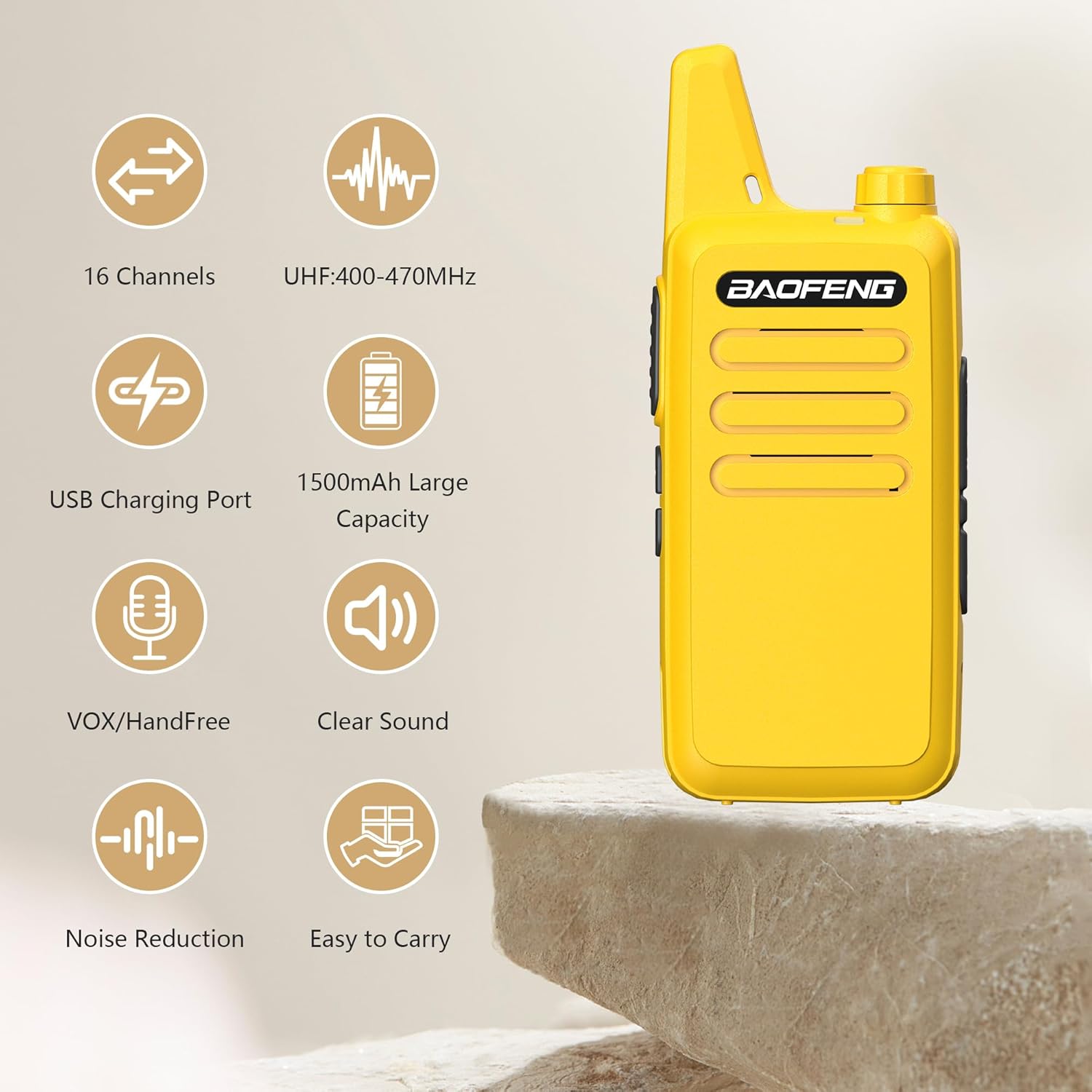
คุณสมบัติที่สำคัญ ได้แก่:
- เสาอากาศแบบบูรณาการ: Designed for durability and long-range transmission.
- ขนาดกะทัดรัดและน้ำหนักเบา: Weighs approximately 4.2oz (113g) with a rugged, splash-proof (IP55) shell.
- 16 ช่อง: มีตัวเลือกการสื่อสารหลากหลายรูปแบบ
- VOX Hands-Free Mode: Allows for voice-activated transmission.
- การลดเสียงรบกวน: Enhances audio clarity in various environments.
- Durable Belt Clip: Easily attachable to belts, pockets, or backpacks.

4. การตั้งค่า
4.1 การติดตั้งแบตเตอรี่
- ตรวจสอบให้แน่ใจว่าวิทยุปิดอยู่
- ค้นหาช่องใส่แบตเตอรี่ที่ด้านหลังของวิทยุ
- วางแบตเตอรี่ลิเธียมไอออนขนาด 1500mAh ให้ตรงกับขั้วสัมผัสในช่องใส่แบตเตอรี่
- ค่อยๆ ดันแบตเตอรี่เข้าที่จนกระทั่งคลิกเข้าที่
4.2 การชาร์จแบตเตอรี่
The BF-T20D features a convenient USB-C charging port, allowing you to recharge the battery using various power sources.
- Connect the provided USB-C charging cable to the radio's USB-C port.
- Connect the other end of the USB-C cable to a compatible power source, such as:
- The included US power adapter connected to a wall outlet.
- A car charger (not included).
- A power bank (not included).
- A computer's USB port.
- The charging indicator on the radio will illuminate to show charging status.
- Charging is complete when the indicator changes color or turns off (refer to radio's specific indicator behavior).


5. คู่มือการใช้งาน
5.1 การเปิด/ปิดเครื่อง
To power on the radio, rotate the power/volume knob clockwise until you hear a click. To power off, rotate the knob counter-clockwise until it clicks.
5.2 การปรับระดับเสียง
หมุนปุ่มปรับระดับเสียงตามเข็มนาฬิกาเพื่อเพิ่มระดับเสียง และหมุนทวนเข็มนาฬิกาเพื่อลดระดับเสียง
5.3 การเลือกช่องสัญญาณ
The BF-T20D supports 16 channels. Use the channel selector knob (typically on top of the radio) to choose your desired channel. Ensure all radios in your group are on the same channel for communication.
5.4 การส่งและรับ
- ในการส่งสัญญาณ ให้กดปุ่ม Push-to-Talk (PTT) ด้านข้างของวิทยุค้างไว้ แล้วพูดให้ชัดเจนใส่ไมโครโฟน
- ปล่อยปุ่ม PTT เพื่อหยุดการส่งและกลับสู่โหมดรับ
- เมื่อรับสัญญาณวิทยุแล้ว วิทยุจะส่งสัญญาณเสียงออกโดยอัตโนมัติ

5.5 ฟังก์ชัน VOX (ระบบโทรศัพท์อัตโนมัติ)
The VOX function allows for hands-free operation. When activated, the radio will automatically transmit when it detects your voice, without needing to press the PTT button.
- Refer to the specific programming software or manual for instructions on how to enable and adjust VOX sensitivity.
- VOX is useful in situations where hands-free communication is required.

5.6 ลดเสียงรบกวน
The BF-T20D incorporates AI noise reduction technology to filter out background noise, providing clearer audio transmissions and reception.
- This feature is typically active by default to improve communication quality.
- It helps in noisy environments like construction sites or busy outdoor areas.

6. การบำรุงรักษา
6.1 การทำความสะอาดวิทยุ
- เช็ดพื้นผิววิทยุด้วยผ้านุ่มๆamp ผ้า.
- อย่าใช้สารเคมีรุนแรงหรือน้ำยาทำความสะอาดที่มีฤทธิ์กัดกร่อน
- ตรวจสอบให้แน่ใจว่าพอร์ตการชาร์จปราศจากฝุ่นและเศษขยะ
6.2 การดูแลแบตเตอรี่
- หลีกเลี่ยงการปล่อยแบตเตอรี่จนหมดบ่อยครั้งเพื่อยืดอายุการใช้งาน
- เก็บแบตเตอรี่ไว้ในที่แห้งและเย็นเมื่อไม่ได้ใช้งานเป็นเวลานาน
- อย่าให้แบตเตอรี่สัมผัสกับอุณหภูมิที่สูงเกินไป
7 การแก้ไขปัญหา
| ปัญหา | สาเหตุที่เป็นไปได้ | สารละลาย |
|---|---|---|
| วิทยุไม่เปิด | แบตเตอรี่เหลือน้อยหรือติดตั้งไม่ถูกต้อง | ชาร์จแบตเตอรี่หรือติดตั้งใหม่ให้ถูกต้อง |
| ไม่สามารถส่งหรือรับได้ | Incorrect channel selected; out of range; low battery | Verify channel; move closer to other radios; charge battery |
| คุณภาพเสียงไม่ดี | Weak signal; interference; microphone/speaker obstruction | Move to a clearer area; check for obstructions; ensure noise reduction is active |
| แบตเตอรี่ไม่ชาร์จ | สาย/อะแดปเตอร์ชำรุด; พอร์ตชาร์จสกปรก | Try a different cable/adapter; clean the USB-C port |
8. ข้อมูลจำเพาะ
| คุณสมบัติ | ข้อมูลจำเพาะ |
|---|---|
| หมายเลขรุ่น | บีเอฟ-ที20ดี |
| ช่วงความถี่ | UHF 400-470MHz |
| กำลังขับ | ≤5วัตต์ |
| ความจุช่องสัญญาณ | 16 ช่อง |
| ความจุของแบตเตอรี่ | ลิเธียมไออน 1500mAh |
| ฉบับทำงานtage | กระแสตรง 3.7 โวลต์ |
| พอร์ตไมโครโฟน/ลำโพง/การเขียนโปรแกรม | 2 pin plug type |
| เสาอากาศ | เสาอากาศแบบบูรณาการ |
| อิมพีแดนซ์ของเสาอากาศ | 50 โอห์ม |
| น้ำหนัก (รวมแบตเตอรี่และเสาอากาศ) | 3.99ออนซ์ (113กรัม) |
| Dimensions (not incl. antenna) | 10.5 x 2.5 x 2 ซม. (4.13 x 0.98 x 0.79 นิ้ว) |
| ค่าเบี่ยงเบนสูงสุด | ±5กิโลเฮิรตซ์ |
| ความไวของตัวรับ | ≤0.16µV (12dB SINAD) |
| ความไวต่อแรงกด | <0.2µV |
| intermodulation | 50เดซิเบล |
| พลังเสียง | ≥ 300mW |
| คุณสมบัติพิเศษ | Noise Reduction, USB-C Charging |
| ระยะการสนทนาสูงสุด | 5 กิโลเมตร |
| ระดับความต้านทานต่อน้ำ | Not Water Resistant (IP55 splash-proof) |
9. การรับประกันและการสนับสนุน
9.1 ข้อมูลการรับประกัน
ผลิตภัณฑ์นี้มาพร้อมกับ รับประกัน 1 ปี. The warranty is provided exclusively through "Shiqun Electronics Co., Ltd". Please retain your proof of purchase for warranty claims.
9.2 การสนับสนุนลูกค้า
For technical assistance, troubleshooting, or warranty inquiries, please contact the seller or refer to the official BAOFENG support channels. Detailed contact information can typically be found on the seller's page or in the included warranty card.


