การแนะนำ
This manual provides comprehensive instructions for the installation, operation, and maintenance of your ANRAN 5MP 4G LTE Solar Security Camera. Please read this manual thoroughly before using the product to ensure proper functionality and safety. Keep this manual for future reference.
สินค้าเกินview
คุณสมบัติหลัก:
- 5MP HD Video & 360° Pan/Tilt: Captures clear 5MP (2560x1920) video with 355° horizontal and 140° vertical rotation. Features 4X digital zoom.
- วิสัยทัศน์ทั้งกลางวันและกลางคืน: Equipped with infrared (IR) night vision and 2.5K color night vision via four spotlights for comprehensive coverage.
- ใช้พลังงานแสงอาทิตย์และไร้สาย: Integrated 9600mAh battery and high-efficiency solar panel provide continuous power, eliminating the need for external wiring.
- การเชื่อมต่อเครือข่ายมือถือ 4G LTE: Operates independently without Wi-Fi, ideal for remote locations. Includes a pre-installed ANRAN SIM card with 100MB data.
- การตรวจจับการเคลื่อนไหว PIR: Advanced sensor detects persons, pets, vehicles, and parcels, reducing false alarms. Customizable alarm plans and sensitivity levels.
- เสียงสองทาง: Built-in speaker and microphone enable real-time communication through the companion application.
เนื้อหาแพ็คเกจ:
- ANRAN 5MP 4G LTE Solar Security Camera
- แผงโซล่าเซลล์
- ตัวยึดและสกรู
- สายชาร์จ USB
- คู่มือการใช้งาน
- Pre-installed ANRAN SIM Card (with 100MB data)
- การ์ด Micro SD ขนาด 32GB (ติดตั้งมาแล้ว)

Image: The ANRAN 5MP 4G LTE Solar Security Camera, shown with its accompanying solar panel and mounting hardware.
คู่มือการติดตั้ง
1. การชาร์จครั้งแรก
Before first use, fully charge the camera's internal battery using the provided USB cable. Connect the cable to the camera's charging port and a standard 5V/2A USB power adapter (not included). The charging indicator light will show the charging status.
2. การติดตั้งซิมการ์ด
The camera comes with a pre-installed ANRAN SIM card. Ensure it is properly seated in the SIM card slot. บันทึก: Only the provided ANRAN SIM card is compatible. Self-replacement of SIM cards is not supported.

ภาพ: รายละเอียด view of the camera's SIM card slot, indicating where the pre-installed ANRAN SIM card should be located.
3. การดาวน์โหลดแอปและการลงทะเบียนบัญชี
- Scan the QR code in the manual or search for "ANRAN" in your mobile app store (iOS App Store or Google Play Store).
- Download and install the ANRAN application.
- เปิดแอปพลิเคชันและลงทะเบียนบัญชีใหม่โดยใช้ที่อยู่อีเมลหรือหมายเลขโทรศัพท์ของคุณ
4. การเพิ่มกล้องลงในแอป
- เปิดกล้อง
- In the ANRAN app, tap the "+" icon to add a new device.
- Select "4G Camera" or the appropriate device type.
- Follow the on-screen instructions to scan the QR code on the camera or manually enter its device ID.
- เมื่อเชื่อมต่อแล้ว คุณสามารถตั้งชื่อกล้องและเริ่มถ่ายทอดสดได้ viewการไอเอ็นจี
5. การติดตั้งกล้องและแผงโซลาร์เซลล์
เลือกสถานที่ที่ได้รับแสงแดดอย่างเหมาะสมสำหรับแผงโซลาร์เซลล์และมีทัศนวิสัยที่แจ่มใส view for the camera. Ensure the camera is within range of a strong 4G LTE signal.
- ทำเครื่องหมายตำแหน่งการเจาะ: ใช้ขายึดเป็นแบบในการทำเครื่องหมายตำแหน่งรูสกรูบนพื้นผิวที่ต้องการ
- เจาะรู: เจาะรูนำตามตำแหน่งที่ทำเครื่องหมายไว้
- วงเล็บยึดที่ปลอดภัย: Attach the mounting bracket to the surface using the provided screws and anchors.
- ติดกล้อง: Secure the camera to the mounting bracket. Adjust the angle for optimal coverage.
- ตำแหน่งแผงโซล่าเซลล์ : ติดตั้งแผงโซลาร์เซลล์ในตำแหน่งที่ได้รับแสงแดดโดยตรงเกือบตลอดทั้งวัน ต่อสายเคเบิลของแผงโซลาร์เซลล์เข้ากับพอร์ตชาร์จของกล้อง

Image: The ANRAN camera and solar panel mounted on an exterior wall, demonstrating a flexible wireless setup.
คำแนะนำการใช้งาน
1. สด View และการควบคุม PTZ
Open the ANRAN app and select your camera to access the live view. Use the on-screen controls to pan (355° horizontally) and tilt (140° vertically) the camera. You can also use the digital zoom feature to get a closer look.

Image: The ANRAN camera demonstrating its 355° pan and 90° tilt capabilities, controlled via the mobile application interface.
2. การตรวจจับการเคลื่อนไหวและการแจ้งเตือน
- Enable PIR Motion Detection: In the app settings, navigate to "Motion Detection" and enable the PIR sensor.
- ปรับความไว: Set the detection sensitivity level to minimize false alarms. Higher sensitivity detects smaller movements.
- Set Alarm Plan: Configure schedules for when motion detection should be active.
- รับการแจ้งเตือน: When motion is detected, the camera will send instant push notifications to your phone and can trigger a smart siren alarm.

Image: An illustration of the ANRAN camera detecting a person, triggering a push notification and siren alarm on a mobile device.
3. เสียงสองทาง
จากการถ่ายทอดสด view, tap the microphone icon to speak through the camera's speaker. Tap the speaker icon to listen to audio from the camera's surroundings. This feature allows for real-time communication.

Image: People interacting with the ANRAN camera's two-way audio feature, communicating with individuals near the camera through the mobile app.
4. โหมดการมองเห็นตอนกลางคืน
The camera supports both infrared (IR) black and white night vision and 2.5K color night vision. In low-light conditions, the camera automatically switches to night vision. You can configure the night vision mode in the app settings.
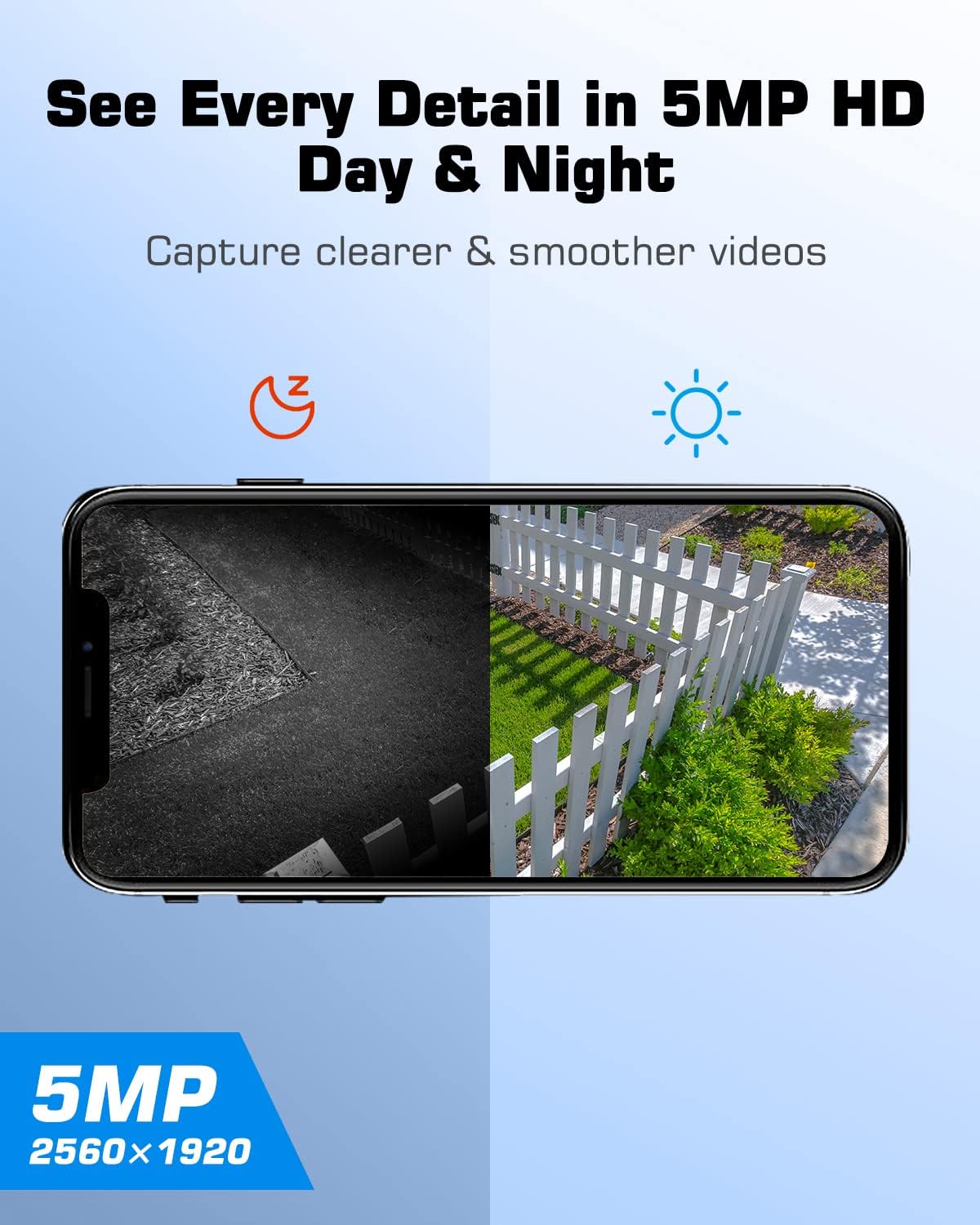
ภาพ: การแยก view demonstrating the ANRAN camera's 5MP HD clarity in both daytime (color) and nighttime (infrared black and white) conditions.
5. การบันทึกและการเล่นวิดีโอ
Recorded videos are stored on the inserted SD card or in cloud storage (subscription may be required). Access recorded footage through the "Playback" or "History" section in the ANRAN app. You can filter by date and time to review เหตุการณ์เฉพาะเจาะจง
การซ่อมบำรุง
- การทำความสะอาดแผงโซลาร์เซลล์: Regularly clean the surface of the solar panel to ensure maximum sunlight absorption. Use a soft, damp ผ้าเพื่อขจัดฝุ่น สิ่งสกปรก หรือเศษต่างๆ
- การทำความสะอาดเลนส์กล้อง: Gently wipe the camera lens with a microfiber cloth to maintain clear image quality. Avoid abrasive cleaners.
- สุขภาพแบตเตอรี่: While the solar panel provides continuous charging, ensure the camera receives adequate sunlight. If the camera is in a shaded area for extended periods, occasional manual charging via USB may be necessary.
- อัพเดตเฟิร์มแวร์: Check the ANRAN app periodically for firmware updates. Keeping the camera's firmware updated ensures optimal performance and security.
การแก้ไขปัญหา
| ปัญหา | สาเหตุที่เป็นไปได้ | สารละลาย |
|---|---|---|
| Camera not connecting to 4G network. | Weak 4G signal; SIM card not properly inserted or activated; incorrect APN settings. | Relocate the camera to an area with better 4G coverage. Ensure the ANRAN SIM card is correctly inserted. Contact ANRAN support if issues persist. |
| Battery not charging via solar panel. | แสงแดดไม่เพียงพอ แผงโซลาร์เซลล์สกปรก การเชื่อมต่อมีปัญหา | Ensure the solar panel is in direct sunlight and free from obstructions. Clean the solar panel surface. Check the connection cable between the panel and camera. |
| มีการแจ้งเตือนการเคลื่อนไหวผิดพลาดบ่อยครั้ง | High PIR sensitivity; environmental factors (e.g., moving branches, insects). | Adjust the PIR motion detection sensitivity in the app settings. Ensure the camera's field of view is clear of common false alarm triggers. |
| ไม่มีระบบเสียงสองทาง | Microphone/speaker disabled in app; app permissions not granted; network issues. | Check app settings to ensure microphone and speaker are enabled. Verify app permissions on your mobile device. Ensure a stable 4G connection. |
| กล้องออฟไลน์ | No 4G signal; battery depleted; camera powered off. | Check 4G signal strength. Recharge the camera battery. Power cycle the camera (turn off and on). |
ข้อมูลจำเพาะ
- ปณิธาน: 5MP (2560x1920)
- ช่วงแพน/เอียง: แนวนอน 355°, แนวตั้ง 140°
- ซูม: ซูมดิจิตอล 4 เท่า
- การมองเห็นตอนกลางคืน: IR Night Vision, 2.5K Color Night Vision (via spotlights)
- การเชื่อมต่อ: 4G LTE Cellular (does not support Wi-Fi)
- แบตเตอรี่: แบตเตอรี่แบบชาร์จไฟได้ 9600mAh
- แหล่งพลังงาน: Solar Panel, USB Charging
- การตรวจจับการเคลื่อนไหว: PIR Humanoid Detection
- เสียง: ระบบเสียงสองทิศทาง (ไมโครโฟนและลำโพงในตัว)
- พื้นที่จัดเก็บ: Supports Micro SD Card (32GB included) and Cloud Storage
- ซิมการ์ด: ANRAN SIM card included (100MB data)
การรับประกันและการสนับสนุน
ANRAN products typically come with a limited warranty. Please refer to the warranty card included with your product or visit the official ANRAN website for detailed warranty information and terms. For technical support, product inquiries, or assistance with troubleshooting, please contact ANRAN customer service through their official webไซต์หรือข้อมูลการติดต่อที่ให้ไว้ในบรรจุภัณฑ์ผลิตภัณฑ์
You can visit the ANRAN Store for more information: ANRAN Official Store


