1. บทนำ
This manual provides detailed instructions for the installation, operation, and maintenance of your Amico 60 Inch Smart Ceiling Fan with Lights. Please read this manual thoroughly before installation and retain it for future reference.
The Amico 60-inch smart ceiling fan features a reversible DC motor, 5 blades, 6 speed settings, 3 color temperature (3CCT) dimmable LED lighting, and smart control options including remote, app (Joinin Home/Smart Life/Tuya Smart), and voice control (Alexa/Google Home). It is designed for indoor use in various spaces such as living rooms, bedrooms, offices, and kitchens.
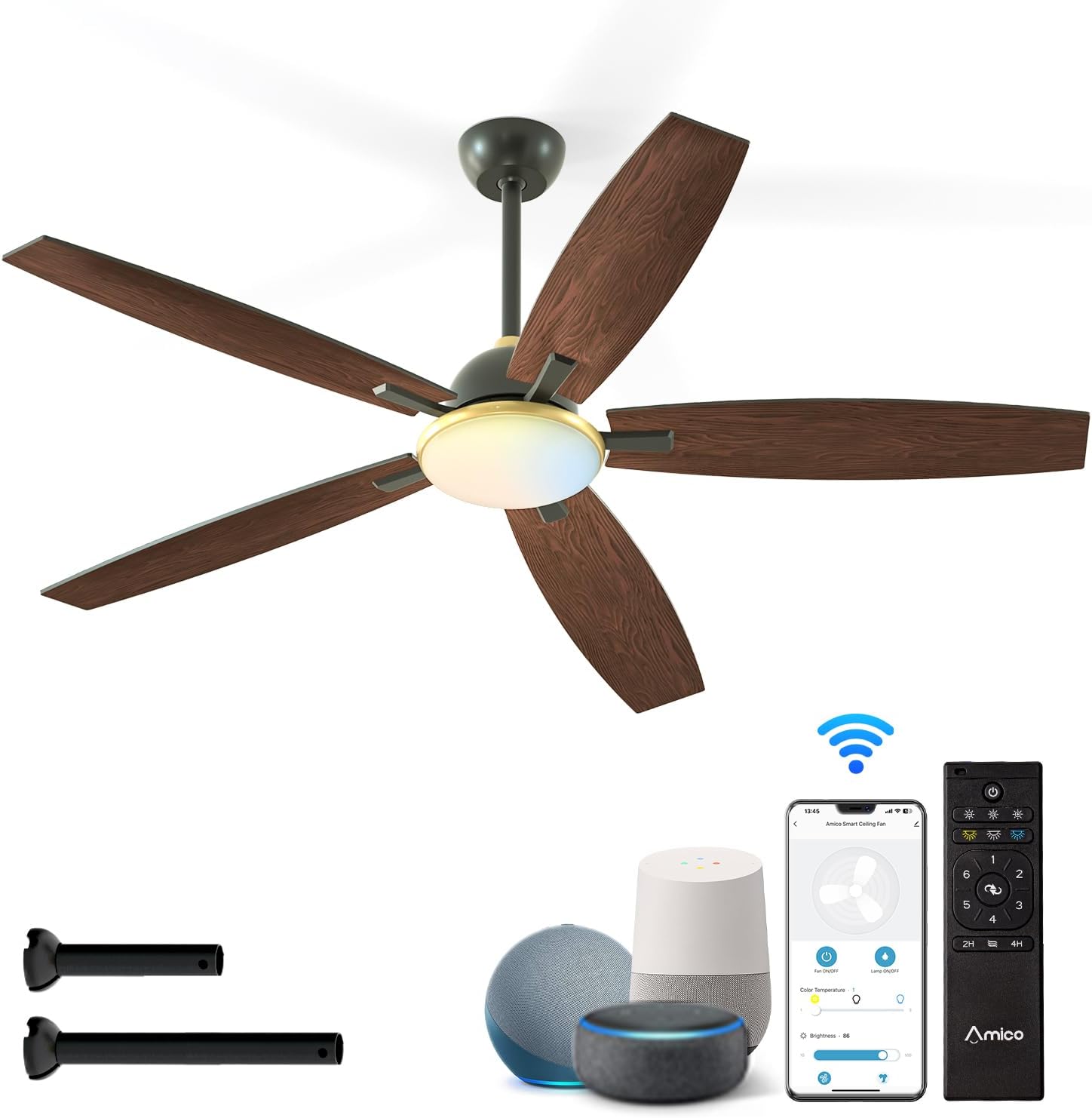
Figure 1: Amico 60 Inch Smart Ceiling Fan with included accessories and smart control options.
2. ข้อมูลด้านความปลอดภัย
คำเตือน: เพื่อลดความเสี่ยงจากไฟไหม้ ไฟฟ้าช็อต หรือการบาดเจ็บ ควรปฏิบัติตามข้อควรระวังพื้นฐานเหล่านี้เสมอ:
- อ่านคำแนะนำทั้งหมดก่อนติดตั้งพัดลม
- Ensure the installation site is structurally sound and can support the fan's weight.
- การเดินสายไฟทั้งหมดต้องเป็นไปตามมาตรฐานไฟฟ้าทั้งระดับชาติและระดับท้องถิ่น หากคุณไม่คุ้นเคยกับการเดินสายไฟ โปรดปรึกษาช่างไฟฟ้าผู้เชี่ยวชาญ
- โปรดตัดกระแสไฟที่เบรกเกอร์หรือกล่องฟิวส์ก่อนเริ่มการติดตั้งหรือการบำรุงรักษาใดๆ
- ห้ามใช้งานพัดลมหากสายไฟหรือปลั๊กชำรุด
- หลีกเลี่ยงการวางวัตถุขวางทางใบพัด
- This fan is designed for indoor use only. Do not expose directly to rain.
3. เนื้อหาบรรจุภัณฑ์
Verify that all components are present before beginning installation. If any parts are missing or damaged, contact Amico customer service.
- ชุดมอเตอร์พัดลมเพดาน
- ใบพัดลม (5)
- ชุดไฟ
- รีโมทคอนโทรลพร้อมขาติดผนัง
- ก้านต่อ (มีให้เลือก 5 นิ้ว และ 10 นิ้ว)
- ตัวยึด
- Hardware Pack (screws, wire nuts, balance kit)
- คู่มือการใช้งาน

Figure 2: Fan dimensions and downrod options.
4. การตั้งค่าและการติดตั้ง
Professional installation is recommended if you are not experienced with electrical wiring or ceiling fan installation.
4.1 การตรวจสอบก่อนการติดตั้ง
- ตรวจสอบให้แน่ใจว่าได้ตัดกระแสไฟที่เบรกเกอร์หลักแล้ว
- Confirm the ceiling junction box is securely mounted and capable of supporting the fan's weight (approximately 10 pounds).
- Determine the appropriate downrod length (5-inch or 10-inch) based on your ceiling height.
4.2 การติดตั้งพัดลม
- ติดตั้งขายึดเข้ากับกล่องรวมสายไฟบนเพดานโดยใช้สกรูที่ให้มา
- Assemble the downrod to the motor housing, feeding the wires through the downrod.
- ยกชุดพัดลมขึ้นอย่างระมัดระวัง แล้วแขวนไว้กับขายึด
4.3 การเชื่อมต่อทางไฟฟ้า
Connect the fan's electrical wires to the household wiring according to the wiring diagram in the full instruction manual. Ensure all connections are secure using wire nuts.
4.4 การติดตั้งใบพัดและชุดไฟ
- ยึดใบพัดลมทั้ง 5 ใบเข้ากับตัวเรือนมอเตอร์อย่างแน่นหนา
- Connect the light kit wiring and attach the light kit to the fan assembly.
- Install the light shade.

Figure 3: Downrod and Sloped Ceiling Mount options.
5. คู่มือการใช้งาน
Your Amico Smart Ceiling Fan offers multiple control methods for convenience.
5.1 การทำงานของรีโมทคอนโทรล
The included remote control allows for comprehensive fan and light adjustments.
- เปิด/ปิดเครื่อง: เปิดหรือปิดพัดลมและไฟ
- ความเร็วพัดลม: Select from 6 fan speeds (Levels 1-2: Low/Comfortable, Levels 3-4: Medium/Natural, Levels 5-6: High/Cooling).
- การควบคุมแสง: Adjust light brightness (10%-100% dimmable) and select color temperature (3000K Warm White, 4000K Natural White, 6000K Cold White).
- มอเตอร์แบบย้อนกลับ: Change fan direction for summer (downward airflow for cooling) or winter (upward airflow for heat circulation).
- การตั้งเวลา: Set a sleep shutdown timer for 2 or 4 hours.

Figure 4: Remote control and smart features overview.

รูปที่ 5: ฟังก์ชันการทำงานของรีโมทคอนโทรล
5.2 การควบคุมแอพอัจฉริยะ
Download the Joinin Home, Smart Life, or Tuya Smart app to control your fan from your smartphone or tablet.
- Download the chosen app from your device's app store.
- Follow the in-app instructions to pair your fan with the app.
- Once paired, you can control all fan and light functions remotely.

Figure 6: App control interface.
5.3 การควบคุมด้วยเสียง
Integrate your fan with Alexa or Google Home for hands-free operation.
- Ensure your fan is connected to the Smart Life/Tuya Smart app.
- Enable the Smart Life/Tuya Smart skill in your Alexa or Google Home app.
- Discover devices. You can now use voice commands like "Alexa, turn on the ceiling fan" or "Hey Google, set fan speed to 3."

รูปที่ 7: การควบคุมด้วยเสียงในการใช้งานจริง
5.4 คุณสมบัติหลัก
- ปรับความเร็วได้ 6 ระดับ: From a gentle breeze (Level 1-2) to strong cooling (Level 5-6).
- มอเตอร์ DC แบบย้อนกลับ: Optimizes air circulation for both summer (cooling) and winter (heat distribution).
- การทำงานแบบไร้เสียง: Designed for quiet performance, operating at approximately 20dB, comparable to falling leaves.
- Customizable Dimmable Light: Adjust brightness from 10% to 100% and choose between 3000K (warm white), 4000K (natural white), and 6000K (cold white) color temperatures.

Figure 8: Fan speed settings.

Figure 9: Reversible motor for year-round comfort.

Figure 10: Quiet operation for peaceful environments.
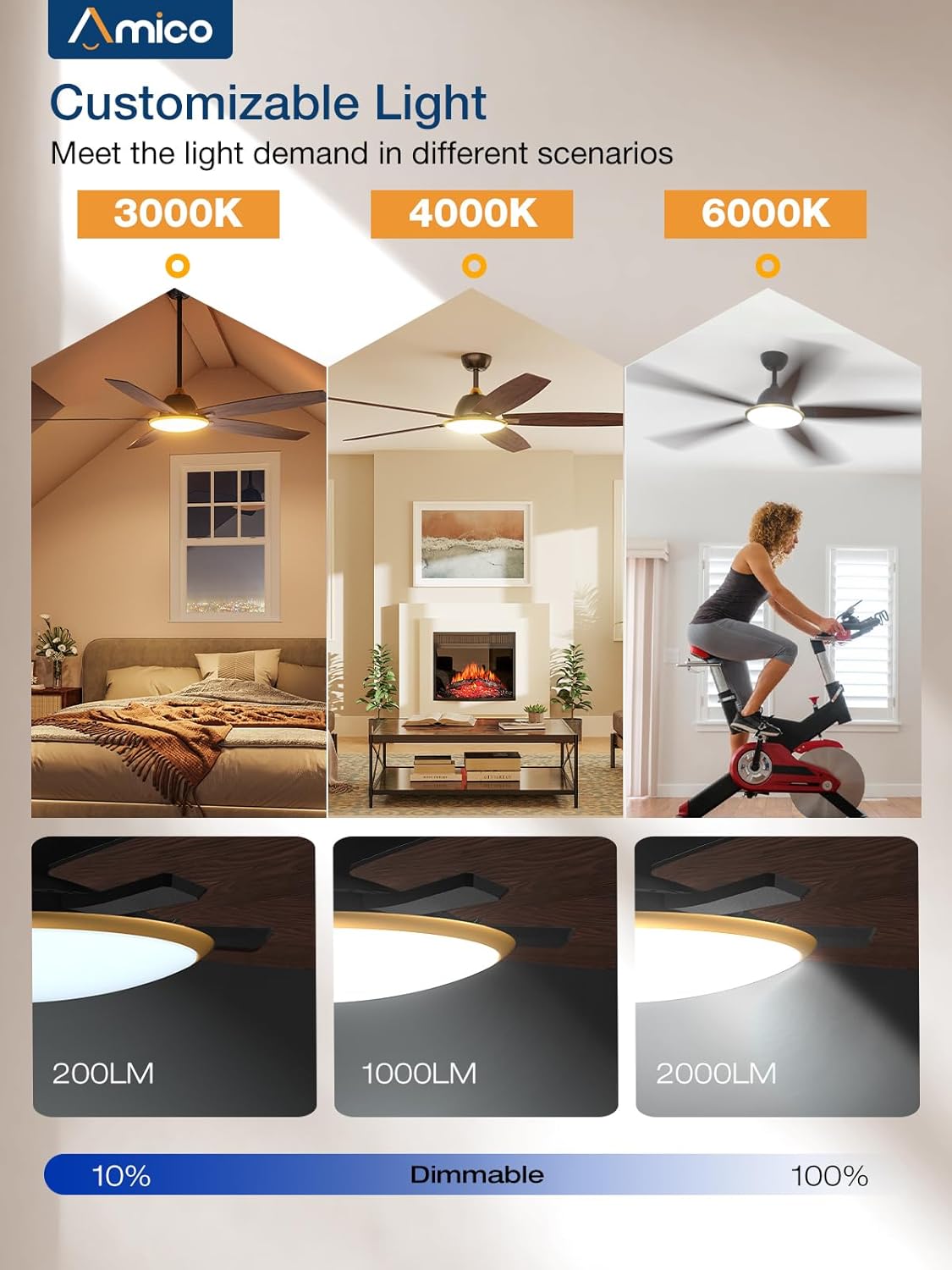
Figure 11: Customizable light settings.
6. การบำรุงรักษา
การบำรุงรักษาตามปกติจะช่วยให้พัดลมเพดานของคุณมีประสิทธิภาพสูงสุดและมีอายุการใช้งานยาวนาน
- การทำความสะอาด: ควรเช็ดใบพัดและตัวมอเตอร์ด้วยผ้าเนื้อนุ่มเป็นระยะๆamp ผ้า ห้ามใช้สารทำความสะอาดที่มีฤทธิ์กัดกร่อนหรือตัวทำละลาย
- ชุดไฟ: Ensure the light shade is clean for optimal light output.
- ความสมดุลของใบมีด: If the fan wobbles, use the included blade balancing kit to correct it.
- ขันสกรูให้แน่น: ตรวจสอบสกรูและอุปกรณ์ยึดทั้งหมดเป็นประจำทุกปี เพื่อให้แน่ใจว่าแน่นหนาดีแล้ว
- การตัดการเชื่อมต่อไฟฟ้า: ควรตัดกระแสไฟก่อนทำความสะอาดหรือบำรุงรักษาทุกครั้ง
7 การแก้ไขปัญหา
If you encounter issues with your Amico ceiling fan, refer to the following common problems and solutions.
| ปัญหา | สาเหตุที่เป็นไปได้ | สารละลาย |
|---|---|---|
| พัดลมไม่เริ่มทำงาน | No power; loose wiring; remote control battery low. | ตรวจสอบเบรกเกอร์วงจร ตรวจสอบให้แน่ใจว่าการเชื่อมต่อสายไฟทั้งหมดแน่นหนาดีแล้ว เปลี่ยนแบตเตอรี่รีโมทคอนโทรล |
| ไฟไม่ทำงาน | Loose wiring in light kit; LED module failure. | Check light kit wiring connections. If issues persist, contact customer service. (Note: Some users reported issues with initial light connection, re-seating connectors may help.) |
| พัดลมสั่น | ใบพัดหลวม; ใบพัดไม่สมดุล; ตัวยึดหลวม | Ensure all blade screws are tight. Use the included balancing kit. Verify mounting bracket is secure. |
| รีโมตคอนโทรลไม่ทำงาน | แบตเตอรี่เหลือน้อย; รีโมทไม่ได้เชื่อมต่อ | เปลี่ยนแบตเตอรี่รีโมท โปรดดูคู่มือฉบับเต็มสำหรับคำแนะนำในการจับคู่รีโมท |
| Smart control (App/Voice) not working | Wi-Fi connectivity issues; incorrect app pairing; skill not enabled. | Ensure your Wi-Fi network is stable. Re-pair the fan with the app. Verify the Smart Life/Tuya Smart skill is enabled in your voice assistant app. |
| พัดลมมีเสียงดัง | Loose screws; motor issue. | Check all screws for tightness. If noise persists and is not typical airflow sound, contact customer service. |
หากต้องการความช่วยเหลือเพิ่มเติม โปรดติดต่อฝ่ายบริการลูกค้าของ Amico
8. ข้อมูลจำเพาะ
- ยี่ห้อ: อามิโก้
- ชื่อรุ่น : C0502AA0301022
- ขนาดสินค้า : ลึก 60 นิ้ว x กว้าง 60 นิ้ว x สูง 15 นิ้ว
- น้ำหนักสินค้า: 10 ปอนด์
- สี: สีดำ
- การออกแบบพัดลมไฟฟ้า: พัดลมเพดาน
- แหล่งพลังงาน: AC
- เล่มที่tage: 120 โวลต์
- จำนวนระดับพลังงาน: 6 (ระดับความเร็วพัดลม)
- คุณสมบัติพิเศษ: LED Light, Dimmable, Reversible DC Motor, Smart Control (Wi-Fi, Voice)
- อุณหภูมิสีของแสง: 3000K (สีขาวอุ่น), 4000K (สีขาวธรรมชาติ), 6000K (สีขาวเย็น)
- วิธีการควบคุม: Remote, App (Joinin Home/Smart Life/Tuya Smart), Voice (Alexa/Google Home)
- การใช้งานในร่ม/กลางแจ้ง: Indoor (Not to be exposed directly to rain)
- ส่วนประกอบที่รวมอยู่: Light Kit, Remote Control, Downrods
- แบตเตอรี่: 2 AAA batteries required for remote (included)
- ใบรับรอง: อีทีแอล
9. การรับประกันและการสนับสนุน
Amico is committed to product quality and customer satisfaction. If you experience any issues or have questions regarding your Amico ceiling fan, please contact our customer service team.
While specific warranty details are not provided in this document, Amico customer service has been noted for its responsiveness and willingness to assist with product issues, including sending replacement parts when necessary. Please retain your proof of purchase for warranty claims.
ข้อมูลติดต่อ: Refer to the packaging or the official Amico website for the most current customer support contact details (email or phone).


