1. บทนำ
This manual provides detailed instructions for the installation, operation, and maintenance of your STUDIOFINIX 6.5 Inch Bluetooth Ceiling Speaker System. Please read this manual thoroughly before using the product to ensure proper setup and optimal performance. Keep this manual for future reference.
2. ข้อมูลด้านความปลอดภัย
เพื่อป้องกันอัคคีภัย ไฟฟ้าช็อต หรือความเสียหายต่อผลิตภัณฑ์ โปรดปฏิบัติตามข้อควรระวังด้านความปลอดภัยดังต่อไปนี้:
- อย่าเปิดเผย amplifier or speakers to rain or moisture.
- ตรวจสอบให้แน่ใจว่ามีการระบายอากาศที่เหมาะสมสำหรับ amplifier เพื่อป้องกันความร้อนสูงเกินไป
- Only use the provided power adapter. Using an incorrect adapter may cause damage or fire.
- อย่าพยายามซ่อมแซมหรือดัดแปลงอุปกรณ์ด้วยตนเอง แนะนำให้ส่งช่างผู้ชำนาญเข้ารับบริการทั้งหมด
- Ensure all wiring connections are secure and correctly polarized before powering on the system.
- Avoid installing speakers in locations with excessive vibration or extreme temperatures.
3. เนื้อหาบรรจุภัณฑ์
ตรวจสอบว่ารายการทั้งหมดที่ระบุไว้ด้านล่างนี้รวมอยู่ในแพ็คเกจของคุณ:
- 4 x 6.5 Inch Ceiling Speakers
- 4 x Speaker Wires
- 1 x 4 Channel Bluetooth Amplifier กล่อง
- อะแดปเตอร์ไฟฟ้า 1 ตัว

This image displays all components included in the STUDIOFINIX 6.5 Inch Bluetooth Ceiling Speaker system: four 6.5-inch ceiling speakers, a 4-channel Bluetooth amplifier box, a power adapter, and four sets of speaker wires.
4. ข้อมูลจำเพาะ
| คุณสมบัติ | ข้อมูลจำเพาะ |
|---|---|
| ชื่อรุ่น | ST-HCS628BTX2-US |
| ประเภทลำโพง | ในเพดาน |
| คุณสมบัติพิเศษ | กันน้ำ |
| การใช้ที่แนะนำ | Indoor/Outdoor (Covered Patio) |
| จำนวนหน่วย | ลำโพง 4 ตัว |
| ขนาดผลิตภัณฑ์ (แต่ละลำโพง) | ลึก 7.5 นิ้ว x กว้าง 7.5 นิ้ว x สูง 4 นิ้ว (19 ซม. x 19 ซม. x 10.16 ซม.) |
| น้ำหนักสินค้า (รวม) | 9.77 ปอนด์ (4.44 กก.) |
| ช่วงบลูทูธสูงสุด | 30.48 เมตร (100 ฟุต) |
| ขนาดลำโพง | 6.5 นิ้ว |
| ผู้ผลิต | สตูดิโอฟินิกซ์ |
| กำลังขับสูงสุดของลำโพง | 160 วัตต์ (ต่อลำโพง) |
| เทคโนโลยีการเชื่อมต่อ | บลูทูธ |
| ประเภทการติดตั้ง | Flush Mount (In-Ceiling) |
| วัสดุ | พลาสติกหรือโลหะ |
5. คู่มือการติดตั้ง
5.1 การวางแผนและการเตรียมการ
- Choose appropriate locations for your speakers, ensuring they are evenly spaced for optimal sound distribution.
- Ensure there are no obstructions (e.g., electrical wires, plumbing, studs) behind the chosen mounting areas.
- Measure and mark the cutout diameter on the ceiling or wall. The recommended cutout diameter is 6.3 นิ้ว (16 ซม.).

This diagram illustrates the necessary dimensions for installing the STUDIOFINIX 6.5 inch ceiling speaker. It shows a recommended cutout diameter of 6.3 inches (16 cm), a total speaker diameter of 7.5 inches (19 cm), and a mounting depth of 3.15 inches (8 cm).
5.2 การเชื่อมต่อสายไฟ
- หมดแรง: Ensure the main power to the installation area is turned off before making any electrical connections.
- เตรียมสายไฟ: Strip approximately 0.5 inches (1.2 cm) of insulation from the ends of the speaker wires.
- เชื่อมต่อกับลำโพง: Connect the speaker wires to the spring-loaded terminals on each speaker. Match the positive (+) wire (typically red or marked) to the red terminal and the negative (-) wire (typically black or unmarked) to the black terminal.
- เชื่อมต่อกับ Ampเครื่องฟอก: Connect the other ends of the speaker wires to the corresponding L+ (Left Positive), L- (Left Negative), R+ (Right Positive), and R- (Right Negative) terminals on the 4-channel Bluetooth amplifier box. Ensure correct polarity for each speaker.
- อะแดปเตอร์ไฟฟ้า: เชื่อมต่ออะแดปเตอร์ไฟฟ้าที่ให้มาเข้ากับ ampกำลังไฟเข้าของเครื่องขยายเสียง
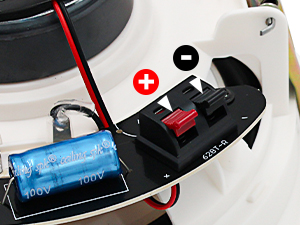
This image shows the spring-loaded terminals on the back of the ceiling speaker, clearly marked for positive (+) and negative (-) wire connections.

This diagram demonstrates the connection process for the STUDIOFINIX speaker system. It shows the 4-channel Bluetooth amplifier connected to mains power and four in-ceiling stereo speakers. A mobile device is depicted successfully paired via Bluetooth to control the ampชีวิต.
5.3 Mounting Speakers
- After cutting the appropriate holes, carefully insert each speaker into its cutout.
- The speakers feature non-slip clamps. Tighten the mounting screws (usually by turning them clockwise) to engage the clamps and secure the speaker firmly in place. Do not overtighten.
- Once the speaker is secured, attach the magnetic grille. The grille will snap into place.
6. คู่มือการใช้งาน
6.1 Amplifier ควบคุม

This image provides a close-up of the STUDIOFINIX 4-channel Bluetooth amplifier box, highlighting its control buttons and their functions.
- 1. ปุ่มเพาเวอร์: Press and hold for 3 seconds to power on/off. Short press to play/pause audio.
- 2. ปุ่มโหมด: Press and hold for 3 seconds to restore factory settings. Short press to switch between Bluetooth, USB, AUX, and MIC input modes.
- 3. VOL- / TWS Button: Press and hold for 3 seconds to turn on/off TWS (True Wireless Stereo) mode. Short press to decrease the volume.
- 4. VOL+ / MONO Button: Press and hold for 3 seconds to turn on/off Mono mode. Short press to increase the volume.
- 5. Previous Track Button: Press and hold for 3 seconds to fast rewind. Short press to go to the previous song.
- 6. ปุ่มติดตามถัดไป: Press and hold for 3 seconds to fast forward. Short press to go to the next song.
6.2 การจับคู่บลูทูธ
- ให้แน่ใจว่า amplifier is powered on and in Bluetooth mode (the 'BT' indicator light should be blinking).
- บนอุปกรณ์มือถือของคุณ ให้ไปที่การตั้งค่าบลูทูธ แล้วค้นหาอุปกรณ์ที่ใช้งานได้
- Select 'STUDIOFINIX' (or similar name) from the list to pair.
- Once connected, the 'BT' indicator light on the amplifier will become solid. You can now stream audio from your device.
6.3 Other Input Modes
- โหมด USB: เสียบไดรฟ์ USB ที่มีไฟล์เสียง files เข้ากับพอร์ต USB บน ampเครื่องฟอก NS amplifier will automatically switch to USB mode and begin playback.
- โหมด AUX: Connect an audio source (e.g., TV, CD player) to the AUX input using a 3.5mm audio cable. Press the 'MODE' button until the 'AUX' indicator light is on.
- โหมดไมค์: Connect a microphone to the MIC input. Press the 'MODE' button until the 'MIC' indicator light is on.
7. การบำรุงรักษา
7.1 การทำความสะอาด
- To clean the speaker grilles, gently remove them by pulling them away from the speaker frame.
- Wipe the grilles and speaker surfaces with a soft, dry cloth. For stubborn dirt, a slightly damp สามารถใช้ผ้าแล้วตามด้วยผ้าแห้ง
- ห้ามใช้สารเคมีรุนแรง ตัวทำละลาย หรือน้ำยาทำความสะอาดที่มีฤทธิ์กัดกร่อน เพราะอาจทำให้พื้นผิวหรือชิ้นส่วนเสียหายได้
- Ensure the grilles are completely dry before reattaching them.
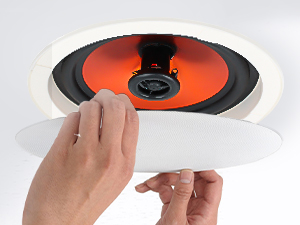
This image illustrates the process of removing the magnetic grille from the ceiling speaker, demonstrating its easy snap-on/snap-off mechanism for installation or maintenance.
7.2 Grille Painting (Optional)
The speaker grilles are paintable to match your room's decor. Use a fine-mist spray paint and apply thin, even coats. Avoid clogging the grille perforations, as this can affect sound quality.
8 การแก้ไขปัญหา
| ปัญหา | สาเหตุที่เป็นไปได้ | สารละลาย |
|---|---|---|
| ไม่มีเสียงออกจากลำโพง |
|
|
| ปัญหาการเชื่อมต่อบลูทูธ |
|
|
| คุณภาพเสียงผิดเพี้ยนหรือไม่ดี |
|
|
| Amplifier not responding |
|
|
9. การรับประกันและการสนับสนุน
STUDIOFINIX products are designed for reliability and performance. For warranty information or technical support, please refer to the contact details provided with your purchase or visit the official STUDIOFINIX website. Please have your model number (ST-HCS628BTX2-US) and purchase date available when contacting support.


