1. บทนำ
This manual provides essential information for the safe and efficient installation, operation, and maintenance of your EARU Electric 3-Phase Auto Transfer Switch (ATS) - 440V 63A. Please read this manual thoroughly before installation and operation to ensure proper functionality and to prevent damage or injury.
The ATS is designed to provide uninterrupted power by automatically transferring loads between phases in a three-phase supply system. It features intelligent monitoring and protection against phase failure, over/under voltage, and overcurrent conditions, ensuring the stability and safety of connected equipment.
2. ข้อมูลด้านความปลอดภัย
คำเตือน: อันตรายจากไฟฟ้าช็อต การติดตั้งและการซ่อมบำรุงควรดำเนินการโดยบุคลากรที่มีคุณสมบัติเท่านั้น
- Always disconnect power before installing or servicing the ATS.
- ตรวจสอบให้แน่ใจว่าสายไฟทั้งหมดเป็นไปตามมาตรฐานไฟฟ้าในท้องถิ่นและระดับชาติ
- ตรวจสอบเล่มที่ถูกต้องtage and current ratings before connecting the device.
- ห้ามใช้งานอุปกรณ์หากพบว่าได้รับความเสียหาย
- Keep children away from electrical equipment.
3. สินค้าหมดview
The EARU Electric 3-Phase ATS is an intelligent device that continuously monitors your three-phase power supply. It automatically switches single-phase loads to a healthy phase in case of a phase failure or imbalance, ensuring continuous operation of critical equipment.
3.1. เนื้อหาบรรจุภัณฑ์
- 1 x EARU Electric 3-Phase Auto Transfer Switch (ATS)
3.2. แผงด้านหน้าและไฟแสดงสถานะ

คำอธิบายภาพ: The front panel of the ATS features a digital display showing voltage for L1, L2, L3 phases and current for L1. Below the display are indicators for Power, Over-voltage (>V), Under-voltage (<V), and Over-current (>I). Control buttons include 'SET' (Menu key), 'Digit+/Up', 'Digit-/Down', and 'Manual ON/OFF' (Power button).
The digital display provides real-time voltage readings for each phase (L1, L2, L3) and the current for L1. Status indicators alert you to the operational state and any detected faults:
- พลัง: Output indication.
- >V: เกินปริมาณtagข้อบ่งชี้อี
- <V: ภายใต้ฉบับtagข้อบ่งชี้อี
- >ฉัน: Over-current indication.
Control buttons allow for parameter settings and manual operation:
- SET: Menu key for accessing settings.
- Digit+/Up: Increases value or navigates up in menus.
- Digit-/Down: Decreases value or navigates down in menus.
- เปิด/ปิดด้วยตนเอง: Power button for manual control.
4. การตั้งค่าและการติดตั้ง
The ATS is designed for standard DIN rail mounting. Ensure sufficient space for ventilation and wiring connections.
4.1. แผนภาพการเดินสายไฟ
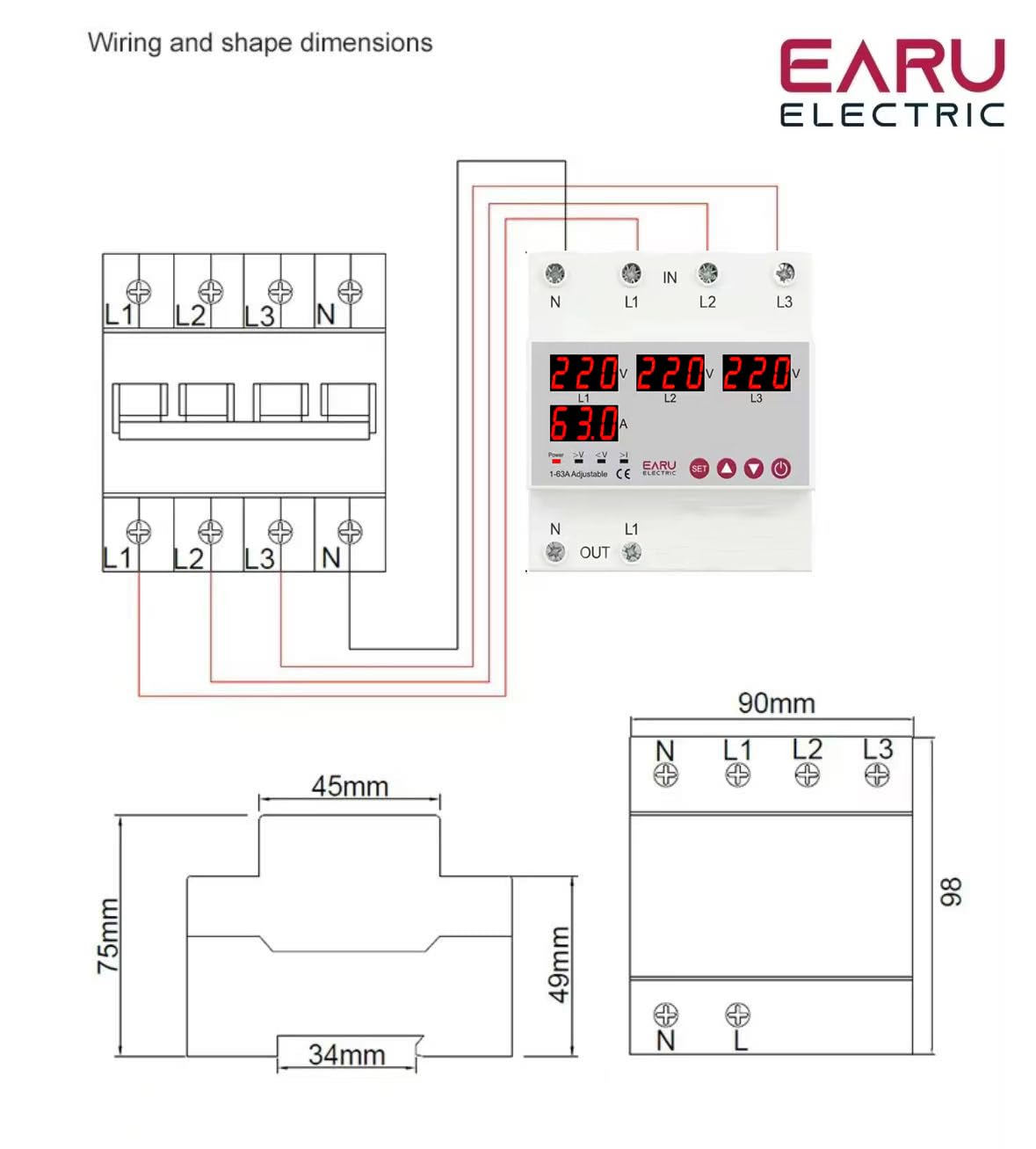
คำอธิบายภาพ: A detailed wiring diagram illustrates the connection points for the ATS. The top terminals are labeled 'IN' with connections for N, L1, L2, L3. The bottom terminals are labeled 'OUT' with connections for N and L1. The diagram shows how to connect the three-phase input to the ATS and how a single-phase load (L1 and N) is connected to the output, with internal connections for phase monitoring and switching.
Follow the wiring diagram carefully. Incorrect wiring can lead to device malfunction or electrical hazards.
- Connect the incoming three-phase power supply (N, L1, L2, L3) to the 'IN' terminals.
- Connect the single-phase load (N, L1) to the 'OUT' terminals. The ATS will manage the phase transfer for the L1 output.
- Ensure all connections are secure and tightened to prevent loose contacts and overheating.
4.2. การเพิ่มพลังครั้งแรก
After completing the wiring, restore power to the system. The ATS will power on and begin monitoring the phases. The digital display will show the current voltage readings for each phase. If all phases are stable and within acceptable limits, the ATS will provide power to the output.
5. คู่มือการใช้งาน
The ATS operates automatically, but you can adjust its protection parameters to suit your specific requirements.
5.1. ทำความเข้าใจเกี่ยวกับหน้าจอแสดงผลและตัวบ่งชี้
The digital display continuously shows the real-time voltage of each phase (L1, L2, L3) and the current on L1. The indicator lights provide quick visual feedback on the device's status and any detected anomalies.
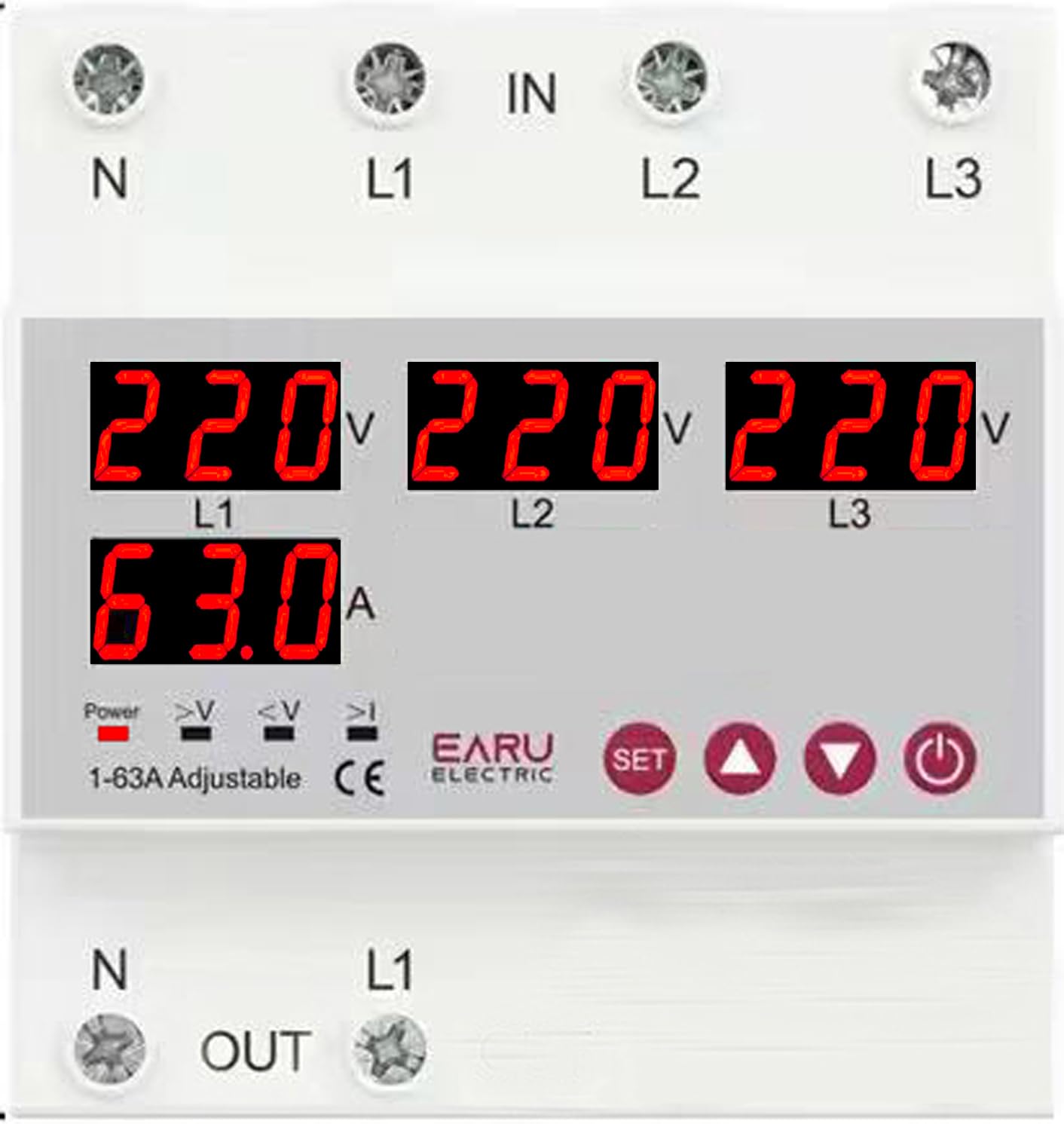
คำอธิบายภาพ: ภาพระยะใกล้ view of the ATS digital display. It shows '220V' for L1, L2, and L3, and '63.0A' for L1 current. Below these readings are small indicator icons for Power, >V (Over-voltage), <V (Under-voltage), and >I (Over-current).
5.2. Adjusting Protection Parameters
Use the 'SET' button to enter the parameter setting mode. Use the 'Digit+/Up' and 'Digit-/Down' buttons to navigate through settings and adjust values. Press 'SET' again to confirm and save changes.
| พารามิเตอร์ | ช่วงการตั้งค่า | การตั้งค่าเริ่มต้น |
|---|---|---|
| Over Current Protection Setting Range | 1-63เอ/100เอ | 30เอ |
| Continuous Over Current Protection Times | 0-20 ครั้ง | ปิด |
| มากกว่าVoltage Protection Setting Range | 230-300โวลต์ | 270โวลต์ |
| มากกว่าVoltage Protection Recover Setting Range | 225-295โวลต์ | 265โวลต์ |
| ภายใต้ฉบับtage Protection Setting Range | 140-210โวลต์ | 170โวลต์ |
| ภายใต้ฉบับtage Protection Recover Setting Range | 145-215โวลต์ | 175โวลต์ |
| เล่มที่tage & Current Protection Recover Delay | 1-500วินาที | 30วินาที |
5.3. Automatic Phase Transfer
The ATS automatically monitors the three input phases (L1, L2, L3). If a phase failure or significant voltage imbalance (over/under voltage) is detected on the currently supplying phase, the device will automatically transfer the single-phase output load to a healthy, stable phase within the same supply. This process is designed to be seamless and rapid, minimizing power interruption to connected equipment.
5.4. การกู้คืนอัตโนมัติ
Once the primary phase recovers and stabilizes, the ATS will intelligently switch the load back to the primary source, ensuring optimal power distribution and preventing equipment damage from unstable power. The recovery delay can be configured as per your operational needs.
6. การบำรุงรักษา
The EARU Electric ATS is designed for minimal maintenance. However, periodic checks are recommended to ensure optimal performance and longevity.
- การทำความสะอาด: รักษาอุปกรณ์ให้สะอาด ปราศจากฝุ่นและสิ่งสกปรก ใช้ผ้าแห้งนุ่มๆ ในการทำความสะอาด ห้ามใช้น้ำยาทำความสะอาด
- การตรวจสอบการเชื่อมต่อ: Periodically inspect all wiring connections to ensure they remain tight and free from corrosion.
- สภาพแวดล้อม : ตรวจสอบให้แน่ใจว่าสภาพแวดล้อมการทำงานยังคงอยู่ในช่วงอุณหภูมิและความชื้นที่กำหนด
7 การแก้ไขปัญหา
If you encounter issues with your ATS, refer to the following common problems and solutions:
| ปัญหา | สาเหตุที่เป็นไปได้ | สารละลาย |
|---|---|---|
| ไม่มีกำลังขับออก | No input power; all phases unstable; device in fault state. | Check incoming power supply. Verify all phases are stable. Check fault indicators. |
| ">V" or "<V" indicator lit | เกินปริมาณtagอีหรืออันเดอร์วอลุ่มtage detected on a phase. | ตรวจสอบอินพุต voltage stability. The ATS will automatically transfer if another phase is healthy. |
| ">I" indicator lit | Over-current detected on the output. | Reduce load on the output. Check for short circuits in the connected equipment. |
| Device not transferring phases | No healthy alternative phase available; transfer delay setting too long. | Ensure at least one healthy phase is present. Check and adjust the transfer delay settings. |
| จอแสดงผลดิจิตอลไม่ทำงาน | No power to the device; internal fault. | Check power supply. If power is present and display is off, contact support. |
For issues not covered here, please contact EARU customer support.
8. ข้อมูลจำเพาะ
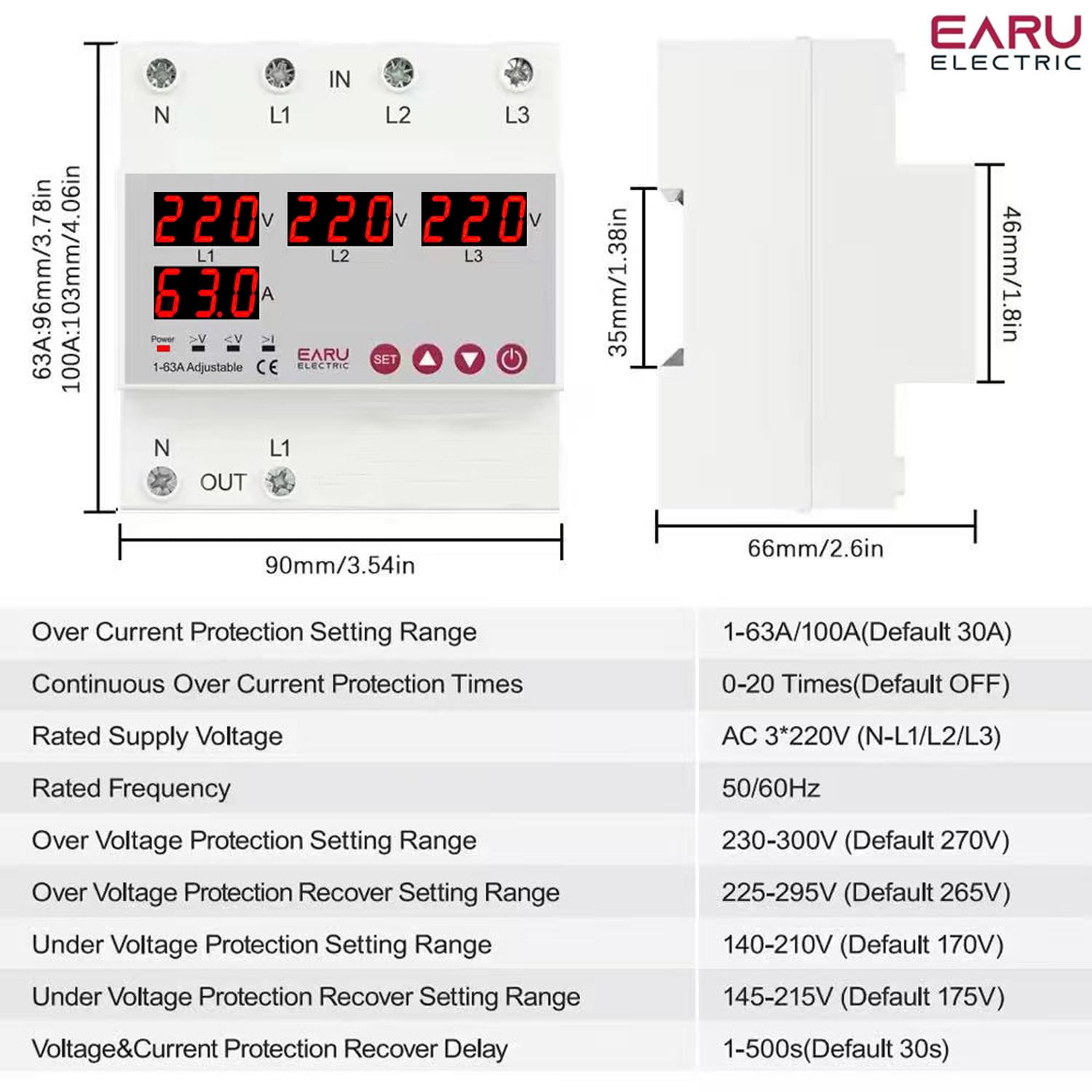
คำอธิบายภาพ: This image displays the physical dimensions of the ATS (90mm width, 96mm height, 66mm depth) and a table of detailed technical specifications, including current rating, voltage, frequency, and various protection setting ranges.
| คุณสมบัติ | รายละเอียด |
|---|---|
| ยี่ห้อ | เอรุ |
| หมายเลขรุ่น | EARU-1012 |
| โหมดการทำงาน | เปิดปิด |
| คะแนนปัจจุบัน | 63 Amps |
| ปฏิบัติการฉบับที่tage | 440 Volts (AC 3*220V (N-L1/L2/L3)) |
| ความถี่ที่กำหนด | 50/60เฮิรตซ์ |
| ประเภทการติดต่อ | เปิดปกติ |
| ประเภทขั้วต่อ | Standard DIN rail 63A |
| ประเภทวงจร | 4 ทาง |
| วัสดุติดต่อ | ทองแดง |
| Over Current Protection Setting Range | 1-63A/100A (Default 30A) |
| Continuous Over Current Protection Times | 0-20 Times (Default OFF) |
| มากกว่าVoltage Protection Setting Range | 230-300V (Default 270V) |
| มากกว่าVoltage Protection Recover Setting Range | 225-295V (Default 265V) |
| ภายใต้ฉบับtage Protection Setting Range | 140-210V (Default 170V) |
| ภายใต้ฉบับtage Protection Recover Setting Range | 145-215V (Default 175V) |
| เล่มที่tage & Current Protection Recover Delay | 1-500s (Default 30s) |
| น้ำหนักสินค้า | 450 กรัม |
| ขนาดแพ็คเกจ | 15 x 15 x 15 ซม. |
| ประเทศต้นกำเนิด | อินเดีย |
9. การรับประกันและการสนับสนุน
9.1. ข้อมูลการรับประกัน
The EARU Electric 3-Phase Auto Transfer Switch (ATS) comes with a การรับประกันจากผู้ผลิต 1 ปี นับจากวันที่ซื้อสินค้า การรับประกันนี้ครอบคลุมถึงข้อบกพร่องในวัสดุและฝีมือการผลิตภายใต้การใช้งานปกติ ไม่ครอบคลุมถึงความเสียหายที่เกิดจากการติดตั้งที่ไม่ถูกต้อง การใช้งานผิดวิธี อุบัติเหตุ หรือการดัดแปลงโดยไม่ได้รับอนุญาต
9.2. การสนับสนุนลูกค้า
For technical assistance, warranty claims, or any questions regarding your EARU Electric ATS, please contact your retailer or the manufacturer directly. Ensure you have your product model number (EARU-1012) and proof of purchase available when contacting support.


