1. บทนำ
Welcome to the PAPIFEED Automatic Smart Pet Feeder user manual. This device is designed to simplify pet feeding with smart features, including scheduled feeding, remote control via an app, a built-in camera, and two-way audio communication. This manual provides detailed instructions to ensure proper setup, operation, and maintenance of your feeder.
2. สินค้าหมดview
คุณสมบัติหลัก:
- ความจุ 6L: Large food container suitable for cats and small dogs.
- 2.4G WiFi & Bluetooth Connectivity: Seamless app control for remote feeding and monitoring.
- Manual Adjustable 480P Camera: Monitor your pet's feeding activity with adjustable viewing angle (no night vision).
- เสียงสองทาง: Communicate with your pet remotely.
- ตารางการให้อาหารที่ปรับแต่งได้: Program up to 10 meals per day with 1-6 portions each.
- แหล่งจ่ายไฟคู่: DC 5V adapter with 4xAA battery backup (batteries not included) for uninterrupted feeding.
- ง่ายต่อการทำความสะอาด: Detachable, BPA-free food container and stainless steel bowl are dishwasher safe.
- ดีไซน์ป้องกันการอุดตัน: Ensures smooth food dispensing.
เนื้อหาแพ็คเกจ:
- PAPIFEED Automatic Pet Feeder (Main Unit)
- ชามอาหารสแตนเลส
- ภาชนะบรรจุอาหาร
- Lid with Desiccant Compartment
- อะแดปเตอร์ไฟ DC 5V
- สายไฟ USB
- คู่มือการใช้งาน
- Safety Lock Strap (Velcro)
3. คู่มือการติดตั้ง
3.1 การประกอบทางกายภาพ
- ติดตั้งชามอาหาร: Slide the stainless steel bowl into the designated slot at the base of the feeder. Ensure it clicks securely into place.
- ติดตั้งสารดูดความชื้น: Open the desiccant compartment on the underside of the lid. Insert the provided desiccant packet to help keep food fresh. Close the compartment securely.
- ฝาปิดที่ปลอดภัย: Place the lid onto the food container, ensuring it is properly aligned and sealed.
- Apply Safety Lock (Optional): Attach the provided Velcro safety lock strap around the feeder and lid to prevent pets from opening the lid.
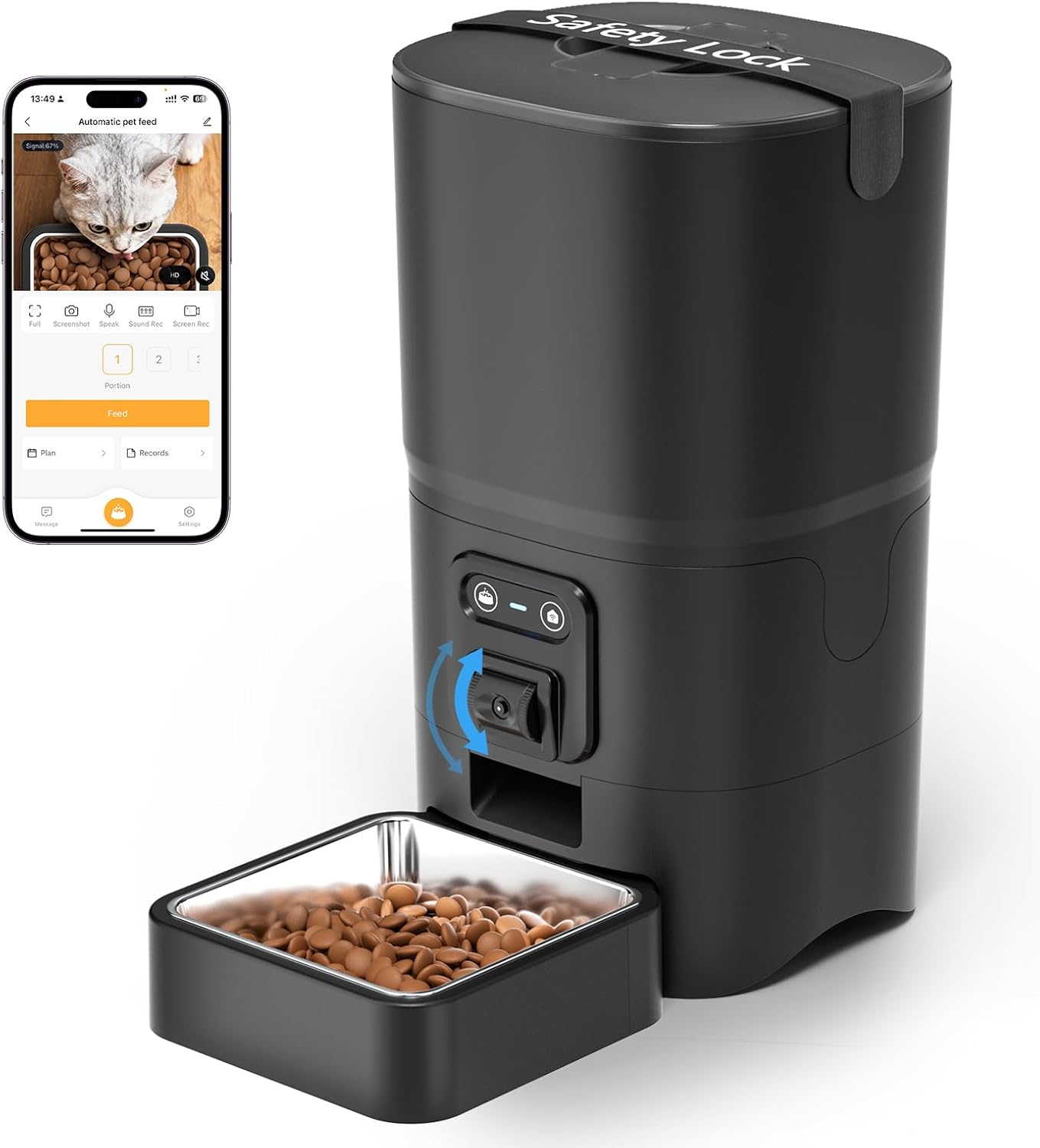
Figure 1: Assembled PAPIFEED Automatic Pet Feeder.

Figure 2: Pet feeder in use, demonstrating the live video feed on a smartphone.
3.2 แหล่งจ่ายไฟ
- เชื่อมต่ออะแดปเตอร์ไฟ: Plug the USB power cable into the DC 5V power adapter, then connect the adapter to a wall outlet. Insert the other end of the cable into the power port at the bottom of the feeder.
- Install Backup Batteries (Recommended): เพื่อให้การทำงานไม่หยุดชะงักแม้ในขณะไฟฟ้าดับtages, open the battery compartment at the bottom of the feeder. Insert 4 AA batteries (not included), ensuring correct polarity. Close the compartment securely.

Figure 3: Dual power supply setup for the feeder.
3.3 การติดตั้งและการเชื่อมต่อแอปพลิเคชัน
- Download Smartlyn App: Scan the QR code in the user manual or search for "Smartlyn" in your smartphone's app store (App Store for iOS, Google Play for Android). Download the Smartlyn App here.
- ลงทะเบียน/เข้าสู่ระบบ: Open the Smartlyn app and follow the on-screen instructions to register a new account or log in if you already have one.
- เพิ่มอุปกรณ์:
- Ensure your phone's Bluetooth and WLAN (2.4GHz WiFi) are enabled. The feeder supports 2.4GHz WiFi only; 5GHz networks are not compatible.
- Power on the feeder. Press and hold the WiFi button on the feeder until the blue light flashes, indicating it's in network configuration mode.
- In the Smartlyn app, tap the "+" icon in the upper right corner to add a device. The app should automatically discover the "Automatic pet feeder".
- Follow the app prompts to connect the feeder to your 2.4GHz WiFi network by entering your WiFi password.
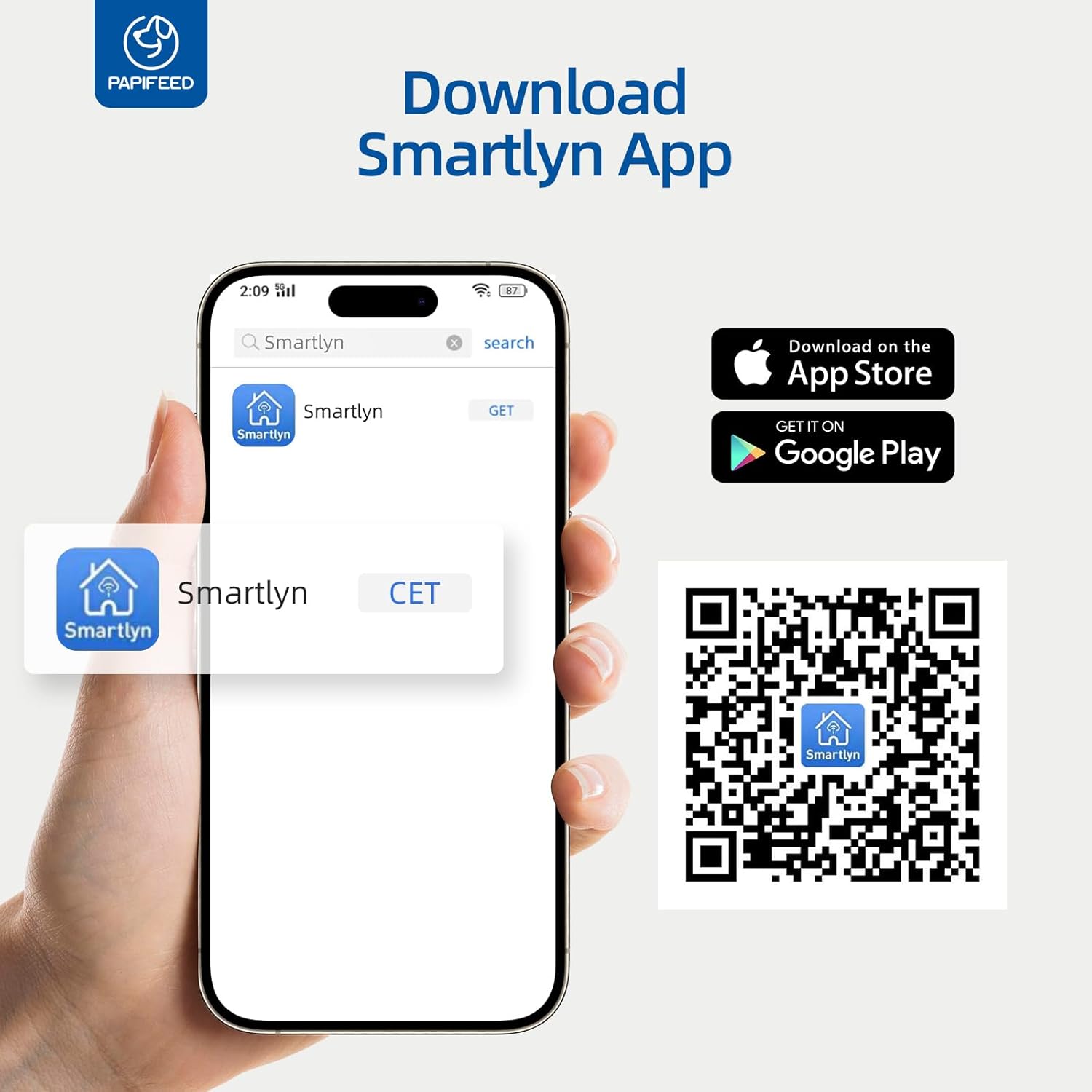
Figure 4: Smartlyn App download and installation guide.

Figure 5: Step-by-step guide for connecting the feeder to the Smartlyn app.
4. คู่มือการใช้งาน
การควบคุมแอพ 4.1 ตัว
- การให้อาหารตามกำหนดเวลา: In the Smartlyn app, navigate to the "Plan" section. You can set up to 10 meals per day, with each meal consisting of 1 to 6 portions (0.48 oz/portion). Select specific days of the week for repeat feeding.
- การให้อาหารระยะไกล: Use the "Feed" button in the app to dispense food instantly, regardless of the schedule.
- การควบคุมส่วน: Adjust the number of portions per meal directly through the app.
- บันทึกการให้อาหาร: The app maintains a record of all dispensed meals, allowing you to monitor your pet's consumption.
- การแชร์อุปกรณ์: Share control access with up to 5 family members to manage feeding tasks collaboratively.

Figure 6: Smartlyn app interface for setting feeding schedules.

รูปที่ 7: รายละเอียด view of the scientific feeding schedule options.
4.2 คุณสมบัติกล้องและเสียง
- การตรวจสอบวิดีโอแบบเรียลไทม์: Access a real-time 480P video feed of your pet's feeding area through the app. The camera angle can be manually adjusted up and down on the feeder itself. Note: The camera does not have night vision.
- เสียงสองทาง: Use the microphone and speaker icons in the app to listen to your pet or speak to them. The device volume can be adjusted in the app settings.
- Personalized Meal Voice: Record a custom voice message to play during feeding times to call your pet.
- การตรวจจับการเคลื่อนไหวและเสียง: Enable motion and sound detection in the app settings to receive alerts when your pet approaches the feeder or makes sounds. Sensitivity can be adjusted.
- บันทึกช่วงเวลาสำคัญ: Take screenshots or record video directly from the live feed within the app.

Figure 8: Two-way audio communication via the Smartlyn app.

Figure 9: Live camera view with manual 85-degree adjustment.
4.3 การให้อาหารด้วยตนเอง
In addition to app control, you can manually dispense a single portion of food by pressing the feed button located on the front of the feeder. This is useful for immediate treats or extra meals.
5. การบำรุงรักษา
5.1 การทำความสะอาด
- ชิ้นส่วนที่ถอดออกได้: The food container and stainless steel bowl are fully detachable and dishwasher safe for easy and hygienic cleaning.
- หน่วยหลัก: The main unit containing electronic components is NOT washable. Wipe it clean with a damp cloth. Ensure no water enters the electronic parts.

Figure 10: Detachable and washable components of the feeder.

รูปที่ 11: ระเบิด view highlighting detachable parts and anti-clog design.
5.2 การเปลี่ยนสารดูดความชื้น
Regularly check and replace the desiccant packet in the lid to maintain food freshness and prevent moisture buildup. The frequency of replacement depends on humidity levels.
6 การแก้ไขปัญหา
| ปัญหา | สาเหตุที่เป็นไปได้ | สารละลาย |
|---|---|---|
| Feeder not connecting to WiFi | Incorrect WiFi band (5GHz not supported); incorrect password; feeder not in pairing mode. | Ensure your router is broadcasting a 2.4GHz signal. Verify WiFi password. Press and hold the WiFi button on the feeder until the blue light flashes to enter pairing mode. |
| App download QR code not working | Outdated link or regional restrictions. | ค้นหา "Smartlyn" directly in your device's app store (Google Play or App Store). |
| อาหารไม่พร้อมจำหน่าย | ถังอาหารว่างเปล่า; อาหารติดขัด; ไฟฟ้าขัดข้อง | Check food level. Ensure kibble size is within recommended range (0.2-0.47 inch). Check power connection and battery backup. Clean the dispensing mechanism if necessary. |
| กล้อง view is dark/unclear at night | Camera lacks night vision. | The 480P camera does not include night vision. Ensure adequate lighting in the viewing area for clear images. |
| Pet opens the lid | ฝาปิดไม่สนิท | Ensure the lid is twisted securely into place. Utilize the provided Velcro safety lock strap for added security. |
7. ข้อมูลจำเพาะ
- ยี่ห้อ: ปาปิฟีด
- ชื่อรุ่น : PPATFD
- หมายเลขรุ่นสินค้า: PPATFD-001
- สี: สีดำ
- วัสดุ: พลาสติก, สแตนเลส
- ความจุ: 6 ลิตร (ประมาณ 25 ถ้วย)
- ขนาดเม็ดอาหารที่แนะนำ: 0.2-0.47 inches (5-12mm) in diameter
- ขนาดสินค้า (กว้าง x ยาว x สูง) : 7.56 x 7.56 x 13.43 นิ้ว
- น้ำหนักสินค้า: 1.68 กิโลกรัม (3.7 ปอนด์)
- แหล่งจ่ายไฟ: DC 5V (adapter included), 4xAA batteries (not included) for backup
- การเชื่อมต่อ: WiFi 2.4GHz, บลูทูธ
- กล้อง: Manual adjustable 480P (no night vision)
- เสียง: ระบบเสียงสองทาง
- ตารางการให้อาหาร: สูงสุด 10 มื้อต่อวัน มื้อละ 1-6 ที่
- สายพันธุ์เป้าหมาย: Cat, Small Dogs

รูปที่ 12: ขนาดผลิตภัณฑ์

Figure 13: Recommended kibble size and food types.
8. การรับประกันและการสนับสนุน
The PAPIFEED Automatic Smart Pet Feeder comes with a การรับประกันจากผู้ผลิต 2 ปี. For any support inquiries, troubleshooting assistance, or warranty claims, please refer to the contact information provided in your product packaging or visit the official PAPIFEED webเว็บไซต์.


