การแนะนำ
The Razer BlackShark V3 Pro is an advanced wireless ANC esports headset designed for elite console and PC gamers. This headset is officially licensed for PlayStation and offers versatile connectivity options including Razer HyperSpeed Wireless Gen-2, Bluetooth, and 3.5mm wired connection. It features a detachable Razer HyperClear Full Band 12 mm microphone, Hybrid Active Noise Cancellation, and Razer TriForce Bio-Cellulose 50 mm Drivers Gen-2 for high-fidelity audio. The headset is compatible with PS5, PC, Mac, smartphones, tablets, and handheld gaming devices.
มีอะไรอยู่ในกล่อง
- Razer BlackShark V3 Pro Headset
- ดองเกิลไร้สาย Razer HyperSpeed Gen-2
- ไมโครโฟน Razer HyperClear Full Band 12 มม. แบบถอดออกได้
- สาย USB Type A ถึง Type C
- สายแปลงสัญญาณอนาล็อก TRRS ขนาด 3.5 มม. เป็น USB-C
- คู่มือการใช้งาน

Image: The Razer BlackShark V3 Pro headset and its included accessories laid out, showing the wireless dongle, detachable microphone, charging cables, and user manual.
คุณสมบัติผลิตภัณฑ์
- HyperSpeed Wireless Gen-2: Optimized for ultra-low latency (as low as 10 ms) for near-instantaneous audio response.
- Detachable HyperClear Full Band 12mm Mic: Large 12 mm capsule captures clear voice details and suppresses background noise with a unidirectional pick-up pattern.
- ระบบตัดเสียงรบกวนแบบไฮบริด (ANC): Blocks distractions for enhanced focus during gameplay.
- TriForce Bio-Cellulose 50mm Drivers Gen-2: Tuned for improved clarity and positional performance, delivering natural, powerful sound.
- โหมดการเชื่อมต่อ 3 โหมด: Seamlessly switch between 2.4 GHz wireless, Bluetooth, and 3.5mm wired connections. Supports simultaneous 2.4 GHz and Bluetooth audio on two devices.
- เสียงเซอร์ราวด์ยุคใหม่: Features PlayStation Tempest 3D Audio and THX Spatial Audio on PC (Windows 10 64-bit or higher).
- Pro-Tuned FPS Profiles and Customizable EQ: Unlock audio advantages with game-specific EQ profiles and custom settings via Razer Synapse 4.

Image: Close-up of the Razer HyperSpeed Wireless Gen-2 dongle, emphasizing its advanced wireless technology.

ภาพ: รายละเอียด view of the detachable Razer HyperClear Full Band 12mm microphone, showing its design for clear voice pickup.

Image: A gamer wearing the headset in a focused stance, illustrating the Hybrid Active Noise Cancellation feature.

ภาพ: ระเบิด view of the Razer TriForce Bio-Cellulose 50mm Drivers Gen-2, showcasing their internal structure.
การตั้งค่า
1. การชาร์จชุดหูฟัง
Before first use, fully charge your Razer BlackShark V3 Pro headset using the provided USB Type A to Type C cable. Connect the USB-C end to the headset's charging port and the USB-A end to a powered USB port (e.g., computer, wall adapter).
2. การติดตั้งไมโครโฟน
Align the detachable Razer HyperClear Full Band 12mm Mic with the microphone port on the headset and push it firmly until it clicks into place. Ensure the pop filter is correctly positioned over the microphone for optimal voice clarity.

ภาพ: รายละเอียด view of the detachable microphone, showing its connection point and the foam pop filter.
3. การเชื่อมต่อกับอุปกรณ์
The Razer BlackShark V3 Pro offers three primary connection methods:
- Razer HyperSpeed ไร้สาย (2.4 GHz): Insert the Razer HyperSpeed Wireless Gen-2 Dongle into a USB-A port on your PS5, PC, Mac, or compatible handheld device. The headset will automatically connect.
- บลูทูธ: Power on the headset and activate Bluetooth pairing mode (refer to Operating Instructions). Select "Razer BlackShark V3 Pro" from your device's Bluetooth settings.
- 3.5 มม. แบบมีสาย: Connect the 3.5mm TRRS Analog to USB-C Converter Cable to the headset's 3.5mm port and the other end to your device's 3.5mm audio jack.

Image: The Razer HyperSpeed Wireless Gen-2 Dongle, indicating its use for 2.4 GHz wireless connection.
คำแนะนำการใช้งาน
เปิด/ปิดเครื่อง
Press and hold the Power button located on the left earcup for a few seconds until the LED indicator lights up/turns off.
การควบคุมระดับเสียง
Rotate the volume wheel on the left earcup up or down to adjust the audio output level.
ปิดเสียง/เปิดเสียงไมโครโฟน
Press the Microphone Mute button on the left earcup to toggle microphone mute on or off. An LED indicator will show the microphone status.
ANC / Transparency Mode
Press the ANC button on the right earcup to cycle through Active Noise Cancellation, Transparency Mode, and Off. Transparency Mode allows you to hear your surroundings while wearing the headset.
อีคิวโปรfiles
Cycle through pre-set or custom EQ profiles by pressing the EQ button on the right earcup. Further customization is available via Razer Synapse 4 software.
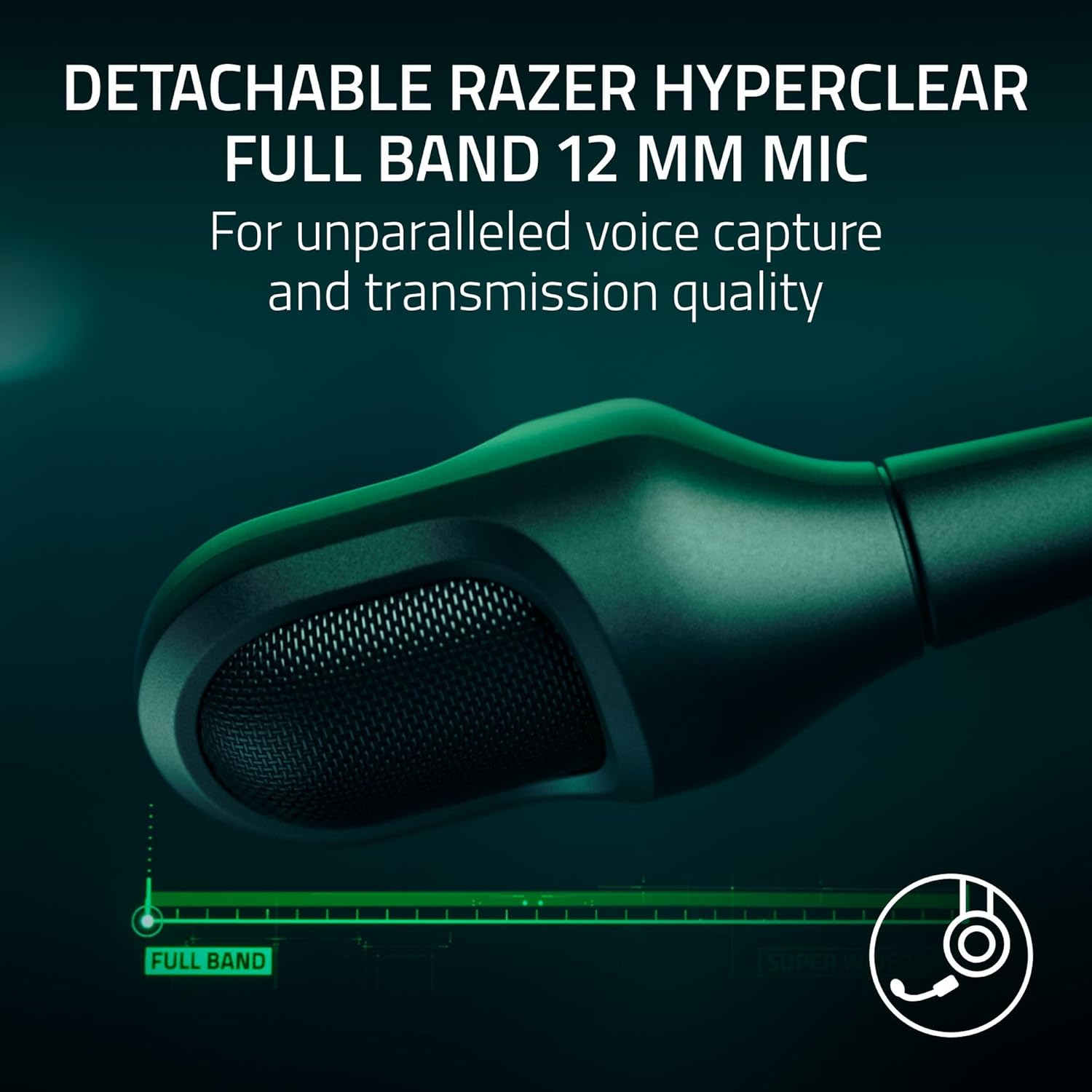
Image: The left earcup of the headset, highlighting the power button and volume control for easy access.

Image: The right earcup of the headset, showing the ANC and EQ buttons for sound customization.
การเชื่อมต่อ
The Razer BlackShark V3 Pro offers flexible connectivity to suit various gaming and audio needs:
- 2.4 GHz Wireless (Razer HyperSpeed Wireless Gen-2): Provides ultra-low latency connection for competitive gaming on PS5, PC, Mac, and Nintendo Switch (docked mode).
- Bluetooth 5.3: Ideal for mobile gaming, music, and calls on smartphones, tablets, and handheld gaming devices.
- อะนาล็อก 3.5 มม.: For universal compatibility with devices that have a 3.5mm audio jack, ensuring connectivity even when battery is low or wireless is not preferred.
- เสียงพร้อมกัน: The headset supports mixing 2.4 GHz and Bluetooth audio from two devices concurrently, allowing you to game and take calls or listen to music simultaneously.
การปรับแต่งเสียง
Enhance your audio experience with Razer Synapse 4 (for PC) or the Razer Audio App (for mobile devices). These applications allow you to:
- Create and manage custom EQ profileสำหรับเกมหรือสื่อต่างๆ
- Access pro-tuned FPS profiles for competitive advantage.
- Adjust microphone settings, including volume normalization, noise cancellation, and voice clarity.
- Configure THX Spatial Audio settings for immersive 7.1.4 surround sound on PC.

Image: A visual representation of the Razer Synapse 4 software interface, demonstrating the customizable EQ and microphone settings.
การซ่อมบำรุง
To ensure the longevity and optimal performance of your Razer BlackShark V3 Pro headset, follow these maintenance guidelines:
- การทำความสะอาด: Use a soft, dry cloth to wipe down the headset. For earcups, gently remove them if possible (refer to product manual for specific instructions) and clean with a mild, non-abrasive cleaner. Ensure they are completely dry before reattaching.
- พื้นที่จัดเก็บ: เก็บหูฟังไว้ในที่แห้งและเย็น หลีกเลี่ยงแสงแดดโดยตรงและอุณหภูมิที่สูงหรือต่ำเกินไป
- การดูแลสายเคเบิล: หลีกเลี่ยงการดัดงอหรือดึงสายเคเบิลอย่างรุนแรงเพื่อป้องกันความเสียหาย
- อัพเดตเฟิร์มแวร์: Regularly check for and install firmware updates via Razer Synapse 4 or the Razer Audio App to ensure the best performance and latest features.
การแก้ไขปัญหา
If you encounter issues with your Razer BlackShark V3 Pro, consider the following:
- ไม่มีเสียง/คุณภาพเสียงไม่ดี:
- Ensure the headset is powered on and correctly connected (2.4 GHz dongle, Bluetooth, or 3.5mm cable).
- Check device volume settings and headset volume wheel.
- ตรวจสอบให้แน่ใจว่าได้เลือกอุปกรณ์เอาต์พุตเสียงที่ถูกต้องในการตั้งค่าระบบของคุณแล้ว
- For PC, ensure Razer Synapse 4 is updated and the headset firmware is current.
- ปัญหาไมโครโฟน:
- ตรวจสอบให้แน่ใจว่าไมโครโฟนติดแน่นดีแล้วและไม่ได้ปิดเสียงไว้
- ตรวจสอบระดับเสียงของไมโครโฟนในการตั้งค่าเสียงของอุปกรณ์ของคุณ
- Update headset firmware via Razer Synapse 4, as updates often improve microphone performance.
- ปัญหาการเชื่อมต่อ:
- For 2.4 GHz, try re-pairing the dongle with the headset (refer to the full user manual for pairing instructions).
- For Bluetooth, ensure the headset is in pairing mode and your device's Bluetooth is enabled. Try forgetting the device and re-pairing.
- Ensure the dongle is not too far from the headset or obstructed by other devices.
- ความกังวลเรื่องอายุการใช้งานแบตเตอรี่:
- ตรวจสอบให้แน่ใจว่าชุดหูฟังชาร์จเต็มแล้ว
- Note that using Hybrid Active Noise Cancellation and simultaneous audio may reduce battery life.
ข้อมูลจำเพาะ
| คุณสมบัติ | รายละเอียด |
|---|---|
| ชื่อรุ่น | แบล็คชาร์ค วี3 โปร |
| การควบคุมเสียงรบกวน | ระบบตัดเสียงรบกวนแบบแอคทีฟ |
| การตอบสนองความถี่ | ความถี่ 28 กิโลเฮิรตซ์ |
| ความไวต่อความรู้สึก | 108 เดซิเบล |
| แจ็คหูฟัง | แจ็ค 3.5 มม. |
| เทคโนโลยีการเชื่อมต่อ | 3.5mm, Bluetooth, Wireless (2.4 GHz) |
| เทคโนโลยีการสื่อสารไร้สาย | 2.4 GHz, Bluetooth |
| เวอร์ชันบลูทูธ | 5.3 |
| ประเภทไดร์เวอร์เสียง | ไดร์เวอร์แบบไดนามิก |
| ขนาดไดร์เวอร์เสียง | 50 มิลลิเมตร |
| อุปกรณ์ที่รองรับ | Mac, Nintendo Switch, PC, PlayStation, Steam Deck |
| น้ำหนักสินค้า | 1.16 กิโลกรัม (2.55 ปอนด์) |
| วัสดุ | พลาสติก โฟม |
| ประเภทแบตเตอรี่ | แบตเตอรี่ลิเธียมไอออน 1 ก้อน (รวมอยู่ด้วย) |
| ผู้ผลิต | เรเซอร์ |
| หมายเลขรุ่นสินค้า | RZ04-05400500-R3UA |
| ยูพีซี | 840272919552 |
วิดีโอผลิตภัณฑ์อย่างเป็นทางการ
Video: Razer BlackShark V3 Line Overviewวิดีโอนี้ให้ข้อมูลทั่วไปเกี่ยวกับview of the Razer BlackShark V3 headset series, highlighting its key features and design.
Video: Razer BlackShark V3 Pro Wireless ANC Gaming Headset Features. This video showcases the specific features of the BlackShark V3 Pro, including its wireless capabilities and active noise cancellation.
Video: Razer BlackShark V3 Pro Unboxing and Review. This video provides an unboxing experience and a detailed review of the Razer BlackShark V3 Pro headset, covering its components and user experience.
Video: Razer BlackShark V3 Pro - Razer's Best Headset Ever. This video highlights the advanced features and superior performance of the Razer BlackShark V3 Pro, positioning it as a top-tier gaming headset.
การรับประกันและการสนับสนุน
Razer products are built to the highest standards of quality and durability. This product comes with a limited warranty. For detailed warranty information, technical support, and customer service, please visit the official Razer support webเว็บไซต์หรือดูบัตรรับประกันที่รวมอยู่ในบรรจุภัณฑ์ผลิตภัณฑ์ของคุณ
คุณอาจพิจารณาซื้อasing แผนคุ้มครองเพิ่มเติมเพื่อความคุ้มครองที่มากขึ้น:
- แผนคุ้มครอง 2 ปี: 32.99 ดอลลาร์
- แผนคุ้มครอง 3 ปี: 44.99 ดอลลาร์
- การปกป้องแบบสมบูรณ์: $16.99/เดือน (ครอบคลุมการซื้อที่เข้าเงื่อนไขทั้งหมดในอดีตและอนาคต)


