1. บทนำ
Thank you for choosing BUGANI Buds True Wireless Earbuds. This manual provides detailed instructions on how to set up, operate, and maintain your earbuds to ensure optimal performance and longevity. Please read this manual thoroughly before using the product.
2. เนื้อหาบรรจุภัณฑ์
- 1 pair of BUGANI B09 True Wireless Earbuds
- สายชาร์จ USB-C 1 เส้น
- 3 pairs of Eartips (S, M, L)
- 3 pairs of Silicone Ear Hooks (S, M, L)
- 1 คู่มือผู้ใช้
3. สินค้าหมดview
Familiarize yourself with the components of your BUGANI Buds.
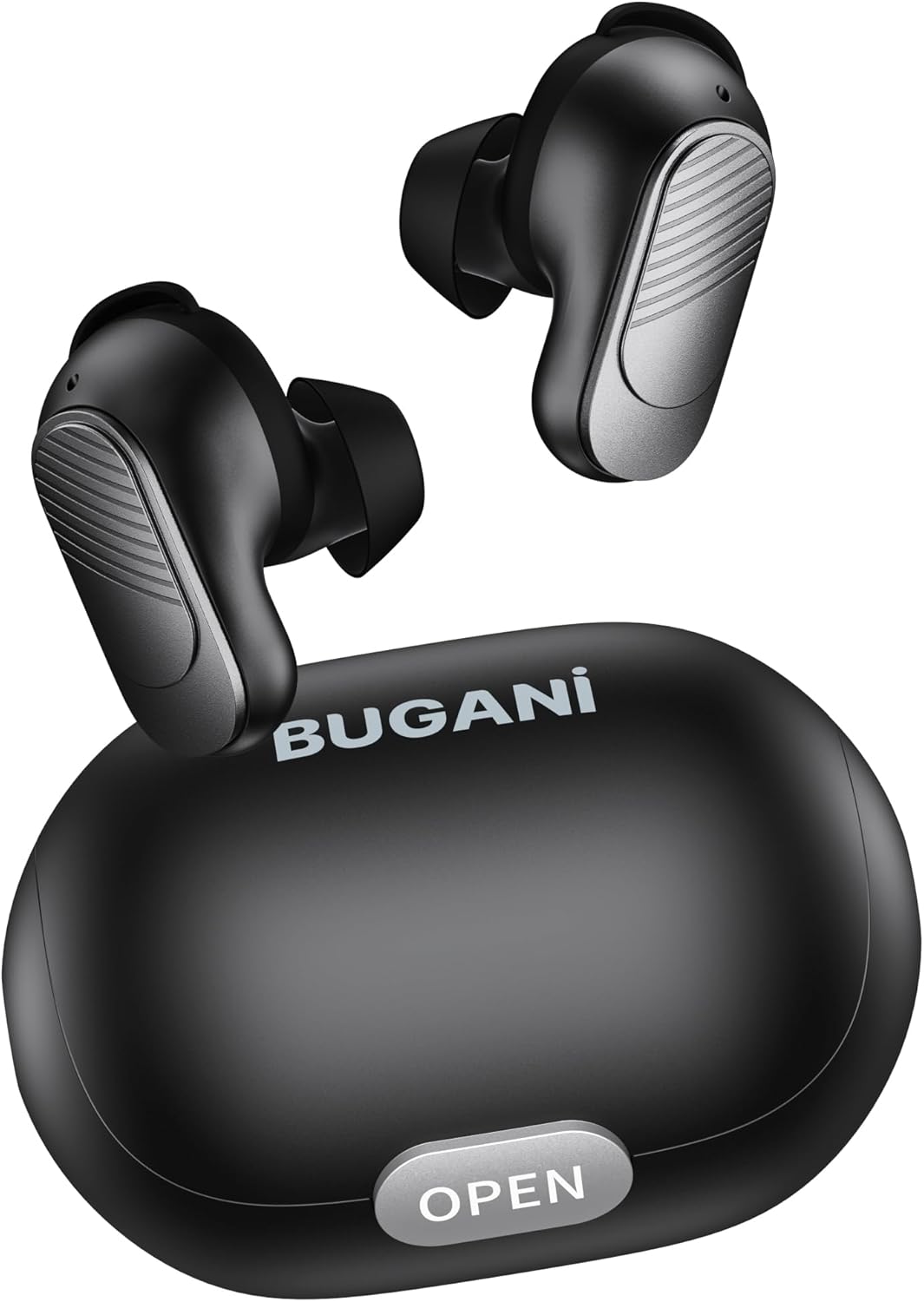
Image: BUGANI Buds True Wireless Earbuds with their charging case. The earbuds are black with silver accents, and the case is a sleek black oval shape with an "OPEN" button.

Image: An exploded diagram showing the internal components of a BUGANI Bud earbud, highlighting the driver and circuit board for enhanced sound quality.

Image: Illustration demonstrating the battery life of BUGANI Buds. It shows 6 hours of playback on a single charge and an additional 24 hours with the charging case, totaling 30 hours.

Image: A woman using BUGANI Buds during a phone call, with an inset showing the earbud and the "MIC" label, indicating the dual microphone for clear calls.

Image: A woman exercising while wearing BUGANI Buds, with an overlay showing the IPX6 water resistance icon, signifying protection against sweat and splashes.

Image: A woman wearing BUGANI Buds, with insets highlighting the lightweight design (3.9g) and the ergonomic fit with proper ear wingtips for comfort.
4. การตั้งค่า
4.1 การชาร์จเริ่มต้น
Before first use, fully charge the earbuds and the charging case. Connect the USB-C charging cable to the charging port on the case and a power source. The indicator lights on the case will show charging status.
4.2 Choosing the Right Eartips
Select the eartips (S, M, L) and silicone ear hooks that provide the most comfortable and secure fit for your ears. A proper seal is crucial for optimal sound quality and noise isolation.
5. คู่มือการใช้งาน
5.1 เปิด/ปิดเครื่อง
- เปิดเครื่อง: เปิดกล่องชาร์จ หูฟังจะเปิดโดยอัตโนมัติ
- หมดแรง: ใส่หูฟังกลับเข้าไปในกล่องชาร์จและปิดฝา หูฟังจะปิดโดยอัตโนมัติและเริ่มชาร์จ
5.2 การจับคู่บลูทูธ
- ตรวจสอบให้แน่ใจว่าหูฟังอยู่ในกล่องชาร์จและฝาเปิดอยู่
- เปิดใช้งาน Bluetooth บนอุปกรณ์ของคุณ (สมาร์ทโฟน แท็บเล็ต ฯลฯ)
- ค้นหา "BUGANI Buds" in the list of available Bluetooth devices.
- Select "BUGANI Buds" to connect. Once connected, you will hear a confirmation tone.
- เมื่อนำเอียร์บัดออกจากเคส เอียร์บัดจะเชื่อมต่อกับอุปกรณ์ที่จับคู่ไว้ครั้งล่าสุดโดยอัตโนมัติ หากเปิดใช้งาน Bluetooth บนอุปกรณ์
5.3 ระบบควบคุมแบบสัมผัส
The BUGANI Buds feature intuitive touch controls on each earbud:
| การกระทำ | เอียร์บัดข้างซ้าย | เอียร์บัดด้านขวา |
|---|---|---|
| เล่น/หยุดชั่วคราว | แตะเพียงครั้งเดียว | แตะเพียงครั้งเดียว |
| เพลงถัดไป | แตะสองครั้ง | |
| เพลงก่อนหน้า | แตะสองครั้ง | |
| รับสาย/วางสาย | แตะเพียงครั้งเดียว | แตะเพียงครั้งเดียว |
| ปฏิเสธการรับสาย | กดแบบยาว (2 วินาที) | กดแบบยาว (2 วินาที) |
| เปิดใช้งานผู้ช่วยเสียง | แตะสามครั้ง | แตะสามครั้ง |
5.4 การชาร์จหูฟังและเคส
- หูฟัง: Place the earbuds into the charging case. They will automatically charge.
- เคสชาร์จ: Connect the USB-C cable to the charging port on the case and a USB power adapter (not included). The indicator lights will show the charging status.
6. การบำรุงรักษา
- ทำความสะอาดหูฟังและกล่องชาร์จเป็นประจำด้วยผ้าแห้งนุ่ม
- ห้ามใช้น้ำยาทำความสะอาดที่มีฤทธิ์กัดกร่อนหรือตัวทำละลาย
- รักษาหน้าสัมผัสการชาร์จบนทั้งหูฟังและเคสให้สะอาดเพื่อให้แน่ใจว่าจะชาร์จได้อย่างถูกต้อง
- เก็บหูฟังเอียร์บัดไว้ในกล่องชาร์จเมื่อไม่ได้ใช้งานเพื่อปกป้องและชาร์จอยู่เสมอ
- หลีกเลี่ยงการให้หูฟังสัมผัสกับอุณหภูมิที่สูงหรือความชื้นสูงหรือแสงแดดโดยตรง
- While IPX6 water-resistant, do not immerse the earbuds in water.
7 การแก้ไขปัญหา
| ปัญหา | วิธีแก้ปัญหาที่เป็นไปได้ |
|---|---|
| หูฟังเอียร์บัดไม่จับคู่ |
|
| เอียร์บัดตัวเดียวเท่านั้นที่ใช้งานได้ |
|
| คุณภาพเสียงไม่ดี |
|
| หูฟังเอียร์บัดไม่ชาร์จ |
|
8. ข้อมูลจำเพาะ
| คุณสมบัติ | รายละเอียด |
|---|---|
| ชื่อรุ่น | B09 |
| ยี่ห้อ | บูกานี |
| เทคโนโลยีการเชื่อมต่อ | ไร้สาย (บลูทูธ 5.3) |
| เทคโนโลยีการสื่อสารไร้สาย | บลูทูธ |
| ประเภทการควบคุม | การควบคุมแบบสัมผัส |
| ระดับความต้านทานต่อน้ำ | IPX6 (กันน้ำ) |
| ช่วงความถี่ | 20 เฮิรตซ์ - 20,000 เฮิรตซ์ |
| องค์ประกอบของแบตเตอรี่ | ลิเธียมไอออน |
| แบตเตอรี่แบบชาร์จไฟได้ | ใช่ |
| การวางตำแหน่งหู | อินเอียร์ |
| ฟอร์มแฟกเตอร์ | อินเอียร์ |
| วัสดุ | พลาสติก |
| สี | สีดำ |
| ASIN | B0FBRKTKTS |
9. การรับประกันและการสนับสนุน
For warranty information and technical support, please refer to the official BUGANI webหรือติดต่อฝ่ายบริการลูกค้า เก็บใบเสร็จรับเงินไว้เพื่อใช้ในการเคลมประกัน
Return Policy: This product typically has a 30-day refund/replacement return policy.
Manufacturer: BUGANI


