การแนะนำ
This manual provides instructions for the installation, operation, and troubleshooting of your Comfort Direct TR214D remote control for Harbor Breeze ceiling fans. Please read these instructions carefully before use to ensure proper function and longevity of your device.

Image: The Comfort Direct TR214D remote control shown with its included wall mount and mounting screws.
การติดตั้งและการตั้งค่า
1. การติดตั้งแบตเตอรี่
The remote control requires one 23A 12V battery (not included).
- ค้นหาช่องใส่แบตเตอรี่ที่ด้านหลังของรีโมทคอนโทรล
- เลื่อนฝาครอบแบตเตอรี่ออก
- ใส่แบตเตอรี่ 23A 12V หนึ่งก้อน โดยตรวจสอบให้แน่ใจว่าขั้ว (+/-) ตรงกับแผนภาพภายในช่องใส่แบตเตอรี่
- เปลี่ยนฝาครอบแบตเตอรี่

ภาพ: ด้านหลัง view of the remote control with the battery cover removed, showing the battery compartment and spring contacts.
2. คำแนะนำการจับคู่
Follow these steps to pair your remote control with your existing ceiling fan receiver. Only one remote can be programmed per fan.
- ปิดพัดลม: ตรวจสอบให้แน่ใจว่าได้ปิดสวิตช์ไฟหรือเบรกเกอร์ที่ผนังเพื่อจ่ายไฟให้กับพัดลมเพดานโดยสมบูรณ์แล้ว
- เปิดพัดลมกลับมาใช้งาน: คืนพลังงานให้กับพัดลมเพดาน
- กดปุ่ม "0" ค้างไว้: Within 30 seconds of restoring power, press and hold the "0" (Off) key on the remote control for 5 seconds.
- The fan light should blink or the fan should briefly turn on to indicate successful pairing.

Image: A visual guide illustrating the three steps for pairing the remote control, highlighting the "0" button.

ภาพ: ภาพระยะใกล้ view of the remote control, specifically highlighting the '0' button used for pairing.
3. การติดตั้งแบบติดผนัง
ที่ยึดติดผนังที่ให้มาช่วยให้จัดเก็บรีโมทคอนโทรลได้อย่างสะดวก
- เลือกตำแหน่งที่เหมาะสมบนผนัง โดยให้ห่างจากแสงแดดโดยตรงหรือแหล่งความร้อน
- Use the provided screws to secure the wall mount to the desired surface.
- Place the remote control into the mounted holder.

Image: The remote control, its wall mount, and two mounting screws, illustrating the components for wall installation.

Image: The remote control securely placed in its wall mount, positioned on a wall in a room with a ceiling fan.
คำแนะนำการใช้งาน
The TR214D remote control provides full control over your ceiling fan's speed and light functions.
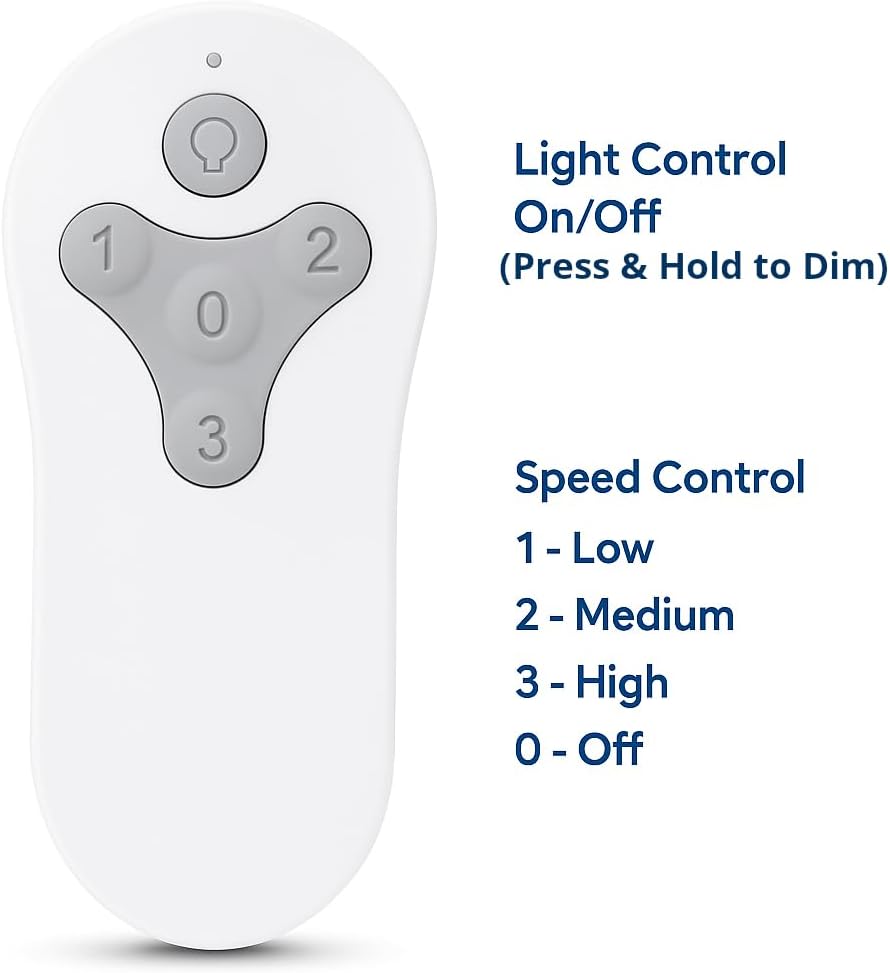
Image: The remote control with labels indicating the functions of each button: Light Control (On/Off, Press & Hold to Dim) and Speed Control (1-Low, 2-Medium, 3-High, 0-Off).
การควบคุมความเร็วพัดลม
- ปุ่มที่ 1: ตั้งค่าความเร็วพัดลมเป็นระดับต่ำ
- ปุ่มที่ 2: Sets fan speed to Medium.
- ปุ่มที่ 3: ตั้งค่าความเร็วพัดลมเป็นระดับสูง
- ปุ่มที่ 0: ปิดพัดลม
การควบคุมแสง
- ปุ่มไฟ (ไอคอนหลอดไฟ): Press once to turn the fan light On or Off.
- ฟังก์ชันลดแสง: Press and hold the Light Button to dim or brighten the fan light to your preferred level. Release the button when the desired brightness is reached.
ความเข้ากันได้
This Comfort Direct TR214D remote control is designed as a replacement for various Harbor Breeze ceiling fan remote models and is compatible with specific fan models.
รุ่นรีโมทที่ใช้งานร่วมกันได้:
- A25-FA0138
- KUJCE10311
- TR214B
- KUJCE10712
- TR214A
- KUJCE10610
Compatible Fan Models:
- BRD48MWW6LR
- BRD60BNK6LRS
- BRD60MBK6LR
- BRD60OSB6LR
- MZ44BNK3LR
- MZ44MBLK3LR
- MZ44ORB3LR
- MZ44WW3LR
- TG44BNK3D1RC
- TG44LW3D1RS
- TG44MBK3D1RS
- TG44OSB3D1RC
- TG52BNK3D1RC
- TG52LW3D1RCS
- TG52MBK3D1RC
- TG52OSB3D1RC

Image: A graphic displaying a comprehensive list of Harbor Breeze fan models that are compatible with this remote control.
การแก้ไขปัญหา
If your remote control is not functioning as expected, refer to the following guide:
| อาการของรีโมทคอนโทรลเสีย | Good Remote Control Symptoms |
|---|---|
| 1. ไฟแสดงสถานะสีแดงไม่ติดสว่างเมื่อกดปุ่ม | 1. ไฟแสดงสถานะสีแดงจะสว่างขึ้นเฉพาะเมื่อกดปุ่มเท่านั้น |
| 2. ไฟแสดงสถานะสีแดงจะสว่างขึ้นเมื่อไม่มีการกดปุ่มใดๆ | 2. Red indicator light stays illuminated when you PRESS and HOLD buttons. |
| Action: Replace remote control if you experience any of these symptoms. | Action: DO NOT replace remote control if you experience these symptoms. You likely have a different problem with your fan. |

Image: A troubleshooting chart detailing symptoms related to the remote control's red indicator light and recommended actions.
If the remote is not pairing, ensure you have followed the pairing instructions precisely, especially the timing of pressing the "0" button after restoring power to the fan. Also, verify that the battery is correctly installed and has sufficient charge.
ข้อมูลจำเพาะ
| หมายเลขรุ่น | ซีดีทีอาร์214ดี |
| ยี่ห้อ | คอมฟอร์ท ไดเร็ก |
| แหล่งพลังงาน | Battery Powered (1 x 23A 12V battery, not included) |
| วิธีการควบคุม | Remote (Radiofrequency) |
| จำนวนระดับพลังงาน | 4 (Off, Low, Medium, High) |
| ขนาดสินค้า | 2.76 x 1.8 x 4.57 นิ้ว |
| น้ำหนักสินค้า | 1.13 ออนซ์ |
| การใช้งานภายใน/ภายนอกอาคาร | ในร่ม |
การรับประกันและการสนับสนุน
ผลิตภัณฑ์นี้มาพร้อมกับ การรับประกันจากผู้ผลิต 1 ปี. For warranty claims or technical support, please contact Comfort Direct customer service. Refer to your purchase documentation for specific contact details or visit the official Comfort Direct webเว็บไซต์.
Note: The manufacturer warranty covers defects in materials and workmanship under normal use. It does not cover damage caused by misuse, accidents, or unauthorized modifications.


