การแนะนำ
The Magene P715 Dual-Sensing Power Meter Cycling Pedals are designed to provide precise power measurement for cyclists. These pedals independently measure left and right leg power with an accuracy of ±1%. They are compatible with KEO pedal systems and offer a long battery life of up to 120 hours. Connectivity is supported via both Bluetooth and ANT+, allowing seamless integration with various cycling computers, applications, and trainers. The design facilitates quick installation, typically within one minute.
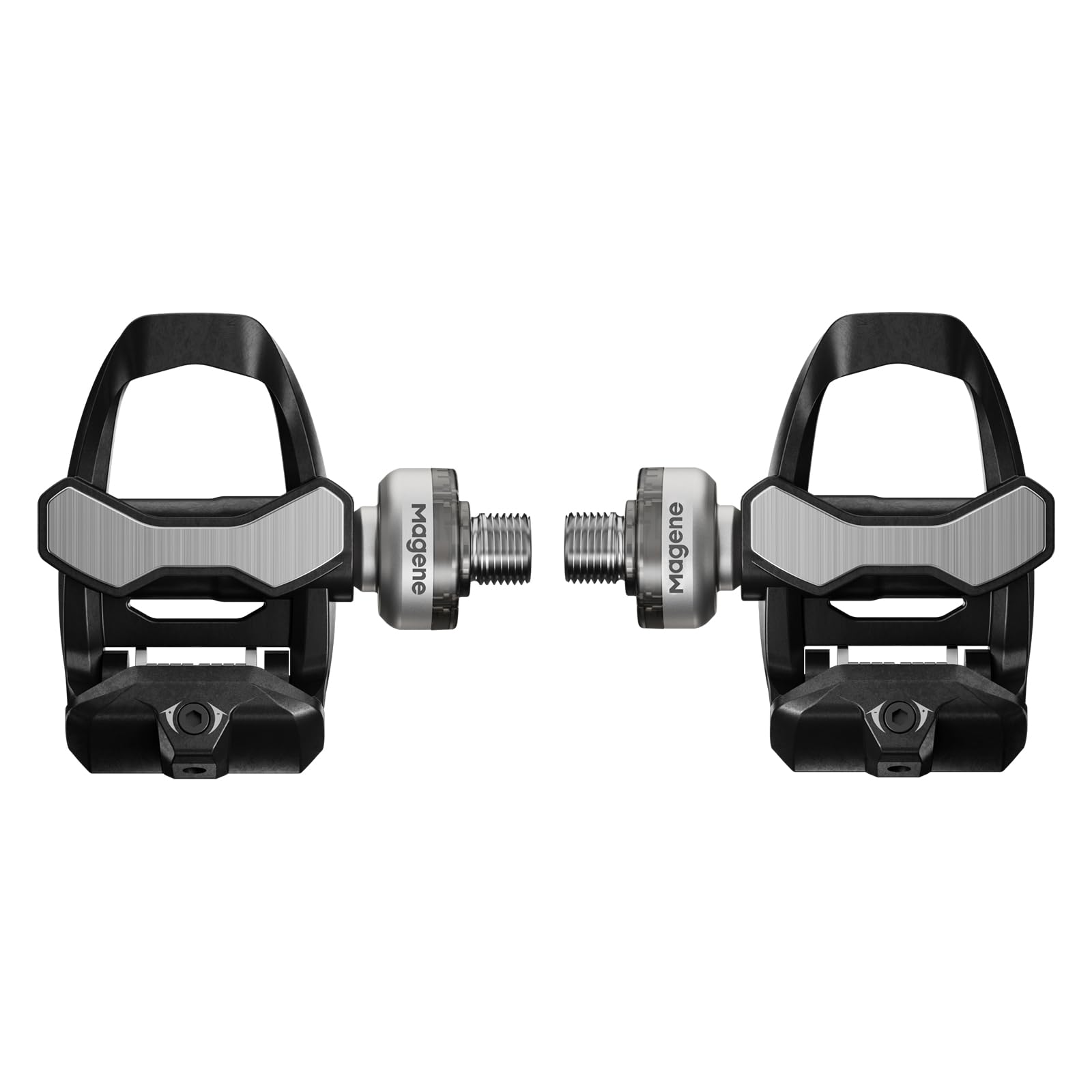
ภาพ: ระยะใกล้ view of the Magene P715 Dual-Sensing Power Meter Cycling Pedal, highlighting its design and power meter spindle.
มีอะไรอยู่ในกล่อง
The Magene P715 package includes the following items:
- 2 x Pedal Power Meters
- 2 x Crank Washers
- 1 x สายชาร์จแบบแม่เหล็ก
- คู่มือเริ่มต้นอย่างรวดเร็ว 1 ชุด

Image: Contents of the Magene P715 Power Meter Pedals box, showing two pedals, a charging cable, crank washers, and a quick start guide.
การตระเตรียม
Before installing the Magene P715 pedals, ensure you have the necessary tools and prepare the crank arm threads.
เครื่องมือที่จำเป็น:
- ประแจหกเหลี่ยม 3มม.
- 8mm Allen key or bit
- ประแจแรงบิด
Crank Arm Preparation:
- Clean the crank arm threads thoroughly. Use a cloth or brush to remove any old grease or debris.
- Apply a small amount of fresh grease to the clean crank arm threads.
Video: This video demonstrates the unboxing and preparation steps for the Magene P715 Power Meter Pedals, including the tools required and initial setup.
การเปิดใช้งาน
The power meter pedals must be charged and activated before their first use to ensure proper functionality.
- Charge the Pedals: Connect the magnetic charging cable to both pedals to charge them. The pedals will wake up during this process.
- Download Magene Utility App: Install the 'Magene Utility' app on your smartphone.
- ค้นหาและเชื่อมต่อ: Open the app and click 'Search Device'. Once the P715 device appears, select it to connect.
- เปิดใช้งานอุปกรณ์: A new device and activation button will appear. Click the button to activate. The app will request your email address for verification. Enter your email, and the app will send a verification code. Enter the received code to complete activation.
บันทึก:
- If activation fails, click 'Back', return to the device search list, and reconnect to activate.
Video: This video illustrates the activation process for the Magene P715 Power Meter Pedals using the Magene Utility app, including charging and email verification.
การติดตั้ง
Proper installation is crucial for accurate power measurement and to prevent damage to the pedals or crank threads.
- Thread Direction: Install the left pedal counterclockwise and the right pedal clockwise. Improper threading can damage your pedal or the crank threads.
- Use Pedal Spacers: When installing, it is mandatory to use one or two pedal spacers to ensure at least 1mm of clearance between the power meter module and the crank arm. If the power meter module is pressed against the crank arm during tightening, it may cause damage.
- ขันให้แน่นด้วยประแจวัดแรงบิด: Use a torque wrench with an 8mm Allen bit for installation. The recommended tightening torque is 30-40 N·m. If your crank manufacturer specifies a different torque, please follow their recommendation.
บันทึก:
- You may hand-thread the power meter module lightly, but do not fully tighten it by hand as this may damage the power meter module.
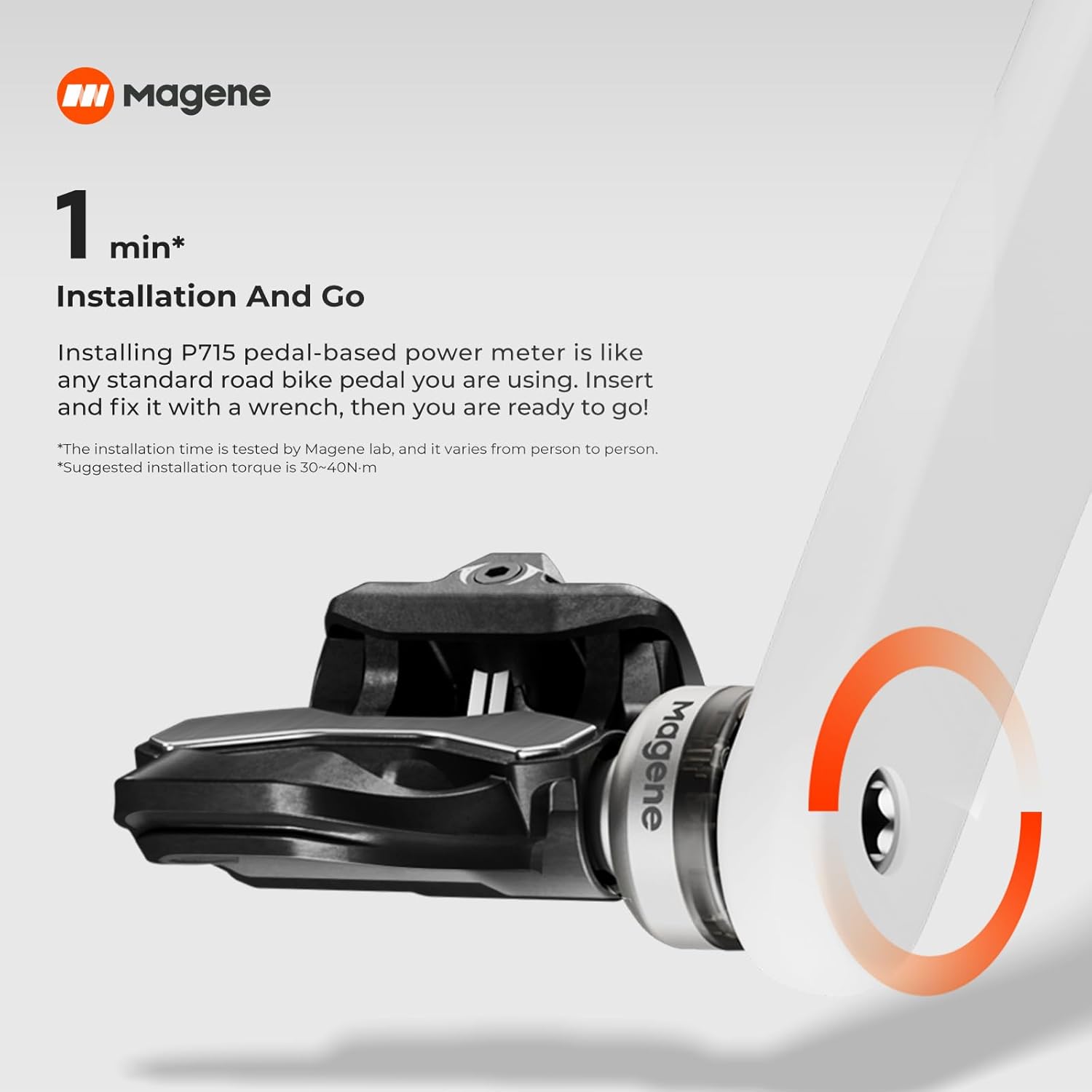
Image: Magene P715 pedal installed on a bicycle crank arm, demonstrating proper fit and clearance.
Video: This video provides a detailed guide on installing the Magene P715 Power Meter Pedals, including thread direction, spacer usage, and torque wrench application.
การสอบเทียบ
To ensure accurate power meter readings, zero-offset calibration is essential, especially after installation or significant changes.
- Initial Pedal Strokes: After each installation, perform several forceful pedal strokes to settle the components before proceeding with zero-offset calibration.
- Crank Length Setting: In the 'Magene Utility' app, select the correct crank length (in mm) that matches your actual crank arm length. This is crucial for accurate power meter readings.
- Perform Zero Calibration: In the app, click the 'Zero Calibration' button to manually calibrate the power meter. The app will indicate whether the calibration was successful.
บันทึก:
- Do not perform zero-point calibration while the pedals are charging or if any external force is being applied to them.
Video: This video demonstrates how to perform zero-offset calibration and set the crank length using the Magene Utility app for the P715 Power Meter Pedals.
การดำเนินงาน
The Magene P715 pedals offer advanced features to enhance your cycling experience.
คุณสมบัติหลัก:
- Dual-Sensing Precision: Independently measures left and right leg power with ±1% accuracy.
- อายุการใช้งานแบตเตอรี่ยาวนาน: Enjoy up to 120 hours of continuous use on a single charge, suitable for extended training sessions and rides.
- การเชื่อมต่อแบบคู่: Connects via Bluetooth and ANT+ to a wide range of cycling computers, smart trainers, and mobile applications for real-time data tracking.
- Advanced Training Data: Provides 7 advanced cycling data metrics including Power, Cadence, Left and Right Balance, Pedaling Smoothness, Torque Effectiveness, Riding Position, and Power Phase.

Image: The Magene P715 pedal features a 120-hour battery life, rechargeable via a magnetic charging cable.

Image: The Magene P715 provides 7 advanced cycling data metrics for comprehensive training analysis.
Video: This video showcases the Magene P715 Power Meter Pedals in use, highlighting their easy installation, precise dual-side power measurement, advanced training functions, and long battery life during a cycling session.
การซ่อมบำรุง
Regular maintenance ensures the longevity and accuracy of your Magene P715 Power Meter Pedals.
- การทำความสะอาด: Periodically clean the pedal body and spindle threads. Ensure no dirt or debris accumulates, especially around the power meter module.
- เกรasing: Reapply grease to the crank arm threads if pedals are removed and reinstalled.
- การชาร์จ: Charge the pedals regularly to maintain optimal battery performance. Avoid completely draining the battery for extended periods.
- การสอบเทียบ: Perform zero-offset calibration regularly, especially after installation, firmware updates, or if you notice inconsistencies in power readings.
- พื้นที่จัดเก็บ: Store the pedals in a dry environment when not in use.
การแก้ไขปัญหา
If you encounter issues with your Magene P715 pedals, refer to these common troubleshooting tips:
- การเปิดใช้งานล้มเหลว: If the app fails to activate the device, ensure the pedals are charged and try reconnecting from the device search list in the 'Magene Utility' app.
- การอ่านค่าที่ไม่ถูกต้อง: Perform a zero-offset calibration. Ensure the correct crank length is set in the app. Check for proper installation, including the use of pedal spacers and correct tightening torque.
- ปัญหาการเชื่อมต่อ: Ensure Bluetooth/ANT+ is enabled on your cycling computer or smartphone. Check that the pedals are charged. Try restarting the pedals and your device.
- Pedal Damage: If the power meter module is pressed against the crank arm, it may cause damage. Ensure proper clearance with pedal spacers during installation.
ข้อมูลจำเพาะ
| ยี่ห้อ | มาเกน |
| ชื่อรุ่น | P715 |
| สี | เงิน |
| วัสดุ | อลูมิเนียม |
| น้ำหนักสินค้า | 315 กรัม |
| สไตล์ | คลิปเลส |
| อายุการใช้งานแบตเตอรี่ | นานถึง 120 ชั่วโมง |
| ความแม่นยำ | ±1% |
| การเชื่อมต่อ | บลูทูธ & ANT+ |

Image: The Magene P715 pedals are designed to be lightweight, with each pedal weighing 157 grams.
การรับประกันและการสนับสนุน
The Magene P715 Dual-Sensing Power Meter Cycling Pedals come with a 2-year manufacturer's warranty.
For further support, product information, or to contact customer service, please visit the official Magene Store or refer to the contact information provided in your Quick Start Guide.
Magene Store: https://www.amazon.com/stores/Magene/page/D1FCDD51-2077-4A34-8476-722FE5ABD084


