1. บทนำ
This manual provides detailed instructions for the installation, operation, and maintenance of your Blaupunkt Orlando 750 Car Stereo System. This package includes the Orlando 750 Double DIN Receiver, 6.5" 3-Way Speakers, speaker harnesses, speaker adapters, speaker wire, and a radio installation kit designed for select GM vehicles.
2. การตั้งค่าและการติดตั้ง
การติดตั้งอย่างถูกต้องเป็นสิ่งสำคัญอย่างยิ่งต่อประสิทธิภาพการทำงานสูงสุด ขอแนะนำให้ติดตั้งโดยผู้เชี่ยวชาญที่มีคุณสมบัติเหมาะสม
2.1. Blaupunkt Orlando 750 Receiver Installation
The Orlando 750 is a Double DIN receiver. Ensure your vehicle's dashboard opening is compatible with a Double DIN unit. The included radio install kit is designed for select GM models from 1994-2012.

ภาพ: ด้านหน้า view of the Blaupunkt Orlando 750 Double DIN Receiver, showing the 6.9-inch touchscreen display and control buttons.

Image: Components of the radio installation kit, including the mounting frame and brackets for securing the receiver in the dashboard.
2.2. การติดตั้งลำโพง
The package includes four 6.5" 3-Way speakers. Use the provided speaker harnesses (GM 88-Up) and speaker adapters (GM Full Size P/U, SUV 1995-2015) for proper fitment in your vehicle's door locations.

Image: A pair of Blaupunkt 6.5-inch 3-Way Car Speakers with black grilles.

Image: Black plastic speaker adapters designed for GM Full Size P/U and SUV models, facilitating the installation of 5 1/4 or 6 1/2 inch speakers.
2.3. การเชื่อมต่อสายไฟ
Utilize the included radio wiring harness and 50 feet of 16-gauge speaker wire for all electrical connections. Ensure all connections are secure and correctly matched to avoid damage to the unit or vehicle's electrical system.
- Connect the radio wiring harness to the vehicle's factory harness.
- Connect the speaker harnesses to the speakers and then to the vehicle's factory speaker wiring.
- Connect the 16-gauge speaker wire from the receiver to the speakers, ensuring correct polarity.
- เชื่อมต่อด้านหลังview camera input, steering wheel control input, and external microphone (if applicable).
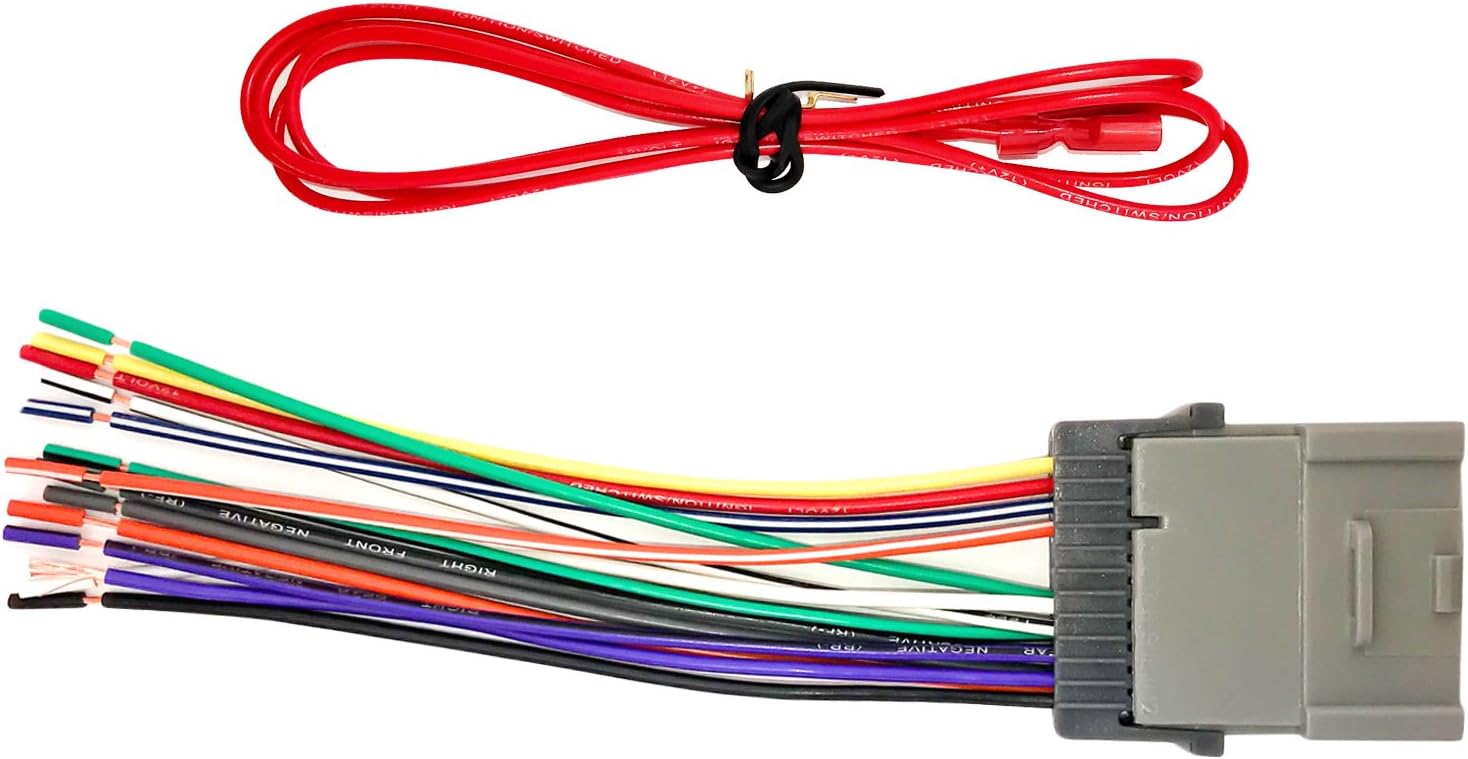
Image: A multi-colored radio wiring harness with a gray connector, used to integrate the aftermarket receiver with the vehicle's electrical system.

Image: Two speaker harnesses with black connectors and red/white wires, designed for GM vehicles from 1988 onwards.
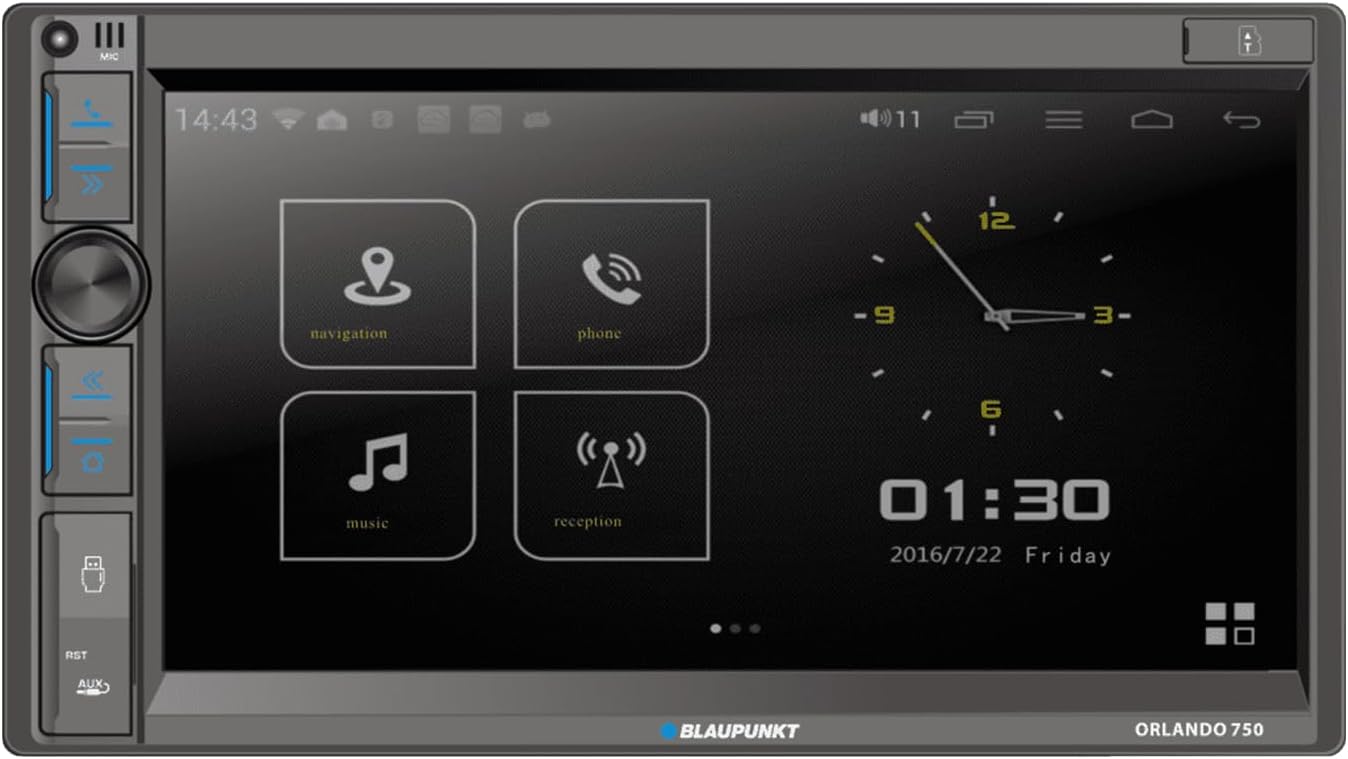
Image: A spool of 50 feet of 16-gauge copper clad aluminum (CCA) speaker wire.
3. คู่มือการใช้งาน
3.1. ฟังก์ชั่นตัวรับสัญญาณ
- จอแสดงผลแบบสัมผัส: Navigate menus and control functions using the 6.9" touchscreen.
- วิทยุ AM/FM: ปรับเข้าสู่สถานีวิทยุที่คุณชื่นชอบ
- Apple CarPlay และ Android Auto แบบไร้สาย: Connect your smartphone wirelessly for navigation, music, and communication.
- บลูทูธ: Pair your device for hands-free calling and audio streaming.
- การเล่น USB: Insert a USB drive to play audio or video files.
- Aux-in & SD Card: Connect external audio devices or play media from an SD card.
- หลังview กล้อง: เชื่อมต่อด้านหลังview camera for enhanced safety during parking.
- ระบบควบคุมพวงมาลัย: Integrate with your vehicle's steering wheel controls for convenient operation.
- เครื่องเล่นดีวีดี/ซีดี: Play your favorite DVDs and CDs.
- รีโมทคอนโทรล: Use the included remote for convenient control of the receiver.
3.2. การตั้งค่าเสียง
Adjust equalizer settings, balance, and fader to optimize sound output from the 6.5" 3-Way speakers. The speakers are designed for clear audio with 40W peak and 20W RMS power handling per pair.
4. การบำรุงรักษา
- การทำความสะอาดจอแสดงผล: Use a soft, dry cloth to clean the touchscreen. Avoid abrasive cleaners.
- การทำความสะอาดทั่วไป: Keep the receiver and speakers free from dust and debris.
- การตรวจสอบการเชื่อมต่อ: ตรวจสอบการเชื่อมต่อสายไฟทั้งหมดเป็นระยะเพื่อให้แน่ใจว่ามีความปลอดภัย
- อุณหภูมิ: ควรหลีกเลี่ยงการวางเครื่องไว้ในที่ที่มีอุณหภูมิสูงหรือต่ำเกินไป หรือโดนแสงแดดโดยตรงเป็นเวลานาน
5 การแก้ไขปัญหา
- ไม่มีไฟฟ้า: Check the vehicle's fuse box and the receiver's power connections. Ensure the ignition is on.
- ไม่มีเสียง: Verify speaker connections and settings. Check the volume level and mute function.
- ปัญหาการเชื่อมต่อบลูทูธ: Ensure Bluetooth is enabled on both the receiver and your device. Try unpairing and re-pairing the device.
- CarPlay/Android Auto ไม่เชื่อมต่อ: Ensure your phone's operating system is up to date. Check USB cable connection if using wired mode (though this unit supports wireless). Restart both the receiver and your phone.
- จอแสดงผลไม่ตอบสนอง: Try resetting the unit (refer to the specific reset procedure in the full product manual if available).
6. ข้อมูลจำเพาะ
6.1. Blaupunkt Orlando 750 Receiver
- แสดง: หน้าจอสัมผัสขนาด 6.9 นิ้ว
- กำลังขับ: 60 watts x 4 (Maximum), 4 Ohms Load Impedance
- การเชื่อมต่อ: Bluetooth, Wireless Apple CarPlay, Wireless Android Auto, USB, Aux-in, SD Card
- ข้อมูลอินพุต: หลังview กล้อง, ระบบควบคุมบนพวงมาลัย
- สื่อ: AM/FM Radio, DVD/CD Player
6.2. Blaupunkt BPS-E653 6.5" 3-Way Speakers
- พิมพ์: 6.5" 3-Way
- การจัดการพลังงาน: 40W Peak, 20W RMS (per pair)
- วัสดุวูฟเฟอร์: โพลีโพรพีลีน
- ประเภททวีตเตอร์: PET dome with Neodymium magnet
6.3. ทั่วไป
- ยี่ห้อ: บลูพังค์
- แบบอย่าง: ออร์แลนโด 750
- Item Weight (Receiver): 3.39 ปอนด์
- ยูพีซี: 840440917496
7. ข้อมูลการรับประกัน
กรุณาอ้างอิงจากคู่มืออย่างเป็นทางการของผู้ผลิต website or the product packaging for detailed warranty information regarding the Blaupunkt Orlando 750 Car Stereo System and its components.
8. การสนับสนุน
For technical support, troubleshooting assistance, or further inquiries, please visit the official Blaupunkt website or contact their customer service department. Keep your product model number (Orlando 750) and UPC (840440917496) available when seeking support.


