การแนะนำ
The MCHOSE Mix 87 is a wired magnetic switch TKL gaming keyboard designed for high-performance gaming and efficient daily use. It features advanced Hall effect switches, rapid trigger technology, and extensive customization options to enhance your computing experience.

Figure 1: MCHOSE Mix 87 Magnetic Switch Rapid Trigger Gaming Keyboard (Red variant).
มีอะไรอยู่ในกล่อง
- MCHOSE Mix 87 Keyboard
- USB-C Wired Cable
- ตัวดึงกุญแจ
- คู่มือการใช้งาน
- สวิตช์สำรอง (2 ชิ้น)
การตั้งค่า
- แกะคีย์บอร์ดออก: Carefully remove the MCHOSE Mix 87 keyboard and all accessories from the packaging.
- เชื่อมต่อสาย USB: Insert the USB-C end of the provided cable into the keyboard's USB-C port. Connect the other end (USB-A) to an available USB port on your computer.
- การจดจำระบบ: Your computer should automatically detect and install the necessary drivers for the keyboard. No additional software download is required for basic functionality.
- การทดสอบเบื้องต้น: เปิดโปรแกรมแก้ไขข้อความหรือเบราว์เซอร์ แล้วทดลองพิมพ์เพื่อให้แน่ใจว่าทุกปุ่มทำงานได้อย่างถูกต้อง

Figure 2: MCHOSE Mix 87 keyboard connected via USB-C to a computer setup.
คำแนะนำการใช้งาน
คุณสมบัติหลักและประสิทธิภาพ
- Rapid Trigger (RT) Technology: The Mix 87 supports Rapid Trigger, allowing keys to react instantly upon actuation and reset immediately upon release. This feature is crucial for competitive gaming, enabling faster repeated inputs.
- การปรับการทำงาน: Equipped with Hall effect Apollo magnetic switches, the keyboard offers ultra-precise 0.001 mm adjustment of the trigger point, ranging from 0.01-3.4 mm. Key travel is dynamically calibrated with each trigger.
- อัตราการสำรวจข้อมูลสูงมาก: Experience minimal input latency with an 8000 Hz polling rate and a 256K ultra-high scan rate, ensuring every keystroke is registered with extreme speed.
- Advanced Gaming Functions: Supports SOCD (Simultaneous Opposite Cardinal Directions), DKS (Dynamic Keystrokes), MT (Macro Toggle), TGL (Toggle), and RS (Rapid Stop) functions for enhanced control and customization beyond traditional macros.

Figure 3: Visual representation of the MCHOSE Mix 87's high performance metrics including 0.001mm precision and 8K Hz polling rate.
Layout and Controls
The Mix 87 features a compact 80% TKL (Tenkeyless) layout with 87 keys, balancing functionality with a smaller footprint. It includes a multi-function knob and three practical function keys.
- ลูกบิดมัลติฟังก์ชั่น: Located on the top right, this knob primarily controls volume.
- ปุ่มฟังก์ชัน: Three dedicated keys provide quick access to:
- One-click return to desktop (customizable)
- Mode switching (e.g., gaming/office)
- Adjusting light brightness
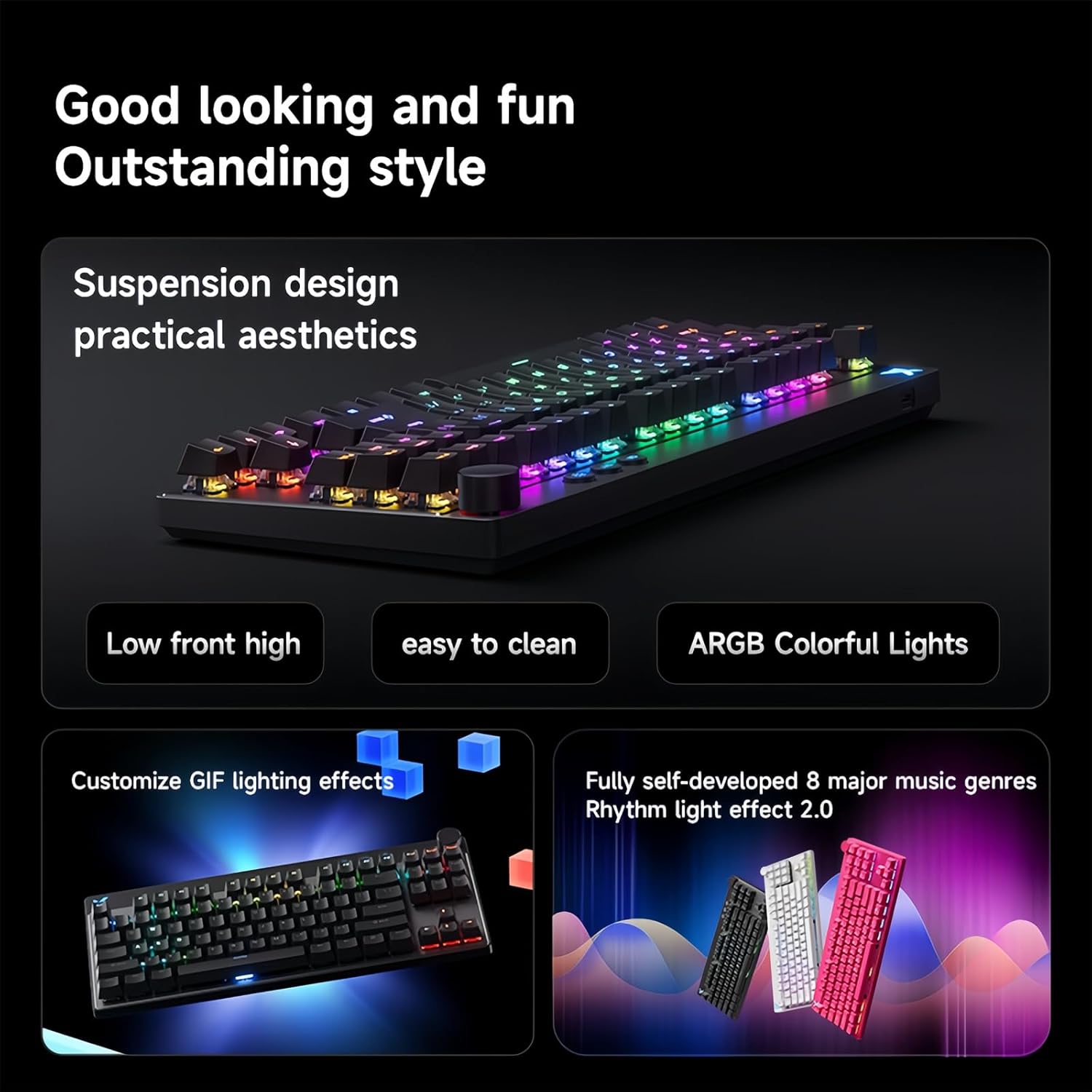
Figure 4: The MCHOSE Mix 87 keyboard seamlessly transitions between office and game modes.
การปรับแต่งแสงไฟแบ็คไลท์ RGB
The keyboard features 16 million colors with north-facing LEDs. You can personalize lighting effects using FN shortcut keys or the webไดรเวอร์แบบ -based
- FN Shortcut Keys: Use combinations of the FN key with other keys to cycle through various lighting modes, adjust brightness, and change colors. Refer to the included quick start guide for specific combinations.
- Music Rhythm Support: The RGB lighting can be synchronized with music for an immersive experience.

Figure 5: MCHOSE Mix 87 keyboard showcasing its vibrant RGB lighting effects.
สามารถตั้งโปรแกรมได้ Web Driver (MCHOSE HUB)
The MCHOSE Mix 87 supports customization via a web-based HUB driver, eliminating the need for software downloads. This ensures compatibility across various operating systems.
- การเข้าถึงไดรเวอร์: Visit the official MCHOSE webเว็บไซต์เพื่อเข้าถึง web- เครื่องมือกำหนดค่าตาม
- ตัวเลือกการปรับแต่ง: Within the driver, you can:
- Personalize individual key functions.
- Adjust actuation points for each key.
- Configure macros and advanced gaming functions.
- ปรับแต่งเอฟเฟกต์แสง RGB และความสว่างได้ตามต้องการ
Figure 6: Screenshot of the MCHOSE HUB web-based driver for advanced keyboard settings.
การซ่อมบำรุง
- การทำความสะอาดคีย์แคป: ใช้ที่ดึงปุ่มกดที่ให้มาเพื่อถอดปุ่มกดออกอย่างระมัดระวัง เช็ดทำความสะอาดด้วยผ้านุ่มๆamp ผ้าและสบู่อ่อนๆ หากจำเป็น ตรวจสอบให้แน่ใจว่าแห้งสนิทก่อนติดกลับเข้าที่
- การทำความสะอาดตัวคีย์บอร์ด: Use a soft, lint-free cloth to wipe down the keyboard body. For dust between keys, use compressed air.
- การบำรุงรักษาสวิตช์: The Hall effect switches are designed for durability. Avoid exposing them to excessive moisture or dust.
การแก้ไขปัญหา
- แป้นพิมพ์ไม่ตอบสนอง:
- ตรวจสอบให้แน่ใจว่าสาย USB-C เชื่อมต่อกับคีย์บอร์ดและคอมพิวเตอร์อย่างแน่นหนา
- ลองเชื่อมต่อคีย์บอร์ดกับพอร์ต USB อื่นบนคอมพิวเตอร์ของคุณ
- ทดสอบแป้นพิมพ์บนคอมพิวเตอร์เครื่องอื่นเพื่อตัดปัญหาเฉพาะระบบ
- ไฟ RGB ไม่ทำงาน/แสดงผลผิดปกติ:
- Check FN key combinations for lighting control (refer to quick start guide).
- ตรวจสอบให้แน่ใจว่าแป้นพิมพ์เชื่อมต่ออย่างถูกต้องและได้รับพลังงาน
- Access the MCHOSE HUB web driver to verify lighting settings.
- Keys Not Actuating Correctly:
- Verify actuation point settings in the MCHOSE HUB web คนขับรถ
- Ensure no debris is obstructing the switch mechanism.
- If a specific switch is faulty, replace it with one of the provided extra switches using the keycap/switch puller.
ข้อมูลจำเพาะ
| ชื่อรุ่น | คีย์บอร์ด Mix 87 |
| การเชื่อมต่อ | USB-C แบบมีสาย |
| จำนวนคีย์ | 87 keys (80% TKL Layout) |
| ประเภทสวิตซ์ | Hall Effect Apollo Magnetic Switch |
| การสั่งงานแบบปรับได้ | 0.01-3.4 mm (0.001 mm precision) |
| อัตราการสแกน | 256K |
| อัตราการสำรวจความคิดเห็น | 8K เฮิร์ตซ์ |
| ความหน่วงเวลา | 0.08มิลลิวินาที |
| ไฟแบ็คไลท์ RGB | 16 million colors, North-facing LEDs |
| โครงสร้าง | Gasket Mount Keyboard |
| สคร | รองรับ |
| ความเข้ากันได้ของระบบ | Windows/Mac/iOS/Android |
| ขนาดสินค้า | 14.1 x 6 x 1.4 นิ้ว |
| น้ำหนักสินค้า | 2 ปอนด์ |
วิดีโอผลิตภัณฑ์อย่างเป็นทางการ
วิดีโอ 1: จบแล้วview of the MCHOSE Mix 87 TKL Wired Magnetic Keyboard, demonstrating its features and functionality.
การรับประกันและการสนับสนุน
สำหรับข้อมูลการรับประกัน การสนับสนุนทางเทคนิค หรือความช่วยเหลือเพิ่มเติม โปรดดูที่เว็บไซต์อย่างเป็นทางการของ MCHOSE webหรือติดต่อฝ่ายบริการลูกค้าโดยตรง เก็บใบเสร็จรับเงินไว้เพื่อใช้ในการเคลมประกัน


