1. บทนำ
The AOCHUAN Smart M3 is a versatile 3-in-1 device combining a selfie stick, desktop stand, and floor tripod, featuring advanced AI face tracking and remote control capabilities. Designed for content creators and everyday users, it offers hands-free video recording and photography without the need for a dedicated application. This manual provides comprehensive instructions for setting up, operating, and maintaining your Smart M3 tripod.
2. ข้อมูลด้านความปลอดภัย
- อย่าให้เครื่องสัมผัสกับอุณหภูมิที่สูงหรือต่ำเกินไปหรือโดนแสงแดดโดยตรงเป็นเวลานาน
- เก็บอุปกรณ์ให้ห่างจากน้ำและของเหลวอื่นๆ
- หลีกเลี่ยงการทำอุปกรณ์หล่นหรือกระแทกอย่างรุนแรง
- อย่าพยายามถอดประกอบหรือซ่อมแซมอุปกรณ์ด้วยตนเอง ติดต่อฝ่ายสนับสนุนลูกค้าเพื่อขอความช่วยเหลือ
- Ensure your smartphone is securely mounted in the holder before use.
3. เนื้อหาบรรจุภัณฑ์
ตรวจสอบว่ามีรายการทั้งหมดรวมอยู่ในแพ็คเกจของคุณ:
- Smart M3 AI Face Tracking Tripod
- รีโมทคอนโทรล (x1)
- สายชาร์จ USB-C (x1)
- คู่มือการใช้งานผลิตภัณฑ์ (1 เล่ม)

4. สินค้าหมดview
The AOCHUAN Smart M3 features an integrated design with several key components:
- ที่วางโทรศัพท์: Securely holds smartphones from 1.8 to 3.8 inches in width.
- AI Tracking Camera: Located on the main unit, it detects and follows faces.
- ปุ่มเปิด/ปิด: สำหรับเปิด/ปิดอุปกรณ์
- พอร์ตชาร์จ USB-C: สำหรับชาร์จแบตเตอรี่ภายใน
- Remote Control Slot: Stores the detachable Bluetooth remote.
- เสาแบบยืดได้: Made from aluminum alloy, extends up to 57 inches.
- ขาตั้งกล้อง: Four-legged design with anti-slip rubber pads for enhanced stability.


5. การตั้งค่า
5.1 การกางขาตั้งออก
- Gently pull the bottom of the device to extend the tripod legs. Ensure they are fully spread for maximum stability.
- Extend the telescopic pole to your desired height. The pole can reach up to 57 inches.
5.2 การเชื่อมต่อสมาร์ทโฟนของคุณ
- Open the phone holder by pulling the top clip upwards.
- Carefully place your smartphone into the holder, ensuring it is centered and securely gripped. The holder accommodates devices from 1.8 to 3.8 inches wide.
5.3 การเปิดเครื่อง
กดปุ่มเปิด/ปิดบนตัวเครื่องหลักค้างไว้จนกว่าไฟแสดงสถานะจะสว่างขึ้น
5.4 การจับคู่รีโมทคอนโทรล
The remote control uses Bluetooth. To pair, ensure the remote is charged and the tripod is powered on. Activate Bluetooth on your smartphone and select the Smart M3 remote from the list of available devices. The remote is typically pre-paired or automatically connects upon activation.
6. คู่มือการใช้งาน
6.1 การติดตามใบหน้าด้วย AI
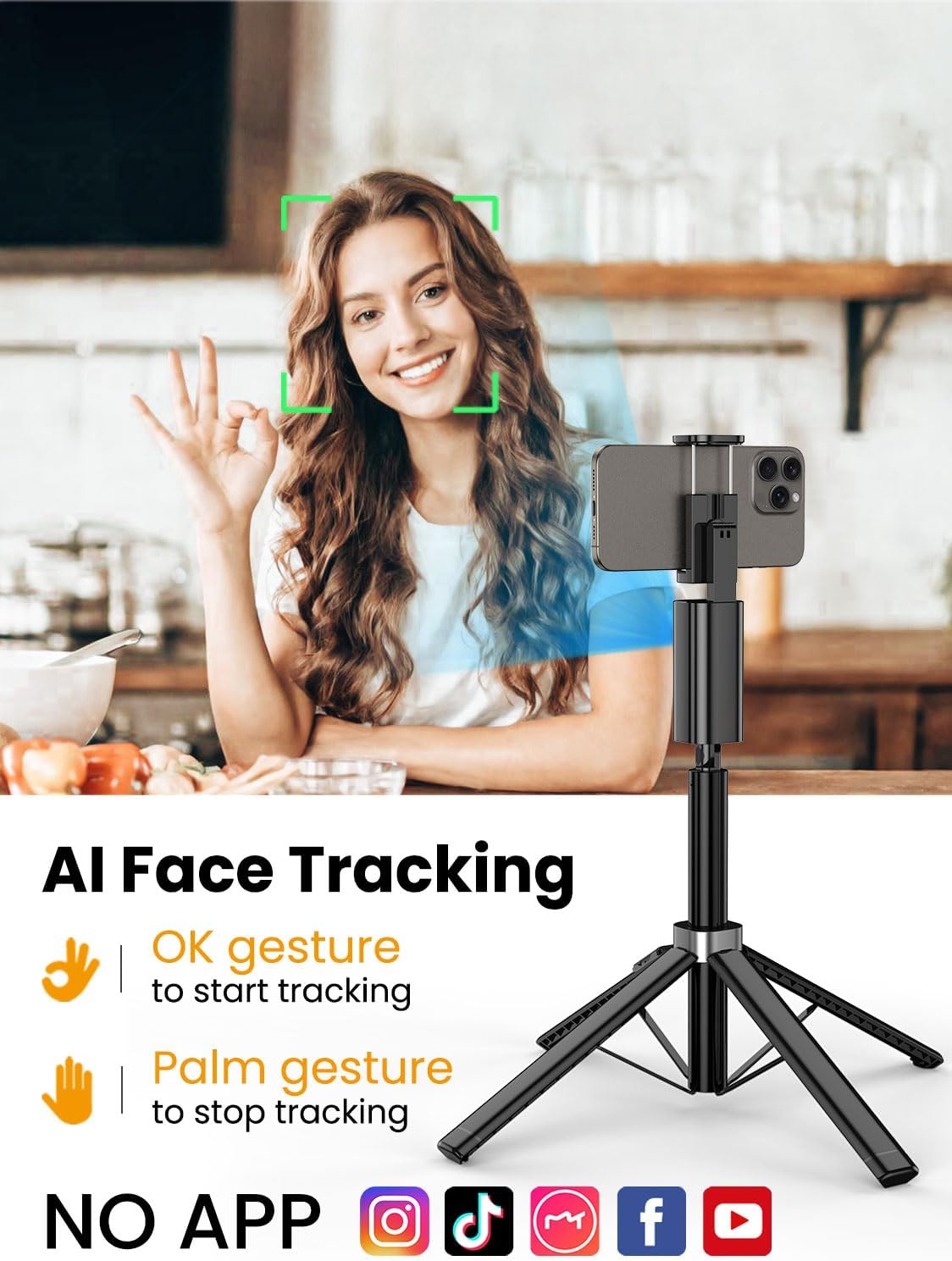
The Smart M3 features an integrated AI tracking camera that does not require an app. It automatically detects and follows faces.
- To Start Tracking: Make an "OK" gesture with your hand towards the AI tracking camera. The device will begin to rotate and follow your face.
- To Stop Tracking: Show your open palm to the AI tracking camera. The device will pause tracking.

6.2 ฟังก์ชั่นการควบคุมระยะไกล
The detachable remote control allows you to operate your smartphone's camera from a distance of up to 10 meters (32 feet). Use it to trigger photos or start/stop video recording, ideal for group shots or solo content creation.

6.3 Extendable Pole
The built-in aluminum alloy extension pole can be adjusted to a maximum height of 57 inches, providing flexibility for various shooting scenarios and wider fields of view.

6.4 Multi-Angle Shooting
The Smart M3 offers extensive adjustability for capturing unique perspectives:
- หัวหมุนได้ 360°: Allows for panoramic shots and seamless tracking.
- การปรับเอียง 270°: Adjust the vertical angle of your smartphone.
- 360° Balanced Handle: Provides additional rotational flexibility.

6.5 โหมดการใช้งาน
The Smart M3 can be used in three primary modes:
- ขาตั้งเดสก์ท็อป: Compact mode for stable placement on flat surfaces.
- Extended Selfie Mode: Use the extended pole for wider selfie shots.
- Floor Tripod Mode: Fully extend the pole and legs for stable, elevated recording.

7. การบำรุงรักษา
- ทำความสะอาดอุปกรณ์ด้วยผ้านุ่มและแห้ง ห้ามใช้น้ำยาทำความสะอาดหรือสารละลายที่มีฤทธิ์กัดกร่อน
- Store the tripod in a cool, dry place when not in use.
- Ensure the remote control is securely stored in its slot to prevent loss.
8 การแก้ไขปัญหา
- อุปกรณ์ไม่เปิดเครื่อง: โปรดตรวจสอบให้แน่ใจว่าอุปกรณ์ได้รับการชาร์จจนเต็มแล้ว โดยใช้สาย USB-C ที่ให้มาด้วย
- AI Face Tracking not working: Check for sufficient lighting. Ensure your face is clearly visible to the AI tracking camera. Avoid rapid movements that might cause the tracker to lose focus.
- Remote Control not connecting: Verify that the remote's battery is functional and that Bluetooth is enabled on your smartphone. Re-pair the remote if necessary.
- ขาตั้งกล้องไม่มั่นคง: Ensure the four legs are fully extended and placed on a flat, stable surface. Avoid using in strong winds.
9. ข้อมูลจำเพาะ
| คุณสมบัติ | ข้อมูลจำเพาะ |
|---|---|
| ขนาดสินค้า | 1.77 x 1.57 x 57 นิ้ว |
| น้ำหนักสินค้า | 1.08 ปอนด์ (0.49 กิโลกรัม) |
| แบตเตอรี่ | ต้องใช้แบตเตอรี่ลิเธียมไอออน 1 ก้อน (รวมอยู่ด้วย) |
| ผู้ผลิต | อ่าวชวน |
| ยี่ห้อ | อ่าวชวน |
| สี | สีดำ |
| อุปกรณ์ที่รองรับ | สมาร์ทโฟน |
| วัสดุ | อลูมิเนียม |
| ความสูงสูงสุด | 57 นิ้ว |
| ประเภทหัวขาตั้งกล้อง | หัวแพน |
| จำนวนส่วนขา | 4 |
| ขนาดเมื่อพับ | 12.41 นิ้ว |
10. การรับประกันและการสนับสนุน
For warranty information and customer support, please refer to the contact details provided on the product packaging or visit the official AOCHUAN webไซต์นี้ โปรดเก็บใบเสร็จรับเงินที่ซื้อไว้เพื่อใช้เรียกร้องการรับประกัน


