1. บทนำ
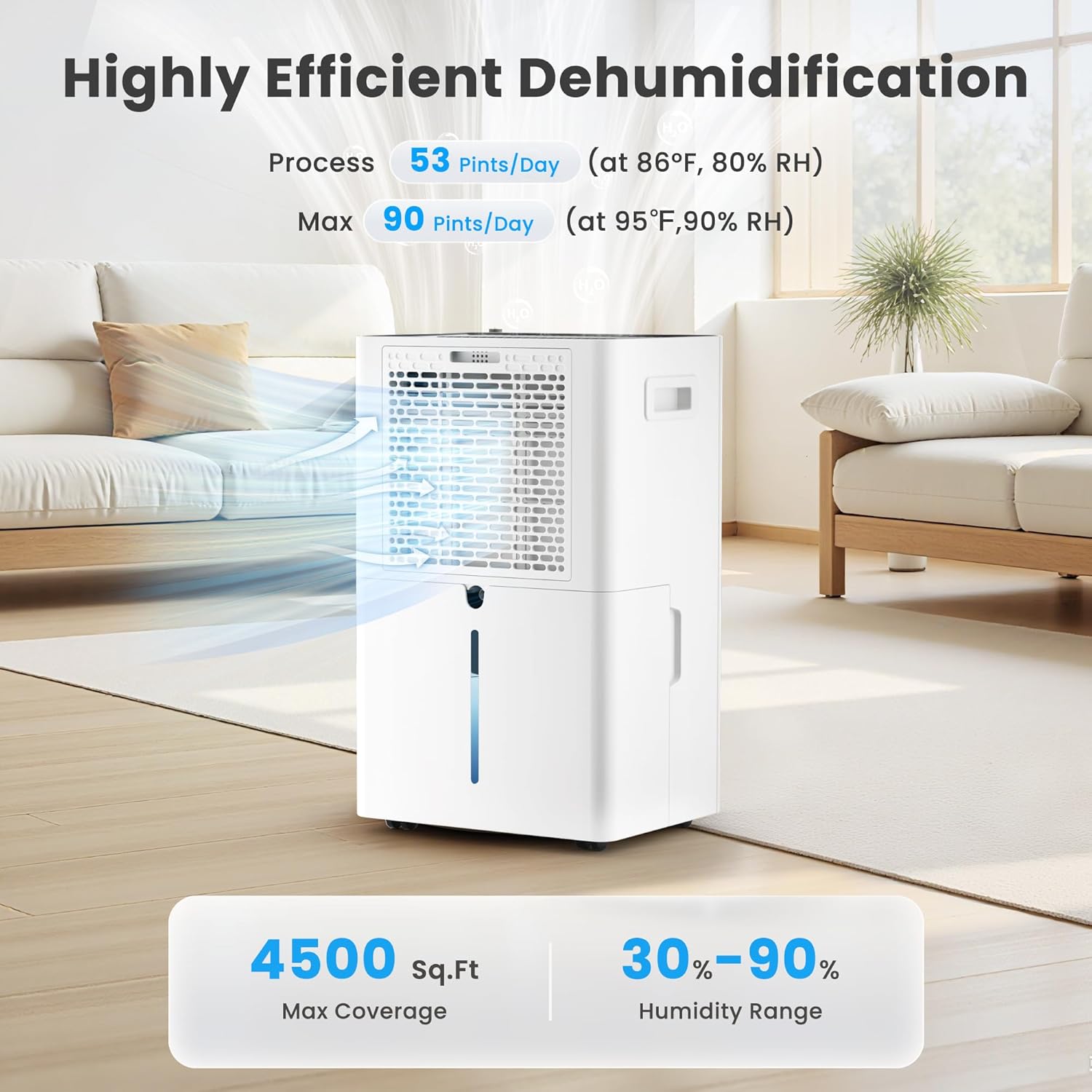
Thank you for choosing the Candy 53 Pints Dehumidifier. This manual provides essential information for the safe operation, installation, maintenance, and troubleshooting of your new appliance. Please read it thoroughly before use and retain it for future reference. This dehumidifier is designed to effectively reduce humidity in spaces up to 4500 square feet, helping to prevent issues such as mold, mildew, and musty odors.


2. ข้อมูลด้านความปลอดภัย
เพื่อลดความเสี่ยงจากการเกิดไฟไหม้ ไฟฟ้าช็อต หรือการบาดเจ็บ ควรปฏิบัติตามข้อควรระวังด้านความปลอดภัยพื้นฐานเหล่านี้เสมอ:
- อ่านคำแนะนำทั้งหมดก่อนใช้เครื่องใช้ไฟฟ้า
- ตรวจสอบให้แน่ใจว่าแหล่งจ่ายไฟตรงกับปริมาตรtage ระบุไว้บนฉลากการจัดอันดับ
- ห้ามใช้งานเครื่องลดความชื้นหากสายไฟหรือปลั๊กชำรุด
- Always place the unit on a firm, level surface to prevent water spillage.
- ควรเว้นระยะห่างอย่างน้อย 8 นิ้ว (20 ซม.) รอบตัวเครื่องเพื่อให้มีการไหลเวียนของอากาศที่เหมาะสม
- ห้ามสอดวัตถุเข้าไปในช่องลมเข้าหรือช่องลมออก
- ถอดปลั๊กเครื่องก่อนทำความสะอาดหรือดำเนินการบำรุงรักษาใดๆ
- เก็บเครื่องให้ห่างจากแหล่งความร้อนและแสงแดดโดยตรง
- เครื่องใช้ไฟฟ้าตัวนี้ไม่ได้มีวัตถุประสงค์เพื่อให้บุคคล (รวมทั้งเด็ก) ที่มีความบกพร่องทางร่างกาย ทางประสาทสัมผัส หรือทางจิตใจ หรือขาดประสบการณ์และความรู้ ใช้งาน เว้นแต่จะมีการดูแลหรือคำแนะนำเกี่ยวกับการใช้เครื่องใช้ไฟฟ้าโดยบุคคลที่รับผิดชอบด้านความปลอดภัยของบุคคลดังกล่าว
3. สินค้าหมดview
The Candy 53 Pints Dehumidifier is designed for efficient moisture removal, covering areas up to 4500 square feet. It features smart controls and flexible drainage options.
3.1 ส่วนประกอบหลัก
- เครื่องลดความชื้น
- Removable Water Tank (1.35 Gallon capacity)
- ท่อระบายน้ำ (6.67 ฟุต สำหรับการระบายน้ำอย่างต่อเนื่อง)
- แผ่นกรองอากาศล้างทำความสะอาดได้
- สายไฟ

3.2 คุณสมบัติ
- ประสิทธิภาพสูง: สามารถกำจัดความชื้นได้มากถึง 53 ไพนต์ต่อวัน (ที่อุณหภูมิ 86°F ความชื้นสัมพัทธ์ 80%)
- ครอบคลุมพื้นที่กว้าง: Suitable for areas up to 4500 sq. ft.
- การควบคุมอัจฉริยะ: Wi-Fi enabled for control via Candy Home App, Google Home, or Alexa.
- หลายโหมด: Continuous, Auto, and Sleep modes.
- สามารถปรับความชื้นได้: Target humidity range from 30% to 90%.
- ความเร็วพัดลม: Three fan speed settings (Low, Medium, High).
- Dual Drainage: Manual (1.35 Gal tank) or Continuous (drain hose).
- การออกแบบที่สะดวกสบาย: Ergonomic handle, universal smooth wheels, anti-spill tank, washable filter, auto defrost, 24-hour timer, child lock.
- การทำงานที่เงียบ: ทำงานที่ระดับเสียงประมาณ 43 เดซิเบล

4. การตั้งค่า
4.1 การแกะกล่อง
Carefully remove the dehumidifier from its packaging. Inspect the unit for any shipping damage. Retain the packaging materials for future storage or transport.
4.2 การจัดวาง
Place the dehumidifier on a smooth, level floor in a location where the humidity is highest. Ensure there is at least 8 inches (20 cm) of space on all sides of the unit to allow for proper air circulation. Avoid placing it near heat-generating appliances or in direct sunlight. For optimal performance, close all doors and windows in the room where the dehumidifier is operating.

5. คู่มือการใช้งาน
5.1 แผงควบคุมโอเวอร์view
The dehumidifier features an intuitive touch control panel with an LED display. Familiarize yourself with the buttons and indicators:

5.2 เปิด/ปิดเครื่อง
กดปุ่ม พลัง button (usually indicated by a power symbol) to turn the unit on or off. Hold for 3 seconds to connect to Wi-Fi.
5.3 การตั้งค่าความชื้นที่ต้องการ
In ออโต้ โหมดกดปุ่ม การตั้งค่าความชื้น button to adjust the desired humidity level between 30% and 90% in 5% increments. The unit will operate until the set humidity is reached, then pause, restarting when humidity rises.
5.4 การเลือกความเร็วพัดลม
กดปุ่ม ความเร็ว button to cycle through Low, Medium, and High fan speeds. The corresponding speed icon will illuminate on the display.

5.5 โหมดการทำงาน
กดปุ่ม โหมด ปุ่มเพื่อเลือกจากรายการต่อไปนี้:
- โหมดอัตโนมัติ: The unit automatically maintains the set humidity level, pausing when reached and restarting when needed.
- โหมดต่อเนื่อง: The dehumidifier operates continuously at high fan speed, regardless of the humidity level, for rapid moisture removal.
- โหมดสลีป: Operates at ultra-quiet, low fan speed with dimmed display lights for undisturbed nighttime use.

5.6 ฟังก์ชั่นจับเวลา
กดปุ่ม ตัวจับเวลา button to set a 24-hour timer for automatic power on or off. Each press increases the time by one hour. The timer can be set from 1 to 24 hours.

5.7 ล็อคป้องกันเด็ก
To prevent unintentional changes to settings, press and hold the ล็อค button for 3 seconds to activate or deactivate the child lock function. This ensures safety around children and pets.

5.8 การควบคุมผ่าน Wi-Fi และแอปพลิเคชัน
The dehumidifier can be controlled remotely via the Candy Home App (available for iOS/Android), Google Home, or Alexa. Follow the app's instructions to connect your device to your home Wi-Fi network. This allows you to adjust settings, monitor humidity, and receive notifications from anywhere.
- Download the Candy Home App from your device's app store.
- Follow the in-app instructions to pair your dehumidifier.
- Once connected, you can control power, mode, humidity settings, and fan speed.


6. ตัวเลือกการระบายน้ำ
Your Candy dehumidifier offers two methods for water removal:
6.1 การระบายน้ำด้วยตนเอง (ถังเก็บน้ำ)
The unit collects condensed water in its internal 1.35-gallon water tank. When the tank is full, the dehumidifier will automatically shut off and an indicator light will illuminate. Carefully remove the tank, empty the water, and reinsert it securely to resume operation.
6.2 การระบายน้ำอย่างต่อเนื่อง (ท่อระบายน้ำ)
For continuous, hands-free operation, attach the included 6.67 ft drain hose to the designated outlet on the back of the unit. Route the hose to a suitable floor drain or pump. Ensure the hose is sloped downwards to allow gravity drainage and prevent kinks.

7. การบำรุงรักษา
การบำรุงรักษาตามปกติจะช่วยให้เครื่องลดความชื้นของคุณมีประสิทธิภาพสูงสุดและมีอายุการใช้งานยาวนาน
7.1 การทำความสะอาดแผ่นกรองอากาศ
The washable air filter should be cleaned every two weeks or more frequently depending on usage and air quality. A dirty filter can reduce efficiency and airflow.
- ถอดปลั๊กเครื่องลดความชื้นออกจากเต้าเสียบไฟฟ้า
- เปิดตะแกรงช่องอากาศเข้า
- ถอดไส้กรองอากาศออก
- ล้างตัวกรองด้วยน้ำสบู่อุ่นๆ ล้างออกให้สะอาด
- ปล่อยให้ตัวกรองแห้งสนิทก่อนใส่กลับเข้าไป
- Place the filter back into the air intake grille and close it.

7.2 Water Tank Cover Installation
Ensure the water tank cover is correctly installed after emptying or cleaning to prevent leaks and ensure proper operation.
- Place the water tank cover at an angle under the water tank clip position.
- Then lower the water tank cover to position as shown in the enlarged figure.

7.3 ระบบละลายน้ำแข็งอัตโนมัติ
The dehumidifier is equipped with an automatic defrost function. If frost builds up on the evaporator coils in low temperatures, the unit will automatically defrost. During this process, the lights will illuminate, the compressor will stop, but the fan will continue to run. This is normal operation and ensures efficient performance.

7.4 พื้นที่จัดเก็บ
If the unit will not be used for an extended period, unplug it, empty the water tank, clean the filter, and store it in a cool, dry place, preferably in its original packaging.
8 การแก้ไขปัญหา
ก่อนติดต่อฝ่ายบริการลูกค้า โปรดดูคู่มือการแก้ไขปัญหาต่อไปนี้สำหรับปัญหาทั่วไป:
| ปัญหา | สาเหตุที่เป็นไปได้ | สารละลาย |
|---|---|---|
| เครื่องลดความชื้นไม่เปิด | No power; power cord loose; water tank full or not properly inserted. | ตรวจสอบการเชื่อมต่อไฟฟ้า เทน้ำออกจากถังเก็บน้ำแล้วใส่กลับเข้าไปใหม่ให้ถูกต้อง |
| ไม่มีการเก็บน้ำ | Humidity too low; room temperature too low; air filter clogged; unit in continuous drainage mode. | Increase target humidity; ensure room temperature is above 41°F (5°C); clean air filter; check drain hose connection. |
| เครื่องทำงาน แต่ความชื้นไม่ลดลง | Doors/windows open; room too large; air filter clogged; unit too close to walls. | Close all openings; ensure unit is suitable for room size; clean air filter; ensure proper clearance. |
| หน่วยมีเสียงดัง | Unit not on a level surface; air filter clogged; internal components loose. | Place on a level surface; clean air filter; contact customer support if noise persists. |
| ปัญหาการเชื่อมต่อ Wi-Fi | Incorrect Wi-Fi password; unit too far from router; router issues. | Verify Wi-Fi password; move unit closer to router; restart router; re-pair device via app. |
9. ข้อมูลจำเพาะ
| คุณสมบัติ | ข้อมูลจำเพาะ |
|---|---|
| ยี่ห้อ | ลูกอม |
| หมายเลขรุ่น | CAS-CF25-US |
| ความสามารถในการกำจัดความชื้น | 53 ไพนต์/วัน (ที่ 86°F, 80% RH) |
| พื้นที่ครอบคลุมสูงสุด | 4500 ตร.ฟุต |
| ช่วงการตั้งค่าความชื้น | 30% - 90% |
| ปริมาตรถังเก็บน้ำ | 1.35 แกลลอน |
| ความยาวท่อระบายน้ำ | 6.67 ฟุต |
| ขนาดสินค้า (ลึก x กว้าง x สูง) | 19.69" x 9.25" x 12.2" |
| น้ำหนักสินค้า | 29 ปอนด์ |
| จำนวนความเร็วพัดลม | 3 (ต่ำ, ปานกลาง, สูง) |
| คุณสมบัติพิเศษ | Automatic Defrost, Automatic Shutoff, Continuous/Auto/Sleep Mode, Smart APP WIFI Control, Ergonomic Handle, Washable Filter, Child Lock, 24-Hour Timer |
| ระดับเสียง | ประมาณ 43dB |
10. การรับประกันและการสนับสนุน
This product includes a user manual as part of its packaging. For specific warranty information, please refer to the documentation included with your purchase or contact Candy customer support. If you encounter any issues not covered in this manual, or require further assistance, please reach out to the manufacturer's customer service department.


