1. บทนำ
This manual provides essential information for the setup, operation, maintenance, and troubleshooting of your KOOSMILE N150 8-inch 2-in-1 Mini Laptop. Please read this manual thoroughly before using the device to ensure proper functionality and to prevent damage.
2. เนื้อหาบรรจุภัณฑ์
ตรวจสอบว่ามีรายการทั้งหมดอยู่ในแพ็คเกจ:
- KOOSMILE N150 8-inch 2-in-1 Mini Laptop x1
- PD Adapter x1
- Active Stylus x1
- สาย HDMI x1
- HUB x1
- คู่มือการใช้งาน x1
- Data Cables x2
3. สินค้าหมดview
Familiarize yourself with the components and ports of your mini laptop.
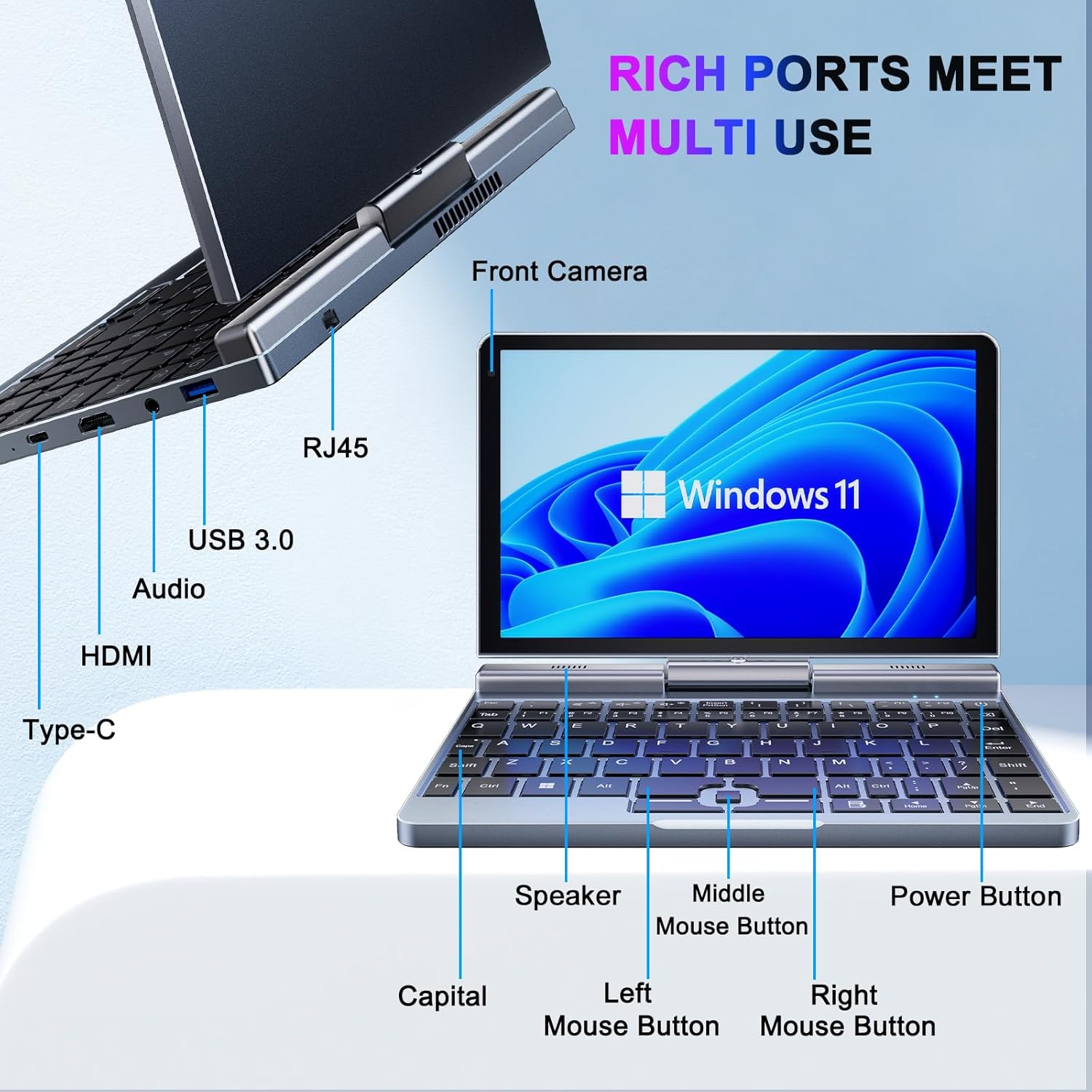
ภาพที่ 3.1: KOOSMILE N150 Mini Laptop with labeled ports and buttons. Key components include the Front Camera, RJ45 port, USB 3.0 port, Audio jack, HDMI port, Type-C port, Speaker, Middle Mouse Button, Left Mouse Button, Right Mouse Button, Capital indicator, and Power Button.
3.1 คุณสมบัติหลัก
- โปรเซสเซอร์: Intel N150 (4 cores/4 threads, up to 3.6GHz)
- ระบบปฏิบัติการ: วินโดวส์ 11 โปร
- แสดง: หน้าจอสัมผัส HD ขนาด 8 นิ้ว (1280x800 พิกเซล)
- หน่วยความจำ: แรม LPDDR5 ขนาด 12GB (4800 MHz)
- พื้นที่จัดเก็บ: 512GB or 1TB M.2 SSD (expandable up to 2TB)
- การเชื่อมต่อ: Wi-Fi 6 (802.11ax), Bluetooth 5.2, Gigabit Ethernet (via RJ45)
- พอร์ต: USB 3.0, USB Type-C, HDMI, Headphone Jack
- กล้อง: กล้องหน้า 2MP
- ออกแบบ: 180° Rotating Screen, 2-in-1 Convertible (Laptop/Tablet mode), CNC-machined full-metal body
- น้ำหนัก: น้ำหนักประมาณ 0.78 กิโลกรัม (1.72 ปอนด์)
4. การตั้งค่า
4.1 การชาร์จเริ่มต้น
- Connect the provided PD Adapter to the USB Type-C port on the laptop.
- เสียบอะแดปเตอร์เข้ากับเต้ารับไฟฟ้า
- Allow the device to charge fully before first use. A full charge is indicated by the charging LED changing color or turning off.
- บันทึก: Use only the provided PD adapter or a compatible Type-C charger with sufficient voltage (e.g., a laptop or Steamdeck charger) to ensure proper charging. Standard phone USB blocks may not provide enough power.
4.2 การบูตครั้งแรกและการตั้งค่า Windows
- Press and hold the Power Button (refer to Image 3.1) until the screen illuminates.
- Follow the on-screen instructions to complete the Windows 11 Pro setup process. This typically includes selecting your region, language, connecting to a Wi-Fi network, and creating a user account.
5. คู่มือการใช้งาน
5.1 การเปิด/ปิดเครื่องและโหมดสลีป
- เปิดเครื่อง: กดปุ่มเปิด/ปิด
- โหมดสลีป: Briefly press the Power Button while the device is on. Press again to wake.
- ปิดระบบ: Click the Windows Start button, then Power, and select "Shut down."
- เริ่มต้นใหม่อีกครั้ง: Click the Windows Start button, then Power, and select "Restart."
5.2 การใช้งานฟังก์ชัน 2-in-1
The laptop features a 180° rotating screen, allowing it to transform into various modes.
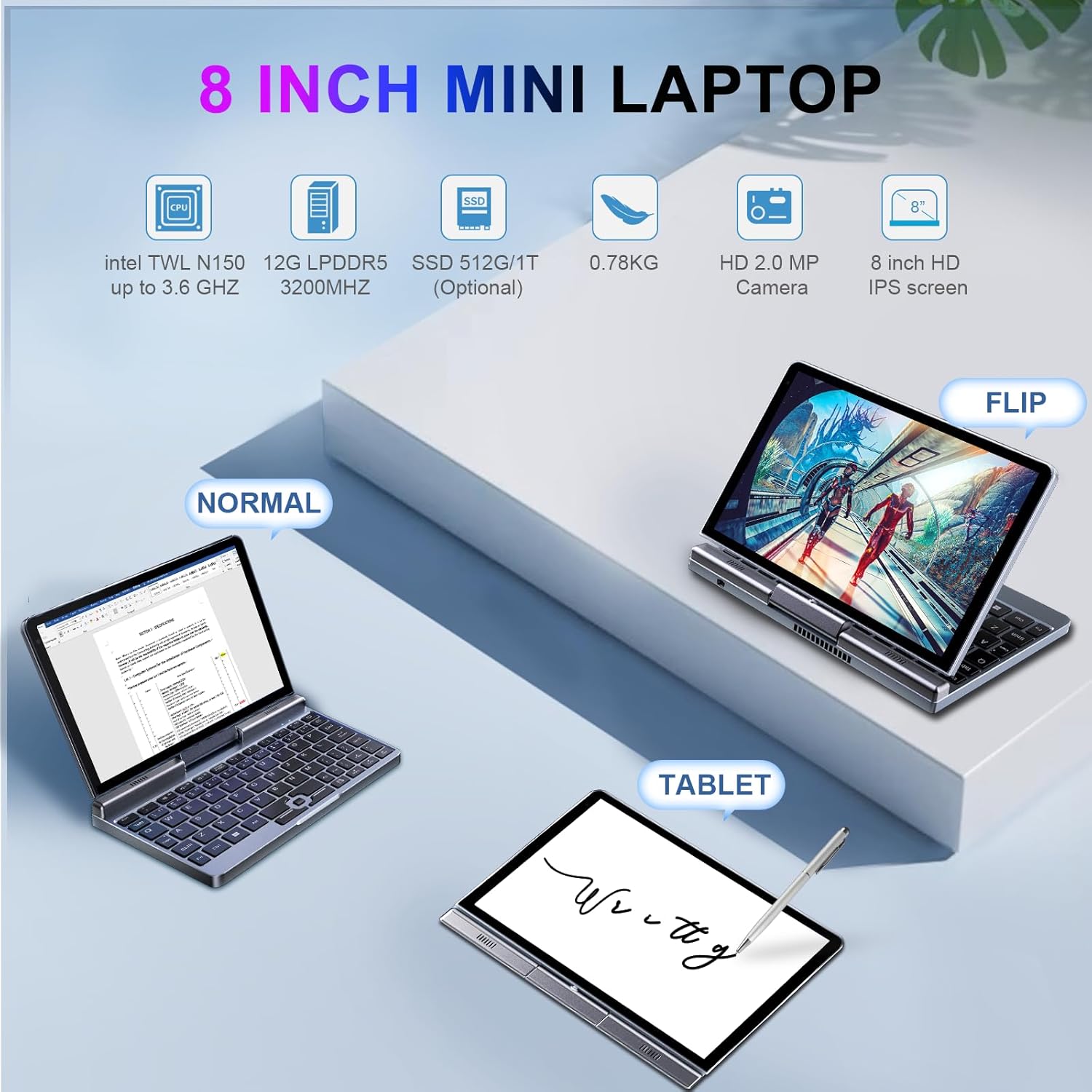
ภาพที่ 5.1: Demonstrates the KOOSMILE N150 Mini Laptop in its three primary modes: Normal (traditional laptop), Flip (tent mode), and Tablet (screen folded back). This highlights the device's versatility for different usage scenarios.
- โหมดแล็ปท็อป: Standard configuration for typing with the physical keyboard.
- Tent Mode (Flip): Rotate the screen 180 degrees and stand the device in a tent shape for media consumption or presentations.
- โหมดแท็บเล็ต: Fold the screen completely back against the base for a full touchscreen experience. The physical keyboard will automatically disable in this mode.
5.3 Touch Screen and Stylus Usage
- The 8-inch HD screen supports multi-touch gestures.
- Use the included Active Stylus for precise input, drawing, or note-taking, especially in Tablet mode.
5.4 การเชื่อมต่อจอแสดงผลภายนอก
The laptop supports external displays via HDMI and USB Type-C (DisplayPort out).

ภาพที่ 5.2: The KOOSMILE N150 Mini Laptop connected to an external monitor, demonstrating its capability for multi-screen display and enhanced productivity. The image shows the laptop displaying a document while the external monitor shows a larger view of the same document.

ภาพที่ 5.3: The KOOSMILE N150 Mini Laptop configured as a micro desktop, connected to two external monitors, a keyboard, and a mouse. This setup illustrates its potential for multi-tasking and extended workspace.
- Connect an HDMI cable from the laptop's HDMI port to your external display.
- Alternatively, use a USB Type-C to DisplayPort cable or adapter for compatible monitors.
- กด ปุ่ม Windows + P to open the Project menu and select your desired display mode (e.g., Duplicate, Extend, Second screen only).
5.5 การเชื่อมต่อเครือข่าย
- ไวไฟ : Access Wi-Fi settings via the Windows taskbar icon to connect to available wireless networks.
- บลูทูธ: Enable Bluetooth in Windows settings to pair with Bluetooth devices like headphones or keyboards.
- อีเธอร์เน็ต: เชื่อมต่อสายเคเบิลอีเทอร์เน็ตเข้ากับพอร์ต RJ45 เพื่อเชื่อมต่อเครือข่ายแบบใช้สาย
6. การบำรุงรักษา
6.1 การทำความสะอาด
- ใช้ผ้าที่ไม่เป็นขุยและนุ่มเพื่อทำความสะอาดหน้าจอและภายนอก
- สำหรับรอยฝังแน่น ให้เช็ดเบาๆampชุบผ้าด้วยน้ำหรือน้ำยาทำความสะอาดหน้าจอ หลีกเลี่ยงสารเคมีรุนแรง
- ตรวจสอบให้แน่ใจว่าอุปกรณ์ปิดอยู่และถอดปลั๊กออกก่อนทำความสะอาด
6.2 การดูแลแบตเตอรี่
- เพื่อยืดอายุการใช้งานแบตเตอรี่ ควรหลีกเลี่ยงอุณหภูมิที่สูงเกินไป
- อย่าปล่อยให้แบตเตอรี่หมดจนหมดบ่อยๆ
- If storing the device for an extended period, charge it to approximately 50-70%.
6.3 การอัปเดตซอฟต์แวร์
- ตรวจสอบและติดตั้งการอัปเดต Windows เป็นประจำเพื่อให้มั่นใจได้ถึงประสิทธิภาพและความปลอดภัยสูงสุด ไปที่ การตั้งค่า > Windows Update.
7 การแก้ไขปัญหา
| ปัญหา | วิธีแก้ปัญหาที่เป็นไปได้ |
|---|---|
| อุปกรณ์ไม่เปิดเครื่อง |
|
| แบตเตอรี่ไม่ชาร์จ |
|
| ปัญหาการเชื่อมต่อ Wi-Fi |
|
| Touchscreen or stylus not responding. |
|
| Device runs hot during use. |
|
8. ข้อมูลจำเพาะ
| คุณสมบัติ | รายละเอียด |
|---|---|
| แบบอย่าง | P8 (N150) |
| โปรเซสเซอร์ | Intel N150 (4 cores/4 threads, up to 3.6GHz) |
| กราฟฟิก | กราฟิก Intel UHD (รวม) |
| ระบบปฏิบัติการ | วินโดวส์ 11 โปร |
| แสดง | 8-inch HD Touch Screen, 1280 x 800 pixels |
| แรม | 12GB LPDDR5 (4800MHz) |
| พื้นที่จัดเก็บ | 512GB or 1TB M.2 SSD (Expandable up to 2TB) |
| การเชื่อมต่อแบบไร้สาย | Wi-Fi 6 (802.11ax), บลูทูธ 5.2 |
| พอร์ต | 1x USB 3.0, 1x USB Type-C (DisplayPort out), 1x HDMI, 1x Headphone Jack, 1x RJ45 (Ethernet) |
| กล้อง | กล้องหน้า 2MP |
| แบตเตอรี่ | 36.5 WH Lithium Polymer |
| ขนาด (กxยxส) | 7.87 x 5.51 x 0.79 นิ้ว |
| น้ำหนัก | 1.72 ปอนด์ (0.78 กก.) |
| สี | สีเทา |
9. การรับประกันและการสนับสนุน
KOOSMILE provides a 1-year warranty for this product. For technical support, warranty claims, or any inquiries, please contact KOOSMILE customer support. Contact details can typically be found on the KOOSMILE official webเว็บไซต์หรือผ่านแพลตฟอร์มการซื้อของคุณ
นอกจากนี้ อาจมีแหล่งข้อมูลออนไลน์และคำถามที่พบบ่อย (FAQ) ให้บริการบนเว็บไซต์ด้วย KOOSMILE Store.


