คำแนะนำด้านความปลอดภัยที่สำคัญ
โปรดอ่านและทำความเข้าใจคำแนะนำด้านความปลอดภัยทั้งหมดก่อนใช้ผลิตภัณฑ์นี้ เก็บคู่มือนี้ไว้เพื่อใช้อ้างอิงในอนาคต
- การระบายอากาศ : ตรวจสอบให้แน่ใจว่ามีการระบายอากาศที่เพียงพอ อย่าปิดกั้นช่องระบายอากาศใดๆ
- น้ำและความชื้น: อย่าวางเครื่องใช้ไฟฟ้านี้ไว้ในที่ที่มีฝนหรือความชื้น อย่าวางสิ่งของที่บรรจุของเหลว เช่น แจกัน ไว้บนเครื่องใช้ไฟฟ้านี้
- แหล่งความร้อน: ห้ามติดตั้งใกล้แหล่งความร้อน เช่น หม้อน้ำ เครื่องทำความร้อน เตา หรืออุปกรณ์อื่น ๆ (รวมถึง ampเครื่องให้ความร้อน) ที่ผลิตความร้อน
- แหล่งพลังงาน: Use only power supplies specified by the manufacturer. Ensure the power cord is protected from being walked on or pinched.
- การทำความสะอาด: ทำความสะอาดด้วยผ้าแห้งเท่านั้น
- การบริการ: อย่าพยายามให้บริการผลิตภัณฑ์นี้ด้วยตนเอง ส่งต่อการบริการทั้งหมดไปยังช่างบริการที่ผ่านการรับรอง
เนื้อหาแพ็คเกจ
ตรวจสอบว่ารายการทั้งหมดที่ระบุไว้ด้านล่างนี้รวมอยู่ในแพ็คเกจของคุณ:
- Kuephom CD-X2A Boombox
- สายไฟ AC
- คู่มือการใช้งาน (เอกสารนี้)
- รีโมทคอนโทรล
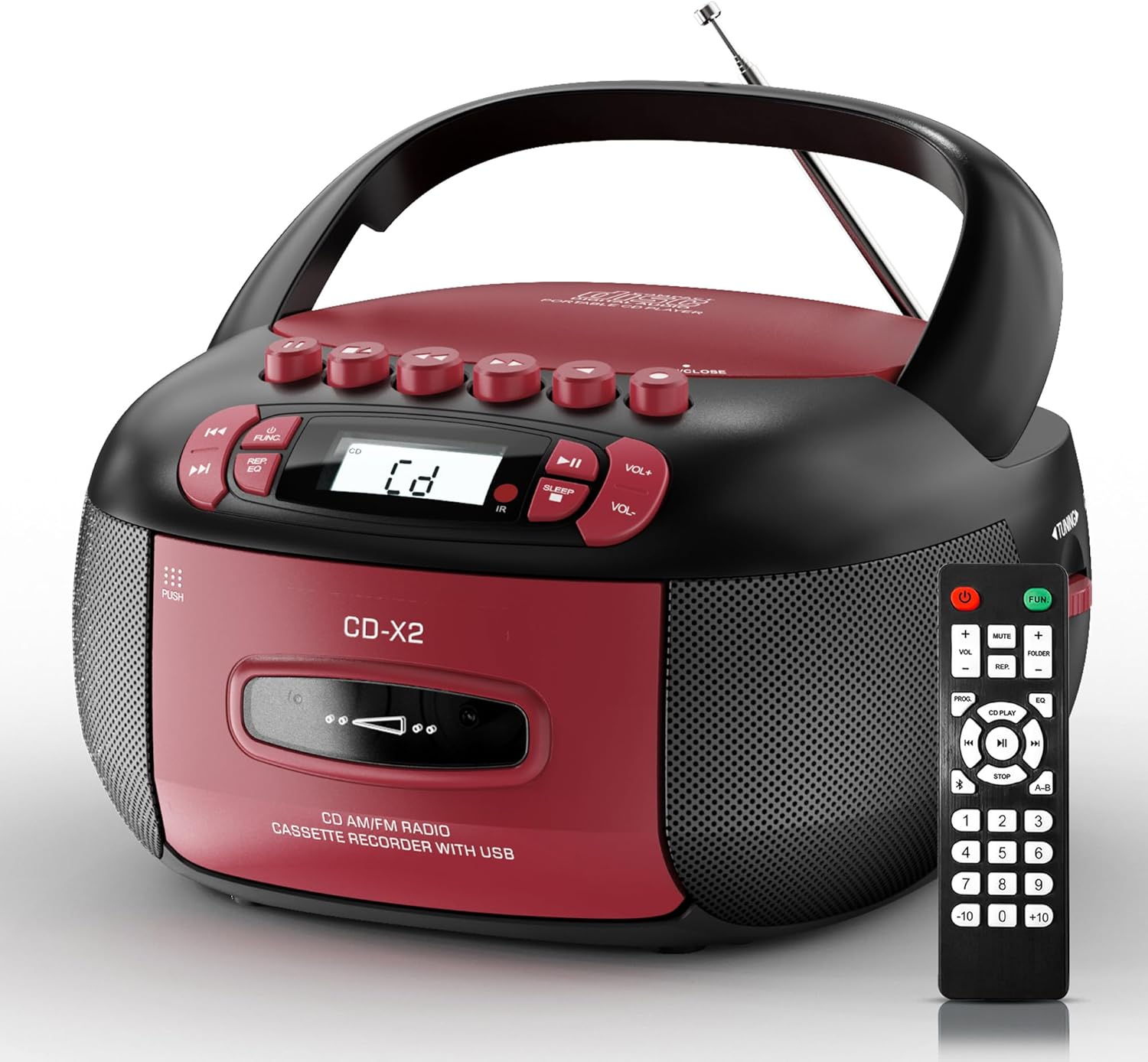
Image: The Kuephom CD-X2A Boombox with its included remote control, showcasing its compact design and red/black color scheme.
สินค้าเกินview
Familiarize yourself with the various components and controls of your Kuephom CD-X2A Boombox.
แผงควบคุมด้านหน้า
- ปุ่มเปิด/ปิด/ฟังก์ชัน: Press and hold to power on/off. Press to cycle through modes (CD, USB, Bluetooth, Radio, AUX, Tape).
- ปุ่มปรับระดับเสียง +/-: ปรับระดับเสียงการเล่น
- ปุ่มเล่น/หยุดชั่วคราว: Start or pause playback for CD, USB, Bluetooth, or Tape.
- ปุ่มหยุด: หยุดเล่น
- ปุ่มข้าม/ค้นหา: Navigate between tracks on CD/USB or fast forward/rewind on tape.
- ปุ่ม EQ: เลือกค่าที่ตั้งไว้ของอีควอไลเซอร์
- ปุ่มตั้งเวลาปิดเครื่อง: ตั้งเวลาปิดเครื่อง
แผงควบคุมด้านข้าง
- ปุ่มปรับ: Manually tune AM/FM radio stations.
- แจ็คหูฟัง: เชื่อมต่อหูฟังเพื่อการฟังแบบส่วนตัว
- พอร์ต AUX-in: เชื่อมต่ออุปกรณ์เสียงภายนอก
- พอร์ต USB: Insert USB drives for MP3/WMA playback.
คุณสมบัติแผงด้านบน
- ช่องใส่ซีดี: Top-loading compartment for CDs.
- ช่องใส่เทปคาสเซ็ต: ช่องใส่เทปคาสเซ็ตแบบเปิดจากด้านหน้า
- เสาอากาศยืดไสลด์: ยืดออกเพื่อการรับสัญญาณวิทยุที่ดีขึ้น

Image: The boombox highlighting its multiple functions including CD/MP3, Bluetooth, Type I/II tape, USB, FM/AM Radios, Sleep timer, Remote, Phone jack, AUX, and Tape recording.

ภาพ: ระยะใกล้ views of the boombox's phone jack, top-loading CD player, telescopic antenna, and tape play/record buttons.
การตั้งค่า
Powering the Boombox
ไฟฟ้ากระแสสลับ
- Connect the supplied AC power cord to the AC IN jack on the back of the boombox.
- Plug the other end of the power cord into a standard AC wall outlet (120V~60Hz).
พลังงานแบตเตอรี่
- Open the battery compartment cover located on the bottom of the boombox.
- Insert 6 x 'C' size batteries (not included), ensuring correct polarity (+/-).
- ปิดฝาช่องใส่แบตเตอรี่ให้แน่น
- When operating on battery power, disconnect the AC power cord.

Image: The boombox demonstrating both AC power connection and the use of 6 C-size batteries for portable operation.
รีโมทคอนโทรล
- Insert 2 x 'AAA' batteries (not included) into the remote control, observing polarity.
- Point the remote control towards the boombox's IR sensor for optimal operation.

Image: An individual comfortably operating the boombox using the remote control from a distance.
คำแนะนำการใช้งาน
การดำเนินงานทั่วไป
- เปิด/ปิดเครื่อง: Press and hold the Power/Function button to turn the unit on or off.
- การเลือกฟังก์ชั่น: Press the Power/Function button repeatedly to switch between CD, USB, Bluetooth, Radio (AM/FM), AUX, and Tape modes.
การเล่นซีดี
- เปิดฝาช่องใส่ซีดี
- Place a CD (CD, CD-R, MP3, WMA compatible) onto the spindle with the label side facing up.
- ปิดฝาปิดช่องใส่ซีดี
- Press the Power/Function button to select 'CD' mode.
- กดปุ่มเล่น/หยุดชั่วคราวเพื่อเริ่มเล่น
- Use the Skip/Search buttons to navigate tracks.
- Press the Repeat button to repeat a single track, folder, or all tracks.
- Press the Program button to program a custom playback sequence.

Image: The boombox's display showing 'CD' mode, with icons indicating compatibility with CD, CD-R, CD-RW, WMA, and MP3 formats, along with single cycle, repeat folder, repeat all, random play, and play in order options.
การเล่นและการบันทึกเทปคาสเซ็ต
- Press the 'OPEN/CLOSE' button on the cassette compartment to open it.
- ใส่เทปคาสเซ็ท
- ปิดช่องใส่กลักกระดาษ
- Press the Power/Function button to select 'TAPE' mode.
- กดปุ่มเล่นเพื่อเริ่มเล่น
- Use the Fast Forward/Rewind buttons to navigate the tape.
- การบันทึก: In TAPE mode, select the desired source (CD, Bluetooth, USB, or AM/FM radio). Press the Record button to begin recording onto the cassette. The unit features an auto-stop function when the tape reaches its end.

Image: A hand inserting a cassette tape into the boombox's front-loading compartment, with controls for tape operation visible.
วิทยุ AM/FM
- Press the Power/Function button to select 'RADIO' mode. Press again to switch between AM and FM bands.
- Extend the telescopic antenna for better FM reception. For AM, rotate the unit for best reception.
- Use the Tuning knob on the side to manually tune to your desired station. The frequency will be displayed on the screen.

Image: A man relaxing on a couch with the boombox, which displays various FM/AM radio frequencies, indicating good reception.
การเชื่อมต่อบลูทูธ
- Press the Power/Function button to select 'BT' (Bluetooth) mode. The display will show 'BT' and flash, indicating it's in pairing mode.
- On your mobile device, enable Bluetooth and search for 'CD-X2A'.
- Select 'CD-X2A' to pair. Once paired, the 'BT' indicator will stop flashing.
- ตอนนี้คุณสามารถสตรีมเสียงแบบไร้สายจากอุปกรณ์ของคุณไปยังลำโพงพกพาได้แล้ว

Image: A woman in a living room wirelessly streaming audio from her smartphone to the boombox via Bluetooth 5.1, indicating a stable connection.
การเล่นผ่าน USB
- Insert a USB flash drive into the USB port on the side of the boombox.
- Press the Power/Function button to select 'USB' mode.
- The boombox will automatically detect and play compatible MP3/WMA files.
- ใช้ปุ่มเล่น/หยุดชั่วคราว, หยุด และ ข้าม/ค้นหา เพื่อควบคุมการเล่น
อินพุต AUX
- Connect an external audio device (e.g., smartphone, MP3 player) to the AUX-in port using a 3.5mm audio cable (not included).
- Press the Power/Function button to select 'AUX' mode.
- Control playback directly from your connected external device.
ตัวตั้งเวลาปิดเครื่อง
- While the unit is playing, press the Sleep Timer button.
- Repeatedly press the button to cycle through available sleep timer durations (e.g., 15, 30, 60, 90 minutes).
- The unit will automatically power off after the selected time.

Image: A man sleeping in bed with the boombox on his nightstand, illustrating the sleep timer feature which allows the device to turn off automatically.
การซ่อมบำรุง
- การทำความสะอาด: Use a soft, dry cloth to clean the exterior of the boombox. Do not use abrasive cleaners or solvents.
- การดูแลรักษาซีดี: จับแผ่นซีดีที่ขอบ ทำความสะอาดแผ่นซีดีที่สกปรกด้วยผ้าเนื้อนุ่มที่ไม่เป็นขุย โดยเช็ดจากตรงกลางออกไปด้านนอก
- การดูแลรักษาเทปคาสเซ็ต: Keep cassette tapes away from direct sunlight and heat. Periodically clean the tape heads with a specialized cassette head cleaner.
- พื้นที่จัดเก็บ: When not in use for extended periods, disconnect the power cord and remove batteries. Store the unit in a cool, dry place.
การแก้ไขปัญหา
หากคุณพบปัญหา โปรดดูตารางด้านล่างเพื่อดูปัญหาทั่วไปและวิธีแก้ไข
| ปัญหา | สาเหตุที่เป็นไปได้ | สารละลาย |
|---|---|---|
| ไม่มีไฟฟ้า | สายไฟ AC ไม่ได้เชื่อมต่อ; แบตเตอรี่หมดหรือใส่ไม่ถูกต้อง | Check AC connection; Replace or correctly insert batteries. |
| ไม่มีเสียง | ระดับเสียงต่ำเกินไป เลือกโหมดฟังก์ชั่นไม่ถูกต้อง เชื่อมต่อหูฟังแล้ว | Increase volume; Select correct mode; Disconnect headphones. |
| CD skips or doesn't play | CD dirty or scratched; CD inserted incorrectly; Incompatible CD format. | Clean or replace CD; Insert CD correctly; Ensure CD is compatible (CD, CD-R, MP3, WMA). |
| สัญญาณวิทยุไม่ชัด/รับสัญญาณได้ไม่ดี | เสาอากาศไม่ได้ยืด/อยู่ในตำแหน่งที่ถูกต้อง; สัญญาณอ่อน | Extend and adjust telescopic antenna; Try repositioning the unit. |
| บลูทูธไม่จับคู่ | Boombox not in pairing mode; Device Bluetooth off; Device too far. | Ensure boombox is in 'BT' mode and flashing; Enable Bluetooth on device; Move device closer. |
| เทปคาสเซ็ตไม่เล่น/บันทึก | Tape inserted incorrectly; Tape heads dirty; Auto-stop engaged. | Insert tape correctly; Clean tape heads; Check tape end. |
ข้อมูลจำเพาะ
| คุณสมบัติ | รายละเอียด |
|---|---|
| หมายเลขรุ่น | ซีดี-X2A |
| ขนาดสินค้า (กว้าง x ยาว x สูง) | 8.39 x 4.8 x 8.54 นิ้ว |
| น้ำหนักสินค้า | 3.45 ปอนด์ |
| แหล่งพลังงาน | AC 120V~60Hz or 6 x 'C' size batteries |
| เทคโนโลยีการเชื่อมต่อ | อุปกรณ์เสริม, บลูทูธ, USB |
| ประเภทลำโพง | Stereo (2W+2W output) |
| รูปแบบดิสก์ที่รองรับ | CD, CD-R, MP3, WMA |
| Supported Tape Types | Type I/II Cassette |
| แบนด์วิทยุ | เอเอ็ม/เอฟเอ็ม |
| คุณสมบัติพิเศษ | Tape Recording, Sleep Timer, Earphone Jack, Remote Control |
การรับประกันและการสนับสนุน
Kuephom products are designed for reliability and performance. This product comes with a standard manufacturer's warranty against defects in materials and workmanship under normal use.
For warranty claims, technical assistance, or any questions regarding your Kuephom CD-X2A Boombox, please contact Kuephom customer support. Refer to the contact information provided with your purchase documentation or visit the official Kuephom webเว็บไซต์สำหรับรายละเอียดการสนับสนุน
We are committed to providing lifetime service support and 7/24 customer assistance for our products.


