การแนะนำ
Thank you for choosing the Nerf GAM83056A-BLU Gaming Headphones. These headphones are designed to enhance your gaming experience with comfortable wear, clear audio, and seamless communication. Featuring a built-in microphone and a sleek black and blue design, they are suitable for extended gaming sessions across various platforms.
ข้อมูลด้านความปลอดภัย
โปรดอ่านคำแนะนำด้านความปลอดภัยทั้งหมดอย่างละเอียดก่อนใช้ผลิตภัณฑ์นี้ เก็บคู่มือนี้ไว้เพื่อใช้อ้างอิงในอนาคต
- หลีกเลี่ยงการฟังในระดับเสียงที่สูงเป็นเวลานานเพื่อป้องกันความเสียหายต่อการได้ยิน
- อย่าให้หูฟังสัมผัสกับอุณหภูมิที่สูงหรือต่ำเกินไป ความชื้นสูง หรือของเหลว
- ห้ามถอดประกอบหรือดัดแปลงหูฟัง การกระทำดังกล่าวจะทำให้การรับประกันเป็นโมฆะ
- เก็บให้พ้นมือเด็กเล็ก เนื่องจากมีชิ้นส่วนเล็กๆ ที่อาจเป็นอันตรายจากการสำลักได้
- Use only with compatible devices and accessories.
เนื้อหาแพ็คเกจ
ตรวจสอบให้แน่ใจว่ามีรายการทั้งหมดอยู่ในบรรจุภัณฑ์:
- 1 x Nerf GAM83056A-BLU Gaming Headphones with Integrated Microphone
- 1 x User Instruction Manual (this document)

Image: The Nerf GAM83056A-BLU Gaming Headphones shown in their retail box, highlighting the product and its key features.
สินค้าเกินview
Familiarize yourself with the components of your new gaming headphones:
- แถบคาดศีรษะปรับได้: เพื่อให้สวมใส่สบายกับศีรษะหลายขนาด
- Cushioned Ear Cups: Ergonomically designed for extended wear and passive noise cancellation.
- ไมโครโฟนในตัว: Flexible boom microphone for clear voice communication.
- แจ็คเสียงขนาด 3.5 มม.: Standard connector for compatibility with multiple devices.
- Inline Control (if applicable): For volume adjustment and microphone mute (refer to specific model features).
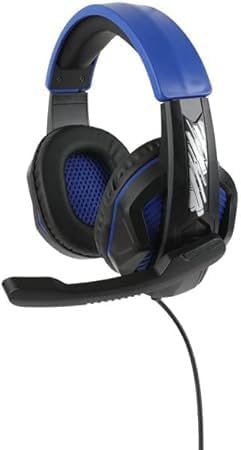

Image: Left: Side view of the headphones showing the adjustable headband, ear cup, and the extended microphone. Right: Front view of the headphones, highlighting the ear cup design and overall structure.
การตั้งค่า
Follow these steps to set up your Nerf GAM83056A-BLU Gaming Headphones:
- เชื่อมต่อกับอุปกรณ์: Locate the 3.5mm audio jack on your gaming console controller, PC, laptop, or other compatible device. Insert the 3.5mm plug from your headphones firmly into the audio jack.
- ปรับแถบคาดศีรษะ: Gently slide the adjustable headband to fit comfortably over your head. The ear cups should fully enclose your ears without excessive pressure.
- ตำแหน่งไมโครโฟน: Adjust the flexible microphone boom so that the microphone is positioned near your mouth for optimal voice pickup. Ensure it is not obstructing your vision.
- ตรวจสอบปริมาณเบื้องต้น: Before starting your game or communication, set the volume on your device to a low level. Gradually increase the volume to a comfortable listening level.
คำแนะนำการใช้งาน
Using your Nerf GAM83056A-BLU Gaming Headphones for various activities:
การเล่นเกม
- Once connected, the headphones will provide immersive stereo sound for your games.
- Utilize the integrated microphone for in-game voice chat with teammates. Ensure your device's audio settings recognize the headphone's microphone as the input source.
- Adjust game audio and chat volume independently through your gaming platform's settings for balanced sound.
Communication (Voice Calls, Online Meetings)
- For voice calls or online meetings on PC/laptop, ensure the headphones are selected as both the audio output and microphone input device in your system's sound settings or the application's settings.
- Speak clearly into the microphone for optimal voice clarity.
Volume Control and Microphone Mute (if applicable)
If your headphones feature an inline control:
- Volume Wheel/Slider: Rotate or slide to increase or decrease the audio volume.
- สวิตช์ปิดเสียงไมโครโฟน: Toggle the switch to mute or unmute your microphone. This is useful for privacy during calls or when you don't want your voice transmitted in-game.
การซ่อมบำรุง
เพื่อให้หูฟังของคุณมีอายุการใช้งานยาวนานและมีประสิทธิภาพสูงสุด โปรดปฏิบัติตามคำแนะนำในการบำรุงรักษาดังต่อไปนี้:
- การทำความสะอาด: Use a soft, dry, lint-free cloth to wipe down the ear cups and headband. For stubborn dirt, slightly dampชุบผ้าด้วยน้ำ ห้ามใช้สารเคมีรุนแรงหรือน้ำยาทำความสะอาดที่มีฤทธิ์กัดกร่อน
- พื้นที่จัดเก็บ: เมื่อไม่ใช้งาน ควรเก็บหูฟังไว้ในที่สะอาดและแห้ง หลีกเลี่ยงแสงแดดโดยตรงและอุณหภูมิที่สูงหรือต่ำเกินไป ระวังอย่าให้สายพันกัน
- การดูแลสายเคเบิล: อย่าดึงสายเพื่อถอดหูฟัง ให้จับที่ปลั๊กเสมอ หลีกเลี่ยงการงอหรือหักงอสายอย่างรุนแรง
การแก้ไขปัญหา
หากคุณประสบปัญหาเกี่ยวกับหูฟังของคุณ โปรดดูปัญหาทั่วไปและวิธีแก้ไขต่อไปนี้:
| ปัญหา | สาเหตุที่เป็นไปได้ | สารละลาย |
|---|---|---|
| ไม่มีเสียงออกจากหูฟัง |
|
|
| ไมโครโฟนไม่ทำงาน |
|
|
| เสียงผิดเพี้ยนหรือสัญญาณรบกวน |
|
|
หากปัญหายังคงมีอยู่หลังจากลองวิธีแก้ไขเหล่านี้แล้ว โปรดติดต่อฝ่ายสนับสนุนลูกค้า
ข้อมูลจำเพาะ
| คุณสมบัติ | รายละเอียด |
|---|---|
| ชื่อรุ่น | GAM83056A-BLU |
| เทคโนโลยีการเชื่อมต่อ | แบบมีสาย (แจ็ค 3.5 มม.) |
| การวางตำแหน่งหู | ครอบหู |
| ขนาดไดร์เวอร์เสียง | 40 มิลลิเมตร |
| ความไวต่อความรู้สึก | 100 เดซิเบล |
| อิมพีแดนซ์ | 32 โอห์ม |
| การควบคุมเสียงรบกวน | การยกเลิกเสียงรบกวนแบบพาสซีฟ |
| ไมโครโฟน | Built-in, Flexible Boom |
| วัสดุ | Plastic, Memory Foam, Metal |
| สี | Black And Blue |
| น้ำหนักสินค้า | 10 ออนซ์ (ประมาณ 283 กรัม) |
| อุปกรณ์ที่รองรับ | PC, Gaming Consoles, Laptops |
| ช่วงอายุที่แนะนำ | 8 Years And Up |
| ผู้ผลิต | เนิร์ฟ |
| ประเทศต้นกำเนิด | จีน |
การรับประกันและการสนับสนุน
This product comes with a standard manufacturer's warranty. Please refer to the warranty card included with your purchase for specific terms and conditions, or visit the manufacturer's official webเว็บไซต์สำหรับข้อมูลการรับประกันโดยละเอียด
For technical support, troubleshooting assistance beyond this manual, or warranty claims, please contact Nerf customer service. Contact information can typically be found on the product packaging or the manufacturer's webเว็บไซต์.
Please have your product model number (GAM83056A-BLU) and proof of purchase ready when contacting support.


