1. บทนำ
Thank you for choosing the Novodesk AZ5130 6-in-1 Automatic Vacuum Sealer Machine. This manual provides essential information for the safe and efficient operation, maintenance, and troubleshooting of your new appliance. Please read these instructions thoroughly before first use and retain them for future reference.

Image 1.1: The Novodesk AZ5130 Vacuum Sealer in operation, sealing food for preservation.
2. คำแนะนำด้านความปลอดภัยที่สำคัญ
เมื่อใช้เครื่องใช้ไฟฟ้า ควรปฏิบัติตามข้อควรระวังด้านความปลอดภัยพื้นฐานเสมอเพื่อลดความเสี่ยงต่อการเกิดไฟไหม้ ไฟฟ้าช็อต และการบาดเจ็บของบุคคล ซึ่งรวมถึงสิ่งต่อไปนี้:
- อ่านคำแนะนำทั้งหมดก่อนใช้เครื่องใช้ไฟฟ้านี้
- Do not operate the appliance with a damaged power cord or plug. If the cord or plug is damaged, contact customer support for assistance.
- ห้ามจุ่มเครื่อง สายไฟ หรือเสียบปลั๊กลงในน้ำหรือของเหลวอื่นๆ
- เครื่องใช้ไฟฟ้าตัวนี้ไม่ได้มีวัตถุประสงค์เพื่อให้บุคคล (รวมทั้งเด็ก) ที่มีความบกพร่องทางร่างกาย ทางประสาทสัมผัส หรือทางจิตใจ หรือขาดประสบการณ์และความรู้ ใช้งาน เว้นแต่จะมีการดูแลหรือคำแนะนำเกี่ยวกับการใช้เครื่องใช้ไฟฟ้าโดยบุคคลที่รับผิดชอบด้านความปลอดภัยของบุคคลดังกล่าว
- จำเป็นต้องมีการดูแลอย่างใกล้ชิดเมื่อมีเด็กหรือใช้งานเครื่องใช้ไฟฟ้าใดๆ ใกล้เด็ก
- ถอดปลั๊กออกเมื่อไม่ได้ใช้งานและก่อนทำความสะอาด ปล่อยให้เย็นลงก่อนใส่หรือถอดชิ้นส่วน และก่อนทำความสะอาดเครื่องใช้ไฟฟ้า
- อย่าใช้อุปกรณ์เสริมที่ไม่แนะนำโดยผู้ผลิต
- ห้ามใช้กลางแจ้ง
- ห้ามวางบนหรือใกล้เตาแก๊สหรือเตาไฟฟ้าที่ร้อน หรือในเตาอบที่อุ่น
- Always ensure the lid is properly latched before operating.
- Use only vacuum sealer bags designed for vacuum sealing.
3. เนื้อหาบรรจุภัณฑ์
Carefully unpack your Novodesk AZ5130 Vacuum Sealer and check that all items are present and in good condition. If any items are missing or damaged, please contact customer support.
- 1 x Novodesk AZ5130 Vacuum Sealer Machine
- 1 x สายไฟ
- 1 x Vacuum Hose (for external vacuuming)
- 2 x Sealing Foam Gaskets (replacement)
- 6 x Pre-cut Vacuum Bags (3.9" x 7.8")
- 6 x Pre-cut Vacuum Bags (7.8" x 11.8")

Image 3.1: All components included in the Novodesk AZ5130 Vacuum Sealer package.
4. สินค้าหมดview
Familiarize yourself with the various parts and functions of your vacuum sealer.

Image 4.1: Control panel and function buttons of the vacuum sealer.
ฟังก์ชั่นแผงควบคุม:
- Process Indicator Light: Illuminates to show operating status.
- โหมดแห้ง: For vacuum sealing dry foods like nuts and grains.
- โหมดชื้น: For vacuum sealing foods with a small amount of liquid.
- ฟังก์ชันพัลส์: Allows manual control of the vacuum process, ideal for fragile foods.
- Seal Function: ซีลถุงโดยไม่ต้องดูดฝุ่น
- ปุ่มหยุด: หยุดการทำงานปัจจุบัน
Image 4.2: Internal components of the vacuum sealer.
ส่วนประกอบหลัก:
- ห้องสุญญากาศ: บริเวณที่อากาศถูกระบายออกจากถุง
- Silicone Strip: Helps create a tight seal.
- แถบปิดผนึก: Heats to create the bag seal (4mm wide).
- Foam Seal Ring: Ensures proper vacuum.
- Cover Slaps: Prevents the vacuum bag from coming out of the vacuum chamber.
- External Sliding Cutter: Integrated cutter for custom bag sizes.
- External VAC Port: For connecting the vacuum hose to jars and containers.
5. การตั้งค่า
Before first use, ensure the appliance is clean and dry. Place the vacuum sealer on a flat, stable surface.
ขั้นตอนการตั้งค่าเริ่มต้น:
- เชื่อมต่อสายไฟเข้ากับเครื่องใช้ไฟฟ้า แล้วจึงเสียบเข้ากับเต้ารับไฟฟ้าที่เหมาะสม
- Prepare your vacuum bag with food, ensuring the open end is clean and dry. Leave at least 2-3 inches of space between the food and the top of the bag.
6. คู่มือการใช้งาน
6.1. Basic Vacuum Sealing (Dry & Moist Modes)
Follow these steps for standard vacuum sealing of food bags:
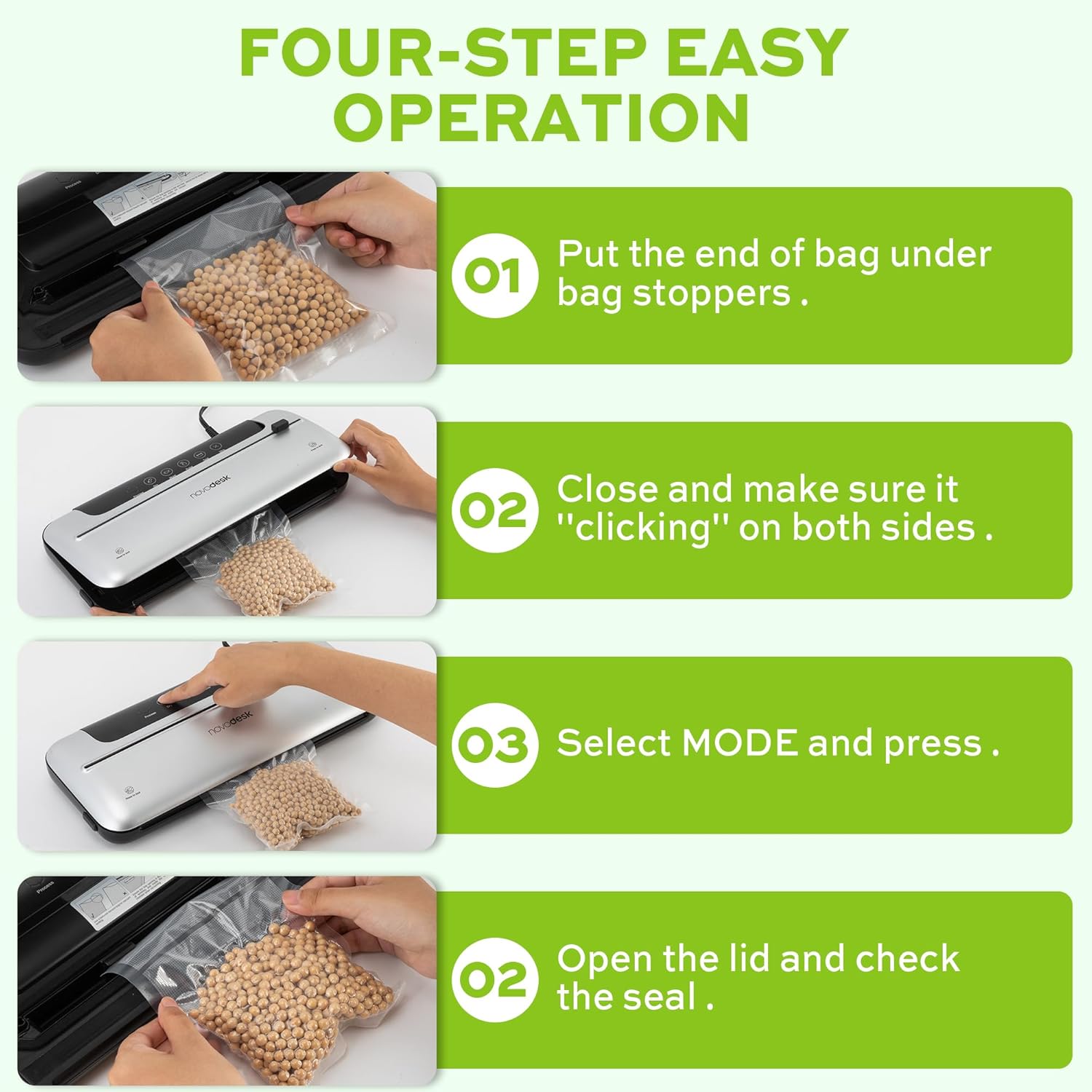
Image 6.1: Four-step easy operation for vacuum sealing.
- เตรียมกระเป๋า: Place the open end of the vacuum bag under the bag stoppers, ensuring it is flat and centered within the vacuum chamber.
- ปิดฝา: Firmly close the lid of the vacuum sealer. Press down on both sides until you hear a "clicking" sound, indicating that the lid is securely latched.
- เลือกโหมด: Choose the appropriate mode for your food:
- กดปุ่ม แห้ง button for dry foods.
- กดปุ่ม ชื้น button for moist foods.
- ตรวจสอบตราประทับ: Once the process is complete and the indicator light turns off, open the lid and remove the sealed bag. Inspect the seal to ensure it is airtight.
6.2. Pulse Function
The Pulse function provides manual control over the vacuum process, which is ideal for delicate or fragile foods that could be crushed by full vacuum pressure.
- Follow steps 1 and 2 from "6.1. Basic Vacuum Sealing".
- กดปุ่มค้างไว้ ชีพจร button. The machine will begin to vacuum.
- ปล่อยตัว ชีพจร button when the desired vacuum level is reached.
- กดปุ่ม ผนึก ปุ่มสำหรับปิดปากถุง
- เปิดฝาและนำถุงที่ปิดผนึกออก
6.3. ฟังก์ชันซีลอย่างเดียว
Use the Seal function to create a seal without vacuuming, useful for making custom-sized bags from a roll or resealing snack bags.
- Place the open end of the bag onto the sealing strip.
- ปิดฝาให้แน่นจนกระทั่งมีเสียงคลิก
- กดปุ่ม ผนึก button. The machine will heat and seal the bag.
- Once the sealing process is complete, open the lid and remove the sealed bag.
6.4. External Vacuum Function (for Jars/Containers)
Your vacuum sealer includes an external vacuum hose for use with compatible vacuum-sealable jars, containers, and wine stoppers.

Image 6.2: Using the external vacuum system with various containers.
- Prepare your vacuum-sealable jar or container with food. Ensure the lid is properly placed.
- Insert one end of the vacuum hose into the external VAC port on the vacuum sealer.
- Insert the other end of the vacuum hose into the port on your vacuum-sealable jar or container.
- Close the lid of the vacuum sealer (no bag needed inside).
- กดปุ่ม External VAC button (if available, otherwise use Dry/Moist mode to activate vacuum pump). The machine will begin to remove air from the container.
- Once the vacuum process is complete, remove the hose. The container should now be sealed.
6.5. Using the External Sliding Cutter
The integrated sliding cutter allows you to create custom-sized bags from a roll of vacuum sealer material.
- Place the vacuum bag roll across the cutting area.
- Slide the cutter blade across the bag material to achieve the desired length.
7. การบำรุงรักษาและการทำความสะอาด
การทำความสะอาดและบำรุงรักษาอย่างสม่ำเสมอจะช่วยให้เครื่องซีลสุญญากาศของคุณใช้งานได้ยาวนานและทำงานได้อย่างมีประสิทธิภาพสูงสุด
คำแนะนำในการทำความสะอาด:
- ควรถอดปลั๊กเครื่องทุกครั้งก่อนทำความสะอาด
- เช็ดด้านนอกของตัวเครื่องด้วยผ้านุ่มdamp ผ้า ห้ามใช้สารทำความสะอาดที่มีฤทธิ์กัดกร่อนหรือตัวทำละลาย
- Clean the vacuum chamber and sealing strip area with a damp cloth. Ensure no food particles or liquids remain.
- The foam seal rings can be removed for cleaning if necessary. Wash with mild soap and water, rinse thoroughly, and allow to air dry completely before reinserting.
- ตรวจสอบให้แน่ใจว่าทุกส่วนแห้งสนิทก่อนจัดเก็บหรือนำเครื่องใช้ไฟฟ้ากลับมาใช้งานอีกครั้ง
พื้นที่จัดเก็บ:
Store the vacuum sealer in a clean, dry place. For best results, store with the lid unlatched to prevent compression of the foam seal rings, which can affect sealing performance over time.
8 การแก้ไขปัญหา
หากคุณพบปัญหาเกี่ยวกับเครื่องซีลสุญญากาศ โปรดดูปัญหาและวิธีแก้ไขที่พบบ่อยต่อไปนี้:
| ปัญหา | สาเหตุที่เป็นไปได้ | สารละลาย |
|---|---|---|
| เครื่องไม่เปิดขึ้น | ไม่มีแหล่งจ่ายไฟ | ตรวจสอบว่าสายไฟเสียบเข้ากับเต้ารับและตัวเครื่องแน่นดีแล้ว ลองใช้เครื่องใช้ไฟฟ้าอื่นทดสอบกับเต้ารับดูด้วย |
| เครื่องดูดฝุ่นแต่ไม่สามารถปิดผนึกได้ | Sealing strip or foam gasket is dirty/damaged. Bag is not positioned correctly. | Clean the sealing strip and foam gaskets. Ensure the bag is flat and centered over the sealing strip. Replace gaskets if damaged. |
| เครื่องซีลแต่ไม่ดูดสูญญากาศ | Lid not properly latched. Foam gaskets are dirty or worn. Bag has holes or is not suitable. | Ensure the lid is firmly closed and latched on both sides. Clean or replace foam gaskets. Use proper vacuum sealer bags and check for damage. |
| แรงดูดอากาศอ่อนหรือไม่สม่ำเสมอ | Foam gaskets are dirty or worn. Too much liquid in the bag (for Dry mode). | Clean or replace foam gaskets. Use Moist mode for foods with liquid, or pre-freeze liquids. |
| ถุงละลายระหว่างการปิดผนึก | Sealing time too long (unlikely for automatic models). | Ensure you are using appropriate vacuum sealer bags. If issue persists, contact customer support. |
If the problem persists after attempting these solutions, please contact Novodesk customer support for further assistance.
9. ข้อมูลจำเพาะ
| ยี่ห้อ | Novodesk |
| หมายเลขรุ่น | AZ5130 |
| เพาเวอร์/วัตต์tage | 120 วัตต์ |
| เล่มที่tage | 120โวลต์ |
| วัสดุ | อะคริโลไนไตรล์ บิวทาไดอีน สไตรีน (ABS) |
| น้ำหนักสินค้า | 980 กรัม (2.16 ปอนด์) |
| สี | สีเงิน |
| โหมดการทำงาน | อัตโนมัติ |
| พลังดูดสูงสุด | 75กิโลปาสคาล |
| ความกว้างของแถบซีล | 4มม. |
10. การรับประกันและการสนับสนุน
Novodesk products are manufactured to high-quality standards. For information regarding warranty coverage, product support, or to purchase replacement parts, please refer to the warranty card included with your product or visit the official Novodesk website. If you have any questions or require assistance, please contact Novodesk customer service.

