1. บทนำ
This manual provides essential instructions for the safe operation and maintenance of your VTech Advanced HD Plus 5.5" HD 1 Cam Video Baby Monitor. Please read this manual thoroughly before using the product to ensure proper setup and functionality. Keep this guide for future reference.

Image 1.1: The VTech Advanced HD Plus 5.5" HD 1 Cam Video Baby Monitor, featuring the parent unit and baby unit.
2. คุณสมบัติหลัก
The VTech Advanced HD Plus Video Baby Monitor is designed to provide reliable monitoring of your baby. Key features include:
- 5.5" HD IPS LCD Screen: Offers clear 720p video resolution with wide viewing angles and enhanced color accuracy.
- อายุการใช้งานแบตเตอรี่ยาวนาน: Up to 13 hours of continuous video streaming or 19 hours of audio-only streaming on a single charge.
- Pan-Tilt-Zoom Camera: Remote control for 360-degree panoramic view, 122-degree vertical view, and 4x digital zoom.
- มุมกว้าง View: A 110-degree wide-angle lens captures more of the nursery.
- ไฟกลางคืนแบบปรับได้: Touch-controlled, dimmable 7-color night light to create a soothing environment.
- การพูดคุยแบบสองทาง: Allows communication with your baby from the parent unit.
- Lullabies & Soothing Sounds: Five calming melodies and five ambient sounds to help soothe your baby.
- การตรวจติดตามอุณหภูมิ: Displays the nursery's ambient temperature on the parent unit.
- การแจ้งเตือนการเคลื่อนไหวและเสียง: Notifies you of activity in the baby's room.
- Automatic Infrared Night Vision: Provides clear video in low-light conditions.
- Secure 2.4GHz Wireless Connection: Ensures a private and interference-free connection up to 1,000 feet. No Wi-Fi required.

Image 2.1: Visual representation of the monitor's main features.
3. เนื้อหาบรรจุภัณฑ์
ตรวจสอบให้แน่ใจว่ามีสินค้าทั้งหมดอยู่ในแพ็คเกจของคุณ:
- หน่วยหลัก
- หน่วยเด็ก (กล้อง)
- 2 AC Adapters (one for Parent Unit, one for Baby Unit)
- คู่มือเริ่มต้นอย่างรวดเร็ว
4. คำแนะนำในการตั้งค่า
4.1. การชาร์จอุปกรณ์หลัก (Parent Unit)
- ต่อปลายเล็กของอะแดปเตอร์แปลงไฟของเครื่องหลักเข้ากับช่องเสียบไฟด้านข้างของเครื่องหลัก
- เสียบปลายด้านใหญ่ของอะแดปเตอร์แปลงไฟเข้ากับเต้ารับที่ผนัง
- Charge the parent unit for at least 12 hours before initial use. The battery icon will indicate charging status.
4.2. การเปิดใช้งานชุดอุปกรณ์สำหรับเด็ก (กล้อง)
- ต่อปลายเล็กของอะแดปเตอร์แปลงไฟของเครื่องช่วยฟังเข้ากับช่องเสียบไฟด้านหลังของเครื่องช่วยฟัง
- เสียบปลายด้านใหญ่ของอะแดปเตอร์แปลงไฟเข้ากับเต้ารับที่ผนัง
- The baby unit will power on automatically once connected to power.
4.3. การจัดวางตำแหน่งเครื่องให้ทารก
วางหน่วยเด็กไว้ในตำแหน่งที่ให้แสงชัดเจน view of your baby in their crib or play area. For optimal performance:
- Place the baby unit at least 3 feet (1 meter) away from your baby to avoid potential hazards.
- Ensure the baby unit is on a flat, stable surface or securely mounted to a wall (mounting hardware not included).
- Avoid placing the baby unit near other electronic devices that may cause interference.
- Keep the power cords out of reach of children.
5. คู่มือการใช้งาน
5.1. Parent Unit Controls
Familiarize yourself with the buttons on your parent unit:
- เมนู/เลือก: Press to open the menu or confirm a selection.
- Arrow Buttons (Up, Down, Left, Right): Navigate menu options and control camera pan/tilt.
- ฉบับ + / ฉบับ -: ปรับระดับเสียงในการฟัง
- พูดคุย: กดค้างไว้เพื่อพูดคุยกับลูกน้อยผ่านทางเครื่องรับเสียงสำหรับเด็ก
- เปิด/ปิด LCD: Press to turn the screen on or off while audio monitoring continues.
- ซูม: Press to zoom in or out on the video feed.
- ปุ่มเปิด/ปิด: กดค้างไว้เพื่อเปิดหรือปิดหน่วยหลัก
5.2. Video Monitoring
Once both units are powered on and linked, the parent unit will automatically display live video from the baby unit. The 5.5" IPS screen provides a clear view.
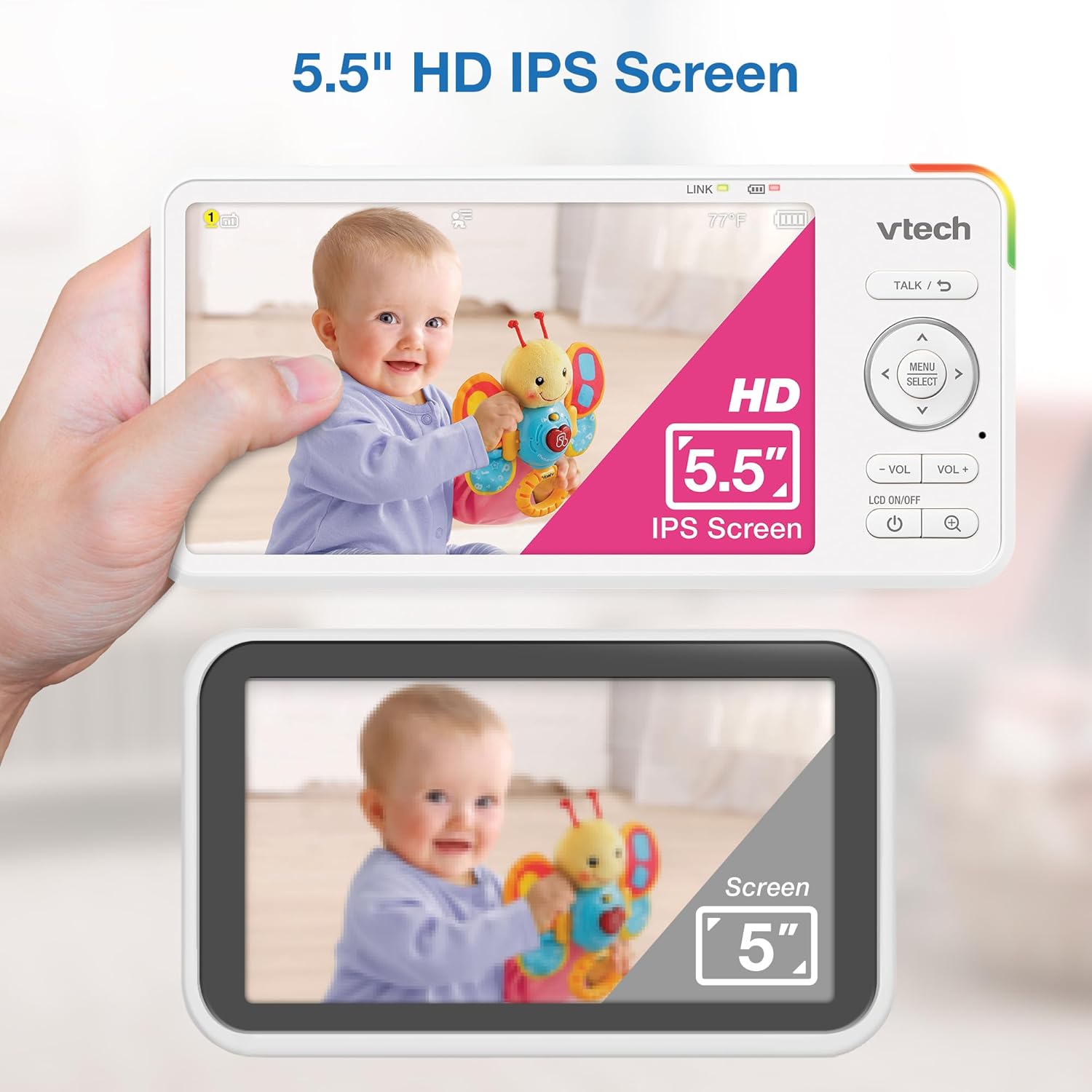
Image 5.1: The 5.5" HD IPS screen offers a larger and clearer view compared to standard screens.
5.3. Pan, Tilt, and Zoom
Use the arrow buttons on the parent unit to remotely adjust the camera's view:
- กดปุ่ม ขึ้น/ลง arrows to tilt the camera vertically (122-degree vertical view).
- กดปุ่ม ซ้าย/ขวา arrows to pan the camera horizontally (360-degree panoramic view).
- กดปุ่ม ซูม button to activate the 4x digital zoom for a closer look.

Image 5.2: Remote pan, tilt, and 4x zoom functionality for comprehensive nursery coverage.
5.4. การพูดสองทาง
หากต้องการพูดคุยกับลูกน้อย ให้กดปุ่มค้างไว้ พูดคุย button on the parent unit. Release the button to stop talking and resume listening.

Image 5.3: Using the two-way talk feature to communicate with your baby.
5.5. Night Light, Lullabies, and Soothing Sounds
Access these features through the parent unit's menu:
- ไฟกลางคืน: Select the night light option to choose from 7 colors or adjust brightness. The adaptive feature adjusts to nursery brightness.
- Lullabies & Soothing Sounds: Choose from five melodies and five ambient sounds to play through the baby unit.
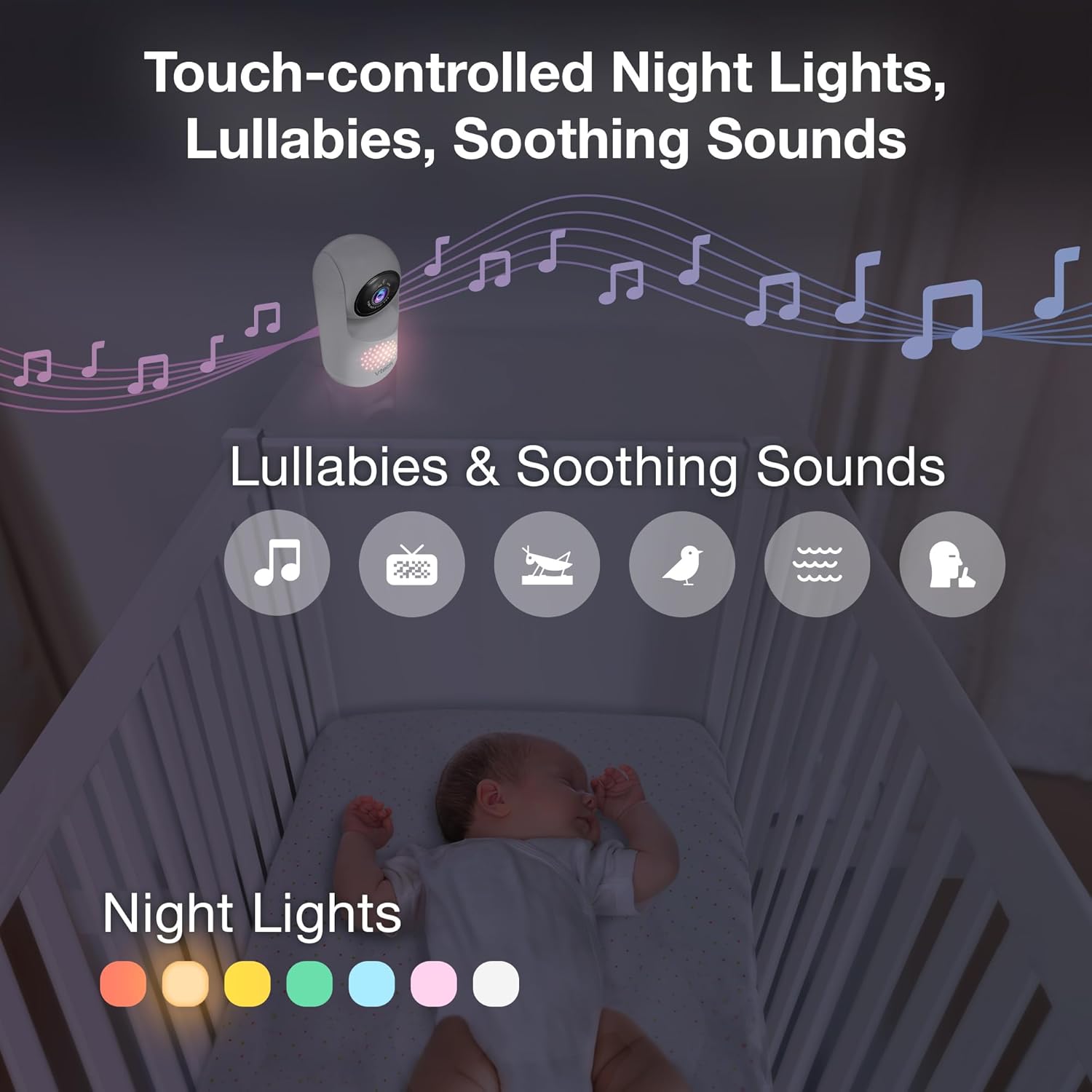
Image 5.4: The camera unit provides touch-controlled night lights, lullabies, and soothing sounds.
5.6. การตรวจวัดอุณหภูมิ
The parent unit displays the current temperature of the baby's room, measured by the baby unit. This helps ensure a comfortable environment for your baby.
5.7. Motion and Sound Alerts
The monitor is equipped with motion and sound detection. When activity is detected, the parent unit will provide an alert. You can adjust the sensitivity settings in the menu.

Image 5.5: Motion and temperature alerts displayed on the parent unit.
5.8. การมองเห็นในเวลากลางคืน
The baby unit automatically activates infrared night vision in low-light conditions, providing a clear black-and-white image on the parent unit.

Image 5.6: Automatic infrared night vision for clear monitoring in the dark.
6. การบำรุงรักษา
6.1. การทำความสะอาด
- ทำความสะอาดจอภาพด้วยผ้าเนื้อนุ่มและแห้งamp ผ้า.
- ห้ามใช้สเปรย์ทำความสะอาดหรือน้ำยาทำความสะอาด
- Ensure units are unplugged before cleaning.
6.2. การดูแลแบตเตอรี่
- To prolong battery life, fully charge the parent unit before first use.
- หลีกเลี่ยงอุณหภูมิที่สูงเกินไป ซึ่งอาจส่งผลต่อประสิทธิภาพของแบตเตอรี่ได้
- หากเก็บรักษาเครื่องไว้เป็นเวลานาน ควรชาร์จแบตเตอรี่เป็นระยะ

Image 6.1: The 5,000mAh rechargeable battery provides extended monitoring time.
7 การแก้ไขปัญหา
If you experience issues with your VTech Advanced HD Plus monitor, refer to the following common solutions:
| ปัญหา | วิธีแก้ปัญหาที่เป็นไปได้ |
|---|---|
| No link / Poor connection |
|
| ไม่มีภาพ / จอดำ |
|
| ไม่มีเสียง / เสียงเบา |
|
| แบตเตอรี่หมดเร็ว |
|
If the problem persists after trying these solutions, please contact VTech customer support.
8. ข้อมูลจำเพาะ
| คุณสมบัติ | รายละเอียด |
|---|---|
| ชื่อรุ่น | Advanced HD Plus |
| ขนาดหน้าจอ | จอ IPS LCD ขนาด 5.5 นิ้ว |
| ความละเอียดวิดีโอ | 720p |
| เทคโนโลยีการเชื่อมต่อ | 2.4G FHSS Wireless (No Wi-Fi) |
| พิสัย | สูงถึง 1,000 ฟุต (ระยะสายตา) |
| ความจุของแบตเตอรี่ | 5000 มิลลิแอมป์ |
| Battery Life (Video Streaming) | นานถึง 13 ชั่วโมง |
| Battery Life (Audio-only) | นานถึง 19 ชั่วโมง |
| มุมกระทะ | 360 degrees panoramic |
| มุมเอียง | 122 degrees vertical |
| ซูม | 4x Digital |
| มุมกว้าง View | 110 องศา |
| การมองเห็นตอนกลางคืน | อินฟราเรดอัตโนมัติ |
| Alert Types | เสียงและการเคลื่อนไหว |
| แหล่งพลังงาน | สายไฟ (5V, 7.5W) |
| Dimensions (Parent Unit) | 6.58 x 3.23 x 0.71 นิ้ว |
| น้ำหนักสินค้า | 1.6 ปอนด์ (0.73 กก.) |
| ยูพีซี | 735078058157 |
9. การสนับสนุนและการรับประกัน
For technical support, product registration, or warranty information, please visit the official VTech webเข้าชมเว็บไซต์หรือติดต่อฝ่ายบริการลูกค้า:
- Webเว็บไซต์: www.vtechbabycare.com
- อีเมล: การสนับสนุน@vtechbabycare.com
Please refer to your product packaging or the VTech webเข้าชมเว็บไซต์เพื่อดูรายละเอียดการรับประกันเฉพาะที่ใช้ได้ในภูมิภาคของคุณ


