1. บทนำ
Thank you for choosing the Elitech WMT-20 Bluetooth Wireless Meat Thermometer. This manual provides detailed instructions for the proper setup, operation, and maintenance of your device. Please read this manual thoroughly before use to ensure optimal performance and longevity of your thermometer.
The Elitech WMT-20 is designed to help you achieve perfectly cooked meats every time, whether grilling, smoking, or oven cooking. Its dual probe design and Bluetooth connectivity allow for convenient and precise temperature monitoring.
2. สินค้าหมดview
2.1 ส่วนประกอบ
- Digital Display Unit (Base)
- 2 หัววัดอุณหภูมิ
- คู่มือการใช้งาน
2.2 คุณสมบัติหลัก
- การออกแบบโพรบคู่: Monitor two food items or ambient/internal temperatures simultaneously.
- การเชื่อมต่อบลูทูธ: Wireless monitoring via a smartphone app (ToGrill).
- จอแสดงผล LCD ดิจิตอล: Clear display of current temperature readings for both probes.
- High-Temperature Stainless Steel Probes: Durable construction for various cooking methods.
- Ceramic Handle: Withstands extreme heat up to 300°C (572°F).
- การติดแม่เหล็ก: Base unit can be attached to metal surfaces like ovens or refrigerators.
- App-Controlled Presets: Pre-set temperatures for various meat types and doneness levels.
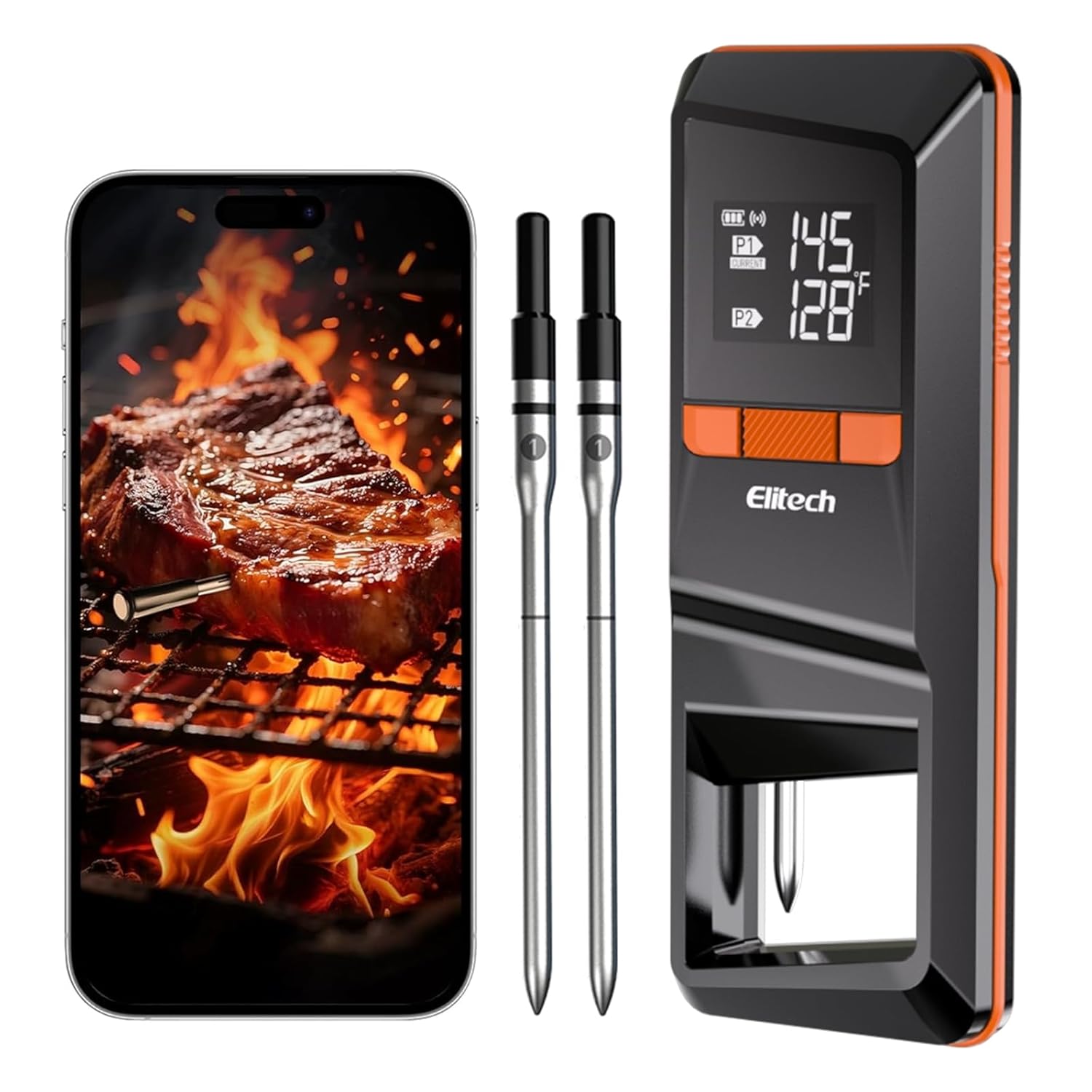
Image 2.2.1: The Elitech WMT-20 thermometer base unit, two probes, and a smartphone showing the accompanying app.

ภาพที่ 2.2.2: รายละเอียด view of the probe's construction, highlighting the ceramic handle, ambient sensor, safety line, and internal temperature sensor. The ceramic handle withstands heat up to 300°C/572°F, the ambient sensor measures 50-300°C/122-572°F, and the internal sensor measures 0-100°C/32-212°F.
3. การตั้งค่า
3.1 การติดตั้งแบตเตอรี่
- Open the battery compartment on the back of the digital display unit.
- Insert the provided batteries, ensuring correct polarity.
- ปิดช่องใส่แบตเตอรี่ให้แน่น

Image 3.1.1: The Elitech WMT-20 thermometer base unit, showing the probes and the location for battery installation.
3.2 การดาวน์โหลดแอปและการจับคู่อุปกรณ์
The Elitech WMT-20 connects to your smartphone via the 'ToGrill' app for enhanced monitoring and control.
- ดาวน์โหลดแอป: Scan the QR code provided in the manual or on the device packaging, or search for 'ToGrill' in the App Store (iOS) or Google Play Store (Android).
- เปิดใช้งานการอนุญาต: Open the 'ToGrill' app and grant necessary permissions, such as Bluetooth access.
- เปิดเครื่อง: Take the probes out of the base unit. Press and hold the power button on the digital display unit to turn it on.
- การจับคู่: In the app, select 'Add Device' or 'ค้นหา devices'. The app will guide you through the pairing process. Press the pairing/stop alarm button on the device when prompted. A 'beep' sound indicates successful pairing.
Video 3.2.1: This video demonstrates the process of installing batteries, downloading the 'ToGrill' app, and pairing the Elitech WMT-20 thermometer with a smartphone. It shows the steps for initial setup and connectivity.
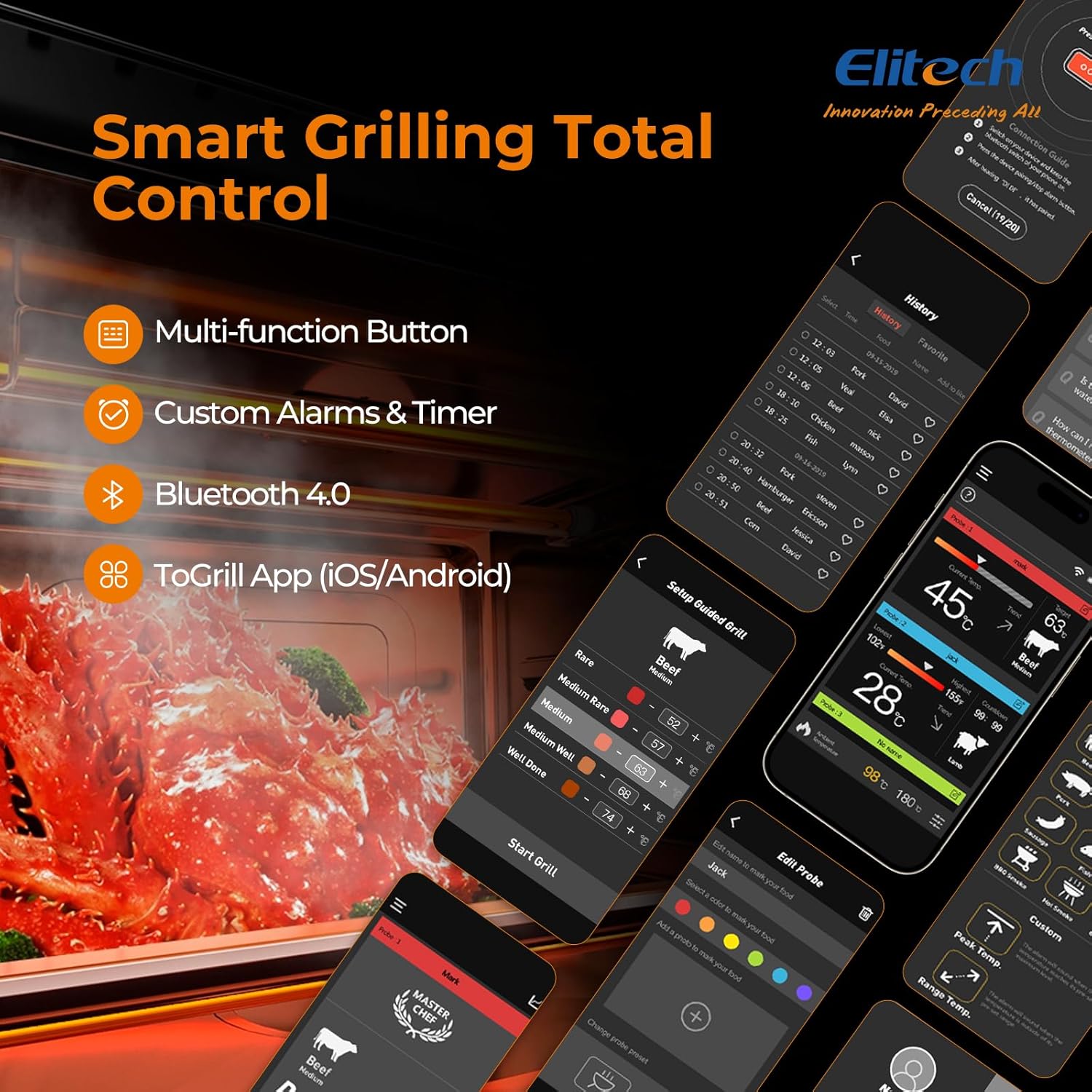
Image 3.2.2: The 'ToGrill' app interface, illustrating the selection of meat types, doneness levels, and real-time temperature monitoring.
4. คู่มือการใช้งาน
4.1 การสอดหัววัด
การเสียบหัววัดอย่างถูกต้องเป็นสิ่งสำคัญอย่างยิ่งต่อการวัดอุณหภูมิที่แม่นยำ
- Insert the probe into the thickest part of the meat, avoiding bones or gristle.
- Ensure the probe is inserted up to the safety line (the black part of the probe) to protect the electronic components and ensure accurate internal temperature measurement.
- For ambient temperature monitoring, place a probe in the cooking environment (grill, oven, smoker) without it touching the food or direct flame.

Image 4.1.1: A meat probe correctly inserted into a piece of meat on a grill, demonstrating proper placement for internal temperature measurement.
4.2 Using the ToGrill App
The 'ToGrill' app provides comprehensive control and monitoring features:
- การตรวจสอบตามเวลาจริง: View current temperatures for both probes on your smartphone.
- Pre-set Temperatures: Select from a variety of pre-set temperatures for different meat types (Beef, Pork, Chicken, Lamb, Fish, etc.) and doneness levels (Rare, Medium, Well Done).
- Custom Alarms & Timer: Set custom target temperatures and timers for personalized cooking. The app will alert you when the target temperature is reached.
- Cooking History: Track and review past cooking sessions.

Image 4.2.1: A visual guide to recommended internal temperatures for various meat types and doneness levels, as available within the 'ToGrill' app.
4.3 การตรวจติดตามอุณหภูมิ
Once probes are inserted and the device is paired, you can monitor temperatures:
- The digital display unit shows real-time temperatures for both Probe 1 (P1) and Probe 2 (P2).
- The 'ToGrill' app provides a more detailed interface, including temperature trends, target temperatures, and alerts.
Video 4.3.1: This video illustrates the use of the Elitech WMT-20 thermometer during cooking, demonstrating how to monitor temperatures and utilize the app's features for various dishes.
5. การบำรุงรักษา
5.1 การทำความสะอาด
- After each use, allow the probes to cool completely.
- Hand wash the probe tips with warm, soapy water. Do not immerse the entire probe or the digital display unit in water.
- Wipe the digital display unit with a damp cloth. Keep the display unit away from water.
- The probes are not dishwasher safe.
5.2 พื้นที่จัดเก็บ
- Ensure probes are clean and dry before storing.
- Return the probes to their designated slots in the digital display unit for safe storage. This also helps the unit automatically shut down, saving energy.
- เก็บเทอร์โมมิเตอร์ไว้ในที่แห้งและเย็น
6 การแก้ไขปัญหา
If you encounter issues with your Elitech WMT-20, please refer to the following common solutions:
- ไม่มีไฟ/จอแสดงผล: ตรวจสอบว่าใส่แบตเตอรี่ถูกต้องและมีประจุเพียงพอหรือไม่ เปลี่ยนแบตเตอรี่หากจำเป็น
- ปัญหาการเชื่อมต่อ: Ensure Bluetooth is enabled on your smartphone and the device is within range. Restart both the thermometer and the app. Re-pair the device if needed.
- การอ่านค่าที่ไม่ถูกต้อง: Ensure the probe is inserted correctly into the thickest part of the meat, avoiding bones. Verify that the probe tip is not touching direct flame.
- แอปไม่ตอบสนอง: Close and reopen the 'ToGrill' app. Ensure your phone's operating system is up to date.
หากต้องการความช่วยเหลือเพิ่มเติม โปรดติดต่อฝ่ายบริการลูกค้าของ Elitech
7. ข้อมูลจำเพาะ
| คุณสมบัติ | รายละเอียด |
|---|---|
| หมายเลขรุ่น | WMT-20 |
| ขนาดแพ็คเกจ | 8.54 x 3.7 x 1.34 นิ้ว |
| น้ำหนักสินค้า | 8.15 ออนซ์ |
| ยี่ห้อ | อีลิเทค |
| คุณสมบัติพิเศษ | Auto Shutdown, Bluetooth Wireless, Dual Probe, LCD Display |
| สี | สีดำ |
| ส่วนประกอบที่รวมอยู่ | 2 Temperature Probes, Digital Display Unit |
| วัสดุภายนอก | โลหะ, พลาสติก |
| ตรงตามข้อกำหนด | CE, อย., RoHS |
| ประเภทจอภาพ | จอแอลซีดีดิจิตอล |
| เทคโนโลยีการเชื่อมต่อ | บลูทูธ, ไร้สาย |
| คำแนะนำการดูแลผลิตภัณฑ์ | Do Not Put Probe Directly In Flame, Hand Wash Only, Keep Display Unit Away From Water |
8. การรับประกันและการสนับสนุน
Elitech products are designed for quality and reliability. For information regarding warranty coverage, product registration, or technical support, please visit the official Elitech webหรือติดต่อฝ่ายบริการลูกค้าโดยตรง
โปรดเก็บใบเสร็จรับเงินไว้เป็นหลักฐานการซื้อสำหรับกรณีที่มีการเรียกร้องการรับประกัน


