การแนะนำ
This manual provides detailed instructions for the setup, operation, and maintenance of your Edifier S300 Hi-Fi Tabletop Speaker. Please read this manual thoroughly before using the product to ensure proper functionality and to maximize your listening experience. Keep this manual for future reference.

The Edifier S300 Hi-Fi Tabletop Speaker, showcasing its elegant black walnut finish and front grille.
คำแนะนำด้านความปลอดภัยที่สำคัญ
- อ่านคำแนะนำเหล่านี้อย่างละเอียด
- เก็บคำแนะนำเหล่านี้ไว้เพื่อใช้อ้างอิงในอนาคต
- จงใส่ใจคำเตือนทั้งหมด
- ปฏิบัติตามคำแนะนำทั้งหมด
- ห้ามใช้อุปกรณ์นี้ใกล้น้ำ
- ทำความสะอาดด้วยผ้าแห้งเท่านั้น
- อย่าปิดกั้นช่องระบายอากาศใดๆ ติดตั้งตามคำแนะนำของผู้ผลิต
- ห้ามติดตั้งใกล้แหล่งความร้อน เช่น หม้อน้ำ เครื่องทำความร้อน เตา หรืออุปกรณ์อื่น ๆ (รวมถึง ampเครื่องให้ความร้อน) ที่ผลิตความร้อน
- ปกป้องสายไฟไม่ให้ถูกเหยียบหรือถูกหนีบ โดยเฉพาะที่ปลั๊ก เต้ารับไฟฟ้า และจุดที่สายไฟออกจากเครื่อง
- ใช้เฉพาะอุปกรณ์เสริม/สิ่งที่แนบตามที่ผู้ผลิตกำหนดเท่านั้น
- ถอดปลั๊กอุปกรณ์นี้ในระหว่างพายุฝนฟ้าคะนองหรือเมื่อไม่ได้ใช้งานเป็นเวลานาน
- แจ้งบริการทั้งหมดให้ช่างที่ผ่านการรับรองทราบ จำเป็นต้องให้บริการเมื่ออุปกรณ์ได้รับความเสียหายในลักษณะใดก็ตาม เช่น สายไฟหรือปลั๊กชำรุด ของเหลวหกหรือมีวัตถุตกลงไปในอุปกรณ์ อุปกรณ์โดนฝนหรือความชื้น ไม่สามารถทำงานได้ตามปกติ หรือตกหล่น
มีอะไรอยู่ในกล่อง
เมื่อแกะกล่องแล้ว โปรดตรวจสอบว่าสินค้าทั้งหมดที่ระบุไว้ด้านล่างนี้มีอยู่และอยู่ในสภาพดี:
- S300 Speaker × 1
- สายไฟ × 1
- สาย USB × 1
- 3.5mm-to-3.5mm Audio Cable × 1
- รีโมทคอนโทรล× 1
- แบตเตอรี่ AAA × 2
- คู่มือการเริ่มต้นฉบับย่อ × 1
- คำแนะนำด้านความปลอดภัยที่สำคัญ × 1
โอเวอร์view of all items included in the Edifier S300 package.
สินค้าเกินview
แผงควบคุมและไฟแสดงสถานะด้านหน้า
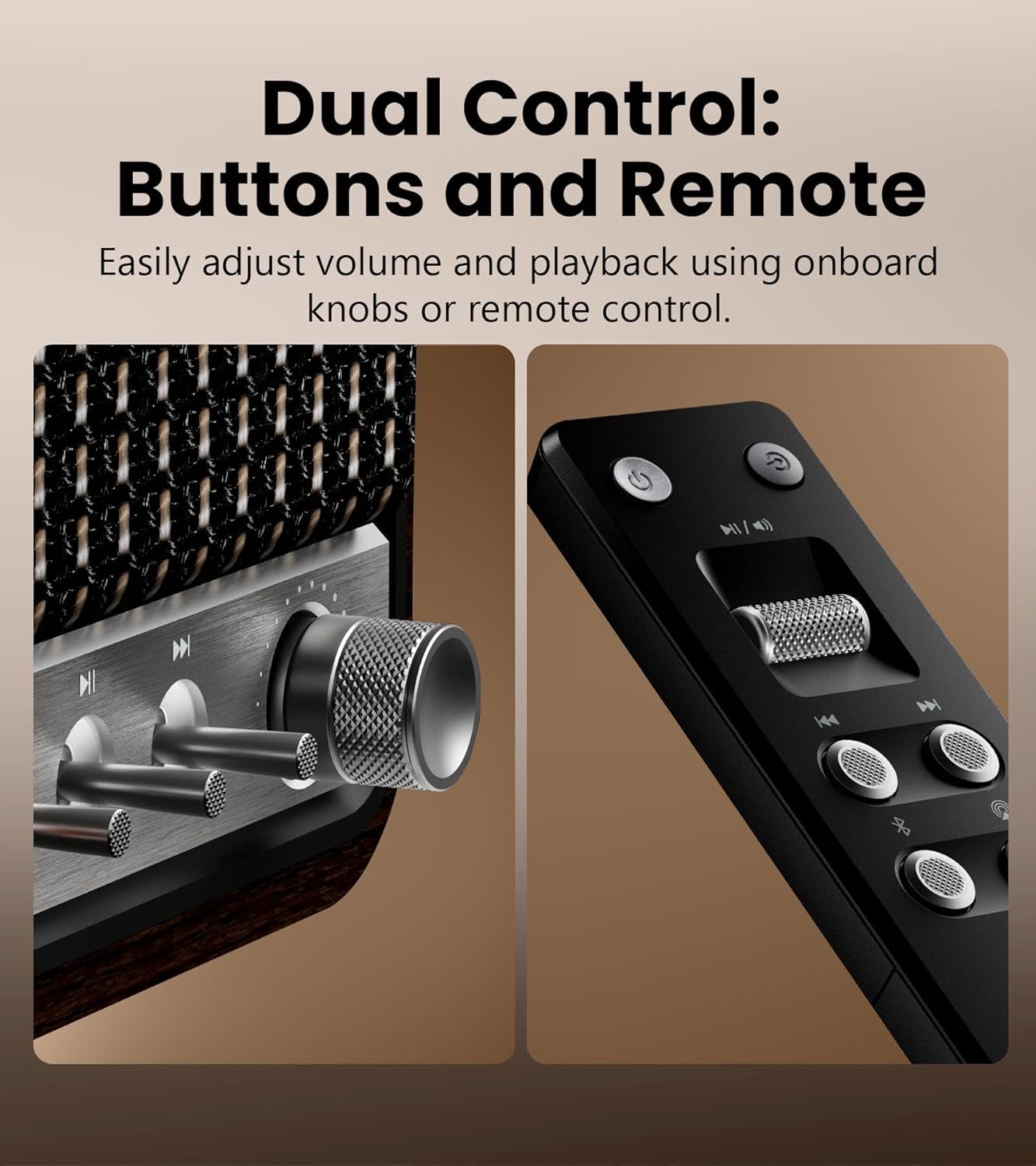
รายละเอียด view of the speaker's control knobs and the included remote control.
- Volume/Input Selector Knob: Rotate to adjust volume. Press to cycle through input sources (Bluetooth, AirPlay, USB-C, AUX).
- การควบคุมการเล่น: Buttons for Play/Pause, Previous Track, Next Track (functionality varies by input source).
- ไฟแสดงสถานะ: Displays current input mode and connection status.
การเชื่อมต่อแผงด้านหลัง

The rear panel of the Edifier S300, highlighting its various connectivity options.
- อินพุต USB-C: สำหรับเชื่อมต่อกับคอมพิวเตอร์หรือแหล่งสัญญาณเสียง USB-C อื่นๆ
- อินพุต AUX: Standard 3.5mm audio jack for connecting to analog audio devices.
- กำลังไฟเข้า: เชื่อมต่อสายไฟที่ให้มาที่นี่
การตั้งค่า
ตำแหน่งลำโพง
For optimal sound performance, place the Edifier S300 on a stable, flat surface. Ensure there is adequate space around the speaker for proper ventilation. Placing the speaker near a wall can enhance bass response, but avoid placing it directly in a corner, which might lead to boomy or unclear bass.

The dimensions of the Edifier S300 speaker, useful for placement planning.
การเชื่อมต่อไฟฟ้า
- Connect the power cable to the power input port on the rear of the speaker.
- เสียบปลายสายไฟอีกด้านหนึ่งเข้ากับเต้ารับไฟฟ้าที่ผนัง
- The speaker will power on automatically or can be turned on using the power button on the remote control.
คำแนะนำการใช้งาน
การเลือกแหล่งที่มาของข้อมูล
The S300 supports multiple audio input sources. You can switch between them using the volume/input selector knob on the front panel or the dedicated input buttons on the remote control.
- บลูทูธ: สำหรับการสตรีมเสียงแบบไร้สายจากอุปกรณ์ที่รองรับ
- ออกอากาศ 2: For seamless multi-room audio and lossless streaming from Apple devices.
- ยูเอสบี-C: For direct digital audio connection to computers or other USB-C sources.
- ช่องเสริม: For connecting traditional analog audio devices using a 3.5mm cable.
จับคู่บลูทู ธ

The Edifier S300 supports dual Bluetooth device pairing for convenient switching.
- Select Bluetooth input on the speaker. The status indicator will flash, indicating pairing mode.
- On your device (smartphone, tablet, computer), enable Bluetooth and search for "EDIFIER S300".
- Select "EDIFIER S300" to pair. Once connected, the indicator light will become solid.
- The S300 supports LDAC for high-resolution wireless audio on compatible Android 8.0+ devices.
- It also supports multi-device pairing, allowing two devices to be connected simultaneously.
AirPlay 2 Setup (for Apple Devices)

AirPlay 2 enables seamless multi-room audio and lossless streaming across your home.
- Ensure your S300 speaker is connected to the same Wi-Fi network as your Apple device.
- On your iOS device, open Control Center, tap the AirPlay icon, and select "EDIFIER S300".
- For multi-room audio, select multiple AirPlay 2 compatible speakers from the AirPlay menu.
- For stereo pairing, use the EDIFIER Home App to configure two S300 speakers as left and right channels.
Using the EDIFIER Home App
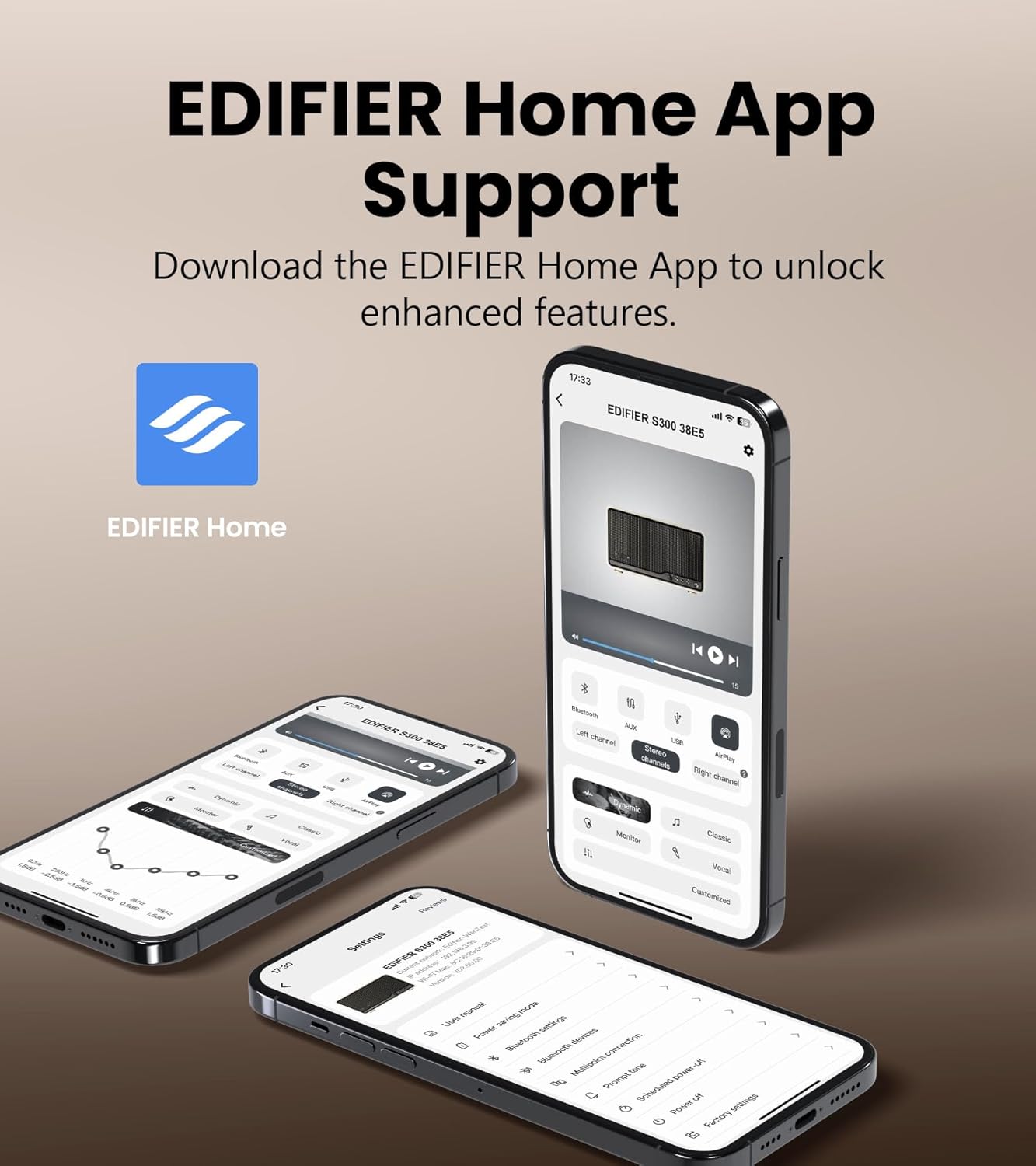
The EDIFIER Home App provides enhanced control and features for your S300 speaker.
Download the EDIFIER Home App from your device's app store to unlock enhanced features and control options for your S300 speaker. The app allows you to:
- Connect your speaker to a Wi-Fi network.
- Switch between input sources effortlessly.
- Control playback with ease.
- Customize sound effects to suit your preferences.
- Access the digital user manual anytime.
การซ่อมบำรุง
- การทำความสะอาด: Use a soft, dry cloth to clean the speaker's surface. Do not use liquid cleaners or aerosol sprays.
- การระบายอากาศ : ตรวจสอบให้แน่ใจว่าช่องระบายอากาศไม่ได้ถูกปิดกั้นเพื่อป้องกันความร้อนสูงเกินไป
- พื้นที่จัดเก็บ: If storing the speaker for an extended period, unplug it from the power outlet and store it in a cool, dry place.
การแก้ไขปัญหา
| ปัญหา | สาเหตุที่เป็นไปได้ | สารละลาย |
|---|---|---|
| ไม่มีเสียง | Power not connected; incorrect input source selected; volume too low. | Ensure power cable is securely plugged in. Select the correct input source. Increase volume. |
| การเชื่อมต่อบลูทูธล้มเหลว | ลำโพงไม่ได้อยู่ในโหมดจับคู่ อุปกรณ์อยู่ไกลเกินไป มีสัญญาณรบกวน | Ensure speaker is in Bluetooth pairing mode. Move device closer to speaker. Avoid obstacles. Try re-pairing. |
| AirPlay 2 connection issues | Speaker and device on different Wi-Fi networks; network instability. | Verify both speaker and Apple device are on the same Wi-Fi network. Restart router and speaker. |
| เสียงเพี้ยน | ระดับเสียงดังเกินไป คุณภาพเสียงต้นฉบับไม่ดี | Reduce volume. Check audio source quality. |
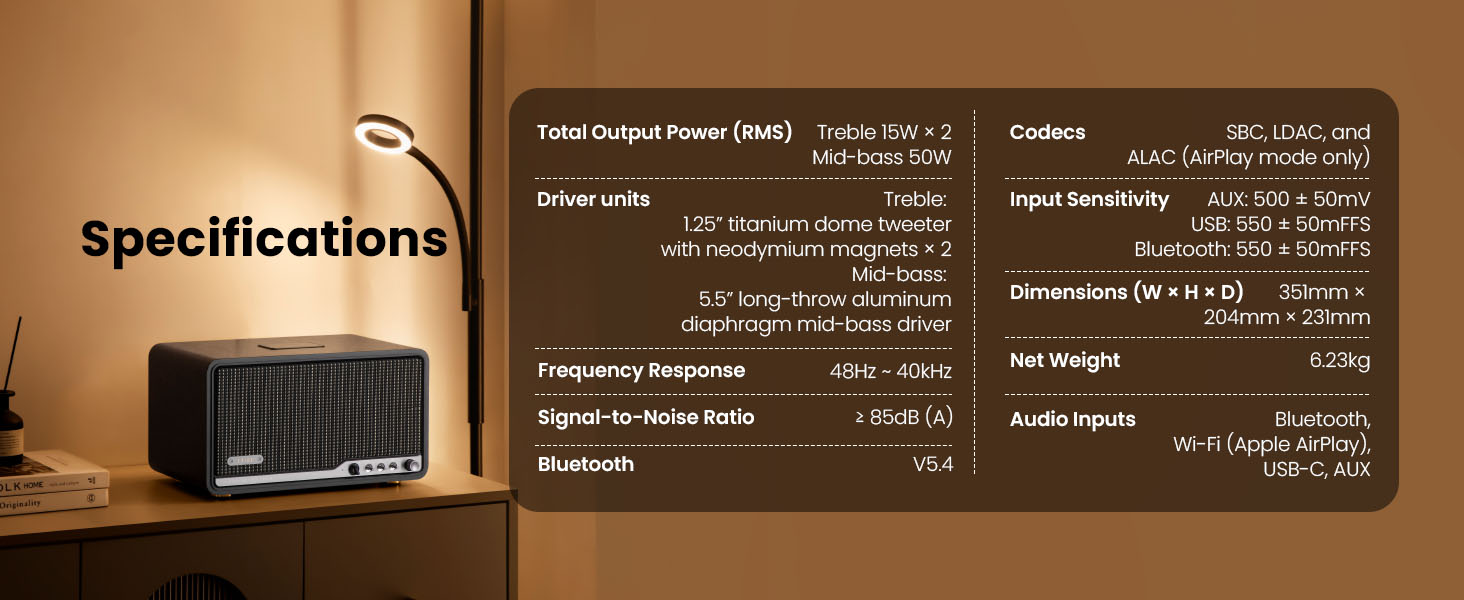
ข้อมูลจำเพาะ

Detailed technical specifications of the Edifier S300 speaker.
| คุณสมบัติ | รายละเอียด |
|---|---|
| กำลังขับรวม (RMS) | Treble 15W × 2, Mid-bass 50W |
| หน่วยไดรเวอร์ | 1.25" titanium dome tweeter with neodymium magnets × 2, 5.5" long-throw aluminum diaphragm mid-bass driver |
| การตอบสนองความถี่ | 48Hz ~ 40kHz |
| อัตราส่วนสัญญาณต่อเสียงรบกวน | ≥ 85เดซิเบล (เอ) |
| เวอร์ชันบลูทูธ | วี5.4 |
| โคเดก | SBC, LDAC, and ALAC (AirPlay mode only) |
| ความไวในการป้อนข้อมูล | AUX: 500 ± 50mV, USB: 550 ± 50mFFS, Bluetooth: 550 ± 50mFFS |
| ขนาด (กว้าง × สูง × ลึก) | 351 มม. × 204 มม. × 231 มม. (13.82" × 8.03" × 9.09") |
| น้ำหนักสุทธิ | 6.23 กก. (13.73 ปอนด์) |
| อินพุตเสียง | Bluetooth, Wi-Fi (Apple AirPlay), USB-C, AUX |
การรับประกันและการสนับสนุน
Edifier products are designed and manufactured to the highest quality standards. For information regarding warranty coverage, please refer to the warranty card included in your product packaging or visit the official Edifier webเว็บไซต์.
หากต้องการความช่วยเหลือด้านเทคนิค การแก้ไขปัญหา หรือสอบถามข้อมูลเกี่ยวกับบริการ โปรดติดต่อฝ่ายบริการลูกค้าของ Edifier ผ่านช่องทางอย่างเป็นทางการ webไซต์หรือข้อมูลการติดต่อที่ระบุไว้ในเอกสารผลิตภัณฑ์ของคุณ
บรรณาธิการอย่างเป็นทางการ Webเว็บไซต์: www.edifier.com


