การแนะนำ
Thank you for choosing the MOTPK Gaming Desk. This manual provides detailed instructions for assembly, operation, maintenance, and troubleshooting to ensure you get the most out of your new desk. Please read this manual thoroughly before assembly and use, and retain it for future reference.
ข้อมูลด้านความปลอดภัย
- ควรประกอบโต๊ะบนพื้นผิวที่นุ่มและสะอาดเสมอ เพื่อป้องกันรอยขีดข่วน
- ตรวจสอบให้แน่ใจว่าสกรูและตัวยึดทั้งหมดขันแน่นดีแล้วก่อนใช้งาน ตรวจสอบและขันให้แน่นอีกครั้งเป็นระยะๆ ตามความจำเป็น
- Do not overload the desk or shelves beyond their weight capacity.
- Keep liquids away from the power outlet and LED light strip to prevent electrical hazards.
- ห้ามเด็กปีนป่ายหรือเล่นกับโต๊ะ
- Use only the provided power cord and ensure it is properly routed to avoid tripping hazards.
เนื้อหาแพ็คเกจ
โปรดตรวจสอบให้แน่ใจว่าส่วนประกอบทั้งหมดครบถ้วนก่อนเริ่มประกอบ หากมีชิ้นส่วนใดสูญหายหรือเสียหาย โปรดติดต่อฝ่ายสนับสนุนลูกค้า
- Desk Top Panels
- ชั้นวางจอภาพ
- ส่วนประกอบโครงโลหะ
- ลิ้นชักผ้า
- Recessed Power Outlet with USB Ports
- RGB LED Light Strip with Controller
- ที่แขวนหูฟัง
- Adjustable Non-slip Foot Pads
- อุปกรณ์ประกอบ (สกรู, โบลต์, ฯลฯ)
- อุปกรณ์ประกอบ (ประแจหกเหลี่ยม, ไขควง)
- คู่มือการใช้งาน
ติดตั้งและประกอบ
This desk is designed for hassle-free assembly with clearly labeled parts and a detailed, step-by-step illustrated manual included in the package. All necessary assembly tools are provided.
คุณสมบัติหลักสำหรับการประกอบ:
- การออกแบบแบบพลิกกลับได้: The fabric drawer and PC stand can be assembled on either the left or right side of the desk to suit your preference and room layout.
- ชั้นวางจอมอนิเตอร์: The integrated monitor shelf provides an ergonomic viewเพิ่มความสูง ลดอาการปวดคอและปวดตา
- ที่เกี่ยวหูฟัง: A convenient hook is included for hanging headphones or bags.

Figure 1: Product Dimensions and Reversible Design. This diagram illustrates the overall dimensions of the desk and highlights the reversible nature of the side storage unit, allowing it to be installed on either the left or right side.

Figure 2: Assembled MOTPK Gaming Desk in a typical setup. This image provides a visual reference of the fully assembled desk with accessories, showcasinก. การออกแบบตามฟังก์ชันการใช้งาน
คำแนะนำการใช้งาน
Recessed Power Outlet
The desk is equipped with a built-in power panel for convenient access to power for your devices.
- เต้ารับไฟฟ้ากระแสสลับ 3 ช่อง: 120V/12A
- 2 พอร์ต USB: 5V/2A
Simply plug your laptop, tablet, smartphone, or gaming peripherals directly into the outlets or USB ports located on the desk surface.
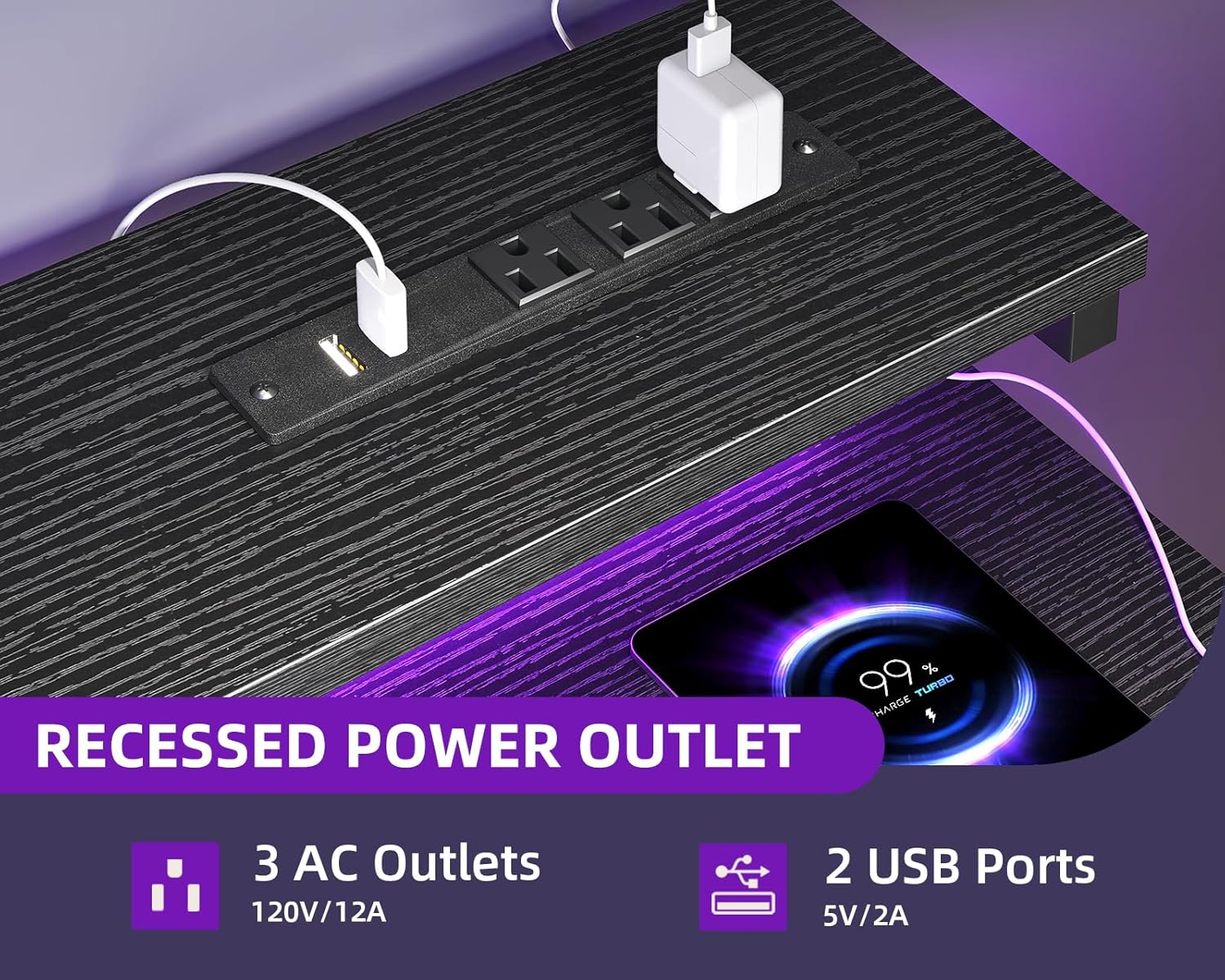
Figure 3: Recessed Power Outlet. This image details the integrated power strip with AC and USB ports, designed for easy device charging and power access.
ไฟ LED RGB
The integrated RGB LED strip under the monitor shelf offers customizable lighting to enhance your workspace or gaming ambiance.
- 10 Static Colors: Choose from a variety of solid colors.
- โหมดไดนามิก 10 โหมด: Experience different lighting effects.
How to Control the LED Lights:

Figure 4: LED Light Controller. This diagram illustrates the control panel for the RGB LED lights, explaining the function of each button for color, mode, speed, and brightness adjustments.
- ปุ่มสีคงที่ (C): กดหนึ่งครั้งเพื่อเปลี่ยนเป็นโหมดสีคงที่ การกดครั้งต่อไปจะเปลี่ยนสี
- ปุ่มโหมดไดนามิก (M): Press once to switch to dynamic effect mode. Each subsequent press changes the dynamic mode. Press and hold for 3 seconds to enter demo mode, where the strip cycles through various dynamic modes automatically.
- Speed & Brightness & Power Button (S/B/Power):
- ในโหมดคงที่ ให้กดเพื่อปรับระดับความสว่าง
- ในโหมดไดนามิก ให้กดเพื่อปรับความเร็วของโหมดไดนามิก
- Press and hold to shut down the LED strip when it is on. Press briefly to turn it on.
The product features a power-off memory function, meaning the strip will restore the last color, brightness, and mode settings upon the next power-on.
ลิ้นชักผ้า
The fabric drawer provides discreet storage for your items.

Figure 5: Fabric Drawer. This image showcases the pull-out fabric drawer, emphasizing its ease of use, durability, and simple assembly.
- The drawer is designed for easy pushing and pulling.
- It is easy to clean.
การซ่อมบำรุง
- การทำความสะอาด: เช็ดพื้นผิวโต๊ะด้วยน้ำยาทำความสะอาดamp ใช้ผ้าเช็ดทำความสะอาด หลีกเลี่ยงสารเคมีรุนแรงหรือน้ำยาทำความสะอาดที่มีฤทธิ์กัดกร่อน ซึ่งอาจทำให้พื้นผิวเคลือบเสียหายได้
- ลิ้นชักผ้า: The fabric drawer can be spot cleaned with a mild detergent and water. Allow to air dry completely.
- ส่วนประกอบไฟฟ้า: Ensure the power outlet and LED strip are dry before use. Do not attempt to disassemble or repair electrical components yourself.
- การตรวจสอบเสถียรภาพ: ตรวจสอบสกรูและการเชื่อมต่อทั้งหมดเป็นระยะๆ เพื่อให้แน่ใจว่าแน่นหนาและปลอดภัย
การแก้ไขปัญหา
| ปัญหา | สาเหตุที่เป็นไปได้ | สารละลาย |
|---|---|---|
| Desk is wobbly after assembly. | Screws are not fully tightened. Uneven floor. | Ensure all assembly screws are tightened securely. Adjust the non-slip foot pads to level the desk on uneven surfaces. |
| ไฟ LED ไม่ติด | Power cable not connected. Controller malfunction. | Check if the LED light strip's power cable is securely plugged into a working outlet. Ensure the controller is properly connected to the LED strip. Try pressing the power button on the controller. |
| เต้ารับไฟฟ้า/พอร์ต USB ใช้งานไม่ได้ | Desk power cord not plugged in. Overload. | Verify the desk's main power cord is securely plugged into a functional wall outlet. Check if too many high-power devices are connected, potentially tripping a circuit breaker (if applicable). |
| Fabric drawer does not slide smoothly. | Improper installation. Obstruction. | Ensure the drawer frame is assembled correctly and free of obstructions. Check if the drawer is overloaded. |
ข้อมูลจำเพาะ
| คุณสมบัติ | รายละเอียด |
|---|---|
| ยี่ห้อ | MOTPK |
| หมายเลขรุ่น | B01170401006 |
| ขนาดสินค้า (ลึก x กว้าง x สูง) | ลึก 18.9 นิ้ว x กว้าง 47.2 นิ้ว x สูง 29.9 นิ้ว |
| สี | สีดำ |
| สไตล์ | ทันสมัย |
| วัสดุฐาน | โลหะ |
| ประเภทวัสดุยอดนิยม | ไม้แปรรูป |
| ประเภทการเสร็จสิ้น | ลามิเนต |
| คุณสมบัติพิเศษ | Built-In USB Outlet, Built-in Power Outlet, Compact, Reversible, Monitor Shelf, Headphone Hook |
| จำนวนลิ้นชัก | 1 (Fabric Drawer) |
| น้ำหนักสินค้า | 12.8 กิโลกรัม |
| จำเป็นต้องประกอบ | ใช่ (มีเครื่องมือให้ครบ) |
| คำแนะนำการดูแลผลิตภัณฑ์ | เช็ดด้วย Damp ผ้า |
การรับประกันและการสนับสนุน
For warranty information or customer support, please refer to the documentation included with your purchase or contact MOTPK customer service directly. Please have your model number (B01170401006) and purchase details ready when contacting support.


