1. บทนำ
This manual provides essential instructions for the setup, operation, and maintenance of your Saiyin Sound Bar DS6401PB. Please read this manual thoroughly before using the product to ensure proper functionality and to prevent damage.

Image 1.1: The Saiyin Sound Bar DS6401PB positioned below a television.
2. เนื้อหาบรรจุภัณฑ์
โปรดตรวจสอบให้แน่ใจว่าสินค้าทุกรายการที่ระบุไว้ด้านล่างครบถ้วนในพัสดุของคุณ หากมีสินค้าใดขาดหายหรือเสียหาย โปรดติดต่อฝ่ายบริการลูกค้า
- Two Tower Speakers (forming the sound bar)
- รีโมทคอนโทรล
- Tower Speaker Base (for vertical setup)
- อะแดปเตอร์แปลงไฟ
- สายใยแก้วนำแสง
- สายสัญญาณเสียงขนาด 3.5 มม.
- ชุดติดตั้งบนผนัง
- คู่มือการใช้งาน (เอกสารนี้)
- คู่มือเริ่มต้นอย่างรวดเร็ว
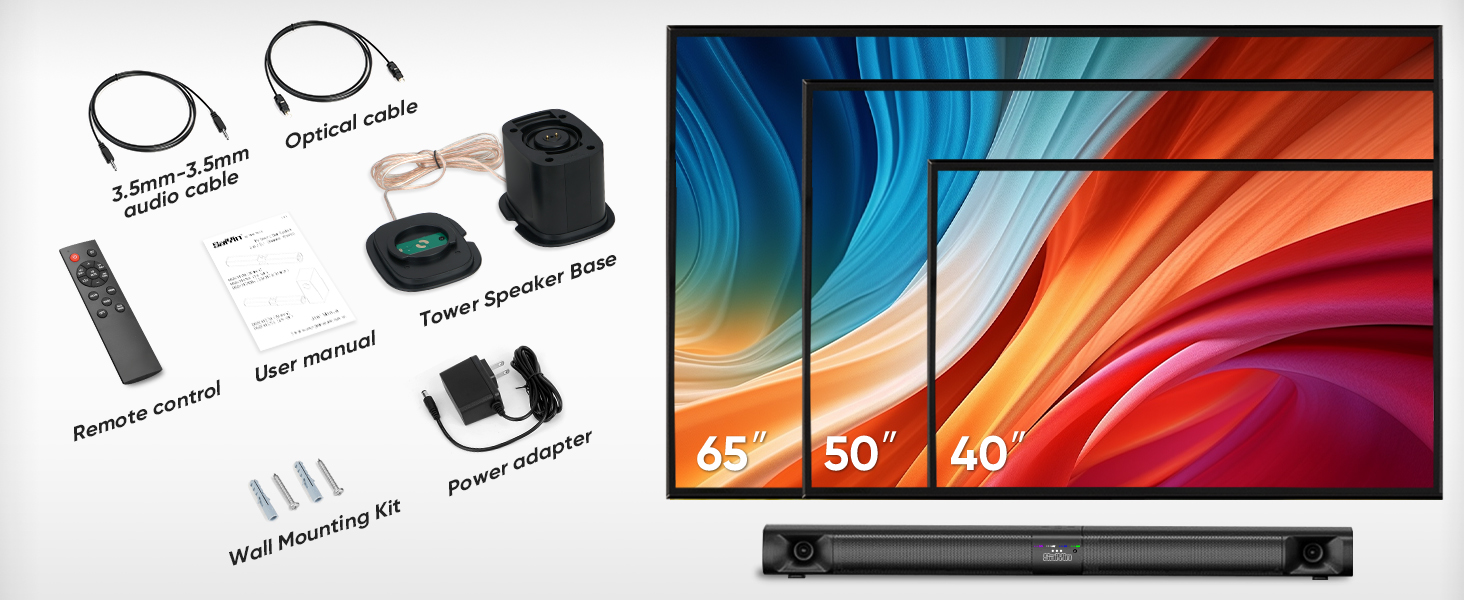
Image 2.1: All components included in the Saiyin Sound Bar DS6401PB package.
3. สินค้าหมดview
3.1. คุณสมบัติ
- การออกแบบที่ถอดออกได้: The 31-inch sound bar can be used as a single horizontal unit or split into two vertical tower speakers.
- ส่วนประกอบเสียง: Features dual silk horn tweeters for clear high frequencies and four low-frequency drivers for extended bass response down to 65Hz.
- การเชื่อมต่อ: Supports Bluetooth 5.3 for wireless audio, and wired connections via TV ARC, Optical, and AUX. Includes an extra subwoofer interface.
- โหมดเสียง: Three optimized sound modes (News, Movie, Music) for various audio content.
- ตัวเลือกการวางตำแหน่ง: Suitable for desktop placement or wall mounting.
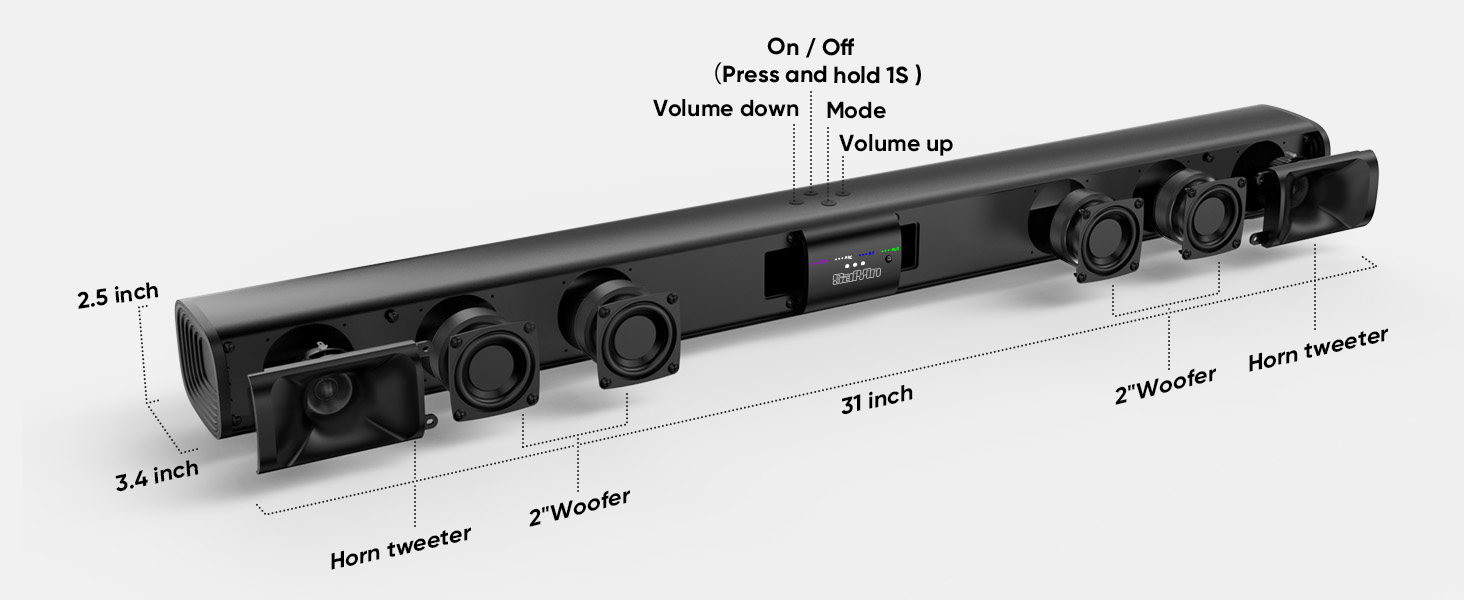
ภาพที่ 3.1: ระเบิด view illustrating the internal components and control buttons of the sound bar.
3.2. การควบคุมและตัวชี้วัด
The sound bar features intuitive controls and LED indicators for easy operation.
- ปุ่มเปิด/ปิด: Press and hold for 1 second to turn on/off.
- ปุ่มปรับระดับเสียง: ปรับระดับเสียงขึ้นหรือลง
- ปุ่มโหมด: Cycle through input modes (Optical, ARC, Bluetooth, AUX).
- ไฟ LED แสดงสถานะ: Display the active input mode (OPT, ARC, BT, AUX).
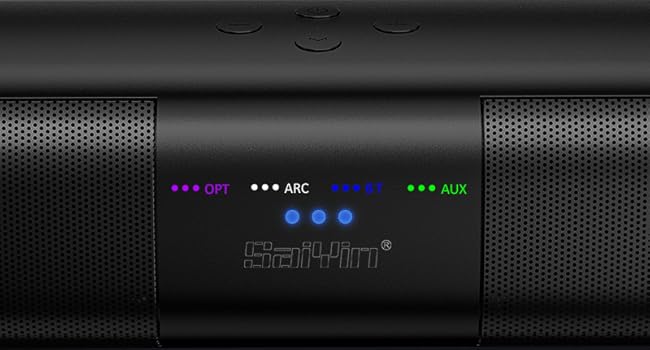
ภาพที่ 3.2: รายละเอียด view of the LED indicators showing active input modes (OPT, ARC, BT, AUX).
3.3. การเชื่อมต่อแผงด้านหลัง
The rear panel provides various ports for connecting to your audio sources.
- อาร์ค: HDMI ARC input for TV connection.
- ออปติคัล: Optical audio input.
- ย่อยออก: Port for connecting an external powered subwoofer.
- DC IN: กำลังไฟเข้า
- ช่องเสริม: อินพุตเสริมขนาด 3.5 มม.
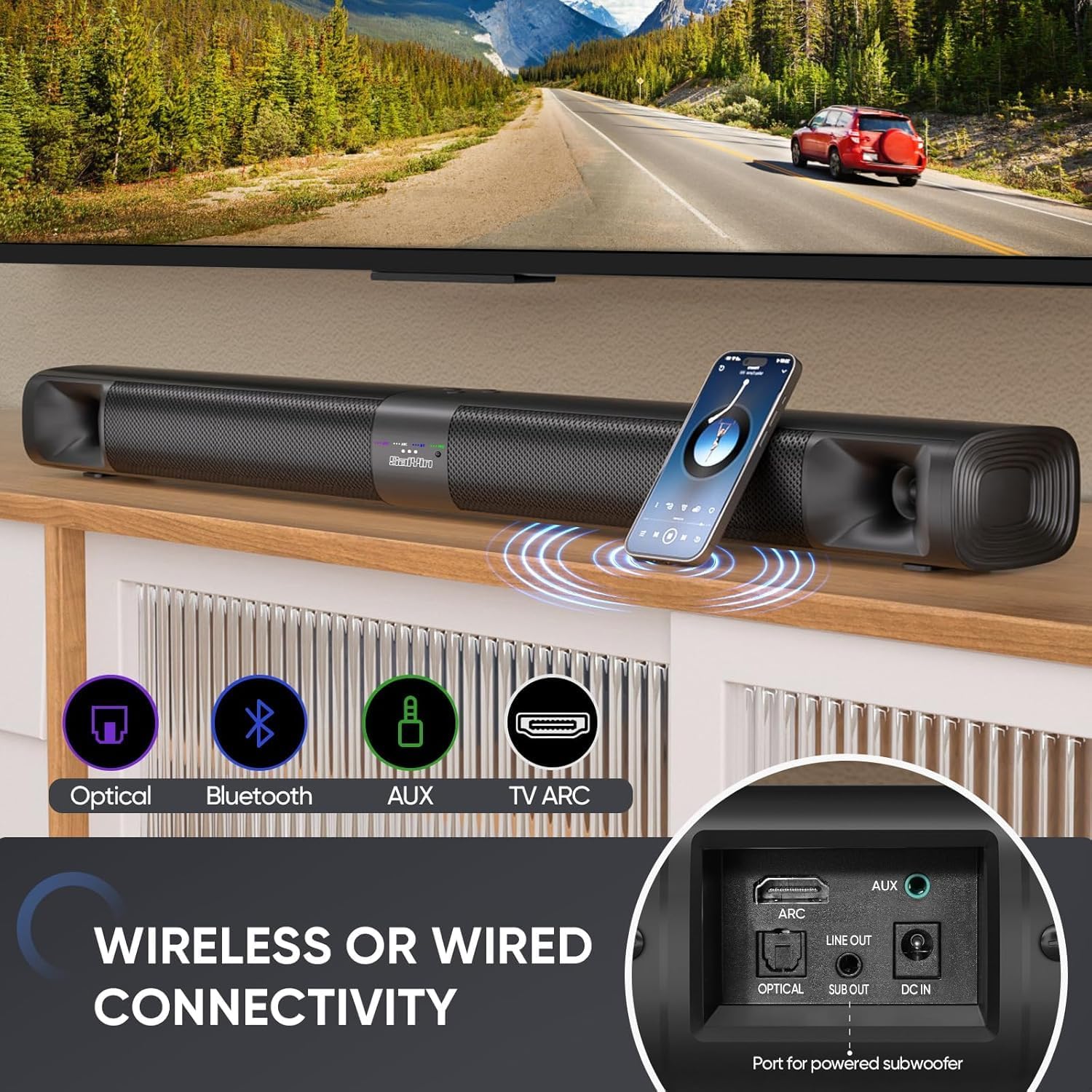
ภาพที่ 3.3: จบแล้วview of the sound bar's connectivity ports, including Optical, Bluetooth, AUX, and TV ARC.
4. การตั้งค่า
4.1. Assembly and Placement
The Saiyin Sound Bar DS6401PB offers flexible placement options: as a single horizontal sound bar or as two vertical tower speakers.
4.1.1. Detachable Assembly
To convert between the single sound bar and tower speaker configurations:
- การถอด: Gently twist and pull the two halves of the sound bar apart.
- Assembling Tower Speakers: Attach each half to its respective tower speaker base. Ensure the 'A' and 'B' markings align. Rotate until securely locked.
- Assembling Sound Bar: Align the two halves of the sound bar, ensuring the 'A' and 'B' markings align. Twist and merge them into one unit.
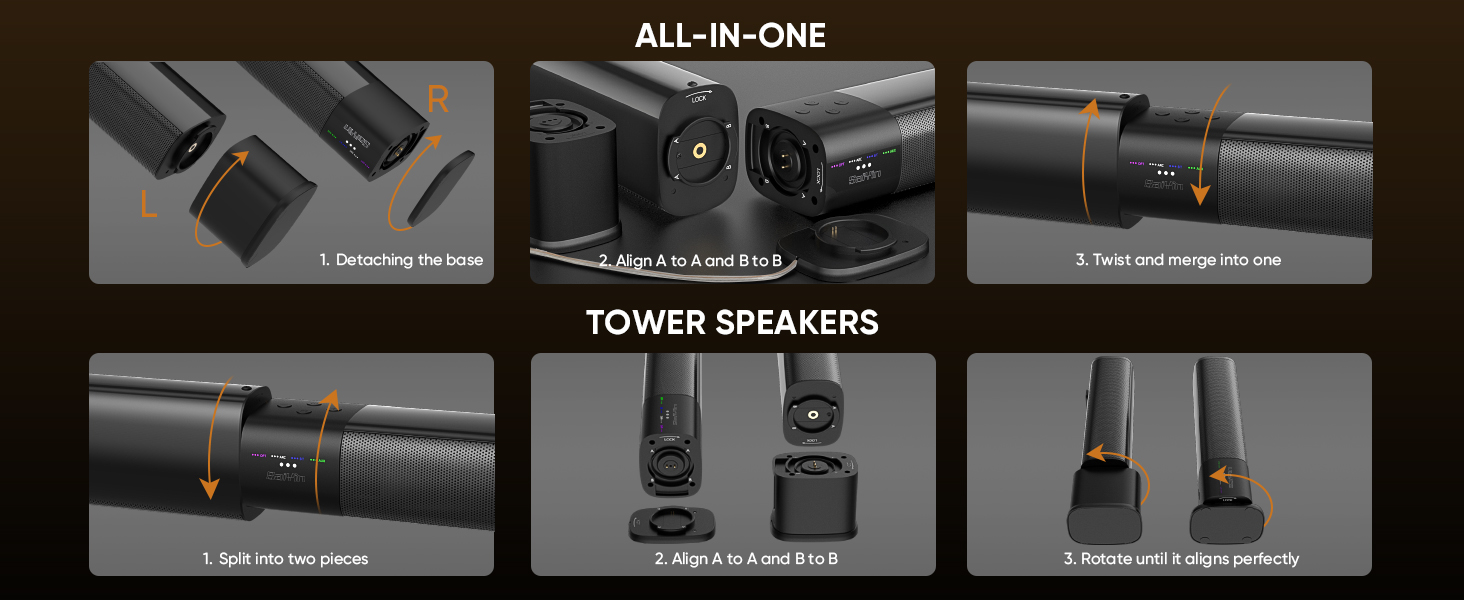
Image 4.1: Visual guide for converting the sound bar between its single unit and tower speaker configurations.
4.1.2. ตัวเลือกการจัดวาง
Choose the placement that best suits your environment and audio preference.
- Desktop Placement (Sound Bar): Place the assembled sound bar horizontally on a stable surface below your TV.
- Wall Mount (Sound Bar): Use the provided wall mounting kit to secure the sound bar horizontally to a wall.
- Desktop Placement (Tower Speakers): Place the two assembled tower speakers vertically on either side of your TV or monitor. The widened base provides stability.
- Wall Mount (Tower Speakers): Use the provided wall mounting kit to secure the two tower speakers vertically to a wall on either side of your TV.
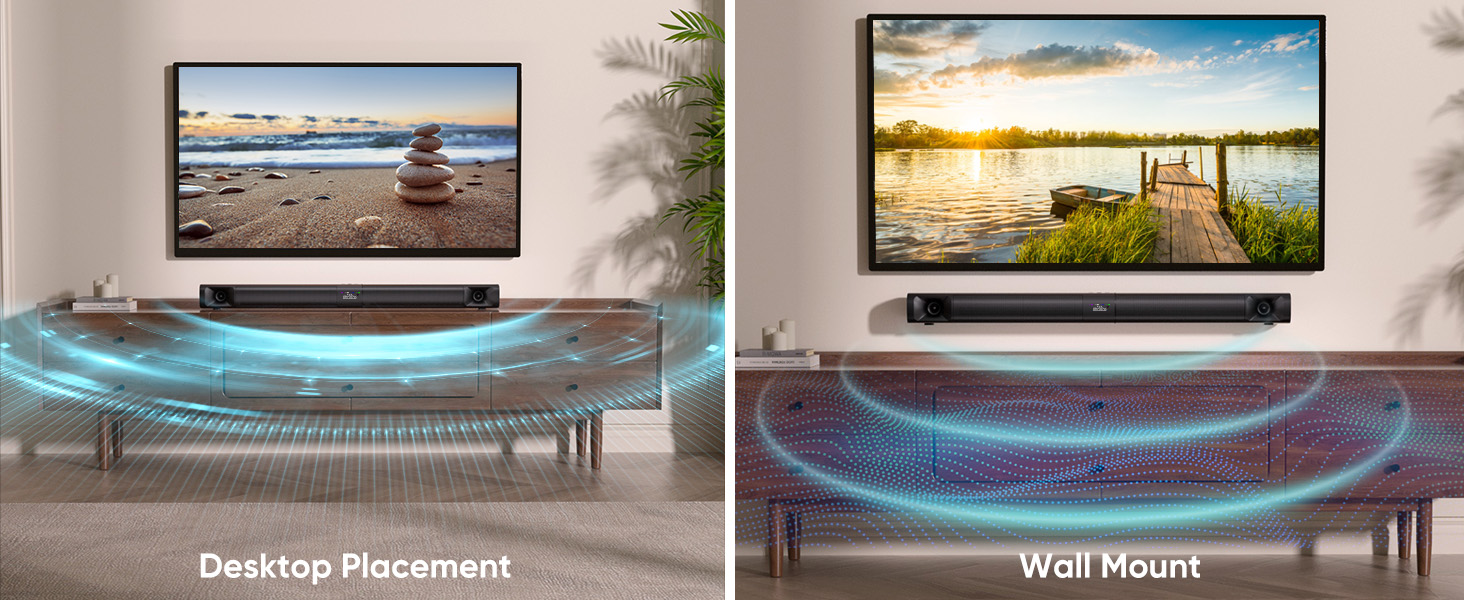
Image 4.2: Illustrates the sound bar in both desktop and wall-mounted horizontal positions.
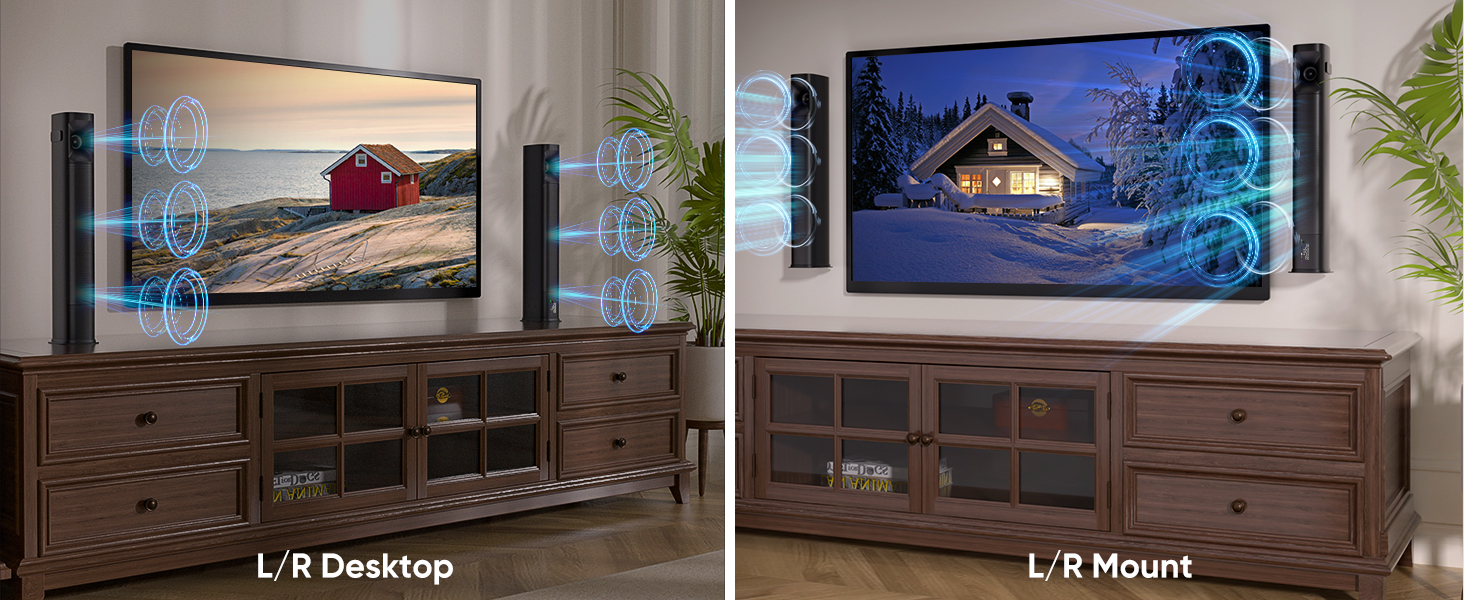
Image 4.3: Illustrates the tower speakers in both desktop and wall-mounted vertical positions.
4.2. Connecting to Audio Sources
Connect the sound bar to your TV or other devices using one of the available methods.
4.2.1. Optical Cable Connection
For high-quality digital audio, use the optical cable.
- Connect one end of the optical cable to the OPTICAL port on the sound bar.
- เชื่อมต่อปลายอีกด้านหนึ่งเข้ากับพอร์ต Optical Digital Audio Out บนทีวีของคุณ
- บนทีวีของคุณ ให้ไปที่ Settings > Sound Output > Optical.
- Adjust TV audio settings: Go to Settings > Sound > Expert Settings > Digital Output Audio Format และเลือก PCM/Stereo Sound.
- To avoid silent or noisy output, disable Dolby/DTS on your TV and streaming apps (e.g., Netflix, Amazon Prime Video, Hulu).
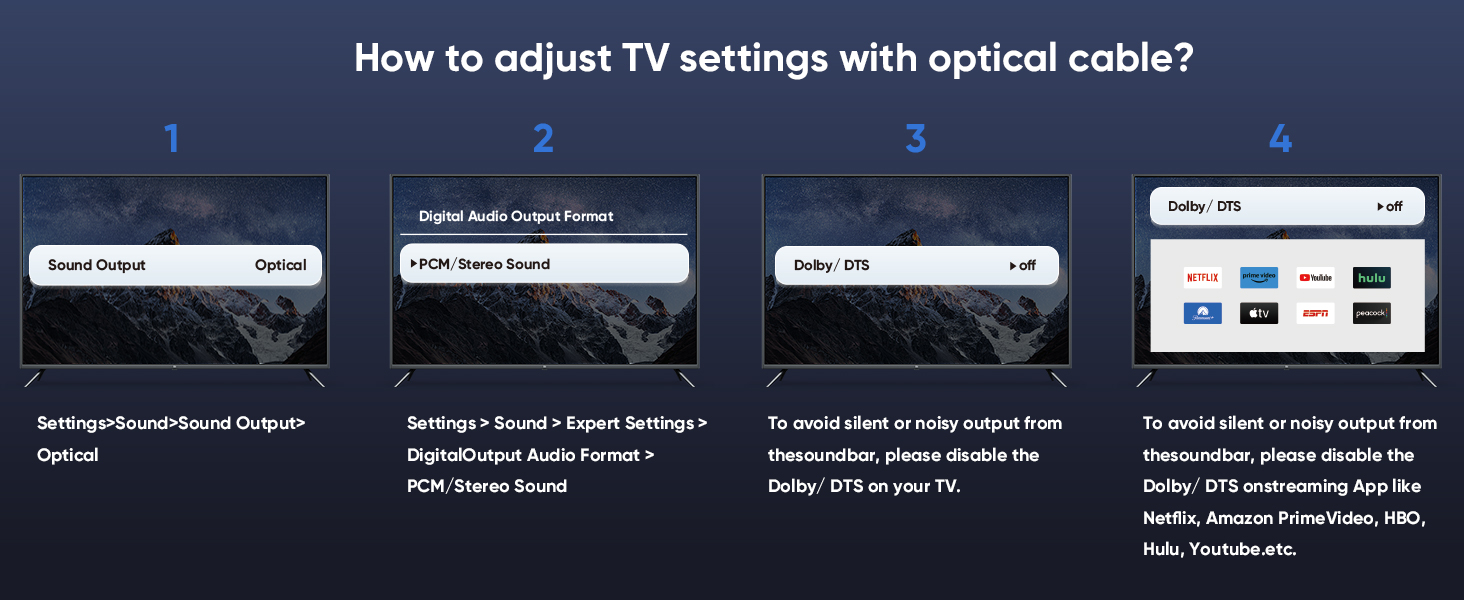
Image 4.4: Step-by-step guide for configuring TV audio settings when using an optical cable.
4.2.2. TV ARC Connection
Use an HDMI cable (not included) for TV ARC connection.
- Connect one end of an HDMI cable to the ARC port on the sound bar.
- ต่อปลายอีกด้านหนึ่งเข้ากับพอร์ต HDMI ARC บนทีวีของคุณ
- Select the ARC input on the sound bar using the remote or control panel.
4.2.3. การเชื่อมต่อ AUX
For analog audio devices, use the 3.5mm audio cable.
- Connect one end of the 3.5mm audio cable to the AUX port on the sound bar.
- Connect the other end to the 3.5mm audio output port on your device.
- Select the AUX input on the sound bar.
4.2.4. การเชื่อมต่อบลูทู ธ
สำหรับการสตรีมเสียงแบบไร้สายจากอุปกรณ์ที่รองรับ
- Turn on the sound bar and select Bluetooth mode (BT). The BT indicator will flash.
- เปิดใช้งานบลูทูธบนอุปกรณ์เคลื่อนที่ของคุณ (สมาร์ทโฟน แท็บเล็ต ฯลฯ)
- ค้นหา "Saiyin DS6401PB" in the list of available devices and select it to pair.
- Once paired, the BT indicator will stop flashing and remain solid.
4.2.5. การเชื่อมต่อซับวูฟเฟอร์
To enhance bass, connect an external powered subwoofer (not included) to the SUB OUT port on the sound bar.
4.3. เปิดเครื่อง
After connecting your audio source and power adapter:
- Connect the power adapter to the DC IN port on the sound bar.
- เสียบอะแดปเตอร์ไฟฟ้าเข้ากับเต้ารับไฟฟ้าที่ผนัง
- Press and hold the power button on the sound bar or remote control for 1 second to turn it on.
5. คู่มือการใช้งาน
5.1. การใช้รีโมทคอนโทรล
The included remote control allows full functionality of the sound bar.
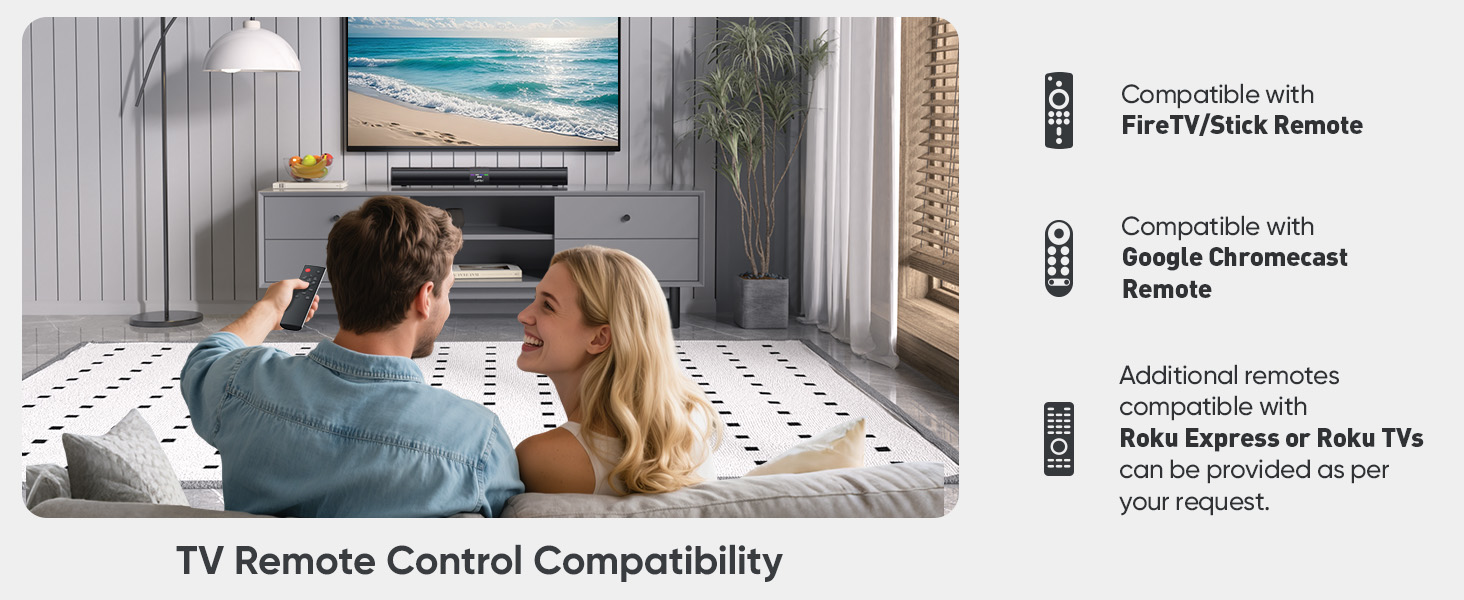
Image 5.1: The sound bar's remote control and its compatibility with FireTV/Stick, Google Chromecast, and Roku remotes.
5.2. Selecting Sound Modes
Optimize your audio experience by choosing one of the three preset sound modes.
- โหมดข่าว: Enhances vocal clarity for dialogue-heavy content.
- โหมดภาพยนตร์: มอบประสบการณ์เสียงที่ทรงพลังและสมจริงtage สำหรับภาพยนตร์
- โหมดเพลง: Delivers balanced audio reproduction for music listening.
Press the corresponding button on the remote control to switch between modes.
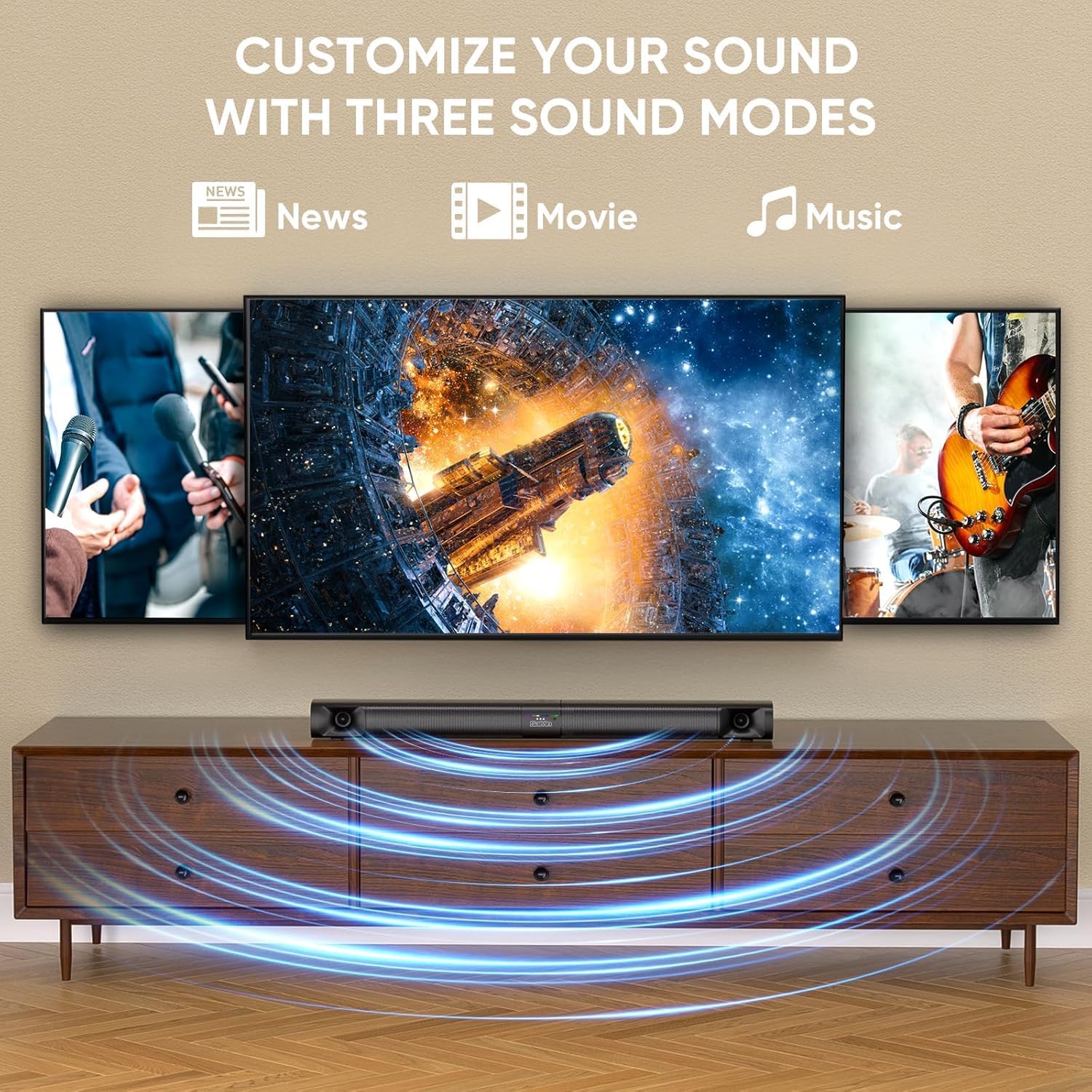
Image 5.2: Visual representation of the three customizable sound modes: News, Movie, and Music.
6. การบำรุงรักษา
To ensure the longevity and optimal performance of your sound bar, follow these maintenance guidelines:
- การทำความสะอาด: ใช้ผ้าแห้งเนื้อนุ่มเช็ดทำความสะอาดพื้นผิวของลำโพงซาวด์บาร์ ห้ามใช้น้ำยาทำความสะอาดหรือวัสดุที่มีฤทธิ์กัดกร่อน
- การระบายอากาศ : Ensure the sound bar's vents are not blocked to prevent overheating.
- พื้นที่จัดเก็บ: หากจะเก็บซาวด์บาร์ไว้เป็นเวลานาน ควรถอดปลั๊กออกและเก็บไว้ในที่แห้งและเย็น
- หลีกเลี่ยงความชื้น: Keep the sound bar away from water and high humidity.
7 การแก้ไขปัญหา
If you encounter issues with your sound bar, refer to the following common problems and solutions.
| ปัญหา | สาเหตุที่เป็นไปได้ | สารละลาย |
|---|---|---|
| ไม่มีเสียง |
|
|
| การตัดการเชื่อมต่อบลูทู ธ |
|
|
| รีโมตคอนโทรลไม่ทำงาน |
|
|
| เสียงผิดเพี้ยน |
|
|
8. ข้อมูลจำเพาะ
| คุณสมบัติ | ข้อมูลจำเพาะ |
|---|---|
| ชื่อรุ่น | Saiyin Soundbar DS6401PB |
| ประเภทลำโพง | Soundbar (Detachable) |
| เทคโนโลยีการเชื่อมต่อ | Bluetooth 5.3, TV ARC, Optical, AUX |
| โหมดเอาต์พุตเสียง | สเตอริโอ (2.0 ช่อง) |
| กำลังขับสูงสุดของลำโพง | 90 วัตต์ |
| การตอบสนองความถี่ | Down to 65Hz (low-frequency drivers) |
| วิธีการควบคุม | รีโมทคอนโทรล, ปุ่มบนตัวเครื่อง |
| ประเภทการติดตั้ง | Wall Mount, Desktop |
| ขนาดสินค้า (ซาวด์บาร์) | 31 inches (Length) x 3.4 inches (Depth) x 2.5 inches (Height) |
| น้ำหนักสินค้า | 5.02 ปอนด์ |
| ผู้ผลิต | Shenzhen Saiyin Electronics Co.,Ltd. |
9. การรับประกันและการสนับสนุน
9.1. ข้อมูลการรับประกัน
The Saiyin Sound Bar DS6401PB comes with a รับประกัน 12 เดือน from the date of purchase. This warranty covers manufacturing defects and workmanship under normal use. It does not cover damage caused by misuse, accidents, unauthorized modifications, or improper installation.
9.2. การสนับสนุนลูกค้า
For technical assistance, warranty claims, or any questions regarding your Saiyin Sound Bar DS6401PB, please contact our customer support team. Refer to the contact information provided in your quick start guide or on the official Saiyin webเว็บไซต์.


