1. บทนำ
This manual provides essential information for the proper setup, operation, and maintenance of your FUNYET FUNPAD 10-inch Android Tablet. Please read this guide thoroughly before using your device to ensure optimal performance and longevity.
2. อะไรอยู่ในกล่อง
ตรวจสอบว่ามีรายการทั้งหมดอยู่ในแพ็คเกจ:
- FUNYET FUNPAD 10-inch Android Tablet
- อะแดปเตอร์แปลงไฟ
3. สินค้าหมดview
The FUNYET FUNPAD is a 10-inch Android tablet featuring an Octa-Core processor, 8GB RAM, 128GB storage, and a metal shell design. It is equipped with dual cameras, Wi-Fi 5, and Bluetooth 5.0 for versatile use.
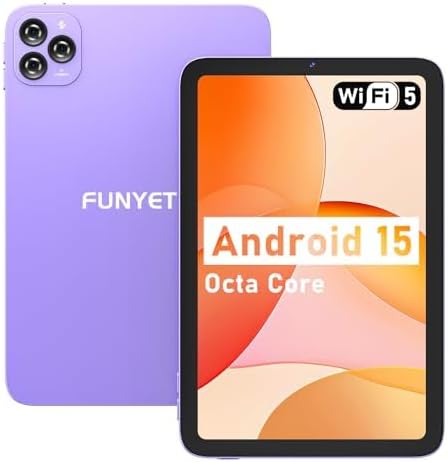
ภาพ: ด้านหน้าและด้านหลัง view of the FUNYET FUNPAD 10-inch Android Tablet, showcasing its purple metal shell and camera module.
3.1 Device Layout and Components

Image: Diagram illustrating the various ports and buttons on the FUNYET FUNPAD tablet. This includes the Micro SD Slot, Power On/Off button, Volume buttons, Type-C (Full Function) port, Auto Focus 8MP Rear Camera, Fixed Focus 2MP Front Camera, Flashlight, and Dual Speakers.
- ปุ่มเปิด/ปิด: Located on the side, used to power the device on/off or put it to sleep.
- ปุ่มปรับระดับเสียง: ปรับระดับเอาท์พุตเสียง
- พอร์ต Type-C: สำหรับการชาร์จและถ่ายโอนข้อมูล
- สล็อตไมโคร SD: Insert a Micro SD card for expandable storage.
- กล้องหน้า: กล้อง 2MP สำหรับการสนทนาทางวิดีโอและการถ่ายเซลฟี่
- กล้องหลัง: 8MP autofocus camera with flashlight for capturing photos and videos.
- ลำโพงคู่: ให้เอาต์พุตเสียง
4. การตั้งค่า
4.1 การชาร์จเริ่มต้น
Before first use, fully charge the tablet using the provided power adapter and Type-C cable. The battery indicator on the screen will show charging status.
4.2 การเปิด/ปิดเครื่อง
- การเปิดเครื่อง: Press and hold the Power button until the FUNYET logo appears.
- วิธีปิดเครื่อง: กดปุ่มเปิด/ปิดค้างไว้ จากนั้นเลือก "ปิดเครื่อง" จากตัวเลือกบนหน้าจอ
- ในการรีสตาร์ท: กดปุ่มเปิด/ปิดค้างไว้ จากนั้นเลือก "รีสตาร์ท" จากตัวเลือก
4.3 ตัวช่วยการตั้งค่าเริ่มต้น
เมื่อเปิดเครื่องครั้งแรก แท็บเล็ตจะแนะนำคุณตลอดขั้นตอนการตั้งค่าเบื้องต้น ทำตามคำแนะนำบนหน้าจอเพื่อ:
- เลือกภาษาของคุณ
- เชื่อมต่อกับเครือข่าย Wi-Fi
- ตั้งค่าบัญชี Google ของคุณ (ไม่บังคับ แต่แนะนำสำหรับการดาวน์โหลดแอป)
- ตั้งค่าวันที่และเวลา
5. คู่มือการใช้งาน
5.1 การนำทางพื้นฐาน
The FUNYET FUNPAD features an In-cell multi-touch display. Use standard Android gestures:
- แตะ: เลือกรายการหรือเปิดแอป
- ปัด: เลื่อนดูหน้าจอหรือรายการ
- หยิก: ซูมเข้าหรือออกจากรูปภาพและ web หน้า
- กดแบบยาว: เข้าถึงเมนูบริบทหรือย้ายไอคอน
5.2 การเชื่อมต่อ Wi-Fi
หากต้องการเชื่อมต่อกับเครือข่าย Wi-Fi:
- ไปที่ การตั้งค่า > เครือข่ายและอินเตอร์เน็ต > ไวไฟ.
- สลับ Wi-Fi On.
- เลือกเครือข่ายที่คุณต้องการจากรายการ
- ป้อนรหัสผ่านหากได้รับแจ้ง จากนั้นแตะ เชื่อมต่อ.
5.3 การจับคู่บลูทูธ
วิธีเชื่อมต่อกับอุปกรณ์บลูทูธ (เช่น หูฟัง ลำโพง):
- ไปที่ การตั้งค่า > อุปกรณ์ที่เชื่อมต่อ > บลูทูธ.
- สลับบลูทูธ On.
- ตรวจสอบให้แน่ใจว่าอุปกรณ์ Bluetooth ของคุณอยู่ในโหมดจับคู่
- Select your device from the list of available devices and follow any on-screen prompts to complete pairing.
5.4 การใช้งานกล้อง
The tablet features an 8MP autofocus rear camera and a 2MP fixed-focus front camera.

Image: Visual representation of the FUNYET FUNPAD tablet's camera capabilities, highlighting the 8MP rear camera with autofocus and flashlight, and the 2MP front camera. Example photos are displayed.
- เปิด กล้อง แอป.
- แตะไอคอนกล้องเพื่อสลับระหว่างกล้องหน้าและกล้องหลัง
- แตะปุ่มชัตเตอร์เพื่อถ่ายภาพหรือเริ่ม/หยุดการบันทึกวิดีโอ
5.5 การจัดการการจัดเก็บข้อมูล
The tablet comes with 128GB of internal storage. You can expand this by inserting a Micro SD card (up to 1TB capacity).

Image: The FUNYET FUNPAD tablet screen showing icons for 128GB ROM, 8GB RAM, and 1TB Micro SD expansion, indicating ample storage and expandability.
วิธีจัดการพื้นที่จัดเก็บข้อมูล:
- ไปที่ การตั้งค่า > พื้นที่จัดเก็บ.
- View การใช้งานและการจัดการพื้นที่จัดเก็บข้อมูลภายใน files.
- Insert a Micro SD card into the designated slot to expand storage.
5.6 การจัดการแบตเตอรี่
The tablet is equipped with a 6000mAh battery for extended usage.

Image: The FUNYET FUNPAD tablet being used for various activities like watching videos and video calls, illustrating its long-lasting 6000mAh battery.
- หากต้องการตรวจสอบสถานะแบตเตอรี่ ให้ไปที่ การตั้งค่า > แบตเตอรี่.
- For optimal battery life, avoid extreme temperatures and use the provided charger.
5.7 ระบบนำทาง GPS
The tablet supports GPS, GLONASS, and BDS for accurate location services. Ensure location services are enabled in การตั้งค่า > ที่ตั้ง for navigation apps to function correctly.
6. การบำรุงรักษา
6.1 การทำความสะอาดเครื่อง
- ใช้ผ้านุ่มไม่เป็นขุยทำความสะอาดหน้าจอและตัวเครื่อง
- หลีกเลี่ยงการใช้สารเคมีรุนแรงหรือวัสดุที่มีฤทธิ์กัดกร่อน
- ห้ามฉีดน้ำยาทำความสะอาดลงบนหน้าจอโดยตรง
6.2 การอัปเดตซอฟต์แวร์
ตรวจสอบและติดตั้งการอัปเดตซอฟต์แวร์เป็นประจำเพื่อให้แน่ใจว่าแท็บเล็ตของคุณมีคุณสมบัติล่าสุดและการปรับปรุงด้านความปลอดภัย ไปที่ การตั้งค่า > ระบบ > การอัพเดทระบบ.
6.3 การดูแลแบตเตอรี่
- หลีกเลี่ยงการปล่อยแบตเตอรี่จนหมดบ่อยครั้ง
- อย่าให้ยาเม็ดนี้โดนความร้อนหรือความเย็นจัด
- If the tablet will not be used for an extended period, charge it to about 50% before storing.
7 การแก้ไขปัญหา
If you encounter issues with your FUNYET FUNPAD, refer to the following common solutions:
| ปัญหา | วิธีแก้ปัญหาที่เป็นไปได้ |
|---|---|
| แท็บเล็ตไม่สามารถเปิดเครื่องได้ | Ensure the battery is charged. Connect the tablet to the charger for at least 30 minutes, then try powering on again. |
| ปัญหาการเชื่อมต่อ Wi-Fi | รีสตาร์ทแท็บเล็ตและเราเตอร์ Wi-Fi ของคุณ ลบการเชื่อมต่อเครือข่ายในตั้งค่า Wi-Fi แล้วเชื่อมต่อใหม่ ตรวจสอบให้แน่ใจว่าคุณอยู่ในระยะสัญญาณ |
| ประสิทธิภาพช้าหรือค้าง | Close unnecessary background apps. Clear cache for problematic apps. Restart the tablet. Check for available storage space. |
| หน้าจอไม่ตอบสนอง | Perform a forced restart by holding the Power button for approximately 10-15 seconds. If the issue persists, consider a factory reset (data will be lost). |
| Device reboots unexpectedly | Ensure the device is updated to the latest software. Check for conflicting apps. If the issue persists, a factory reset may be necessary. |
7.1 รีเซ็ตเป็นค่าโรงงาน
A factory reset will erase all data from your tablet and restore it to its original factory settings. This should be considered a last resort for persistent software issues.
- Back up any important data.
- ไปที่ การตั้งค่า > ระบบ > ตัวเลือกการรีเซ็ต > ลบข้อมูลทั้งหมด (รีเซ็ตเป็นค่าโรงงาน).
- ยืนยันตัวเลือกของคุณและทำตามคำแนะนำบนหน้าจอ
8. ข้อมูลจำเพาะ
Key technical specifications for the FUNYET FUNPAD 10-inch Android Tablet:
| คุณสมบัติ | ข้อมูลจำเพาะ |
|---|---|
| ขนาดหน้าจอแสดงผล | 10 นิ้ว |
| ความละเอียดหน้าจอ | 800x1280 พิกเซล |
| โปรเซสเซอร์ | 1.6 GHz Octa-Core (Spreadtrum T606) |
| โคโปรเซสเซอร์กราฟิก | มะลิ-G57 |
| แรม | 8GB |
| การจัดเก็บข้อมูลภายใน | 128GB |
| พื้นที่เก็บข้อมูลแบบขยายได้ | ไมโคร SD (สูงสุด 1TB) |
| ระบบปฏิบัติการ | แอนดรอยด์ |
| ประเภทไร้สาย | 802.11ac (ไวไฟ 5) |
| บลูทูธ | บลูทูธ 5.0 |
| กล้องหลัง | ออโต้โฟกัส 8MP |
| กล้องหน้า | 2MP โฟกัสคงที่ |
| แบตเตอรี่ | 6000mAh |
| น้ำหนักสินค้า | 1.74 ปอนด์ |
| ขนาดสินค้า | 9.48 x 6.28 x 0.3 นิ้ว |
9. การรับประกันและการสนับสนุน
FUNYET is dedicated to providing quality electronic products. We offer a 30-day free exchange policy and a 1-year free repair service for all our products.
If you have any questions or require assistance with your FUNYET FUNPAD tablet, please contact FUNYET support. We aim to reply to all inquiries within 24 hours.
For further information or to explore other products, visit the official FUNYET store: FUNYET Store on Amazon
