1. บทนำ
Thank you for choosing the VSTARCAM Outdoor Security Dual Lens Camera CS663DR. This manual provides detailed instructions for the installation, operation, and maintenance of your new security camera. Designed for comprehensive outdoor surveillance, this camera features dual lenses, 3MP resolution, AI auto-tracking, two-way audio, and robust IP66 weather protection, ensuring reliable monitoring for your home or property.
2. อะไรอยู่ในกล่อง
- VSTARCAM Outdoor Security Dual Lens Camera
- คู่มือการใช้งาน
- สกรูยึด
- อะแดปเตอร์แปลงไฟ
- ยืน
3. สินค้าหมดview
The VSTARCAM CS663DR camera integrates advanced features for superior surveillance. It includes a fixed wide-angle lens and a rotating PTZ (Pan-Tilt-Zoom) lens, allowing for simultaneous monitoring of different areas. The camera supports 2K HD resolution for clear image capture.
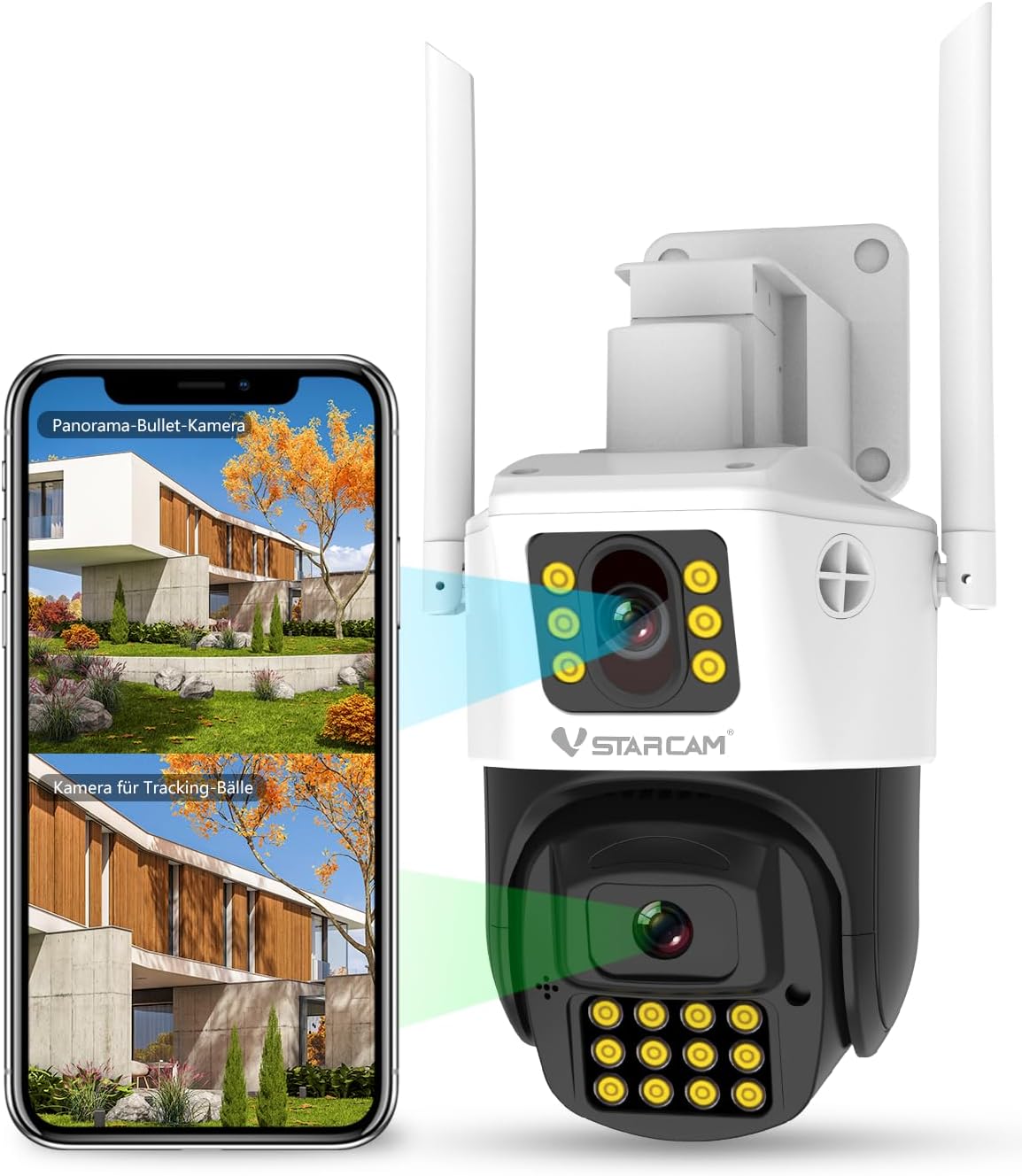
รูปที่ 3.1: เกินview of the VSTARCAM Dual Lens Camera and its mobile application interface.

Figure 3.2: The camera captures clear 2K HD resolution, suitable for monitoring outdoor activities.
4. คำแนะนำในการตั้งค่า
4.1. เปิดเครื่อง
- เชื่อมต่ออะแดปเตอร์ไฟที่ให้มาเข้ากับพอร์ตอินพุตไฟของกล้อง
- Plug the power adapter into a standard electrical outlet. The camera will initiate its startup sequence.
4.2. การติดตั้งแอพ
- Download the VSTARCAM mobile application from your device's app store (available for Android and iOS).
- ลงทะเบียนบัญชีใหม่หรือเข้าสู่ระบบหากคุณมีบัญชีอยู่แล้ว
4.3 การเชื่อมต่อ Wi-Fi
- ตรวจสอบให้แน่ใจว่าเครือข่าย Wi-Fi ของคุณเป็น 2.4 GHz หมายเหตุ: ไม่รองรับเครือข่าย Wi-Fi 5 GHz
- Follow the in-app instructions to add your camera and connect it to your Wi-Fi network. This typically involves scanning a QR code on the camera or using an audio pairing method.
4.4. การติดตั้งกล้อง
กล้องรองรับการติดตั้งทั้งบนผนังและเพดาน เลือกตำแหน่งที่ให้การครอบคลุมที่ดีที่สุดและสัญญาณ Wi-Fi ที่เสถียร
- Use the included mounting screws and stand to securely attach the camera to your desired surface.
- Ensure the camera is positioned to cover the intended surveillance area.

Figure 4.1: Illustration of the camera's mounting options, power connection, and 2.4 GHz Wi-Fi compatibility. The camera offers 350° pan and 90° tilt capabilities.
5. คู่มือการใช้งาน
5.1. Dual-Lens View และการควบคุม PTZ
The VSTARCAM CS663DR features two lenses: a fixed lens and a PTZ lens. You can switch between viewสหรือ view both simultaneously within the app. Use the app's controls to pan the PTZ lens 350 degrees horizontally and tilt it 90 degrees vertically to adjust your viewมุมอิง

Figure 5.1: Screenshot of the VSTARCAM mobile application displaying dual-lens live view และตัวเลือกการควบคุม
5.2. AI Auto Tracking
The camera is equipped with AI human detection and auto-tracking. When a human figure is detected within the camera's field of view, the PTZ lens will automatically track their movement, ensuring continuous surveillance of the subject.

Figure 5.2: Demonstration of the camera's AI human detection and auto-tracking capabilities in an outdoor setting.
5.3. การตรวจจับการเคลื่อนไหวและการแจ้งเตือน
Configure motion detection settings in the app to receive instant notifications on your smartphone when activity is detected. You can customize detection zones and sensitivity levels to minimize false alarms.
5.4. การพูดสองทาง
Utilize the built-in microphone and speaker for two-way communication. This feature allows you to speak to visitors or deter unwanted intruders directly through the camera via the mobile app.
5.5. การมองเห็นในเวลากลางคืน
The camera offers both full-color night vision and infrared (IR) night vision modes. The 18 built-in lights enable clear visibility up to 30 meters in low-light conditions. The spotlight can be triggered by motion or controlled manually.

Figure 5.3: Comparison of full-color night vision and infrared (IR) night vision modes, providing optimal visibility in all lighting conditions.
5.6. ตัวเลือกการจัดเก็บ
The VSTARCAM CS663DR supports local storage via a Micro SD card (up to 256 GB, not included) and cloud storage services. You can access recorded footage and live streams anytime, anywhere, through the mobile app or a computer.
6. การบำรุงรักษา
- การทำความสะอาดเลนส์: Regularly wipe the camera lenses with a soft, dry cloth to ensure clear image quality. Avoid abrasive cleaners.
- การเชื่อมต่อไฟฟ้า: Periodically check that the power adapter is securely connected and free from damage.
- สัญญาณ Wi-Fi: Ensure the camera maintains a strong 2.4 GHz Wi-Fi signal for optimal performance.
- อัพเดตเฟิร์มแวร์: Check the VSTARCAM app for available firmware updates to ensure your camera has the latest features and security enhancements.
7 การแก้ไขปัญหา
- กล้องไม่เชื่อมต่อกับ Wi-Fi: Ensure your Wi-Fi is 2.4 GHz. Verify the Wi-Fi password. Move the camera closer to the router. Restart the camera and router.
- คุณภาพของภาพไม่ดี: Clean the camera lenses. Check your internet connection speed. Ensure the camera is within optimal Wi-Fi range.
- การตรวจจับการเคลื่อนไหวไม่ทำงาน: Verify motion detection settings in the app. Adjust sensitivity and detection zones. Ensure the camera's view ไม่ถูกกีดขวาง
- Two-way talk issues: Check microphone and speaker permissions for the app on your phone. Ensure the camera's microphone and speaker are not obstructed.
- ไม่พบการ์ด SD: Ensure the SD card is correctly inserted. Format the SD card through the camera settings in the app. Use a compatible Micro SD card (up to 256 GB).
8. ข้อมูลจำเพาะ
The VSTARCAM CS663DR is built to withstand outdoor conditions with an IP66 waterproof rating, operating effectively in temperatures ranging from -30°C to +60°C.

Figure 8.1: The camera's IP66 rating ensures protection against water and dust, making it suitable for various weather conditions.
| คุณสมบัติ | ข้อมูลจำเพาะ |
|---|---|
| หมายเลขรุ่น | ซีเอสทูดีอาร์ |
| การใช้งานภายใน/ภายนอกอาคาร | กลางแจ้ง |
| ความละเอียดในการจับภาพวิดีโอ | 3 ล้านพิกเซล (2K HD) |
| เทคโนโลยีการเชื่อมต่อ | Wi-Fi (2.4 GHz เท่านั้น) |
| แหล่งพลังงาน | สายไฟ |
| ประเภทการติดตั้ง | ติดผนัง |
| Viewing Angle (PTZ) | แพน 350°, เอียง 90° |
| ช่วงการมองเห็นตอนกลางคืน | Up to 30 meters (15 meters effective) |
| คุณสมบัติพิเศษ | Dual Lens, Siren & Spotlight, Color Night Vision, Motion Detection, AI Humanoid Detection, Two-Way Talk, Multi-User Sharing |
| ทนทานต่อสภาพอากาศ | กันน้ำระดับ IP66 |
| ตัวเลือกการจัดเก็บข้อมูล | Micro SD Card (up to 256 GB), Cloud Storage |
| อุปกรณ์ที่รองรับ | Android, iOS, PC, MAC |
| ขนาดสินค้า | 6.08 x 5.5 x 8.06 นิ้ว |
| น้ำหนักสินค้า | 2.2 ปอนด์ |
9. การรับประกันและการสนับสนุน
VSTARCAM products are designed for reliability and performance. For warranty information, please refer to the documentation included with your purchase or visit the official VSTARCAM website. If you encounter any issues or require technical assistance, please contact VSTARCAM customer support for prompt and professional help.


