1. บทนำ
The EUQQ AI Translation Earbuds, Model YYK-Q16 PRO H3 AI, are designed to facilitate global communication through real-time, bidirectional translation across 144 languages. These earbuds integrate advanced features such as an AI assistant, AI chat, and AI image generation, making them a versatile tool for various scenarios including personal conversations, travel, and business. This manual provides detailed guidance to help you maximize your device's capabilities.
2. เนื้อหาบรรจุภัณฑ์
ตรวจสอบว่ามีรายการทั้งหมดอยู่ในบรรจุภัณฑ์ผลิตภัณฑ์ของคุณ:
- 2 x EUQQ AI Language Translation Earbuds
- 1 x Charging Case with LCD Touchscreen
- สายชาร์จ 1 x USB Type-C
- 1 x คู่มือผู้ใช้ (เอกสารนี้)
3. สินค้าหมดview
3.1 หูฟังไร้สายและเคสชาร์จ

The EUQQ AI Translation Earbuds, featuring an open-ear design, are shown alongside their charging case, which includes a vibrant LCD touchscreen display.
The EUQQ AI Translation Earbuds feature an open-ear design for comfort during extended use, weighing approximately 8 grams each. They are designed to allow awareness of your surroundings while providing audio. The accompanying charging case is equipped with an LCD touchscreen for intuitive control.
3.2 Multifunctional Smart Touchscreen

A close-up of the charging case's LCD touchscreen, displaying various icons for functions like call history, dial settings, music playback, AI translation, timer, calendar, camera, key settings, language switch, counter, and multi-settings.
The charging case features a vibrant color touchscreen that allows direct control over various functions without needing your phone. These functions include:
- Music playback control (play, pause, skip tracks)
- Call management (answer/end calls)
- Noise cancellation activation
- การปรับระดับเสียง
- การควบคุมกล้อง
- Switching between 7 interface languages
- การปรับแต่งวอลเปเปอร์
- การปรับความสว่างหน้าจอ
- Earphone search function
- มีตัวตั้งเวลาในตัว
4. การตั้งค่า
4.1 Initial Setup and App Installation
To begin using your EUQQ AI Translation Earbuds, follow these steps:
- ดาวน์โหลดแอป: Locate the QR code in the charging case or within this user manual. Scan the QR code to download the dedicated AI app, named "NebulaBuds".
- เปิดใช้งานบลูทูธ: On your smartphone, navigate to your device's settings and ensure Bluetooth is turned on.
- เปิดแอป: Launch the "NebulaBuds" app. The app will prompt you to allow necessary permissions for connection. Grant these permissions.
- จับคู่หูฟัง: The app will automatically detect nearby devices. Select "YYK-Q16 Pro H3 AI" from the list and confirm to establish a successful connection.

A four-step visual guide demonstrating how to connect the earbuds: 1. Download the 'NebulaBuds' app. 2. Turn on phone's Bluetooth. 3. Open the app and allow permissions. 4. Select 'YYK-Q16 Pro H3 AI' to connect.
No membership fees are required to use the core translation features.
4.2 การเชื่อมต่อบลูทูธ
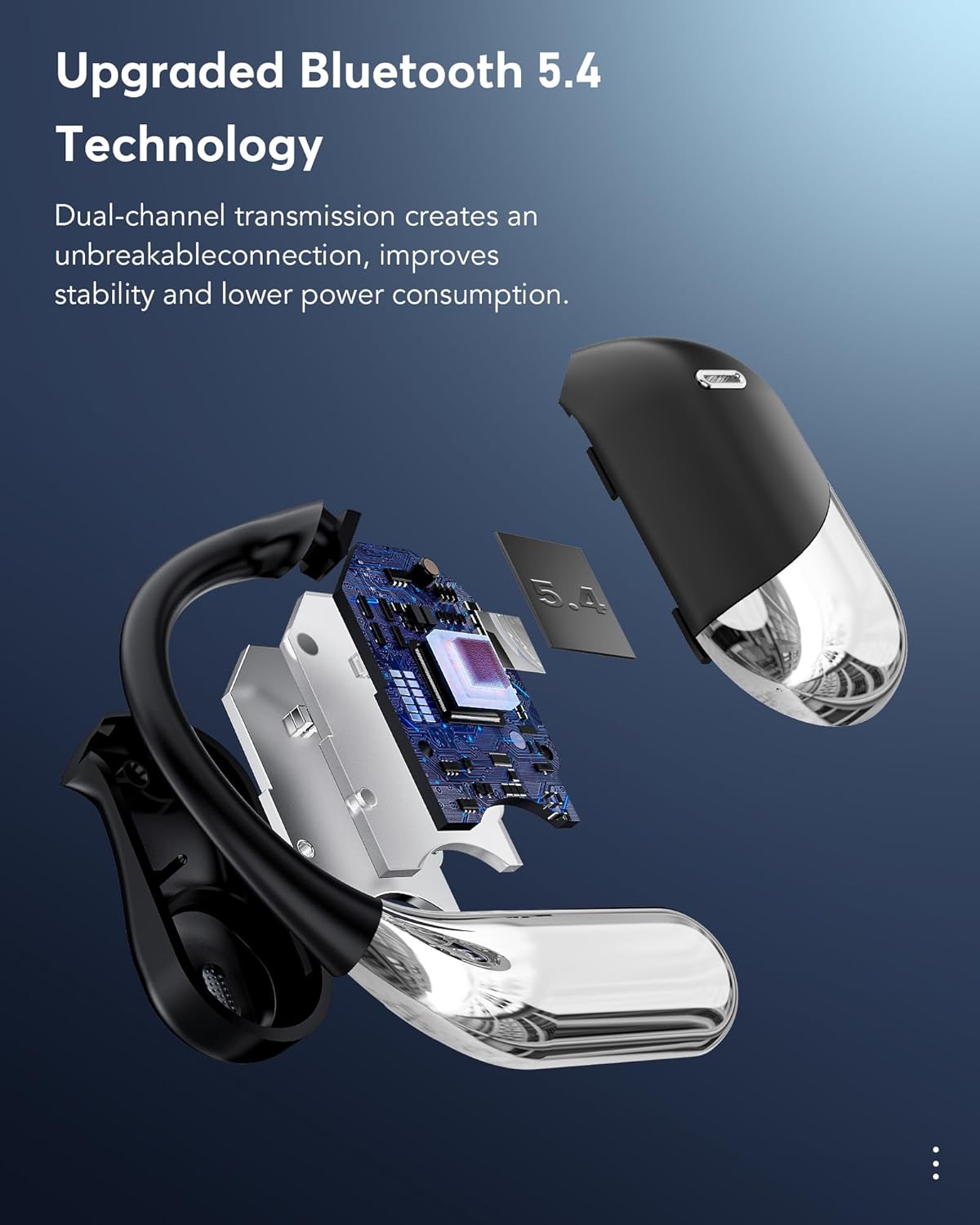
เกิดการระเบิดขึ้น view of an earbud showcasing the internal components and highlighting the Bluetooth 5.4 chip, emphasizing dual-channel transmission for stable connection and lower power consumption.
The earbuds utilize Bluetooth 5.4 technology, providing a stable and efficient wireless connection. This advanced connectivity ensures reliable performance and optimized power consumption.
5. คู่มือการใช้งาน
5.1 โหมดการแปลแบบเรียลไทม์
The EUQQ AI Translation Earbuds support real-time, bidirectional translation for 144 languages. The device offers several translation modes to suit different communication needs:

An illustration showing two individuals communicating with the aid of the earbuds, demonstrating real-time translation across multiple languages, including English, German, Spanish, French, Chinese, Russian, Japanese, and Arabic.

An image illustrating the four primary translation modes: Touch Mode, Free-speech Mode, Speaker Mode, and Offline Mode. Offline translation is supported in most regions.
- โหมดสัมผัส: Tap the earbud to initiate translation.
- โหมดเสรีภาพในการแสดงความคิดเห็น: การแปลอย่างต่อเนื่องเพื่อการสนทนาที่เป็นธรรมชาติ
- โหมดลำโพง: Use your phone's speaker for translation output, ideal for group settings.
- โหมดออฟไลน์: Supports translation in most parts of the world without an internet connection.
- การแปลพร้อมกัน: Real-time voice translation suitable for international conferences.
- การแปลแบบเห็นหน้ากัน (หูฟัง + โทรศัพท์มือถือ): Two-way translation for negotiations or travel.
- การแปลแบบเห็นหน้ากัน (โหมดหูฟังคู่): Share earbuds with another person for simultaneous two-way communication.
5.2 คุณสมบัติการสื่อสาร
The earbuds offer integrated communication functionalities:
- การโทรด้วยเสียง: Make and receive calls directly through the earbuds.
- วิดีโอคอล: Conduct video calls with real-time translation. The accompanying app generates an invitation link for seamless communication via a web browser, eliminating the need for the other party to install the app.
- การบันทึกสด: Record conversations and convert them to text for meeting notes or documentation.
- ประวัติเสียงและวิดีโอ: อย่างง่ายดาย view past call records and redial directly from the device.
5.3 AI Assistant and Advanced Features
Beyond translation, the earbuds integrate advanced AI capabilities:
- ผู้ช่วย AI: Access over 200 AI small applications for various tasks.
- AI Chat: Engage in text-based conversations with the AI.
- AI Voice Smart Dialogue: Interact with the AI using real-time voice commands.
- Text-to-Image Generation: Create images based on provided text descriptions.
- Image-to-Image Generation: Generate new images based on a reference image and text description.
- Summary & Playback: The AI can summarize historical recordings and identify speakers.
5.4 Audio Features and EQ Modes

ภาพตัดขวาง view of an earbud, illustrating the internal 15mm dynamic driver and precision directional sound design, which contribute to an immersive audio experience.
The earbuds are equipped with 14.2mm bio-carbon fiber dynamic drivers, delivering robust bass and clear mid-high frequencies. You can customize your listening experience with five Equalizer (EQ) modes:
- มาตรฐาน
- คลาสสิค
- แจ๊ส
- หิน
- โผล่
Select your preferred EQ mode via the charging case touchscreen or the companion app.
5.5 Scene-Adaptive Design
The earbuds offer various listening modes to adapt to your environment:
- โหมดเงียบ: For focused listening.
- โหมดหูฟัง: Standard earbud use.
- โหมดลำโพงโทรศัพท์: Utilizes the phone's speaker for audio output.
- โหมด binaural: Both earbuds active for stereo sound and immersive translation.
6. แบตเตอรี่และการชาร์จ

An image highlighting the charging capabilities and battery life: 1.5 hours for fast charging via Type-C, 60 hours total playtime with the case, and 8 hours of single playtime for the earbuds. It also shows power displays for both the case and earbuds.
The earbuds and charging case provide extended battery life:
- เวลาเล่นเอียร์บัด: สูงสุด 8 ชั่วโมงต่อการชาร์จหนึ่งครั้ง
- เวลาเล่นทั้งหมดกับเคส: Up to 60 hours (standby time).
- การชาร์จ: The case supports fast charging via a Type-C cable. A full charge for the case takes approximately 1.5 hours.
The LCD touchscreen on the charging case displays the current battery levels for both the case and the individual earbuds.
7. การบำรุงรักษา
To ensure the longevity and optimal performance of your EUQQ AI Translation Earbuds, follow these maintenance guidelines:
- การทำความสะอาด: เช็ดหูฟังและกล่องชาร์จด้วยผ้านุ่ม แห้ง และไม่เป็นขุยเป็นประจำ หลีกเลี่ยงการใช้วัสดุที่มีฤทธิ์กัดกร่อนหรือสารเคมีรุนแรง
- ความต้านทานน้ำ: The earbuds have an IPX7 water resistance rating, meaning they can withstand sweat and splashes. However, they are not designed for submersion in water. Avoid exposing them to strong jets of water or prolonged water contact.
- พื้นที่จัดเก็บ: เมื่อไม่ใช้งาน ให้เก็บหูฟังไว้ในกล่องชาร์จเพื่อป้องกันฝุ่นและความเสียหาย เก็บในที่แห้งและเย็น หลีกเลี่ยงแสงแดดโดยตรงและอุณหภูมิที่สูงหรือต่ำเกินไป
- การชาร์จ: Use only the provided Type-C charging cable or a certified equivalent. Avoid overcharging the device.
- การอัปเดตซอฟต์แวร์: Periodically check the "NebulaBuds" app for firmware updates to ensure your earbuds have the latest features and performance improvements.
8 การแก้ไขปัญหา
If you encounter issues with your EUQQ AI Translation Earbuds, refer to the following common solutions:
| ปัญหา | สาเหตุที่เป็นไปได้ | สารละลาย |
|---|---|---|
| หูฟังไม่จับคู่/เชื่อมต่อ | Bluetooth is off; earbuds are out of charge; app permissions not granted. | Ensure Bluetooth is enabled on your phone. Charge the earbuds and case. Verify that the "NebulaBuds" app has all necessary permissions. Restart the app and your phone. |
| Translation not working accurately | Incorrect language selection; poor microphone input; internet connection issues (for online translation). | Confirm the correct source and target languages are selected in the app. Speak clearly and directly into the earbud's microphone. Ensure a stable internet connection for online translation modes. Download offline language packs if available. |
| เอียร์บัดข้างหนึ่งไม่ทำงาน | Low battery; connection issue with one earbud. | Place both earbuds back into the charging case and ensure they are charging. Re-pair the earbuds with your device. Check for any debris blocking the charging contacts. |
| หน้าจอสัมผัสไม่ตอบสนอง | Temporary software glitch; low battery. | Ensure the charging case is adequately charged. Try restarting the case by closing and reopening it, or by connecting it to power. |
| คุณภาพเสียงไม่ดี | Earbuds not positioned correctly; debris in earbud; Bluetooth interference. | Adjust the earbuds for a secure and comfortable fit. Clean the earbud speakers gently. Move away from other wireless devices that may cause interference. |
หากปัญหายังคงมีอยู่หลังจากพยายามแก้ไขปัญหาเหล่านี้แล้ว โปรดติดต่อฝ่ายสนับสนุนลูกค้า
9. ข้อมูลจำเพาะ
| คุณสมบัติ | รายละเอียด |
|---|---|
| ชื่อรุ่น | YYK-Q16 PRO H3 AI |
| ยี่ห้อ | EUQQ |
| เทคโนโลยีการเชื่อมต่อ | ไร้สาย (บลูทูธ 5.4) |
| ภาษาแปล | 144 Languages (Bidirectional) |
| วิธีการควบคุม | Touch (on earbuds and charging case) |
| อายุการใช้งานแบตเตอรี่ของหูฟังเอียร์บัด | สูงสุด 8 ชั่วโมงต่อการชาร์จหนึ่งครั้ง |
| อายุการใช้งานแบตเตอรี่ทั้งหมด (รวมเคส) | Up to 60 hours (standby) |
| พอร์ตชาร์จ | ยูเอสบี ไทป์ ซี |
| ไดร์เวอร์เสียง | 14.2mm Bio-Carbon Fiber Dynamic Driver |
| รูปทรงของหูฟัง | หูเปิด |
| ความต้านทานต่อน้ำ | IPX7 (ทนเหงื่อและน้ำกระเซ็น) |
| วัสดุ | โพลีคาร์บอเนต (พีซี) |
| การควบคุมเสียงรบกวน | ระบบตัดเสียงรบกวน |
| น้ำหนักสินค้า | 6.7 ออนซ์ |
| แบตเตอรี่ | แบตเตอรี่ลิเธียมโพลิเมอร์ 2 ก้อน (รวมอยู่ด้วย) |
10. ข้อมูลด้านความปลอดภัย
โปรดอ่านและปฏิบัติตามข้อควรระวังด้านความปลอดภัยเหล่านี้เพื่อป้องกันความเสียหายต่ออุปกรณ์ของคุณหรือการบาดเจ็บต่อตัวคุณเอง:
- Do not attempt to disassemble, repair, or modify the earbuds or charging case.
- เก็บอุปกรณ์ให้ห่างจากอุณหภูมิที่สูงหรือต่ำมาก แสงแดดโดยตรง และเปลวไฟ
- หลีกเลี่ยงการให้อุปกรณ์สัมผัสกับสนามแม่เหล็กแรงสูง
- อย่าใช้หูฟังในระดับเสียงดังเกินไปเป็นเวลานาน เพราะอาจทำให้การได้ยินเสียหายได้
- Exercise caution when using earbuds in situations requiring awareness of your surroundings, such as driving or cycling.
- กำจัดแบตเตอรี่และส่วนประกอบอิเล็กทรอนิกส์อย่างมีความรับผิดชอบตามกฎระเบียบท้องถิ่น
11. การรับประกันและการสนับสนุน
For warranty information and customer support, please refer to the warranty card included in your product packaging or visit the official EUQQ website. If you require assistance with setup, troubleshooting, or have questions about your device, please contact our support team through the provided channels.


