1. สินค้าหมดview
The Bagotte A21 Robot Vacuum and Mop Combo is a versatile cleaning device designed for efficient floor maintenance. It features 4-in-1 functionality: sweeping, rolling, vacuuming, and mopping. With a powerful 5000Pa suction, it effectively removes debris, pet hair, and dust from various floor types, including hard floors and low-pile carpets. The device is equipped with smart obstacle avoidance and anti-drop sensors for safe navigation.
คุณสมบัติที่สำคัญ ได้แก่:
- No Roller Brush Design: Prevents pet hair entanglement, ideal for pet owners.
- 5000Pa Super Suction: Powerful cleaning for dust and debris.
- ระบบหลีกเลี่ยงสิ่งกีดขวางอัจฉริยะ: Navigates around furniture and avoids stairs.
- App Control & Scheduling: Customize cleaning plans and modes via a smartphone application.
- การออกแบบบางเฉียบ: 2.87 inches height allows access under low furniture.
- ชาร์จอัตโนมัติ: กลับไปยังสถานีชาร์จเมื่อแบตเตอรี่เหลือน้อย

Figure 1: The Bagotte A21 Robot Vacuum and Mop Combo demonstrating its 4-in-1 cleaning capabilities, highlighting the 300ml dust box, 280ml water tank, 3 water levels, and 5000Pa suction power.
2. อะไรอยู่ในกล่อง
Carefully unpack the box and ensure all components are present and in good condition. If any items are missing or damaged, please contact customer support.
- 1x Robotic Vacuum Cleaner
- 1x Electric Control Water Tank
- 1x สถานีชาร์จ
- อะแดปเตอร์ไฟฟ้า 1x
- แปรงด้านข้าง 2x
- 2x Mop Cloths
- 1x Mopping Cloth Holder
- 1x รีโมทคอนโทรล
- 1x คู่มือผู้ใช้
- 1x Filter (pre-installed or spare)

Figure 2: All included components of the Bagotte A21 package, clearly labeled for identification.
3. คู่มือการติดตั้ง
3.1 การจัดวางสถานีชาร์จ
Place the charging station against a wall in an open, uncluttered area. Ensure there is at least 0.5 meters (1.6 feet) of clear space on both sides and 1.5 meters (4.9 feet) in front of the charging station. Connect the power adapter to the charging station and plug it into a wall outlet. Ensure the indicator light on the charging station illuminates.
3.2 ค่าบริการเริ่มต้น
Place the robot vacuum onto the charging station, ensuring the charging contacts on the robot align with those on the station. The robot will begin charging automatically. For first-time use, fully charge the robot for at least 6 hours.
3.3 การติดตั้งแปรงด้านข้าง
Press the side brushes onto the posts at the bottom of the robot until they click into place. Ensure the left (L) and right (R) brushes are installed on the correct posts.
3.4 App Connection (Wi-Fi)
- Download the Bagotte app from your smartphone's app store (iOS or Android).
- ลงทะเบียนบัญชีและเข้าสู่ระบบ
- โปรดตรวจสอบให้แน่ใจว่าโทรศัพท์ของคุณเชื่อมต่อกับเครือข่าย Wi-Fi 2.4GHz แล้ว หุ่นยนต์ไม่รองรับ Wi-Fi 5GHz
- Follow the in-app instructions to add your device. This typically involves pressing and holding a button on the robot to enter pairing mode.
- Once connected, you can control the robot, set schedules, and monitor its status via the app.
4. คู่มือการใช้งาน
4.1 การเริ่ม/หยุดการทำความสะอาด
Press the power button on the robot or the "Start/Pause" button on the remote control/app to begin or pause a cleaning cycle. The robot will automatically select a cleaning mode or follow the last selected mode.
โหมดทำความสะอาด 4.2 โหมด
เครื่องดูดฝุ่น Bagotte A21 มีโหมดการทำความสะอาดหลากหลายให้เลือกใช้ตามความต้องการที่แตกต่างกัน:
- การทำความสะอาดอัตโนมัติ: หุ่นยนต์ทำความสะอาดอย่างเป็นระบบ โดยปรับเส้นทางตามสภาพแวดล้อม
- การทำความสะอาดเฉพาะจุด: Concentrates cleaning on a specific area, moving in a spiral pattern.
- การทำความสะอาดขอบ: ทำความสะอาดตามผนังและขอบเฟอร์นิเจอร์
- Zig-Zag Cleaning: Cleans in a back-and-forth pattern for thorough coverage.
- การตั้งค่ากำหนดการ: Program specific cleaning times and modes via the app.
- เติมเงินอัตโนมัติ: The robot returns to the charging station when the battery is low or cleaning is complete.

Figure 3: Visual representation of the six available cleaning modes for the Bagotte A21.
4.3 ฟังก์ชันถูพื้น
การใช้งานฟังก์ชันถูพื้น:
- Fill the electric control water tank with clean water. Do not use cleaning solutions that are not approved for robot vacuums.
- Attach a clean mop cloth to the mopping cloth holder and then attach the holder to the water tank.
- Insert the filled water tank assembly into the robot.
- Select a mopping mode via the app or remote control. The robot will vacuum and mop simultaneously.
การควบคุมแอพ 4.4 ตัว
The Bagotte app provides comprehensive control over your robot vacuum:
- โหมด: Select specific cleaning modes (Auto, Spot, Edge).
- กำหนดการ: กำหนดตารางการทำความสะอาดรายวันหรือรายสัปดาห์
- การปรับแรงดูด: Adjust suction power levels (e.g., Quiet, Standard, Strong, Max).
- จอแสดงผลแบตเตอรี่: Monitor the robot's current battery level.
- ควบคุมด้วยมือ: Use directional controls to steer the robot.

Figure 4: The Bagotte app interface for controlling the robot vacuum's functions.
5. การบำรุงรักษา
การบำรุงรักษาอย่างสม่ำเสมอจะช่วยให้หุ่นยนต์ดูดฝุ่นทำงานได้อย่างมีประสิทธิภาพสูงสุดและยืดอายุการใช้งาน ควรปิดหุ่นยนต์และถอดปลั๊กออกจากแท่นชาร์จก่อนทำการบำรุงรักษาทุกครั้ง
5.1 การล้างกล่องเก็บฝุ่น
The dust box should be emptied after each cleaning cycle or when full. Press the release button to remove the dust box, open its lid, and discard the collected debris. Clean the filter inside the dust box as described below.
5.2 การทำความสะอาดตัวกรอง
The HEPA filter and sponge filter should be cleaned regularly (weekly for light use, more frequently for heavy use or pets). Tap the filter gently to remove dust. Do not wash the HEPA filter with water; the sponge filter can be rinsed and air-dried completely before reinstallation.
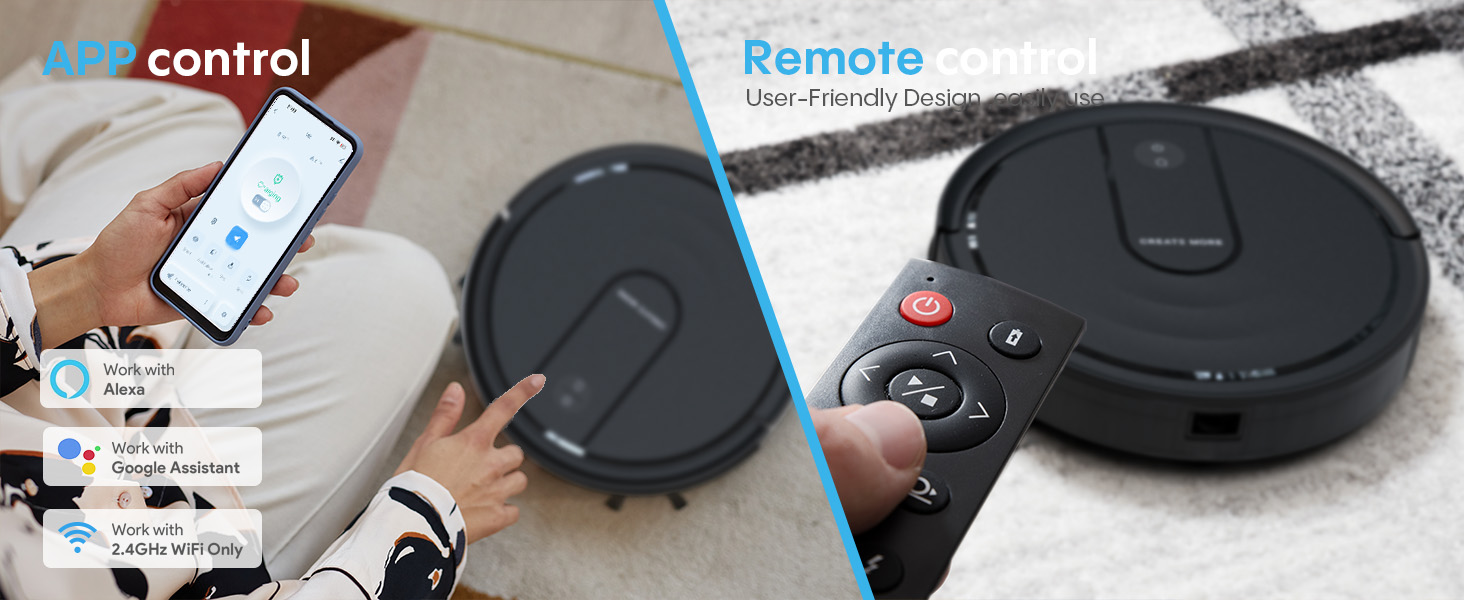
Figure 5: Illustration of the robot's filtration system and the electric control water tank assembly.
5.3 การทำความสะอาดถังเก็บน้ำและผ้าถูพื้น
After each mopping session, empty any remaining water from the water tank. Rinse the tank thoroughly. Remove the mop cloth, wash it with water, and allow it to air dry completely before storing or reusing. Replace mop cloths when they show signs of wear.
5.4 การทำความสะอาดแปรงด้านข้าง
Periodically check the side brushes for tangled hair or debris. Use a small brush or your fingers to remove any obstructions. If brushes are damaged or worn, replace them with new ones.
5.5 การทำความสะอาดเซ็นเซอร์และหน้าสัมผัสการชาร์จ
Wipe the anti-drop sensors, bumper sensors, and charging contacts on both the robot and the charging station with a clean, dry cloth. This ensures proper navigation and charging.
6 การแก้ไขปัญหา
If you encounter issues with your Bagotte A21, refer to the following common problems and solutions:
| ปัญหา | สาเหตุที่เป็นไปได้ | สารละลาย |
|---|---|---|
| หุ่นยนต์ไม่เปิดและไม่ชาร์จ | Battery is completely drained; charging contacts are dirty; power adapter is not connected. | Ensure the power adapter is securely plugged in. Clean the charging contacts on both the robot and the charging station with a dry cloth. Place the robot directly on the charging station. |
| หุ่นยนต์ติดขัดบ่อยครั้ง | Obstacles in the cleaning path; sensors are dirty; robot is on a dark-colored surface that triggers anti-drop sensors. | Clear the cleaning area of cables, small objects, and thick rugs. Clean all sensors. If on dark carpet, consider using boundary strips (if applicable) or manual cleaning. |
| ประสิทธิภาพการทำความสะอาดไม่ดี | Dust box is full; filter is clogged; side brushes are worn or tangled. | Empty the dust box. Clean or replace the filter. Clean or replace side brushes. |
| หุ่นยนต์ไม่สามารถเชื่อมต่อกับ Wi-Fi/แอปได้ | Incorrect Wi-Fi password; 5GHz Wi-Fi network; robot is too far from router; app pairing mode not activated. | Ensure you are connecting to a 2.4GHz Wi-Fi network. Verify the Wi-Fi password. Move the robot closer to the router. Follow app instructions to re-enter pairing mode. |
| ฟังก์ชั่นถูพื้นไม่ทำงาน | Water tank is empty; water outlet is clogged; mop cloth is not properly attached. | Fill the water tank. Check for blockages in the water outlet and clean if necessary. Ensure the mop cloth and holder are correctly installed. |
7. ข้อมูลจำเพาะ
| คุณสมบัติ | รายละเอียด |
|---|---|
| ยี่ห้อ | บากอต |
| ชื่อรุ่น | เอ21 |
| คุณสมบัติพิเศษ | Advanced Custom Cleaning |
| สี | สีดำ |
| ขนาดสินค้า | ยาว 12.61 นิ้ว x กว้าง 12.61 นิ้ว x สูง 2.88 นิ้ว |
| ส่วนประกอบที่รวมอยู่ | Filter, Robotic Vacuum Cleaner, Electric Control Water Tank, Charging Station, Power Adapter, Side Brushes x 2, MOP x 2, Mopping Cloth Holder, Remote Controller, User Manual |
| ประเภทตัวกรอง | แผ่นกรอง HEPA |
| อายุการใช้งานแบตเตอรี่ | สูงสุด 120 นาที |
| แหล่งพลังงาน | ใช้พลังงานจากแบตเตอรี่ |
| วิธีการควบคุม | แอป, รีโมทคอนโทรล |
| ฟอร์มแฟกเตอร์ | กลม |
| น้ำหนักสินค้า | 7.76 ปอนด์ |
| คำแนะนำด้านพื้นผิว | Hard Floors, Low-Pile Carpet |
8. การรับประกันและการสนับสนุน
The Bagotte A21 Robot Vacuum and Mop Combo comes with a รับประกัน 2 ปี. For technical support, warranty claims, or any questions regarding your product, please contact Bagotte customer service. Refer to the contact information provided in the included User Manual or visit the official Bagotte webเว็บไซต์.
โปรดเก็บหลักฐานการซื้อไว้เพื่อวัตถุประสงค์การรับประกัน


