การแนะนำ
The Surfans F28 is a high-fidelity portable music player designed to deliver an immersive audio experience. Featuring dual ESS9018 DACs, a 4.4mm balanced output, and comprehensive Bluetooth 5.2 support including LDAC and aptX HD, the F28 supports a wide range of lossless audio formats. This manual provides detailed instructions for setting up, operating, maintaining, and troubleshooting your device to ensure optimal performance and longevity.

รูปที่ 1: ด้านหน้าและด้านหลัง view of the Surfans F28 HiFi Music Player.
เนื้อหาแพ็คเกจ
โปรดตรวจสอบว่าสินค้าทั้งหมดที่ระบุไว้ด้านล่างนี้มีอยู่ในแพ็คเกจของคุณ:
- 1x Surfans F28 HiFi Music Player
- สายชาร์จ USB-C 1x
- 1x 128GB Micro SD Card (pre-installed or included separately)
- 1x คู่มือผู้ใช้ (เอกสารนี้)

รูปที่ 2: ภาพประกอบแสดงสิ่งของที่บรรจุอยู่ในบรรจุภัณฑ์โดยทั่วไป
สินค้าเกินview
Familiarize yourself with the various components and controls of your F28 music player.
คุณสมบัติหลัก:
- Dual ESS9018 DACs: For high-resolution audio decoding and minimal distortion.
- เอาต์พุตที่สมดุล 4.4 มม.: Provides enhanced audio quality and power for demanding headphones.
- เอาต์พุตแบบ Single-Ended ขนาด 3.5 มม.: Standard audio output for common headphones.
- Bidirectional Bluetooth 5.2: Supports LDAC and aptX HD for high-quality wireless audio transmission and reception.
- หน้าจอสัมผัส IPS ขนาด 3.5 นิ้ว: สำหรับการนำทางและการควบคุมที่ใช้งานง่าย
- ALPS Analog Volume Knob: For precise volume adjustments.
- พื้นที่เก็บข้อมูลที่ขยายได้: รองรับการ์ด Micro SD สูงสุด 512GB.
- พอร์ต USB-C: สำหรับการชาร์จและถ่ายโอนข้อมูล

Figure 3: The F28 player showcasing its display and audio capabilities.

Figure 4: The dual ESS9018K2M DAC chips, central to the F28's high-fidelity audio.

Figure 5: Top panel with 4.4mm balanced and 3.5mm single-ended audio outputs, and the ALPS analog volume knob.
การตั้งค่า
1. การชาร์จอุปกรณ์
Before first use, fully charge the F28. Connect the included USB-C cable to the player's USB-C port and the other end to a USB power adapter (5V/1A recommended) or a computer's USB port. The charging indicator will show the charging status. A full charge typically takes several hours.
2. การใส่การ์ด Micro SD
The F28 supports Micro SD cards up to 512GB. Locate the Micro SD card slot on the bottom of the device. Gently insert the Micro SD card with the gold contacts facing down until it clicks into place. To remove, push the card in slightly until it springs out.

Figure 6: Inserting the Micro SD card and connecting via USB-C for data transfer.
3 การถ่ายโอนเพลง Files
Connect the F28 to your computer using the USB-C cable. The player will appear as a removable storage device. You can then drag and drop your music files directly into the Micro SD card's folders. The F28 supports various lossless formats including DSD (DSF/DFF), FLAC/WAV (up to 384kHz), AIFF/APE, as well as MP3/AAC.

Figure 7: Supported audio file formats for the F28 player.
คำแนะนำการใช้งาน
1. เปิด/ปิดเครื่อง
- เปิดเครื่อง: Press and hold the power button (located on the side) until the screen illuminates.
- หมดแรง: Press and hold the power button until a power-off prompt appears, then confirm.
2. การนำทางพื้นฐาน
The F28 features a 3.5-inch IPS touchscreen for primary navigation. Swipe gestures and taps are used to select options and move between menus. Physical buttons on the side provide additional control for playback (play/pause, next/previous track) and menu navigation.
3. การเล่นเพลง
From the main menu, select "My Music" or "Folder" to browse your audio files. Tap on a song to begin playback. The playback screen displays track information, progress, and playback controls.
4. การควบคุมระดับเสียง
Adjust the volume using the gold-colored ALPS analog knob located on the top right of the device. Rotate clockwise to increase volume and counter-clockwise to decrease. The volume level will be displayed on the screen.
5. การเชื่อมต่อบลูทูธ
The F28 supports Bidirectional Bluetooth 5.2 with LDAC and aptX HD codecs for high-quality wireless audio. To pair with Bluetooth headphones or speakers:
- Go to "System Settings" and select "Bluetooth".
- เปิดบลูทูธ
- เครื่องเล่นจะสแกนหาอุปกรณ์ที่ใช้งานได้ เลือกอุปกรณ์ของคุณจากรายการเพื่อทำการจับคู่
The F28 can also act as a Bluetooth receiver, allowing you to stream audio from your phone or PC to the player.

Figure 8: The F28 features a Bluetooth 5.2 chip for stable and high-quality wireless connections.
6. การตั้งค่าอีควอไลเซอร์
The F28 includes an equalizer to customize your sound. Navigate to the "Equalizer" option in the settings. You can choose from various presets or create a custom sound profile by adjusting the frequency bands.
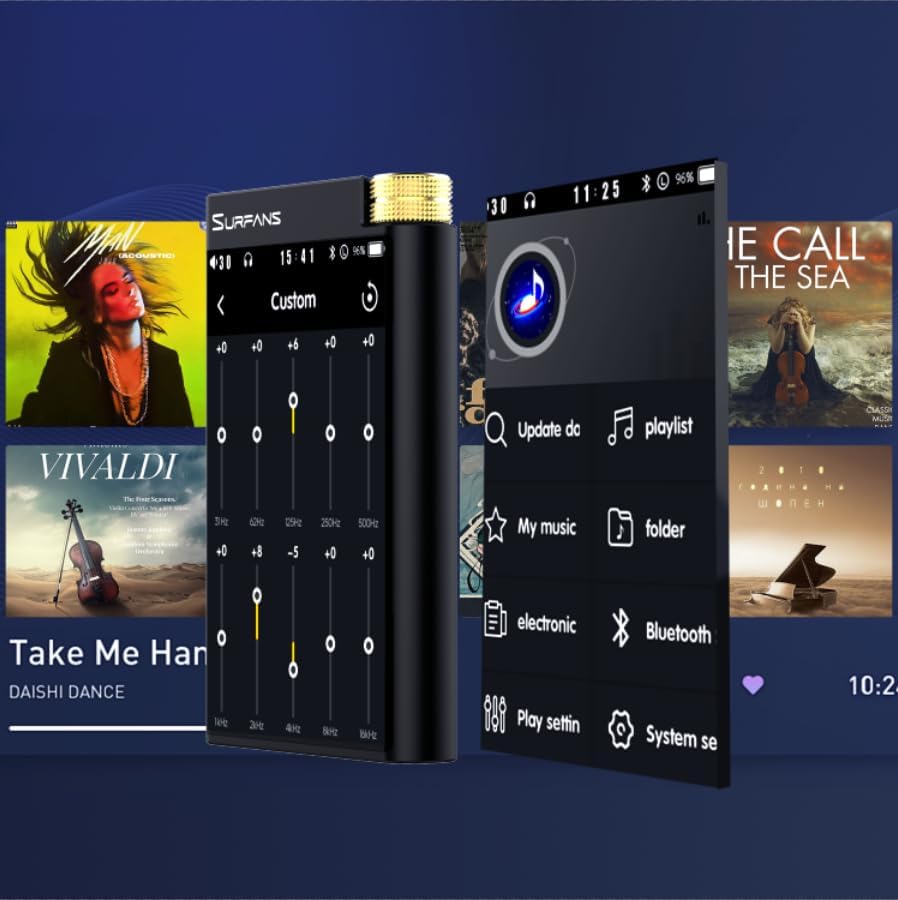
Figure 9: Customizing audio with the built-in equalizer.
7. การเชื่อมต่อกับอุปกรณ์ภายนอก
Use the 4.4mm balanced or 3.5mm single-ended output to connect to headphones, amplifiers, or speakers. The USB-C port also supports USB DAC functionality, allowing the F28 to act as an external sound card for your computer.

Figure 10: The F28 can be connected to various audio systems, including acting as a USB DAC for computers.
การซ่อมบำรุง
- การทำความสะอาด: ใช้ผ้านุ่มและแห้งทำความสะอาดอุปกรณ์ หลีกเลี่ยงการใช้น้ำยาทำความสะอาดหรือตัวทำละลายที่มีฤทธิ์กัดกร่อน
- พื้นที่จัดเก็บ: เก็บเครื่องเล่นไว้ในที่แห้งและเย็น หลีกเลี่ยงแสงแดดโดยตรงและอุณหภูมิที่สูงหรือต่ำเกินไป
- การดูแลแบตเตอรี่ เพื่อยืดอายุการใช้งานแบตเตอรี่ ควรหลีกเลี่ยงการปล่อยให้แบตเตอรี่หมดเกลี้ยงบ่อยๆ หากเก็บรักษาเป็นเวลานาน ควรชาร์จแบตเตอรี่ให้ได้ประมาณ 50% ทุกๆ สองสามเดือน
การแก้ไขปัญหา
| ปัญหา | สาเหตุที่เป็นไปได้ | สารละลาย |
|---|---|---|
| อุปกรณ์ไม่เปิดเครื่อง | แบตเตอรี่อ่อน อุปกรณ์ค้าง | Charge the device for at least 30 minutes. If still unresponsive, try holding the power button for 10-15 seconds for a hard reset. |
| Touchscreen is unresponsive or slow. | ความผิดพลาดของซอฟต์แวร์ชั่วคราว; รบกวนการทำงานของฟิล์มกันรอยหน้าจอ | Restart the device. Ensure the screen is clean and free of debris. If using a screen protector, ensure it is properly applied and not too thick. |
| ปัญหาการจับคู่บลูทูธ | Device not in pairing mode; distance; interference. | Ensure both devices are in pairing mode and within range. Turn off and on Bluetooth on both devices. Clear previous pairings if necessary. |
| Low volume via Bluetooth. | Volume settings on both devices; codec compatibility. | Increase volume on both the F28 and the connected Bluetooth device. Ensure optimal codec (LDAC/aptX HD) is selected if supported by the receiving device. |
| ดนตรี files not recognized or played in incorrect order. | ทุจริต files; file system indexing issue. | ทำให้มั่นใจ files are in supported formats. Re-scan the music library from the player's settings. If issues persist, try reformatting the Micro SD card (backup data first) and re-transferring files. Note: Some players may sort by filename alphabetically rather than track number metadata. |
ข้อมูลจำเพาะ
| คุณสมบัติ | รายละเอียด |
|---|---|
| ชื่อรุ่น | เอฟ28 128จี |
| ขนาดสินค้า | 0.7 x 2.6 x 4.7 นิ้ว |
| น้ำหนักสินค้า | 9.6 ออนซ์ |
| ชิป DAC | Dual ESS9018K2M |
| รูปแบบเสียงที่รองรับ | DSD (DSF/DFF), FLAC/WAV (up to 384kHz/32-bit), AIFF/APE, MP3/AAC, WMA Lossless |
| เวอร์ชันบลูทูธ | 5.2 (Bidirectional, supports LDAC/aptX HD) |
| ขนาดหน้าจอ | หน้าจอสัมผัส IPS ขนาด 3.5 นิ้ว |
| การจัดเก็บข้อมูลภายใน | 128GB (included Micro SD card) |
| พื้นที่เก็บข้อมูลแบบขยายได้ | Up to 512GB via Micro SD card |
| แบตเตอรี่ | 1x 12V battery (included), approx. 12-hour playback |
| พอร์ตเอาท์พุต | 4.4 มม. แบบบาลานซ์, 3.5 มม. แบบซิงเกิลเอนด์ |
| เทคโนโลยีการเชื่อมต่อ | Aux, Bluetooth 5.2, USB-C |
| คุณสมบัติพิเศษ | อีควอไลเซอร์ |
การรับประกันและการสนับสนุน
For warranty information and technical support, please refer to the official Surfans webหรือติดต่อฝ่ายบริการลูกค้าโดยตรง โปรดเก็บใบเสร็จรับเงินไว้เป็นหลักฐานการซื้อสำหรับการเรียกร้องการรับประกัน
You can visit the official Surfans Store on Amazon for more information and support: Surfans Audio Store


