1. บทนำ
The DOOGEE Fire 5 is a rugged smartphone designed for durability and extended use in challenging environments. It features a robust construction, a large capacity battery, and a responsive display, powered by Android 15. This manual provides essential information for setting up, operating, maintaining, and troubleshooting your device.
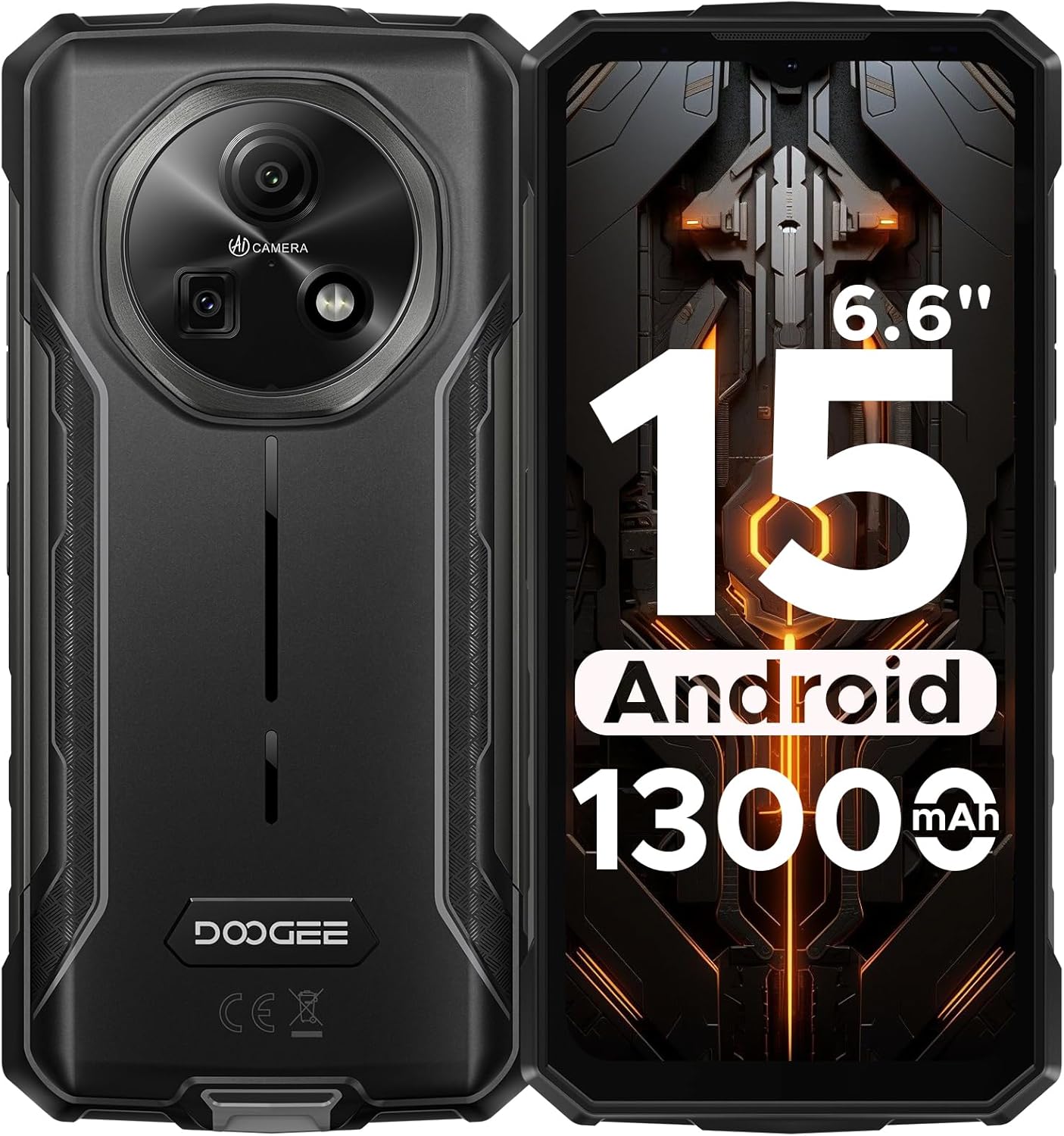
รูปที่ 1: ด้านหน้าและด้านหลัง view of the DOOGEE Fire 5 Rugged Smartphone.
2. อะไรอยู่ในกล่อง
ตรวจสอบว่ามีรายการทั้งหมดอยู่ในบรรจุภัณฑ์ผลิตภัณฑ์ของคุณ:
- 1x DOOGEE Fire 5 Rugged Smartphone
- สาย USB Type-C 1x
- เครื่องชาร์จ 1x
- 1x คู่มือฉบับย่อ
- บัตรรับประกัน 1 ใบ

Figure 2: Package contents of the DOOGEE Fire 5.
3. คุณสมบัติของผลิตภัณฑ์
3.1 การออกแบบที่ทนทาน
The Fire 5 is engineered to withstand harsh conditions, meeting military standards IP68, IP69K, and MIL-STD-810H. This ensures resistance against drops, dust, and water immersion, making it suitable for outdoor work and adventurous activities.

Figure 3: The DOOGEE Fire 5 is built to withstand water, dust, and drops.
3.2 Unbeatable Battery Life & Reverse Charging
Equipped with a 13000mAh battery, the Fire 5 provides extended usage times. It also supports 5W reverse charging via its Type-C port, allowing you to power other devices like headphones or smartwatches.

Figure 4: The 13000mAh battery offers extensive power and reverse charging.
3.3 Vivid HD+ Display
Experience smooth visuals on the 6.6-inch HD+ IPS screen with a 90Hz refresh rate. The display's full lamination reduces glare, enhancing outdoor visibility.

Figure 5: The 6.6-inch HD+ 90Hz display provides a clear and responsive viewการสร้างประสบการณ์
3.4 ประสิทธิภาพอันทรงพลัง
Running on Android 15 and powered by a UNISOC octa-core processor, the Fire 5 offers seamless app switching with 12GB (3GB + 9GB extended) of RAM and 64GB of internal storage, expandable up to 2TB.

Figure 6: The UNISOC SC9863A chipset ensures stable and efficient performance.
3.5 AI Camera System
Capture clear and vibrant photos with the 13MP main camera and 8MP front camera. The AI camera intelligently optimizes settings for various scenes, enhancing your photography experience.

Figure 7: The 13MP main camera and 8MP front camera for crisp shots.
3.6 Connectivity and Tools
The Fire 5 supports dual SIM functionality and is compatible with major carriers like T-Mobile and MetroPCS. It includes NFC for convenient payments, Face ID for secure unlocking, and a pre-loaded professional toolbox with utilities like a compass, sound meter, and gradienter.

Figure 8: Additional features include NFC, Face Unlock, and a 3-card slot.
4. การตั้งค่า
4.1 การติดตั้งซิมการ์ด
- ค้นหาถาดใส่การ์ด SIM ที่ด้านข้างของอุปกรณ์
- ใช้เครื่องมือถอดซิมที่ให้มาเพื่อเปิดถาดใส่ซิม
- ใส่ซิมการ์ดนาโนและ/หรือการ์ด microSD ลงในถาด โดยตรวจสอบให้แน่ใจว่าวางในทิศทางที่ถูกต้อง
- ค่อยๆ ดันถาดกลับเข้าไปในอุปกรณ์จนกระทั่งคลิกเข้าที่
4.2 การเปิดเครื่องครั้งแรก
- กดปุ่มเปิด/ปิดค้างไว้จนกว่าโลโก้ DOOGEE จะปรากฏขึ้น
- ทำตามคำแนะนำบนหน้าจอเพื่อทำการตั้งค่าเบื้องต้นให้เสร็จสมบูรณ์ รวมถึงการเลือกภาษา การเชื่อมต่อ Wi-Fi และการเข้าสู่ระบบบัญชี Google
5. การใช้งานอุปกรณ์ของคุณ
5.1 การนำทางพื้นฐาน
- หน้าจอหลัก: ปัดไปทางซ้ายหรือขวาเพื่อเข้าถึงแผงหน้าจอหลักที่แตกต่างกัน
- ลิ้นชักแอป: ปัดขึ้นจากด้านล่างของหน้าจอเพื่อ view แอปพลิเคชันที่ติดตั้งทั้งหมด
- การแจ้งเตือนและการตั้งค่าด่วน: ปัดลงจากด้านบนของหน้าจอเพื่อเข้าถึงการแจ้งเตือนและการสลับการตั้งค่าด่วน
- การทำงานหลายอย่างพร้อมกัน: ปัดขึ้นค้างไว้จากด้านล่างของหน้าจอเพื่อ view แอพล่าสุด
5.2 การใช้งานกล้อง
เปิดแอปกล้องเพื่อเข้าถึงโหมดต่างๆ:
- โหมดภาพถ่าย: Standard mode for still images. The AI will automatically optimize settings.
- โหมดวิดีโอ: บันทึกวิดีโอ
- โหมดแนวตั้ง: Create photos with a blurred background.
- โหมดโปร: Manually adjust settings like ISO, white balance, and exposure.
5.3 Pre-loaded Tools
The device includes a professional toolbox accessible from the app drawer. This toolbox contains useful utilities such as:
- เข็มทิศ
- เครื่องวัดเสียง
- Gradienter
- ไฟฉาย
- แว่นขยาย
- ลูกดิ่งบ๊อบ
6. การบำรุงรักษา
6.1 ความทนทานต่อน้ำและฝุ่นละออง
The DOOGEE Fire 5 is IP68/IP69K rated for water and dust resistance. Ensure all port covers are securely closed before exposing the device to water or dust. Avoid prolonged submersion in water or exposure to high-pressure water jets.
6.2 การทำความสะอาด
ในการทำความสะอาดอุปกรณ์ของคุณ ให้เช็ดด้วยผ้าเนื้อนุ่มและแห้งamp cloth. Avoid using harsh chemicals or abrasive materials that could damage the device's rugged exterior or screen.
7 การแก้ไขปัญหา
If you encounter issues with your DOOGEE Fire 5, try the following steps:
- อุปกรณ์ทำงานช้าหรือค้าง:
- ปิดแอปพลิเคชันที่ทำงานอยู่เบื้องหลังเพื่อเพิ่มพื้นที่ว่างในหน่วยความจำ (RAM)
- Uninstall unused applications to free up storage.
- Perform a restart by long-pressing the power button and selecting "Restart".
- ปัญหาการเชื่อมต่อเครือข่าย:
- ตรวจสอบให้แน่ใจว่าคุณใส่ซิมการ์ดอย่างถูกต้อง
- Verify that your carrier is compatible with the device's supported bands (GSM:B2/3/5/8 WCDMA:B1/2/4/5/8 TDD:B34/38/39/40/41 FDD:B1/2/3/4/5/7/8/18/19/20/25/26/28AB/66).
- Check your network settings and ensure mobile data is enabled.
- ปัญหาการชาร์จไฟ:
- Use the original charger and Type-C cable provided with the device.
- ตรวจสอบให้แน่ใจว่าพอร์ตการชาร์จสะอาดและไม่มีสิ่งสกปรก
วิดีโอ 1: จบแล้วview of the DOOGEE Fire 5 Rugged Phone, highlighting its features and design.
8. ข้อมูลจำเพาะ
| ขนาดสินค้า | 6.95 x 0.74 x 3.25 นิ้ว |
| น้ำหนักสินค้า | 6.9 ออนซ์ |
| หมายเลขรุ่นสินค้า | ไฟร์5 |
| แบตเตอรี่ | ต้องใช้แบตเตอรี่ลิเธียมโพลิเมอร์ 1 ก้อน (รวมอยู่ด้วย) |
| ระบบปฏิบัติการ | แอนดรอยด์ 15 |
| เทคโนโลยีการเชื่อมต่อ | บลูทูธ, อินฟราเรด, NFC, USB, Wi-Fi |
| คุณสมบัติการแสดงผลอื่น ๆ | ไร้สาย |
| คุณสมบัติอื่นๆ ของกล้อง | ด้านหน้าด้านหลัง |
| ฟอร์มแฟกเตอร์ | บาร์ |
| สี | สีดำ |
| ระดับพลังงานแบตเตอรี่ | 13000 มิลลิวินาทีamp ชั่วโมง |
| ความจุของหน่วยความจำ | 64GB |
| ขนาดการแสดงผลหน้าจอยืน | 6.6 นิ้ว |
| ขนาดหน่วยความจำ RAM ที่ติดตั้ง | 12GB |
| อัตราการรีเฟรช | 90 เฮิรตซ์ |
| ผู้ให้บริการไร้สาย | ปลดล็อคสำหรับผู้ให้บริการทั้งหมด |
| เทคโนโลยีเซลลูล่าร์ | 4G |
9. การรับประกันและการสนับสนุน
The DOOGEE Fire 5 Rugged Smartphone comes with a comprehensive 2-year warranty, ensuring peace of mind with your purchase. For any technical assistance, product inquiries, or warranty claims, please contact DOOGEE's professional support team through their official channels or visit their webเว็บไซต์นี้มีข้อมูลการสนับสนุนโดยละเอียด
You can find additional support and product information by scanning the QR code provided in the quick guide or visiting the official DOOGEE webเว็บไซต์.


