การแนะนำ
This manual provides detailed instructions for the assembly, operation, and maintenance of your FLEXISPOT One-Piece Standing Desk with Rattan Drawers. Please read this manual thoroughly before installation and use to ensure proper function and safety. Keep this manual for future reference.

Image: The FLEXISPOT One-Piece Standing Desk in black with rattan drawers, featuring a monitor shelf and an integrated control panel.
ข้อมูลด้านความปลอดภัยที่สำคัญ
เพื่อป้องกันการบาดเจ็บหรือความเสียหายต่อผลิตภัณฑ์ โปรดปฏิบัติตามข้อควรปฏิบัติด้านความปลอดภัยดังต่อไปนี้:
- ปฏิบัติตามคำแนะนำในการประกอบอย่างระมัดระวังเสมอ
- กันเด็กและสัตว์เลี้ยงออกจากพื้นที่ชุมนุม
- Use appropriate tools and safety gear during assembly.
- ตรวจสอบให้แน่ใจว่าการเชื่อมต่อทั้งหมดแน่นหนาดีแล้วก่อนใช้งานโต๊ะควบคุม
- อย่าวางของหนักเกินไปบนโต๊ะ รับน้ำหนักได้สูงสุดเพียง 110 ปอนด์
- ขณะปรับความสูง ควรระวังอย่าให้มือหรือสิ่งของอยู่ใกล้ชิ้นส่วนที่กำลังเคลื่อนไหว
เนื้อหาแพ็คเกจ
Verify that all components are present before beginning assembly. The desk ships in two separate packages.
- Desktop with integrated monitor shelf and rattan drawers
- Desk frame and legs
- แผงควบคุม
- อะแดปเตอร์และสายเคเบิล
- Assembly hardware (screws, bolts, tools)
- คู่มือการใช้งาน

Image: A diagram illustrating the dimensions of the desk components and indicating that the product ships in two separate packages.
คำแนะนำในการประกอบ
Assembly typically takes approximately one hour. Refer to the separate detailed assembly guide included in your package for step-by-step instructions and diagrams. Ensure all fasteners are correctly identified and used in their designated locations.
- แกะส่วนประกอบทั้งหมดออกและตรวจสอบกับรายการเนื้อหาในแพ็คเกจ
- Attach the desk legs to the desktop frame using the provided hardware.
- Connect the control panel and motor cables as instructed.
- Secure any cable management components.
- Place the desk in its desired location.
การตั้งค่า
After assembly, connect the desk to a power source.
- Plug the power adapter into the desk's control box.
- เสียบสายไฟเข้ากับเต้ารับไฟฟ้ามาตรฐาน
- The desk is now ready for initial use.
คำแนะนำการใช้งาน
การปรับความสูง
The desk features an electric motor system for smooth height transitions.
- กดปุ่ม ลูกศรขึ้น ปุ่มสำหรับยกโต๊ะขึ้น
- กดปุ่ม ลูกศรลง ปุ่มสำหรับปรับระดับโต๊ะลง
- The desk can adjust between 28.9 inches (minimum) and 46.5 inches (maximum).
- The motor operates quietly, typically below 50dB.

Image: The desk shown at its minimum (28.9") and maximum (46.5") adjustable heights.
หน่วยความจำที่ตั้งไว้ล่วงหน้า
Program up to three preferred height settings for quick adjustments.
- ปรับโต๊ะให้อยู่ในระดับความสูงที่คุณต้องการ
- กดปุ่ม M button, then press one of the numbered preset buttons (1, 2, หรือ 3) within 3 seconds to save the current height.
- หากต้องการเรียกใช้ความสูงที่บันทึกไว้ เพียงกดปุ่มตั้งค่าล่วงหน้าที่มีหมายเลขตรงกัน

ภาพ: ภาพระยะใกล้ view of the desk's control panel, highlighting the up/down arrows and memory preset buttons.
ชั้นวางจอภาพ
The integrated monitor shelf is designed to elevate screens to an ergonomic eye level.
- Place your monitor(s) on the shelf to reduce neck and back strain.
- This helps maintain proper posture during extended work sessions.

Image: Visual comparison of poor posture versus ergonomic sitting and standing postures facilitated by the adjustable desk.
Rattan Drawers
The desk includes both sliding-door desktop compartments and an under-desk drawer for organized storage.
- Use the desktop compartments (47.2"x8.7"x5.5") for easy access to frequently used items.
- The under-desk drawer (23.6"x11.8"x3.9") provides discreet storage for documents or books.
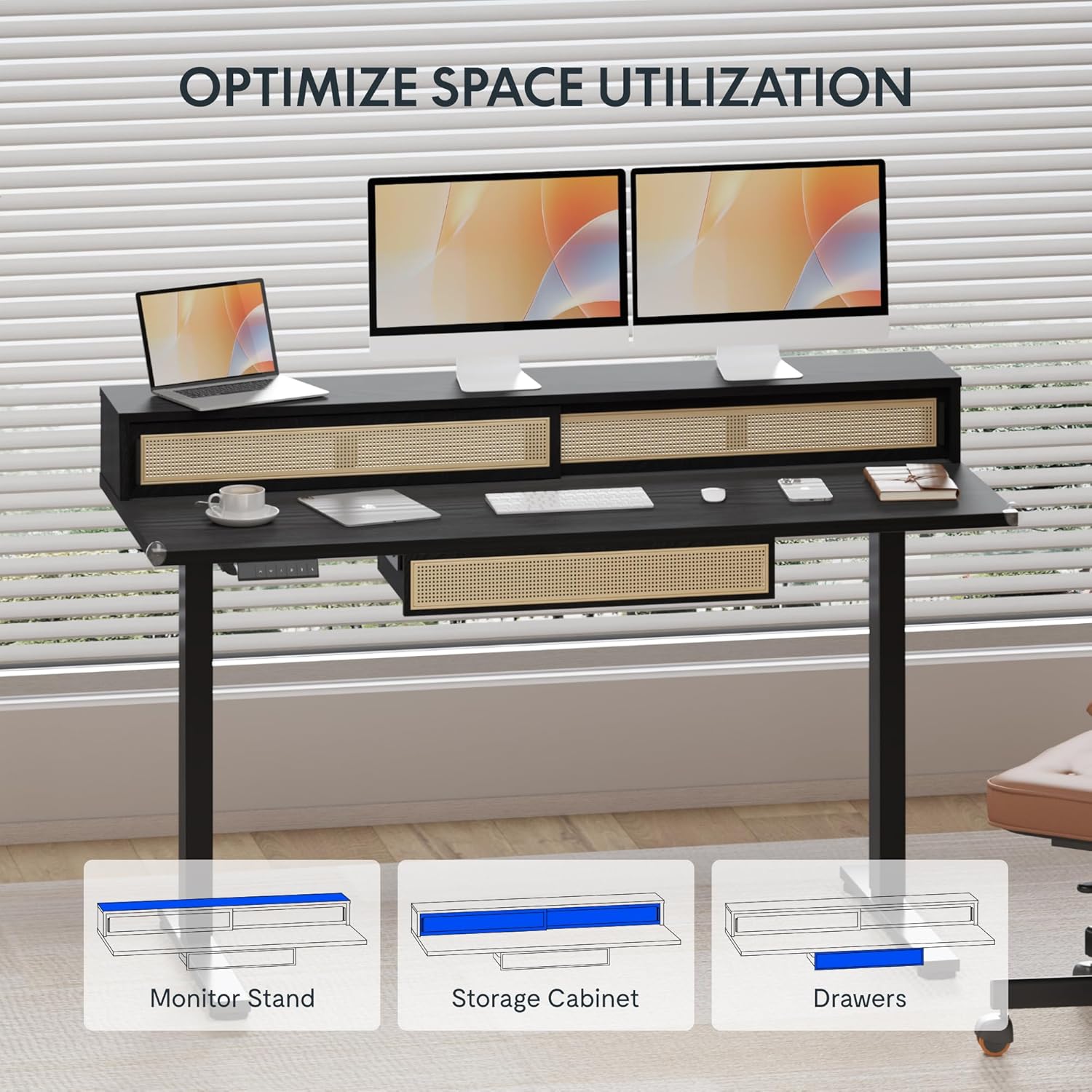
Image: An illustration demonstrating the various storage options, including the monitor stand, storage cabinet, and drawers, for optimal space utilization.
การซ่อมบำรุง
การบำรุงรักษาอย่างสม่ำเสมอจะช่วยให้โต๊ะทำงานของคุณมีอายุการใช้งานยาวนานและทำงานได้อย่างมีประสิทธิภาพสูงสุด
- การทำความสะอาด: เช็ดพื้นผิวโต๊ะด้วยผ้าเนื้อนุ่มและแห้งamp ผ้า. หลีกเลี่ยงน้ำยาทำความสะอาดที่มีฤทธิ์กัดกร่อนหรือสารเคมีรุนแรงที่อาจสร้างความเสียหายให้กับพื้นผิว
- การตรวจสอบ: ตรวจสอบสกรูและน็อตทั้งหมดเป็นระยะเพื่อให้แน่ใจว่าแน่นสนิทดีแล้ว หากจำเป็นให้ขันให้แน่นอีกครั้ง
- การจัดการสายเคเบิล: Ensure cables are neatly organized and not interfering with the desk's movement.
การแก้ไขปัญหา
If you encounter issues with your desk, refer to the following common solutions:
| ปัญหา | สาเหตุที่เป็นไปได้ | สารละลาย |
|---|---|---|
| โต๊ะไม่ขยับหรือไม่ตอบสนองต่อปุ่มควบคุม | Power connection issue, cable disconnected, motor error. | Check power cord connection to outlet and desk. Ensure all motor cables are securely connected. Unplug and replug the power for 10 seconds to reset. |
| โต๊ะขยับไม่สม่ำเสมอหรือมีเสียงผิดปกติ | Uneven load, loose connections, obstruction. | Ensure weight is evenly distributed. Check for any obstructions under the desk. Verify all assembly screws are tight. |
| การตั้งค่าหน่วยความจำล่วงหน้าใช้งานไม่ได้ | ค่าที่ตั้งไว้ล่วงหน้าถูกบันทึกไม่ถูกต้อง | Re-save the desired height settings by pressing 'M' then the preset number within 3 seconds. |
ข้อมูลจำเพาะ
| คุณสมบัติ | รายละเอียด |
|---|---|
| ยี่ห้อ | เฟล็กซิสพอท |
| ขนาดสินค้า (ลึก x กว้าง x สูง) | 23.6"D x 47.2"W x 29"H (at lowest point) |
| สี | สีดำ |
| วัสดุฐาน | เหล็กอัลลอยด์ |
| ประเภทวัสดุยอดนิยม | ไม้ |
| ความสูงขั้นต่ำ | 28.9 นิ้ว |
| ความสูงสูงสุด | 46.5 นิ้ว |
| จำนวนลิ้นชัก | 1 (under-desk) |
| Enclosed Shelves | 2 (sliding-door desktop compartments) |
| คุณสมบัติพิเศษ | Corded electric height adjustment, Memory Presets |
| การประกอบที่จำเป็น | ใช่ |
การรับประกันและการสนับสนุน
FLEXISPOT provides comprehensive warranty coverage for your standing desk:
- โครงและเครื่องยนต์: 5-year coverage.
- อิเล็กทรอนิกส์: 2-year coverage.
This warranty ensures lasting security for your workspace investment. For customer support, technical assistance, or warranty claims, please refer to the contact information provided in your product packaging or visit the official FLEXISPOT webเว็บไซต์.


