1. บทนำ
Thank you for choosing the FLEXISPOT Q4 One-Piece Standing Desk. This manual provides essential information for the safe assembly, operation, and maintenance of your new adjustable height desk. Please read these instructions carefully before use and retain them for future reference.
ข้อมูลด้านความปลอดภัย
- ตรวจสอบให้แน่ใจว่าชิ้นส่วนทั้งหมดครบถ้วนและไม่เสียหายก่อนทำการประกอบ
- โปรดกันเด็กและสัตว์เลี้ยงให้อยู่ห่างจากโต๊ะทำงานขณะทำการผ่าตัด
- Do not overload the desk. Refer to specifications for maximum weight capacity.
- หลีกเลี่ยงการวางของเหลวลงบนแผงควบคุมโดยตรง หรือใกล้กับชิ้นส่วนอิเล็กทรอนิกส์
- ตัดการเชื่อมต่อไฟฟ้าก่อนทำความสะอาดหรือดำเนินการบำรุงรักษา
- โต๊ะนี้ได้รับการออกแบบสำหรับใช้ภายในอาคารเท่านั้น
2. เนื้อหาและส่วนประกอบของบรรจุภัณฑ์
The FLEXISPOT Q4 Standing Desk is shipped in two separate packages. Please verify all parts are included before beginning assembly.
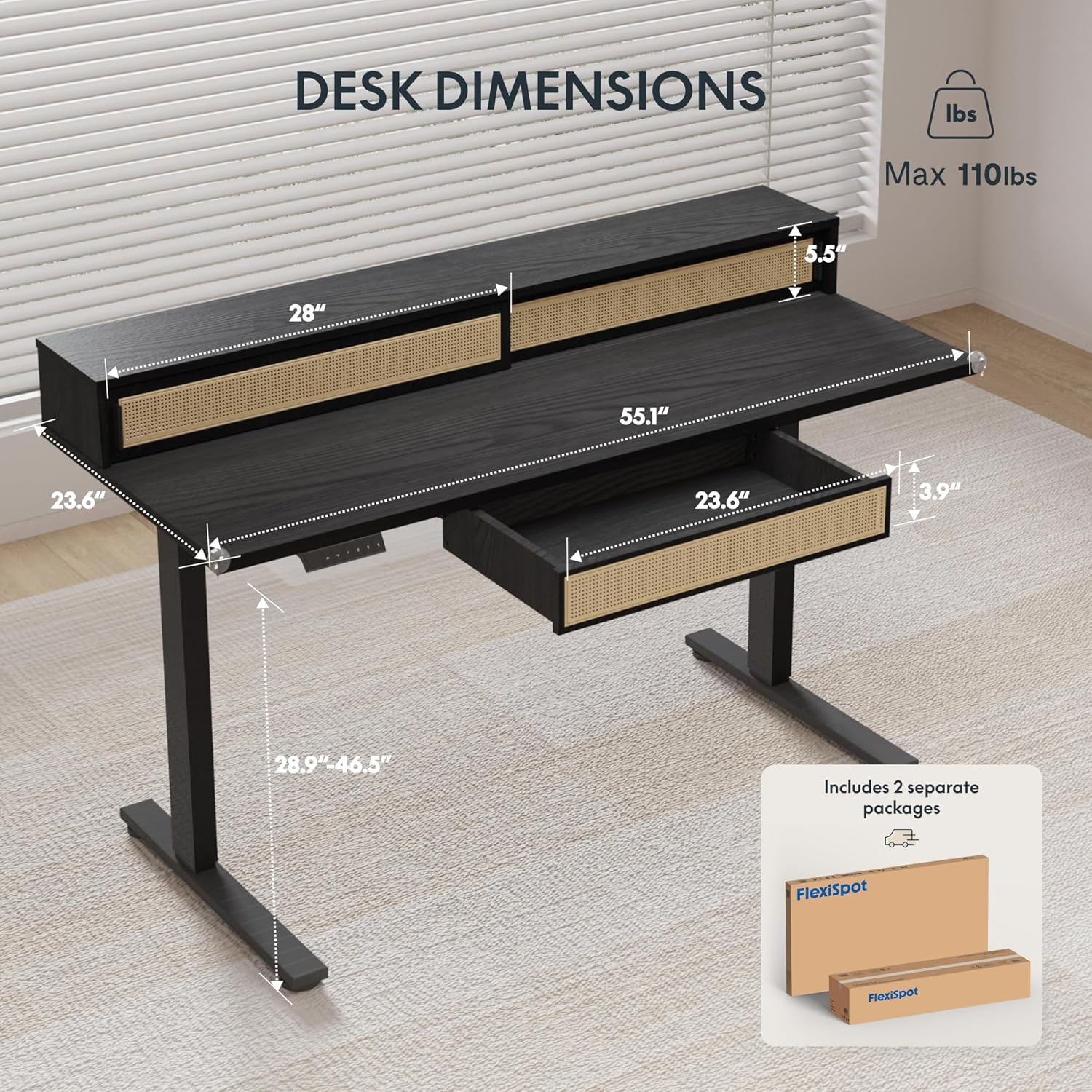
Figure 2.1: Desk dimensions and indication of two separate packages for shipping.
องค์ประกอบหลัก:
- Desktop with integrated monitor shelf and sliding compartments
- Under-desk drawer
- Desk legs (2)
- แผ่นรองพื้น (2)
- แผงควบคุม
- อะแดปเตอร์และสายเคเบิล
- อุปกรณ์ประกอบ (สกรู น็อต เครื่องมือ)
3. คำแนะนำในการประกอบ
Assembly typically requires two people due to the size and weight of the desk components. Follow the steps below carefully.
การประกอบทีละขั้นตอน:
- แกะส่วนประกอบ: นำชิ้นส่วนทั้งหมดออกจากบรรจุภัณฑ์อย่างระมัดระวัง วางชิ้นส่วนเหล่านั้นบนพื้นผิวที่นุ่มและสะอาดเพื่อป้องกันรอยขีดข่วน
- ติดตั้งขาโต๊ะ: Secure the desk legs to the desktop frame using the provided hardware. Ensure all connections are tight and stable.
- ติดตั้งแผ่นรองเท้า: Attach the foot pads to the bottom of the desk legs.
- ติดตั้งแผงควบคุม: Secure the control panel to the underside of the desktop in the designated area.
- เชื่อมต่อสายเคเบิล: Connect the motor cables from the legs to the control box, and then connect the control panel cable to the control box. Finally, connect the power adapter to the control box and plug it into a power outlet.
- Install Under-Desk Drawer: Slide the under-desk drawer into its designated slot beneath the desktop.
- การจัดการสายเคเบิล: Utilize the integrated cable management features to organize power and data cables for a tidy workspace.

Figure 3.1: Fully assembled FLEXISPOT Q4 Standing Desk, showcasinก. การออกแบบและฟังก์ชันการใช้งาน

รูปที่ 3.2: ระยะใกล้ view of the stable desk frame, highlighting the reinforced structure and junction zone.
4. คู่มือการใช้งาน
The FLEXISPOT Q4 desk features an electric height adjustment system with a smart control panel.
ฟังก์ชั่นแผงควบคุม:

Figure 4.1: The smart control panel, illustrating buttons for up/down movement and height memory presets.
- ลูกศรขึ้น/ลง (▲ / ▼): Press and hold to adjust the desk height upwards or downwards. Release the button to stop at the desired height.
- Memory Presets (1, 2, T, Person Icon): The desk allows you to save preferred heights for quick adjustments.
- To save a height: Adjust the desk to your desired height, then press and hold one of the preset buttons (1, 2, T, or Person Icon) until you hear a beep or see a confirmation on the display (if available).
- To use a saved height: Simply press the corresponding preset button once, and the desk will automatically move to the saved height.
ช่วงการปรับความสูง:
The desk smoothly transitions between a minimum height of 28.9 inches and a maximum height of 46.5 inches.

Figure 4.2: Visual representation of the desk's adjustable height range, from minimum to maximum settings.
5. คุณสมบัติหลัก
Spacious Storage System
The desk integrates a comprehensive storage system, including sliding-door desktop compartments (55.1"×8.7"×5.5") and a dedicated under-desk drawer (23.6"×11.8"×3.9"). These dual storage solutions are designed to keep your essentials accessible and maximize workspace organization.
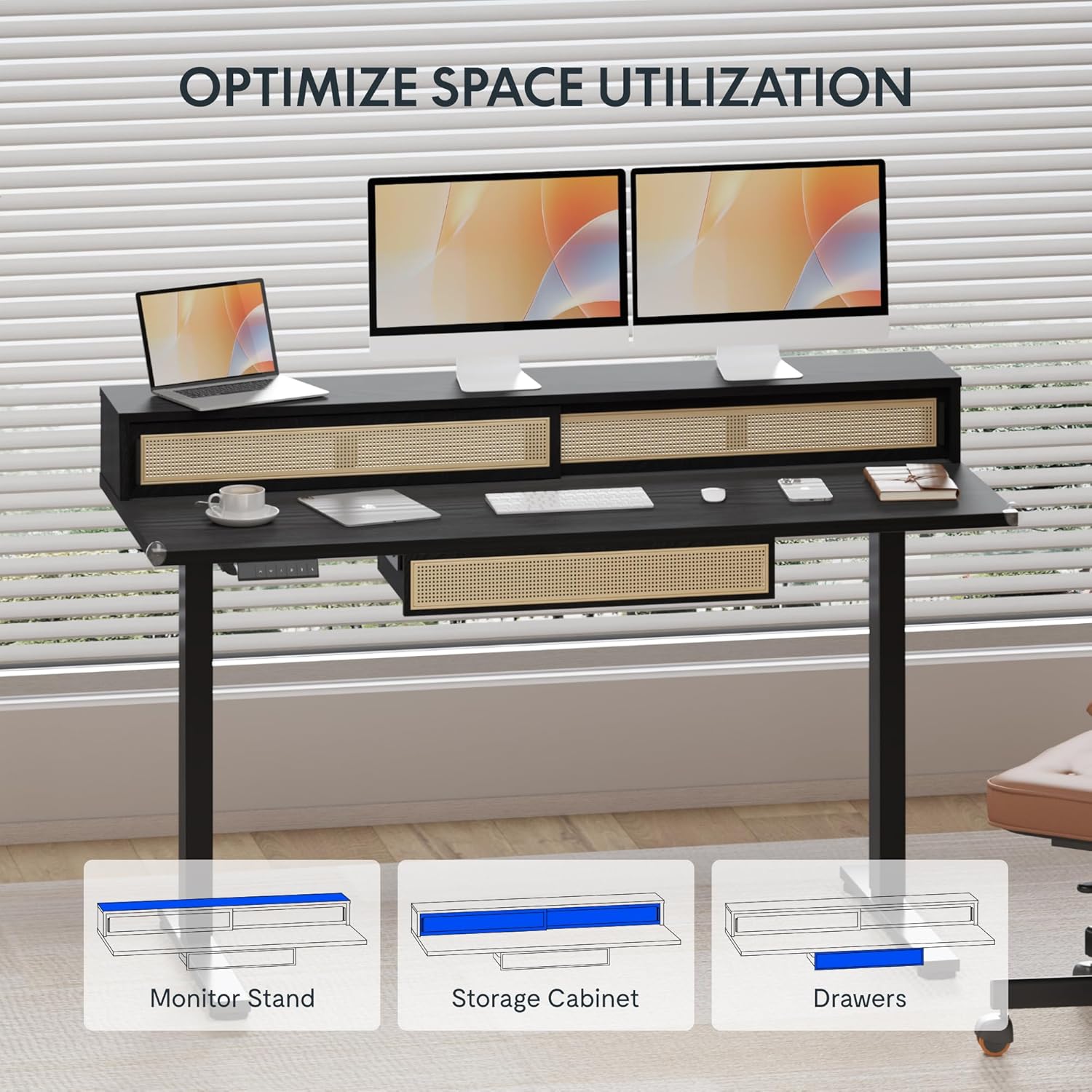
Figure 5.1: Illustration of the desk's integrated storage options, including the monitor stand, storage cabinet, and drawers.
Elegant Rattan Design
The desk features a premium woven rattan texture that enhances interior aesthetics. The seamless desktop design eliminates weak joints, and the scratch-resistant surface is designed to resist daily wear, warping, and stains, maintaining its appearance over time.

รูปที่ 5.2: รายละเอียด view of the desk's rattan design, metal handles, and corner protectors.
Integrated Monitor Shelf
An ergonomically designed monitor shelf elevates screens to eye level, which can help reduce neck strain and back discomfort. This feature promotes proper posture alignment during extended work sessions, whether sitting or standing.
Quiet Electric Height Adjustment
The desk is equipped with a silent motor system (operating at less than 50dB) for smooth transitions between sitting and standing positions. Programmable presets allow for quick adjustments, accommodating multiple users or varying work scenarios.
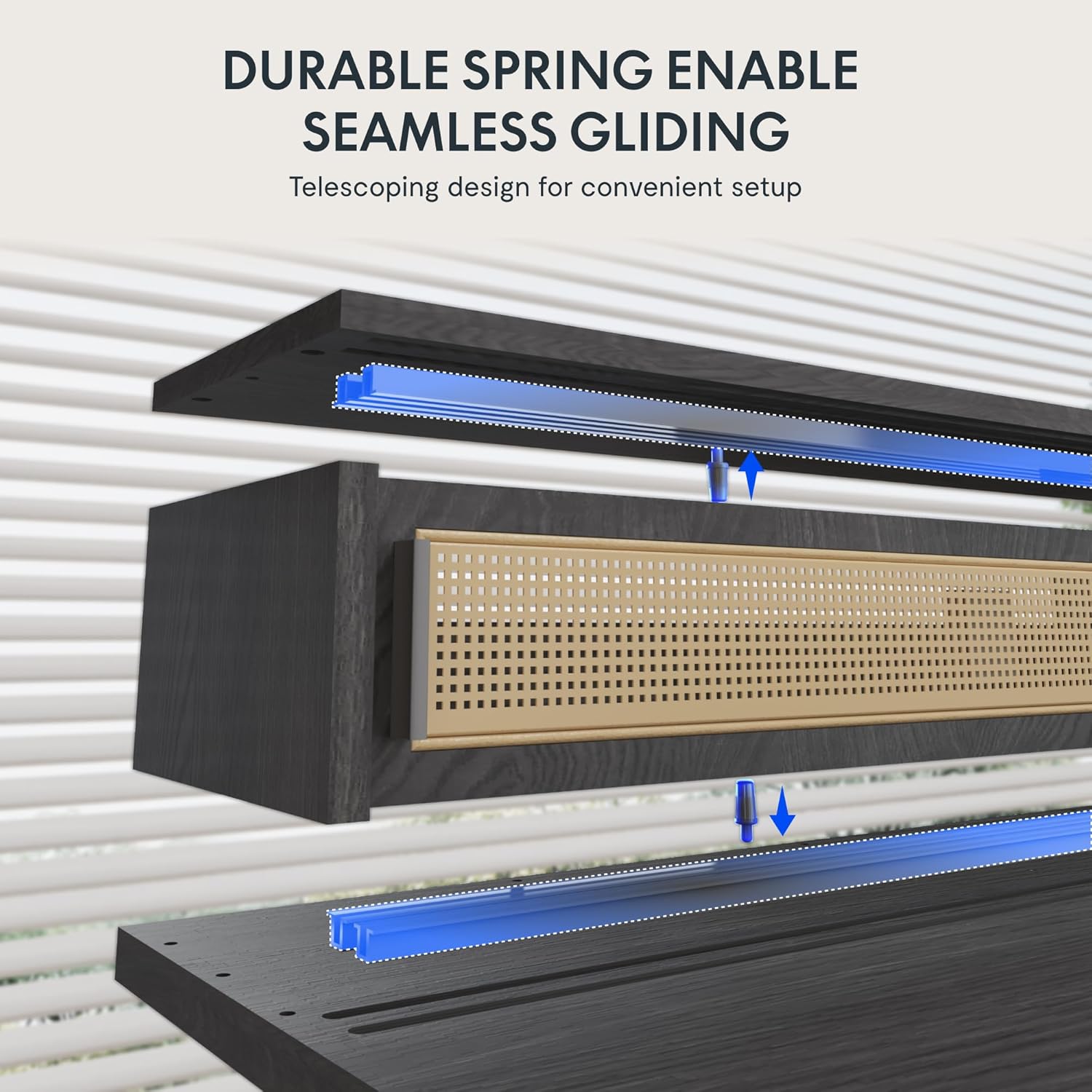
Figure 5.3: Illustration of the durable spring mechanism enabling seamless gliding of desk components.
6. การบำรุงรักษา
Regular maintenance ensures the longevity and optimal performance of your FLEXISPOT Q4 Standing Desk.
- การทำความสะอาด: เช็ดพื้นเดสก์ท็อปและกรอบด้วยผ้าเนื้อนุ่มamp ผ้า. หลีกเลี่ยงน้ำยาทำความสะอาดที่มีฤทธิ์กัดกร่อนหรือสารเคมีรุนแรงที่อาจสร้างความเสียหายให้กับพื้นผิว
- การจัดการสายเคเบิล: Periodically check and reorganize cables to prevent tangles and ensure smooth operation.
- การตรวจสอบตัวยึด: Occasionally inspect all screws and bolts to ensure they remain tight. Retighten if necessary.
- การดูแลมอเตอร์: The electric motor system is designed for maintenance-free operation. Do not attempt to open or lubricate motor components.
7 การแก้ไขปัญหา
If you encounter issues with your FLEXISPOT Q4 Standing Desk, refer to the following common solutions:
| ปัญหา | สาเหตุที่เป็นไปได้ | สารละลาย |
|---|---|---|
| โต๊ะไม่ขยับ | สายไฟหลุด, สายมอเตอร์หลวม, โหลดเกิน | Check all cable connections. Ensure the desk is plugged into a working outlet. Reduce weight on the desk. |
| ปรับความสูงไม่เท่ากัน | Obstruction, uneven weight distribution. | Clear any obstructions. Redistribute weight evenly on the desktop. Perform a reset if necessary (refer to control panel instructions). |
| แผงควบคุมไม่ตอบสนอง | การเชื่อมต่อหลวม ปัญหาด้านพลังงาน | Check the control panel cable connection to the control box. Ensure main power is connected. |
| Desk stops mid-movement | Safety feature activated (anti-collision), motor overheating. | Remove any obstruction. Allow the motor to cool down for 20 minutes before attempting to operate again. |
หากปัญหายังคงอยู่หลังจากลองวิธีแก้ปัญหาเหล่านี้แล้ว โปรดติดต่อฝ่ายบริการลูกค้าของ FLEXISPOT
8. ข้อมูลจำเพาะ
| คุณสมบัติ | รายละเอียด |
|---|---|
| แบบอย่าง | Q4 |
| ขนาดสินค้า (ลึก x กว้าง x สูง) | 23.6" x 55.1" x 29" (Minimum Height) |
| ความสูงขั้นต่ำ | 28.9 นิ้ว |
| ความสูงสูงสุด | 46.5 นิ้ว |
| ประเภทวัสดุยอดนิยม | ไม้ |
| วัสดุฐาน | เหล็กอัลลอยด์ |
| สี | สีดำ |
| ตัวเลือกการจัดเก็บข้อมูล | 1 sliding-door compartment, 1 under-desk drawer |
| จำนวนลิ้นชัก | 1 |
| จำนวนชั้นวาง | 1 (Monitor Shelf) |
| จำเป็นต้องประกอบ | ใช่ |
| ยูพีซี | 840460464574 |
9. การรับประกันและการสนับสนุน
การคุ้มครองการรับประกัน:
The FLEXISPOT Q4 Standing Desk is backed by a comprehensive warranty to ensure your investment security:
- ความคุ้มครอง 5 ปี: ใช้ได้กับโครงโต๊ะและส่วนประกอบมอเตอร์
- ความคุ้มครอง 2 ปี: Applies to all electronic components.
This warranty covers manufacturing defects and ensures lasting performance under normal use conditions.
การสนับสนุนลูกค้า:
For any questions, assistance with assembly, troubleshooting, or warranty claims, please contact FLEXISPOT customer support through the official website or your purchase platform. Please have your model number (Q4) and proof of purchase ready when contacting support.


