1. ข้อมูลด้านความปลอดภัย
Please read all safety instructions carefully before using your iFFALCON TV. Retain this manual for future reference.
- ความปลอดภัยทางไฟฟ้า: Do not expose the TV to rain or moisture. Ensure the power cord is securely plugged into a grounded outlet. Do not overload electrical outlets.
- การจัดวาง: Place the TV on a stable, level surface or mount it securely to a wall. Ensure adequate ventilation around the TV to prevent overheating. Do not block ventilation openings.
- การทำความสะอาด: ถอดปลั๊กทีวีก่อนทำความสะอาด ใช้ผ้านุ่มและแห้ง ห้ามใช้น้ำยาทำความสะอาดชนิดน้ำหรือสเปรย์ทำความสะอาด
- เด็ก: Supervise children to prevent them from climbing on the TV or stand. Small parts can be a choking hazard.
- การบริการ: อย่าพยายามซ่อมแซมทีวีด้วยตนเอง แนะนำให้ซ่อมแซมทั้งหมดโดยช่างผู้ชำนาญการ
2. อะไรอยู่ในกล่อง
ตรวจสอบว่ามีส่วนประกอบทั้งหมดอยู่ครบเมื่อแกะกล่อง:
- iFFALCON 85-Inch U85 Series QD-Mini LED 4K UHD Google Smart TV
- สายไฟ
- แบตเตอรี่ AAA 2 ก้อนสำหรับรีโมท
- 6 x สกรูขาตั้ง
- Table stands (2 pieces)
- คลิปหนีบสายไฟ 5 ชิ้น
- คู่มือเริ่มต้นอย่างรวดเร็ว
- รีโมททีวี
3. การตั้งค่า
3.1 การตั้งค่าทางกายภาพ
Before powering on, ensure the TV is securely placed or mounted.
- การติดตั้งขาตั้ง: If using the table stands, carefully attach them to the designated slots at the bottom of the TV using the provided stand screws. Ensure they are tightened securely.
- การติดตั้งบนผนัง: If wall mounting, follow the instructions provided with your wall mount kit. Ensure the mount is compatible with VESA standards for the 85U85 model.
- การเชื่อมต่อไฟฟ้า: เชื่อมต่อสายไฟเข้ากับช่องอินพุตไฟของทีวี จากนั้นจึงเชื่อมต่อกับเต้ารับที่ผนัง
- อุปกรณ์ภายนอก: Connect any external devices (e.g., cable box, gaming console, Blu-ray player) to the appropriate HDMI or other input ports on the TV.

Image: The iFFALCON 85-Inch U85 Series TV, showcasinด้วยดีไซน์เพรียวบางและจอแสดงผลที่สดใส
3.2 การเปิดเครื่องครั้งแรกและการตั้งค่า Google TV
After connecting power, press the power button on the remote control or TV to turn it on.
- การจับคู่การควบคุมระยะไกล: If the remote does not respond, insert the AAA batteries and follow on-screen instructions to pair it via Bluetooth.
- เลือกภาษา: เลือกภาษาที่คุณต้องการ
- การเชื่อมต่อเครือข่าย: Select your Wi-Fi network and enter the password. A stable internet connection is required for Google TV features.
- การลงชื่อเข้าใช้บัญชี Google: Sign in with your Google account to access Google TV features, personalized recommendations, and app downloads.
- Google Assistant Setup: Follow prompts to set up Google Assistant for voice control.

Image: A user interacting with the iFFALCON TV using hands-free voice control, demonstrating the integrated Google TV interface.
4. การใช้งานทีวีของคุณ
4.1 ฟังก์ชั่นการควบคุมระยะไกล
The provided remote control allows full navigation and control of your iFFALCON TV.
- ปุ่มเปิด/ปิด: เปิดหรือปิดทีวี
- แผ่นนำทาง: Use the directional buttons to move through menus and the OK button to select.
- ระดับเสียง +/-: ปรับระดับเสียง
- ช่อง +/-: เปลี่ยนช่องทีวี
- ป้อนข้อมูล: Selects the input source (HDMI 1, HDMI 2, etc.).
- ปุ่ม Google Assistant: Activates voice control. Press and speak your command.
- ปุ่มโฮม: กลับสู่หน้าจอหลักของ Google TV
- ปุ่มลัดแอป: เข้าถึงบริการสตรีมมิ่งยอดนิยมได้อย่างรวดเร็ว
4.2 Smart Features and Google TV
Your iFFALCON U85 Series TV runs on Google TV, offering a personalized and integrated smart experience.
- Google TV Home Screen: Provides access to movies, shows, and apps from all your subscriptions, organized for easy discovery.
- การควบคุมด้วยเสียง: Use Google Assistant or Alexa (via compatible devices) to search for content, control smart home devices, and manage TV settings hands-free.
- ห้องสมุดแอป: ดาวน์โหลดและติดตั้งแอพพลิเคชั่นมากมายจาก Google Play Store
- Chromecast ในตัว: Cast content from your compatible smartphone, tablet, or computer directly to the TV.
4.3 การตั้งค่าภาพและเสียง
ปรับแต่งของคุณ viewประสบการณ์การรับชมและการรับฟังผ่านเมนูการตั้งค่าทีวี
- โหมดภาพ: เลือกจากโหมดภาพสำเร็จรูปต่างๆ (เช่น มาตรฐาน, สดใส, ภาพยนตร์, เกม) หรือปรับแต่งการตั้งค่าต่างๆ เช่น ความสว่าง ความคมชัด สี และความละเอียดได้ตามต้องการ
- Mini LED Precision: The TV features 352 local dimming zones and 1000 nits peak brightness for enhanced contrast and detail.
- Dolby Vision ไอคิว: Automatically adjusts HDR brightness based on the room's ambient light for optimal viewการไอเอ็นจี
- โหมดเสียง: เลือกจากค่าเสียงที่ตั้งไว้ล่วงหน้า (เช่น มาตรฐาน, เพลง, ภาพยนตร์, เสียงพูด) หรือปรับการตั้งค่าอีควอไลเซอร์
- Dolby Atmos & DTS Virtual X: Experience immersive spatial audio with the integrated 2.1-channel 50W sound system.

Image: Visual comparison illustrating the superior contrast and detail of Mini LED technology compared to conventional TVs.

Image: Depiction of the immersive audio experience with the TV's 2.1 speaker system and Dolby Atmos technology.
4.4 คุณสมบัติการเล่นเกม
The iFFALCON U85 Series TV is equipped with features designed for an enhanced gaming experience.
- 144Hz Game Mode Pro: Provides a high refresh rate for smooth, responsive gameplay.
- 288Hz DLG Acceleration: Further enhances motion clarity for competitive gaming.
- FreeSync Premium Pro: ช่วยลดปัญหาภาพฉีกขาดและกระตุก เพื่อภาพที่ลื่นไหลยิ่งขึ้น
- โหมดเวลาแฝงต่ำอัตโนมัติ (ALLM): Automatically switches to a low-latency mode when a gaming console is detected.
- เกมบาร์: Access and adjust key gaming settings quickly during gameplay.
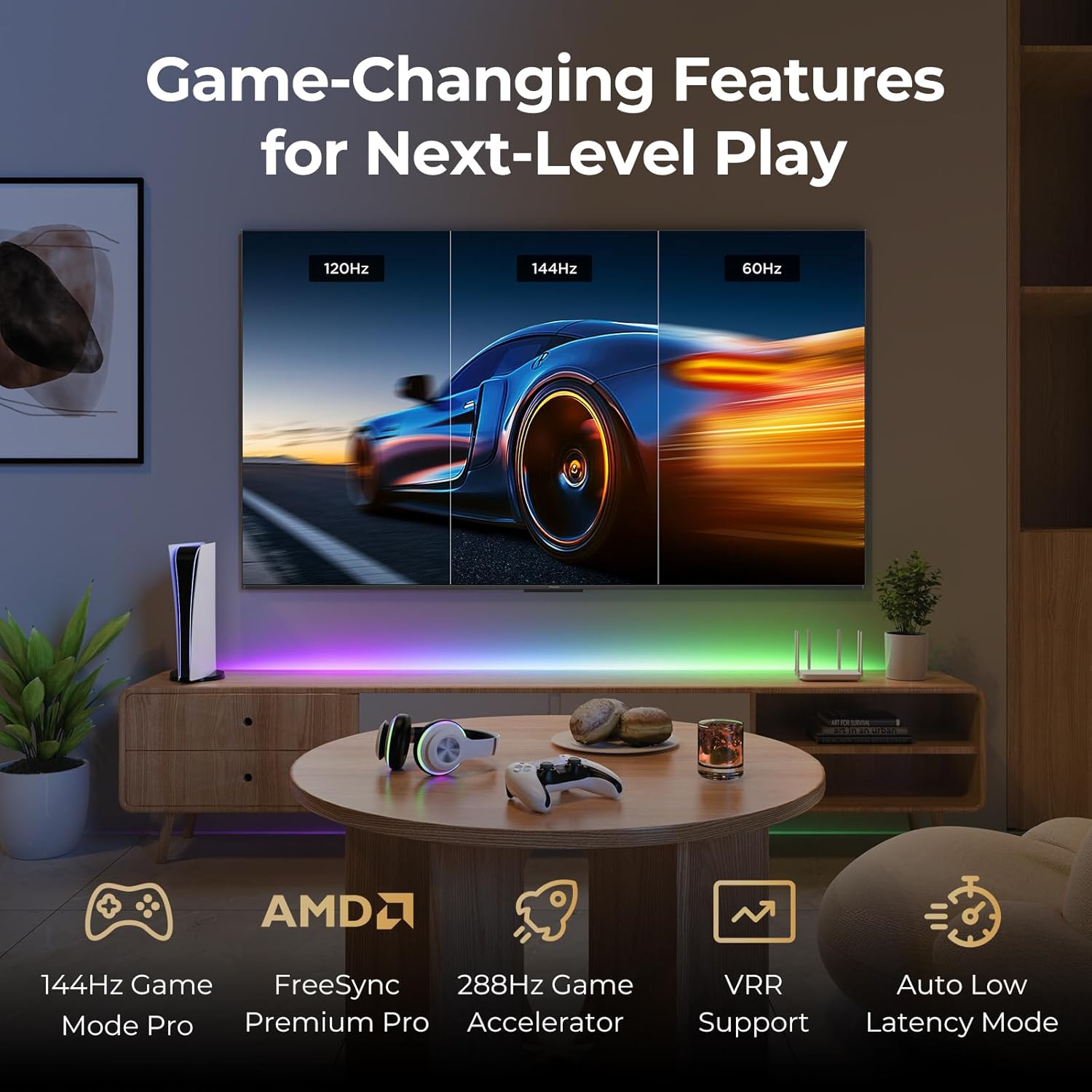
Image: A gaming setup featuring the iFFALCON TV, illustrating its high refresh rate and gaming-specific features for an optimized experience.
5. การบำรุงรักษา
5.1 การทำความสะอาดทีวี
การทำความสะอาดอย่างสม่ำเสมอจะช่วยรักษารูปลักษณ์และประสิทธิภาพการทำงานของทีวีได้
- หน้าจอ: เช็ดหน้าจอเบาๆ ด้วยผ้านุ่มที่ไม่เป็นขุย สำหรับรอยฝังแน่น ให้เช็ดเบาๆampเทน้ำหรือน้ำยาทำความสะอาดหน้าจอลงบนผ้า (อย่าฉีดพ่นลงบนหน้าจอโดยตรง)
- ร่างกาย: Use a soft, dry cloth to wipe the TV's frame and back panel. Avoid abrasive materials or harsh chemicals.
- พอร์ต: Ensure ports are free of dust. Use compressed air if necessary, holding the can upright.
5.2 การอัปเดตซอฟต์แวร์
Your TV may receive automatic software updates to improve performance and add new features. Ensure your TV is connected to the internet for these updates.
- You can check for updates manually in the TV's settings menu under System > About > System update.
6 การแก้ไขปัญหา
If you encounter issues, try these common solutions before contacting support.
- ไม่มีไฟฟ้า: ตรวจสอบให้แน่ใจว่าสายไฟเสียบเข้ากับทีวีและเต้ารับที่ผนังอย่างแน่นหนา ทดสอบเต้ารับกับอุปกรณ์อื่น
- ไม่มีภาพ/เสียง: Check the selected input source. Ensure all cables to external devices are connected correctly. Restart the TV and connected devices.
- ระยะไกลไม่ทำงาน: เปลี่ยนแบตเตอรี่ ตรวจสอบให้แน่ใจว่าไม่มีสิ่งกีดขวางระหว่างรีโมทและทีวี หากใช้บลูทูธ ให้จับคู่รีโมทอีกครั้ง
- ปัญหาการเชื่อมต่อเครือข่าย: Restart your Wi-Fi router. Check TV network settings to ensure correct Wi-Fi password and connection.
- ปัญหาคุณภาพของภาพ: ปรับการตั้งค่าภาพ (ความสว่าง ความคมชัด สี) ตรวจสอบให้แน่ใจว่าแหล่งที่มาของเนื้อหามีคุณภาพสูง
- รีเซ็ตเป็นค่าเริ่มต้นจากโรงงาน: If problems persist, a factory reset can resolve many software-related issues. Navigate to Settings > System > About > Reset. คำเตือน: This will erase all personal data and settings.
7. ข้อมูลจำเพาะ
| คุณสมบัติ | คำอธิบาย |
|---|---|
| ยี่ห้อ | ไอฟัลคอน |
| หมายเลขรุ่น | 85U85 |
| ขนาดหน้าจอ | 85 นิ้ว |
| เทคโนโลยีการแสดงผล | QD-มินิ LED |
| ปณิธาน | 4K UHD (3840 x 2160) |
| อัตราการรีเฟรช | 144 Hz (Native), 288Hz DLG |
| ความสว่างสูงสุด | สูงถึง 1000 nits |
| อัตราส่วนคอนทราสต์ | สูงสุด 6500:1 |
| โซนลดแสงเฉพาะที่ | 352 |
| โปรเซสเซอร์ | โปรเซสเซอร์ AiPQ Pro |
| ระบบปฏิบัติการ | กูเกิลทีวี |
| ผู้ช่วยเสียง | Google Assistant, Alexa compatible |
| ระบบเสียง | 2.1-channel 50W, Dolby Atmos, DTS Virtual X |
| รองรับ HDR | HDR10+, Dolby Vision IQ |
| คุณสมบัติการเล่นเกม | 144Hz VRR, FreeSync Premium Pro, ALLM, Game Bar |
| การเชื่อมต่อ | บลูทู ธ Wi-Fi |
| ขนาดสินค้า (ลึก x กว้าง x สูง) | 15.2 x 74.4 x 45.5 นิ้ว |
| น้ำหนักสินค้า | 76.7 ปอนด์ |
8. การรับประกันและการสนับสนุน
Your iFFALCON U85 Series TV is covered by a manufacturer's warranty. Please refer to the warranty card included with your product for specific terms and conditions.
For technical support, service inquiries, or additional information, please visit the official iFFALCON support website or contact their customer service. Keep your purchase receipt and product serial number handy for warranty claims.
คุณสามารถค้นหาข้อมูลเพิ่มเติมและทรัพยากรสนับสนุนได้โดยไปที่ iFFALCON Store on Amazon.


