1. บทนำ
This manual provides detailed instructions for the installation, operation, and maintenance of your Bkiyougo Self-Powered Wireless Light Switch and Receiver Kit. This system offers a convenient, battery-free, and wireless solution for controlling various lighting fixtures and appliances.
1.1 เนื้อหาบรรจุภัณฑ์
- สวิตช์ไฟไร้สายแบบมีแหล่งจ่ายไฟในตัว 1 ชิ้น
- 1 x Receiver Kit
- Mounting accessories (e.g., double-sided adhesive, screws)
- คู่มือการใช้งาน
2. ข้อมูลด้านความปลอดภัยที่สำคัญ
โปรดอ่านคำแนะนำด้านความปลอดภัยทั้งหมดอย่างละเอียดก่อนการติดตั้งและการใช้งาน การไม่ปฏิบัติตามคำแนะนำเหล่านี้อาจส่งผลให้เกิดไฟฟ้าช็อต ไฟไหม้ หรืออันตรายอื่นๆ
- ความปลอดภัยทางไฟฟ้า: Always disconnect power at the circuit breaker before performing any electrical work. If you are unsure about electrical wiring, consult a qualified electrician.
- เล่มที่tage: Ensure the receiver's operating voltage (AC 110-230V) matches your electrical supply.
- คะแนนปัจจุบัน: ห้ามใช้กระแสไฟฟ้าเกินพิกัดสูงสุด 10 แอมป์ Amps for the receiver.
- สิ่งแวดล้อม: While the switch is IP44 rated for wet environments, ensure the receiver is installed in a dry, protected location.
- เด็ก: เก็บผลิตภัณฑ์ให้พ้นจากมือเด็ก
3. สินค้าหมดview
The Bkiyougo Wireless Light Switch system consists of two main components: the self-powered wireless switch and the compact receiver module.

The wireless switch generates its own power through kinetic energy when pressed, eliminating the need for batteries. The receiver connects to your lighting fixture and responds to signals from the switch.
4. การตั้งค่าและการติดตั้ง
4.1 การต่อสายเครื่องรับสัญญาณ
The receiver must be wired between the power source and the lighting fixture. Ensure power is OFF at the circuit breaker before proceeding.
- ปิดสวิตช์ไฟหลักของวงจรที่ตัวตัดวงจร
- Connect the Live (L) and Neutral (N) wires from your power supply to the 'INPUT' terminals on the receiver.
- Connect the Live (L) and Neutral (N) wires of your lighting fixture to the 'OUTPUT' terminals on the receiver.
- ตรวจสอบให้แน่ใจว่าการเชื่อมต่อทั้งหมดมีความปลอดภัย

4.2 การติดตั้งสวิตช์ไร้สาย
The wireless switch can be mounted on various surfaces using the provided double-sided adhesive or screws. No in-wall wiring is required for the switch.
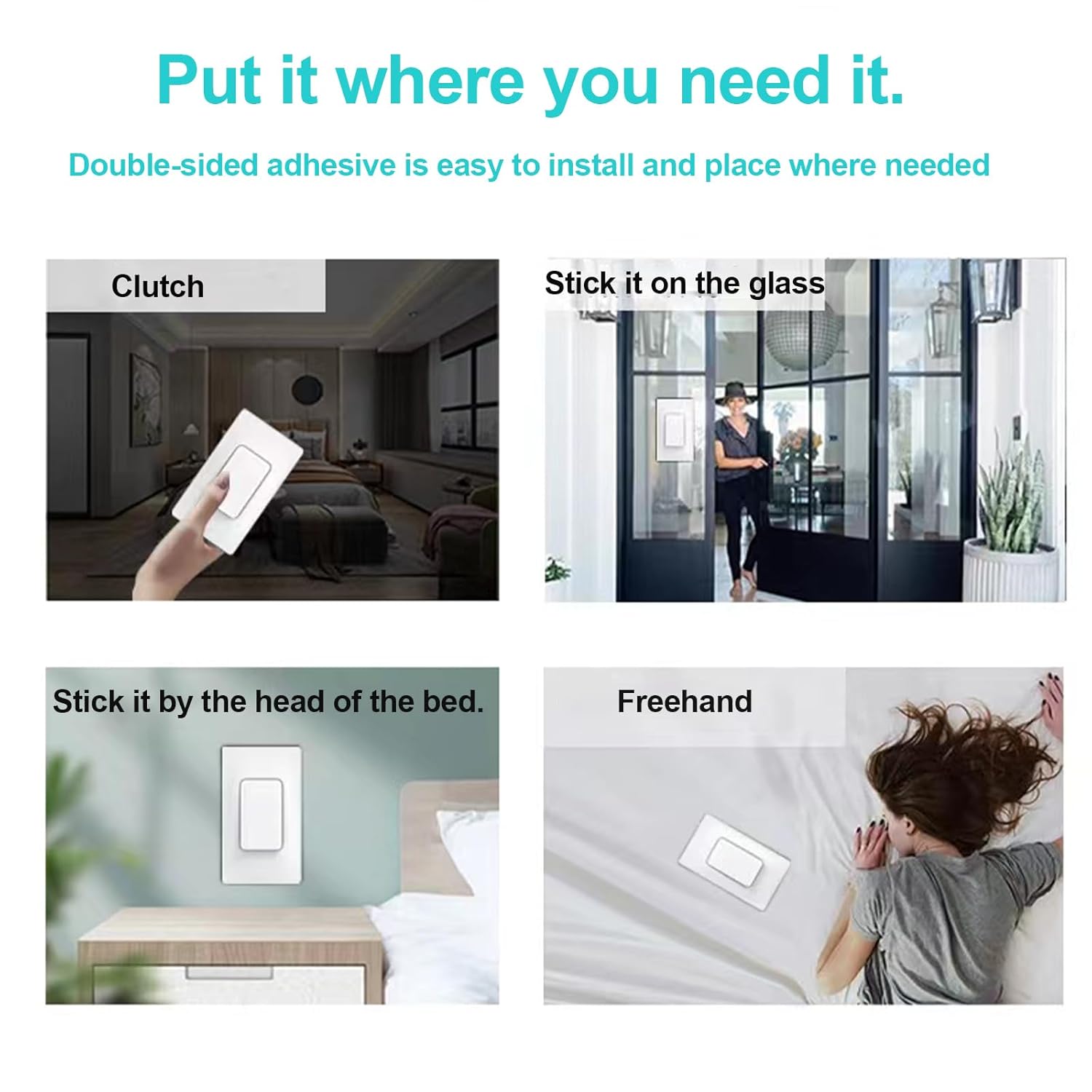
- ทำความสะอาดพื้นผิวที่ต้องการติดตั้งให้สะอาดหมดจด
- Apply the double-sided adhesive to the back of the switch or use screws to secure it to a wall.
- ตรวจสอบให้แน่ใจว่าสวิตช์ติดแน่นดีแล้ว
5. คู่มือการใช้งาน
5.1 Pairing the Switch and Receiver
After wiring the receiver and restoring power, you need to pair the wireless switch with the receiver.

- Ensure the receiver is safely connected to the power supply.
- Press and hold the pairing button on the receiver for approximately 3 seconds. The code indicator light on the receiver will turn on.
- Within 10 seconds, press the wireless switch button once. The code indicator light on the receiver will flash once, indicating successful pairing.
5.2 Clearing the Signal (Unpairing)
To clear all paired switches from a receiver:
- Press and hold the pairing button on the receiver.
- Continue holding until the code indicator light flashes 3 times. This indicates that all previously paired switches have been cleared.
5.3 วิธีการควบคุม
The system supports flexible control configurations:
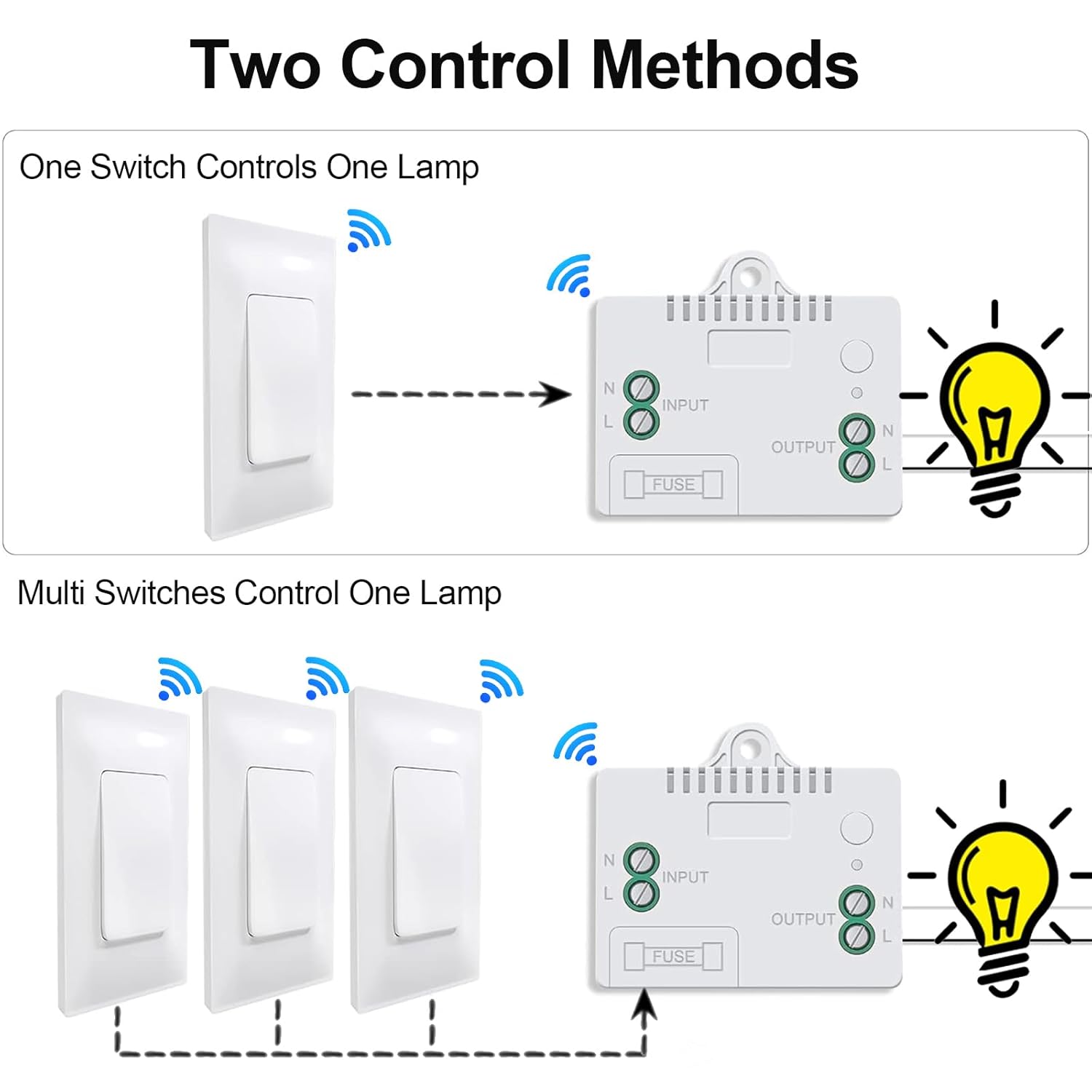
- One Switch Controls One Lamp: A single wireless switch can be paired with one receiver to control a single lighting fixture.
- Multiple Switches Control One Lamp: Up to 15 wireless switches can be paired with a single receiver to create a multi-way switching system for one lighting fixture.
- One Switch Controls Multiple Lamps: A single wireless switch can be paired with multiple receivers to control several lighting fixtures simultaneously.
6. คุณสมบัติหลัก
The Bkiyougo Wireless Light Switch and Receiver Kit offers several advantagใช่:

- ขับเคลื่อนด้วยตนเอง: The switch generates its own power kinetically, requiring no batteries or external power source.
- การทำงานแบบไร้สาย: Eliminates the need for new wiring, simplifying installation and allowing flexible placement.
- IP44 Rated Waterproof Switch: The wireless switch is designed to operate reliably in wet environments, such as bathrooms or courtyards, without risk of electric leakage.

- สัญญาณ RF แรง: The system utilizes a robust RF signal that can penetrate walls and doors.
- ระยะขยาย: Offers an indoor control distance of up to 100 feet and an outdoor control distance of up to 330 feet in open areas.

7 การแก้ไขปัญหา
If you encounter issues with your Bkiyougo Wireless Light Switch and Receiver Kit, refer to the following table for common problems and solutions.
| ปัญหา | สาเหตุที่เป็นไปได้ | สารละลาย |
|---|---|---|
| ไฟไม่เปิด/ปิด. | No power to receiver; Receiver not paired with switch; Faulty wiring; Out of range. | Check power supply to receiver; Re-pair switch and receiver (Section 5.1); Verify wiring connections; Reduce distance between switch and receiver. |
| Light turns on/off unexpectedly. | Interference; Receiver picking up unintended signals. | Clear the signal from the receiver (Section 5.2) and re-pair only the desired switches. Ensure no other RF devices are causing interference. |
| Switch feels stiff or unresponsive. | Mechanical issue; Debris under switch. | Ensure the switch is clean and free of obstructions. If the issue persists, contact customer support. |
| ช่วงการควบคุมลดลง | Obstructions (thick walls, metal objects); Environmental interference. | Relocate the switch or receiver to minimize obstructions. Avoid placing near large metal objects or other strong RF sources. |
8. ข้อมูลจำเพาะทางเทคนิค
- หมายเลขรุ่น: Self-power switch-01
- ขนาดสินค้า : 2.36 x 1.57 x 0.79 inches (Switch); 2.36 x 1.57 x 0.79 inches (Receiver)
- น้ำหนัก: 5.29 ออนซ์ (รวมแพ็คเกจ)
- ปฏิบัติการฉบับที่tage: ไฟฟ้ากระแสสลับ 110-230 โวลต์
- คะแนนปัจจุบัน: 10 Amps
- โหมดการทำงาน: เปิด-ปิด-เปิด
- ประเภทการติดต่อ: เปิดปกติ
- ประเภทตัวเชื่อมต่อ: สกรูเทอร์มินัล
- ประเภทวงจร: หลายทาง
- ประเภทตัวกระตุ้น: ปุ่มกด
- Indoor Control Range: สูงสุด 100 ฟุต (ประมาณ 30 เมตร)
- Outdoor Control Range: ในพื้นที่โล่ง สามารถมองเห็นได้ไกลถึง 330 ฟุต (ประมาณ 100 เมตร)
- Switch Waterproof Rating: IP44
9. การดูแลรักษา
To ensure the longevity and optimal performance of your Bkiyougo Wireless Light Switch and Receiver Kit:
- Clean the switch and receiver with a soft, dry cloth. Do not use abrasive cleaners or solvents.
- ควรหลีกเลี่ยงการวางเครื่องรับสัญญาณไว้ในที่ที่มีความชื้นสูงหรืออุณหภูมิที่สูงเกินไป
- Do not attempt to disassemble or repair the unit yourself. This may void the warranty and pose safety risks.
10. การรับประกันและการสนับสนุน
10.1 ข้อมูลการรับประกัน
Bkiyougo products are covered by a limited warranty against defects in materials and workmanship. Please refer to the product packaging or contact customer support for specific warranty terms and conditions.
10.2 การสนับสนุนลูกค้า
For technical assistance, troubleshooting, or warranty claims, please contact Bkiyougo customer support through the retailer where the product was purchased or visit the official Bkiyougo webเว็บไซต์สำหรับข้อมูลการติดต่อ


