1. บทนำ
ขอบคุณสำหรับการซื้อasing the Supersonic Professional Stereo Amplifier AV-972SA. This amplifier is designed to provide high-fidelity audio for your home entertainment or karaoke system. With its versatile features, including USB/SD card playback, FM radio, and microphone inputs, it offers a powerful and clear sound experience. Please read this manual carefully before operating the unit to ensure proper use and to maximize its performance.
2. คำแนะนำด้านความปลอดภัยที่สำคัญ
- แหล่งจ่ายไฟ: ตรวจสอบแหล่งจ่ายไฟ voltage matches the requirements specified on the unit (220V~250V/50Hz).
- การระบายอากาศ : อย่าปิดกั้นช่องระบายอากาศใดๆ ติดตั้งตามคำแนะนำของผู้ผลิต
- น้ำและความชื้น: อย่าวางอุปกรณ์นี้ไว้ในที่ที่มีฝนหรือความชื้น และอย่าวางสิ่งของที่บรรจุของเหลว เช่น แจกัน บนอุปกรณ์นี้
- ความร้อน: ห้ามติดตั้งใกล้แหล่งความร้อน เช่น หม้อน้ำ เครื่องทำความร้อน เตา หรืออุปกรณ์อื่น ๆ (รวมถึง ampเครื่องให้ความร้อน) ที่ผลิตความร้อน
- การทำความสะอาด: ทำความสะอาดด้วยผ้าแห้งเท่านั้น
- การบริการ: อย่าพยายามให้บริการผลิตภัณฑ์นี้ด้วยตนเอง ส่งต่อการบริการทั้งหมดไปยังช่างบริการที่ผ่านการรับรอง
- การเชื่อมต่อลำโพง: Ensure correct polarity when connecting speakers to prevent damage to the ampเครื่องขยายเสียงและลำโพง
3. คุณสมบัติหลัก
- Luxury Color Pointer Screen Display
- High-Fidelity Stereo Dynamic Ampออกแบบ lifier
- Bass-enhancement Technology
- กำลังขับทรงพลัง 3000W
- Professional Karaoke FM Radio Tuner
- USB/SD Card Playback for MP3 files
- Low Leak Magnetic Ring type Voltage
- Optimized for use with 12", 15", and 18" loudspeakers
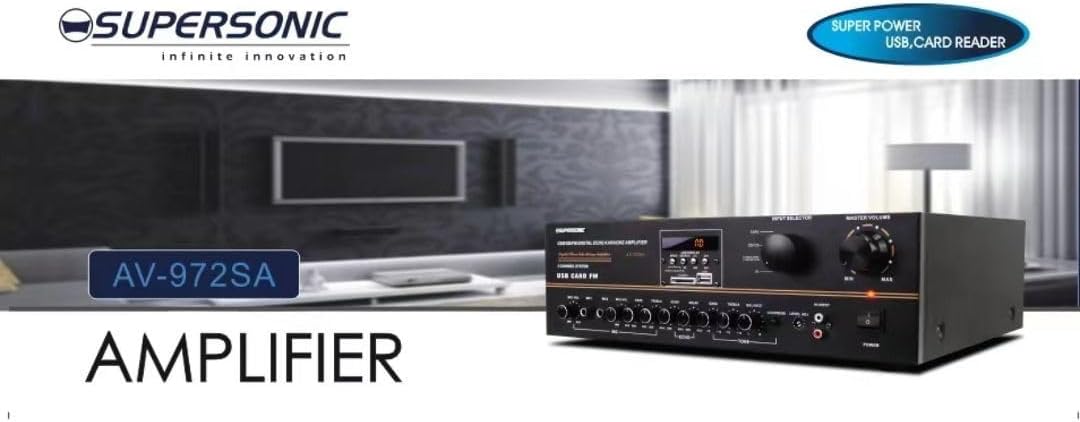
ภาพที่ 3.1: A visual representation of the key features of the Supersonic AV-972SA amplifier, including its display, power output, and connectivity options.
4. สินค้าหมดview
The Supersonic AV-972SA amplifier features a user-friendly front panel for easy control and a rear panel for all necessary connections.
4.1 แผงด้านหน้า

ภาพที่ 4.1: ด้านหน้า view of the Supersonic AV-972SA ampเครื่องแสดงasing its controls, display, and input ports in a home setting.
แผงด้านหน้าประกอบด้วย:
- ปุ่มเปิด/ปิด: เปลี่ยนเป็น amplifier เปิดหรือปิด
- การควบคุมระดับเสียงหลัก: ปรับระดับเสียงเอาต์พุตโดยรวม
- ปุ่มปรับระดับเสียงเบส/เสียงแหลม: Adjusts low and high frequency response.
- ตัวเลือกอินพุต: Switches between different audio sources (e.g., USB, SD, FM, AUX).
- ช่องเสียบ USB/การ์ด SD: สำหรับการเล่นเสียง fileสามารถดาวน์โหลดโดยตรงจากไดรฟ์ USB หรือการ์ด SD ได้
- FM Tuner Controls: For radio station selection and tuning.
- อินพุตไมโครโฟน: For connecting microphones for karaoke or public address.
- หน้าจอแสดงผล: แสดงโหมดปัจจุบัน ข้อมูลเส้นทาง หรือความถี่วิทยุ FM
4.2 แผงด้านหลัง
The rear panel provides all necessary connections for speakers, power, and external audio sources.
- ขั้วต่อลำโพง: เชื่อมต่อลำโพงของคุณที่นี่ ตรวจสอบให้แน่ใจว่าขั้วถูกต้อง (+ ต่อกับ + และ - ต่อกับ -)
- อินพุตเสียง (RCA): For connecting external audio devices like CD players, DVD players, or other audio sources.
- ช่องเสียบสายไฟ: Connect the provided power cord here.
- อินพุตเสาอากาศ FM: เชื่อมต่อเสาอากาศวิทยุ FM เพื่อการรับสัญญาณวิทยุที่ดีขึ้น
5. คู่มือการติดตั้ง
Follow these steps to set up your Supersonic AV-972SA ampเครื่องฟอก:
- การจัดวาง: วาง amplifier on a stable, flat surface with adequate ventilation around it. Avoid direct sunlight, heat sources, or areas with high humidity.
- การเชื่อมต่อลำโพง: Connect your loudspeakers to the speaker terminals on the rear panel. Match the positive (+) terminal on the amplifier to the positive (+) terminal on your speaker, and the negative (-) to the negative (-). Ensure all connections are secure. This amplifier is designed to work best with 12", 15", or 18" loudspeakers.
- การเชื่อมต่อแหล่งกำเนิดเสียง:
- อุปกรณ์ภายนอก: Connect your CD player, DVD player, or other audio sources to the RCA audio input jacks on the rear panel.
- ยูเอสบี/การ์ด SD: Insert a USB flash drive or SD card into the respective slot on the front panel.
- เสาอากาศ FM: Connect the FM antenna to the designated input on the rear panel for optimal radio reception.
- การเชื่อมต่อไฟฟ้า: ให้แน่ใจว่า ampสวิตช์เปิดปิดของเครื่องขยายเสียงอยู่ในตำแหน่ง OFF เสียบสายไฟเข้ากับ... amplifier's power input and then plug it into a suitable 220V~250V/50Hz AC power outlet.
6. คู่มือการใช้งาน
6.1 การเปิด/ปิดเครื่อง
กดปุ่ม ปุ่มเปิดปิด บนแผงด้านหน้าเพื่อหมุน amplifier ON. The display will illuminate. Press it again to turn the ampปิดไฟ
6.2 Selecting Audio Source
ใช้ ตัวเลือกอินพุต button or knob on the front panel to cycle through available audio sources: USB, SD, FM, or AUX (RCA input).
6.3 การควบคุมระดับเสียงและโทนเสียง
- ปริมาณหลัก: หมุน มาสเตอร์ วอลุ่ม knob to adjust the overall sound level. Start with a low volume and gradually increase it.
- เบส/เสียงแหลม: ใช้ เบส และ เสียงแหลม knobs to fine-tune the low and high frequencies of the audio output to your preference.
6.4 การเล่นไฟล์ผ่าน USB/การ์ด SD
Once a USB drive or SD card containing MP3 audio files is inserted, the amplifier will automatically switch to USB/SD mode and begin playback. Use the control buttons (Play/Pause, Next, Previous) on the front panel to manage playback.
การใช้งานวิทยุ FM 6.5
Select the FM input using the ตัวเลือกอินพุต. Use the FM tuner controls to scan for and select radio stations. The display will show the current frequency.
6.6 การใช้งานไมโครโฟน (คาราโอเกะ)
Connect your microphones to the microphone input jacks on the front panel. Adjust the microphone volume and echo effects (if available) using the dedicated controls. Ensure the main volume is set appropriately to avoid feedback.
7. การบำรุงรักษา
- การทำความสะอาด: ถอดปลั๊กไฟก่อนทำความสะอาด ใช้ผ้าแห้งนุ่มเช็ดทำความสะอาดภายนอกเครื่อง ampห้ามใช้น้ำยาทำความสะอาดชนิดเหลวหรือสเปรย์กระป๋อง
- การระบายอากาศ : ตรวจสอบช่องระบายอากาศอย่างสม่ำเสมอว่าไม่มีฝุ่นและเศษสิ่งสกปรกอุดตัน เพื่อป้องกันความร้อนสูงเกินไป
- พื้นที่จัดเก็บ: หากมีการเก็บข้อมูล amplifier for an extended period, ensure it is in a cool, dry place, away from direct sunlight and extreme temperatures.
8 การแก้ไขปัญหา
| ปัญหา | สาเหตุที่เป็นไปได้ | สารละลาย |
|---|---|---|
| ไม่มีไฟฟ้า | สายไฟไม่ได้เชื่อมต่อ; เต้าเสียบไฟฟ้าชำรุด; Ampสวิตช์ไฟเครื่องขยายเสียงปิด | Check power cord connection; Try a different outlet; Ensure power switch is ON |
| ไม่มีเสียงออก | Volume too low; Incorrect input selected; Speaker wires loose or incorrectly connected; Faulty audio source | Increase master volume; Select correct input; Check speaker connections and polarity; Test with a different audio source |
| การรับสัญญาณ FM ไม่ดี | Antenna not connected or poorly positioned; Weak signal | Connect FM antenna securely; Adjust antenna position; Try manual tuning |
| USB/SD เล่นไม่ได้ | ไม่ถูกต้อง file format; USB/SD card faulty or not inserted correctly; Ampเครื่องขยายเสียงไม่ได้อยู่ในโหมด USB/SD | ทำให้มั่นใจ files are MP3 format; Reinsert USB/SD card; Select USB/SD input mode |
9. ข้อมูลจำเพาะ
| คุณสมบัติ | ข้อมูลจำเพาะ |
|---|---|
| ยี่ห้อ | เหนือเสียง |
| หมายเลขรุ่น | AMP-AV972SA |
| เอาท์พุต วัดtage | 3000วัตต์ |
| เทคโนโลยีการเชื่อมต่อ | ยูเอสบี |
| คุณสมบัติพิเศษ | การออกแบบที่กะทัดรัด |
| สี | สีดำ |
| ขนาดสินค้า | 25D x 45W x 26H เซนติเมตร |
| น้ำหนักสินค้า | 1 กิโลกรัม |
| วิธีการควบคุม | สัมผัส |
| แหล่งจ่ายไฟ | 220V ~ 250V / 50Hz |
10. การรับประกันและการสนับสนุน
This Supersonic AV-972SA ampเครื่องขยายเสียงมาพร้อมกับ รับประกันจากผู้ผลิต 6 เดือน นับจากวันที่ซื้อสินค้า การรับประกันนี้ครอบคลุมข้อบกพร่องจากการผลิตภายใต้การใช้งานปกติ ไม่ครอบคลุมความเสียหายที่เกิดจากการใช้งานผิดวิธี อุบัติเหตุ การดัดแปลงโดยไม่ได้รับอนุญาต หรือการติดตั้งที่ไม่ถูกต้อง
For warranty claims or technical support, please contact your retailer or the Supersonic customer service department. Please have your proof of purchase and product model number (AMP-AV972SA) ready when contacting support.


