1. บทนำ
Thank you for choosing a FIREBAT Mini PC. This manual provides comprehensive instructions for setting up, operating, maintaining, and troubleshooting your new A6 or AM02 series Mini PC. Designed for versatility, FIREBAT Mini PCs are suitable for a wide range of applications, including home use, business, education, and gaming.
The FIREBAT A6 model features an AMD Ryzen7 6800H CPU, while the AM02 model is equipped with an AMD Ryzen5 6600H CPU. Both models offer robust performance and compact design.

2. รุ่นผลิตภัณฑ์เพิ่มเติมview
2.1 FIREBAT A6 Model (Ryzen7 6800H)
The A6 model is powered by an AMD Ryzen7 6800H CPU, featuring 8 Cores and 16 Threads with a base speed of 3.2 GHz and a turbo speed of 4.7 GHz. It includes AMD Radeon 680M graphics with a frequency of 2200MHz. This model supports Dual DDR5 RAM (SO-DIMM 4800MHz) and M.2 NVMe 2280 PCIe SSD storage. Connectivity options include WiFi 6 and Bluetooth 5.2, along with 2.5G RJ45 LAN and MU-MIMO technology.
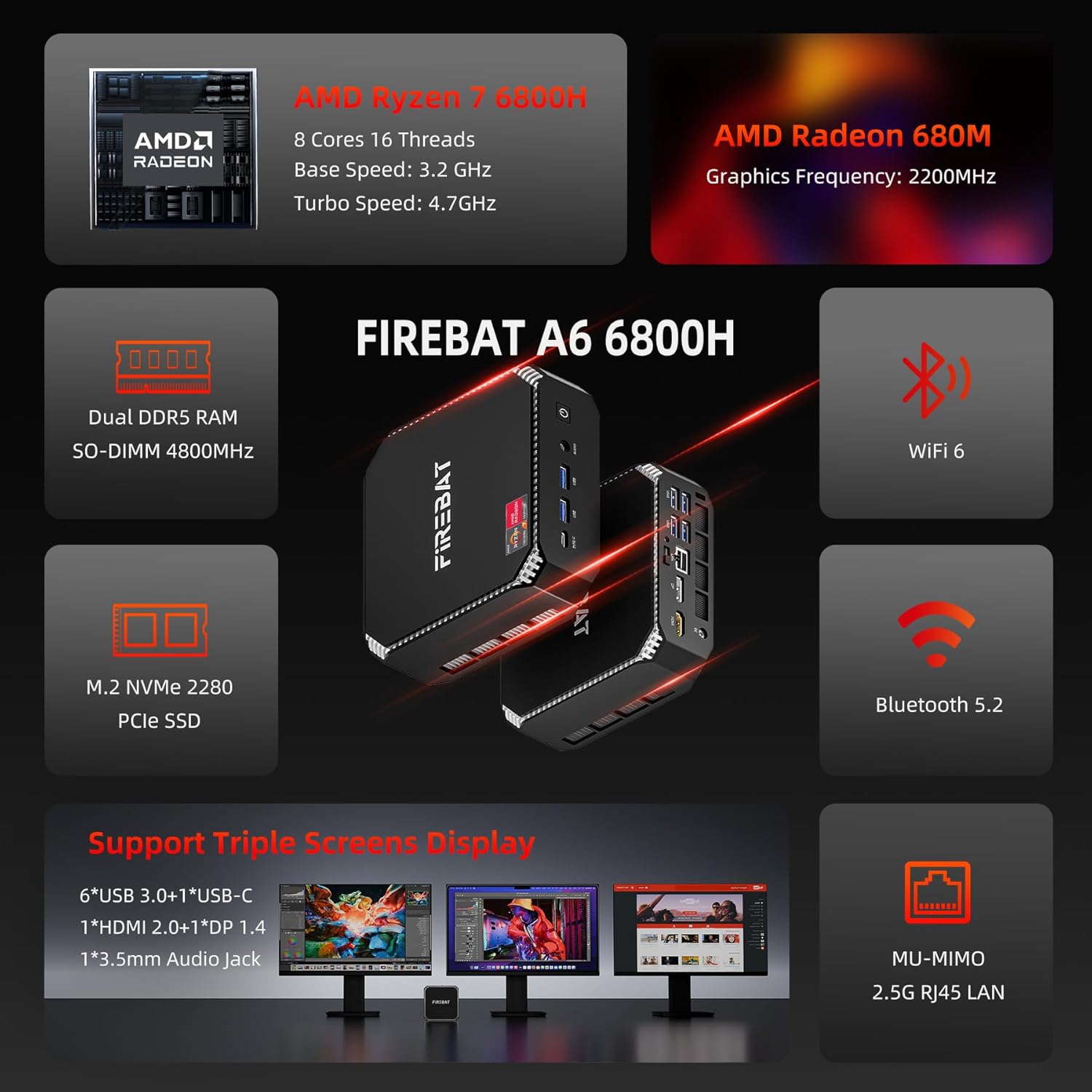
The A6 model is designed for lower power consumption while delivering stronger performance, featuring a 3 Zen+ architecture (12% higher IPC performance than Zen 3) and a 6nm modern core manufacturing process, resulting in up to 17% lower power consumption.

2.2 FIREBAT AM02 Model (Ryzen5 6600H)
The AM02 model is equipped with a 6 Cores/12 Threads AMD Ryzen5 6600H CPU, built on a 6nm FinFET process. This processor offers better power consumption control and multi-core performance, making it suitable for multi-threaded task processing.
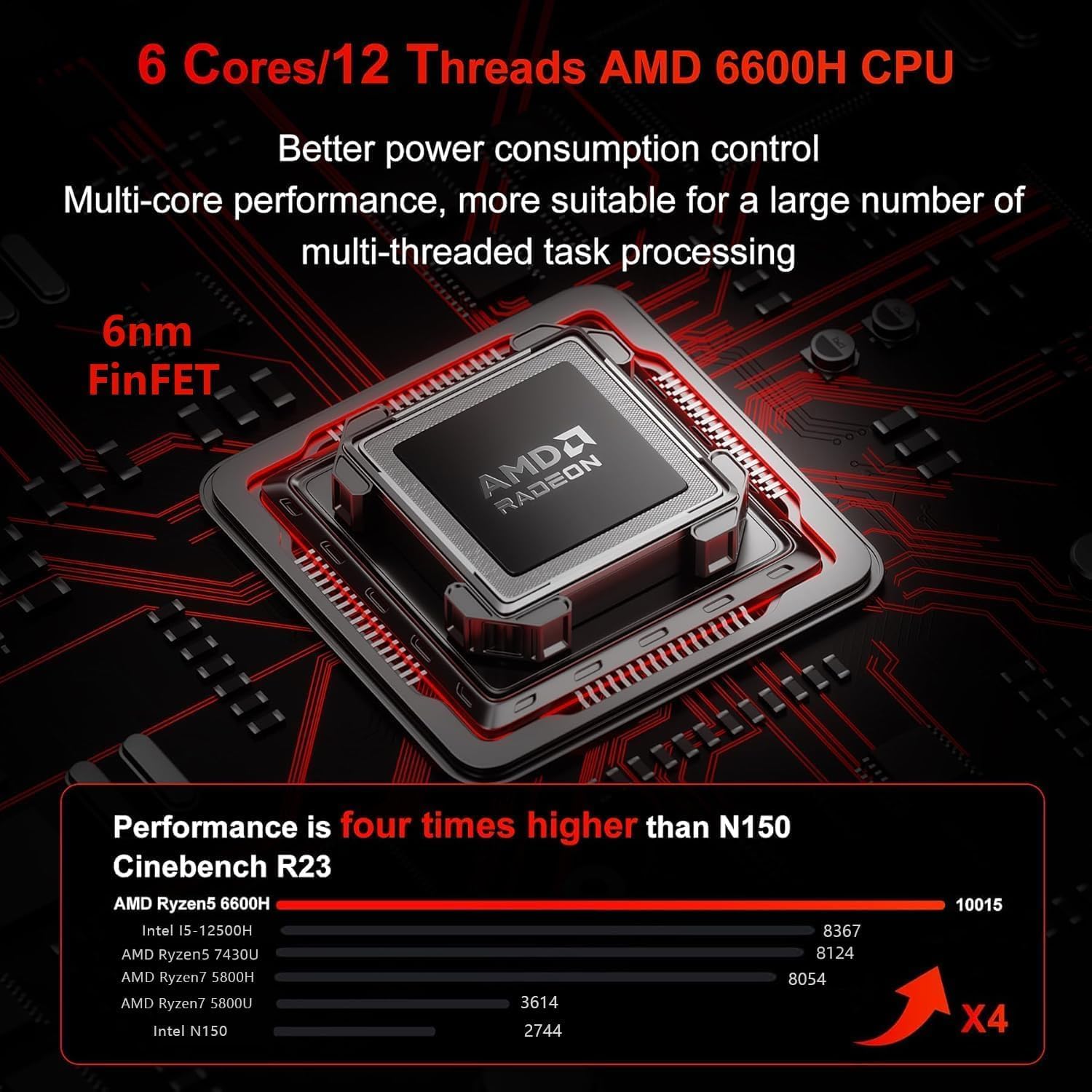
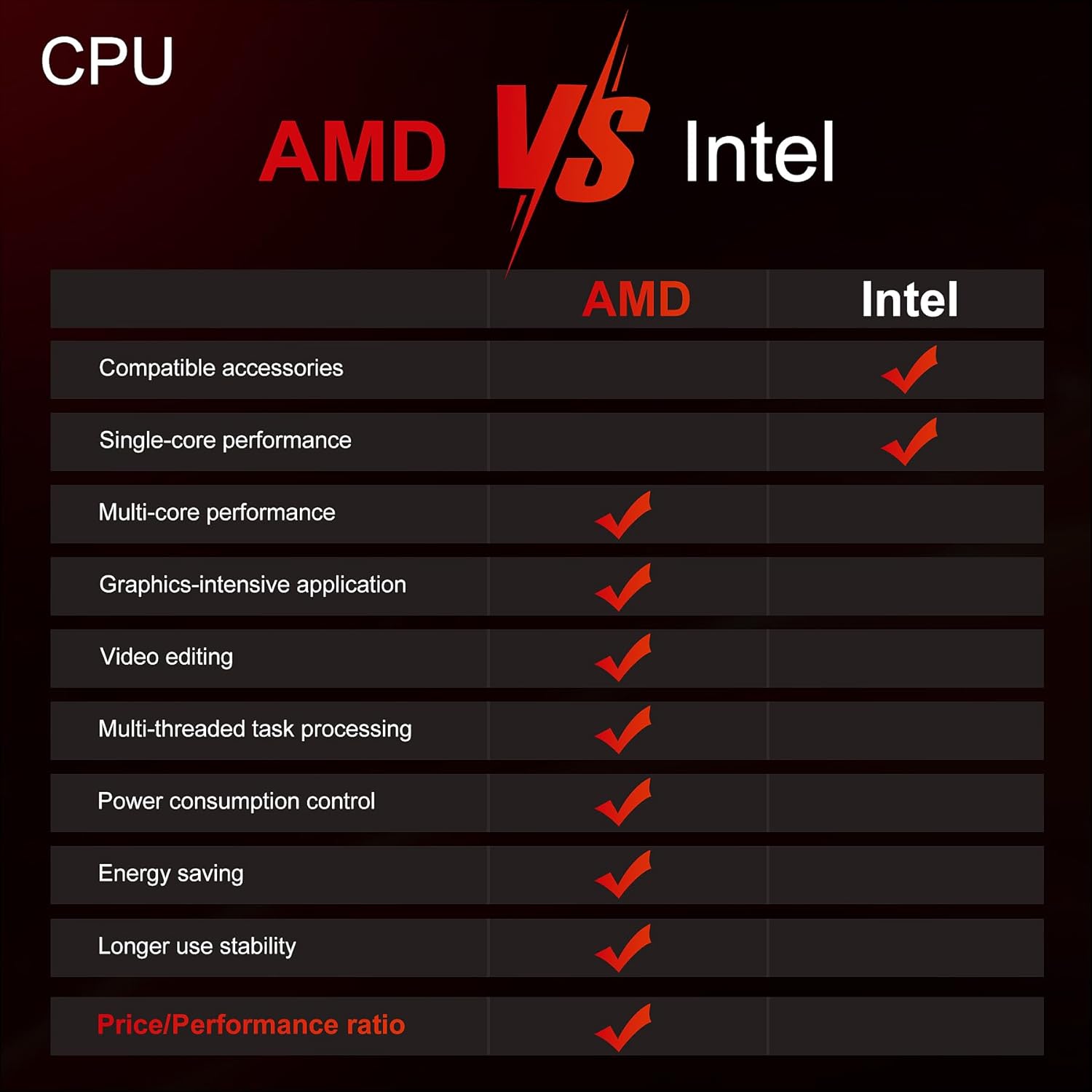
Both models leverage AMD's advanced architecture, providing a strong balance of performance and efficiency compared to other CPU architectures, particularly in areas like multi-core performance, graphics-intensive applications, video editing, and energy saving.
3. คู่มือการติดตั้ง
3.1 การแกะกล่อง
- Carefully open the packaging and remove the Mini PC and all accessories.
- ตรวจสอบว่ามีส่วนประกอบทั้งหมดที่ระบุไว้ในรายการบรรจุภัณฑ์อยู่
- เก็บวัสดุบรรจุภัณฑ์ไว้เพื่อการขนส่งหรือจัดเก็บในอนาคต
3.2 การเชื่อมต่ออุปกรณ์ต่อพ่วง
Connect your monitor, keyboard, mouse, and other peripherals to the appropriate ports on the Mini PC. Both models feature a variety of ports for comprehensive connectivity.
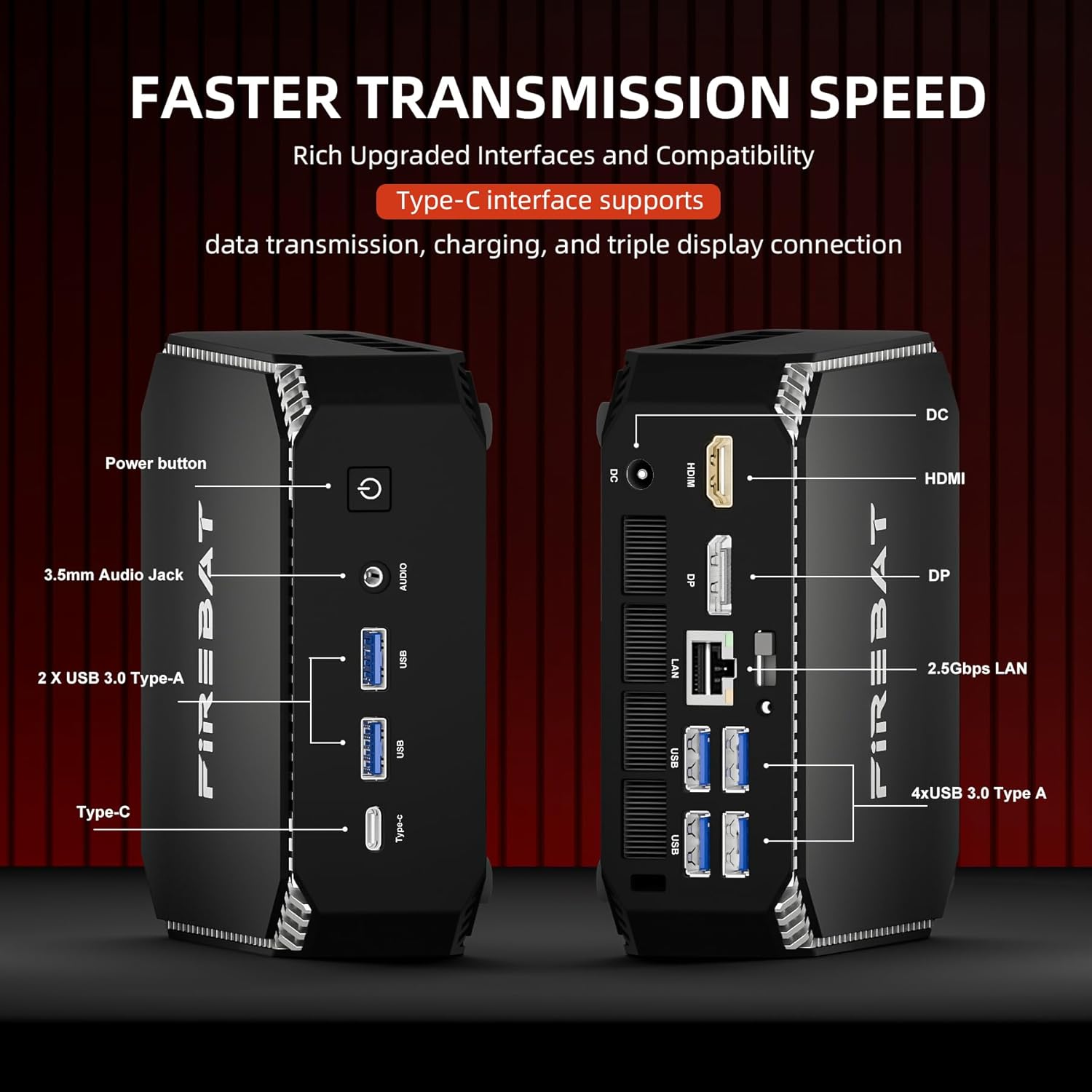
- แสดง: Connect your monitor(s) using the HDMI or DisplayPort (DP) outputs. Both models support triple screen display.
- อุปกรณ์ยูเอสบี: Plug in your keyboard, mouse, and other USB devices into the available USB 3.0 Type-A or USB Type-C ports.
- เครือข่าย: Connect an Ethernet cable to the 2.5Gbps LAN port for wired network access.
- เสียง: เชื่อมต่อหูฟังหรือลำโพงเข้ากับแจ็คเสียงขนาด 3.5 มม.
3.3 การเปิดเครื่อง
- Connect the power adapter to the DC-in port on the Mini PC.
- เสียบอะแดปเตอร์ไฟฟ้าเข้ากับเต้ารับไฟฟ้าที่ผนัง
- Press the power button located on the front or side of the Mini PC. The power indicator light will illuminate.
- The system will boot up. Follow the on-screen instructions to complete the initial setup of your operating system.
4. คู่มือการใช้งาน
4.1 การทำงานพื้นฐาน
Once the operating system is set up, you can begin using your FIREBAT Mini PC like any standard desktop computer. Navigate the interface, install software, and connect to the internet.
4.2 การขยายพื้นที่จัดเก็บข้อมูลและหน่วยความจำ
Both A6 and AM02 models support expandable storage and memory. You can upgrade the RAM up to 64GB (32GB x 2) DDR5 4800MHz and add dual M.2 NVMe SSDs (M-Key PCIe 4.0 x 4).


For detailed instructions on how to install or upgrade RAM and SSDs, please refer to the specific upgrade guide available on the FIREBAT official webไซต์หรือติดต่อฝ่ายสนับสนุนลูกค้า
4.3 การตั้งค่าจอแสดงผลหลายจอ
Your FIREBAT Mini PC supports connecting up to three displays simultaneously via the HDMI and DisplayPort (DP) outputs, along with the USB-C port (if it supports video output). This allows for an extended desktop experience, ideal for multitasking or professional setups.
- เชื่อมต่อจอภาพหลักของคุณเข้ากับพอร์ต HDMI
- เชื่อมต่อจอภาพที่สองเข้ากับพอร์ต DisplayPort
- If your USB-C port supports video output, connect a third monitor using a compatible USB-C to display adapter.
- Once connected, configure display settings within your operating system to extend or duplicate your desktop.
5. การบำรุงรักษา
5.1 การทำความสะอาด
To ensure optimal performance and longevity, regularly clean your Mini PC. Use a soft, dry cloth to wipe down the exterior. For dust accumulation in vents, use compressed air. Ensure the device is powered off and unplugged before cleaning.
5.2 ระบบทำความเย็น
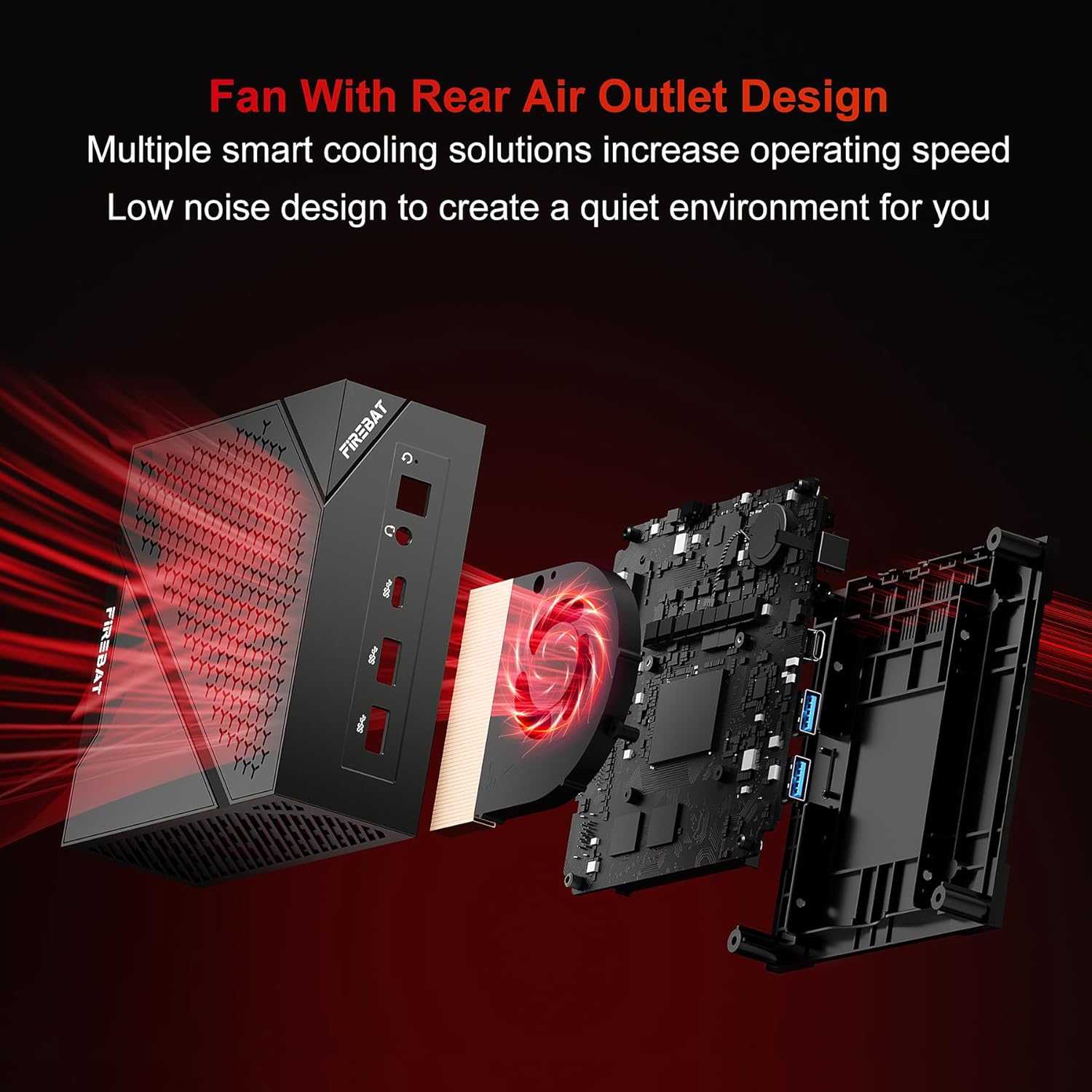
The FIREBAT Mini PC features a fan with a rear air outlet design and multiple smart cooling solutions to maintain optimal operating temperatures and low noise levels. Ensure that the air vents are not obstructed to allow for proper airflow.
6 การแก้ไขปัญหา
If you encounter issues with your FIREBAT Mini PC, please refer to the following common troubleshooting steps:
- ไม่มีไฟฟ้า: ตรวจสอบให้แน่ใจว่าอะแดปเตอร์แปลงไฟเชื่อมต่อกับมินิพีซีและเต้ารับไฟฟ้าที่ใช้งานได้สนิทแล้ว ลองเสียบกับเต้ารับอื่นดู
- ไม่มีจอแสดงผล: Check that the monitor cable (HDMI/DP) is firmly connected to both the Mini PC and the monitor. Ensure the monitor is powered on and set to the correct input source.
- ไม่มีการเชื่อมต่ออินเทอร์เน็ต: For wired connections, check the Ethernet cable and router. For Wi-Fi, ensure Wi-Fi is enabled in the operating system and you are connected to the correct network with the correct password.
- ระบบช้าลง: Close unnecessary applications. Check for background processes consuming high resources. Ensure adequate ventilation and clean dust from vents.
- ไม่ตรวจพบอุปกรณ์ต่อพ่วง: ลองเสียบอุปกรณ์ต่อพ่วงเข้ากับพอร์ต USB อื่นดู ตรวจสอบให้แน่ใจว่าได้ติดตั้งไดรเวอร์แล้ว หากอุปกรณ์ต่อพ่วงนั้นต้องการไดรเวอร์ดังกล่าว
For more complex issues or if the problem persists, please contact FIREBAT customer support.
7. ข้อมูลจำเพาะทางเทคนิค
| คุณสมบัติ | ข้อมูลจำเพาะ |
|---|---|
| ยี่ห้อ | ไฟร์แบต |
| Model (A6) | AMD Ryzen7 6800H CPU (8 Cores, 16 Threads, 3.2GHz Base, 4.7GHz Turbo) |
| Model (AM02) | AMD Ryzen5 6600H CPU (6 Cores, 12 Threads, 4.5GHz Turbo) |
| กราฟฟิก | AMD Radeon 680M (2200MHz) |
| แรม | หน่วยความจำ DDR5 4800MHz ขนาด 16GB (สามารถเพิ่มได้สูงสุดถึง 64GB) |
| พื้นที่จัดเก็บ | 512GB M.2 NVMe 2280 PCIe 4.0 SSD (Dual M.2 SSD support) |
| การเชื่อมต่อ | WiFi 6, Bluetooth 5.2, 2.5Gbps RJ45 LAN |
| พอร์ต (ด้านหน้า) | USB Type-C, USB 3.0 Type-A (x2), 3.5mm Audio Jack, Power Button |
| พอร์ต (ด้านหลัง) | DC Power, HDMI, DisplayPort (DP), 2.5Gbps LAN, USB 3.0 Type-A (x4) |
| ASIN | B0F74VT4RN |
| วันที่พร้อมใช้งานครั้งแรก | 1 พฤษภาคม 2025 |
8. การรับประกันและการสนับสนุน
FIREBAT is committed to providing high-quality products and excellent customer service. Your Mini PC comes with a standard manufacturer's warranty. Please refer to the warranty card included in your product packaging for specific terms and conditions.
For any technical assistance, product inquiries, or support needs, please contact FIREBAT customer support:
- อีเมล: ฝ่ายสนับสนุน@firebatpc.com
- Webเว็บไซต์: www.firebatpc.com
Our team is dedicated to ensuring your satisfaction and will assist you with any questions or concerns you may have.


