1. บทนำ
The ASUS RP-BE58 is a dual-band WiFi 7 (802.11be) range extender designed to expand wireless coverage and enhance network performance. It supports speeds up to 3600 Mbps, utilizing 4096-QAM for increased transmission efficiency. This device is compatible with virtually all WiFi routers, modems, and cable routers, and can also extend seamless AiMesh WiFi systems.
คุณสมบัติที่สำคัญ ได้แก่:
- WiFi 7 Standard: Boosts speeds up to 3600 Mbps with 4096-QAM for 1.2 times faster single frequency band transmission.
- การทำงานแบบมัลติลิงค์: Links to multiple bands simultaneously for stable internet connections and efficient data transfers.
- เข้ากันได้สากล: Works with any WiFi router, modem, or cable router.
- AiMesh Extender: Supports AiMesh for stable, seamless, and secure wireless connections within a compatible system.
- Easy Mobile App Setup: Configure the RP-BE58 using the ASUS Router app or ASUS Extender app.
2. อะไรอยู่ในกล่อง
เมื่อเปิดบรรจุภัณฑ์คุณควรพบรายการดังต่อไปนี้:
- ASUS RP-BE58 Range Extender
- คู่มือเริ่มต้นอย่างรวดเร็ว
- บัตรรับประกัน
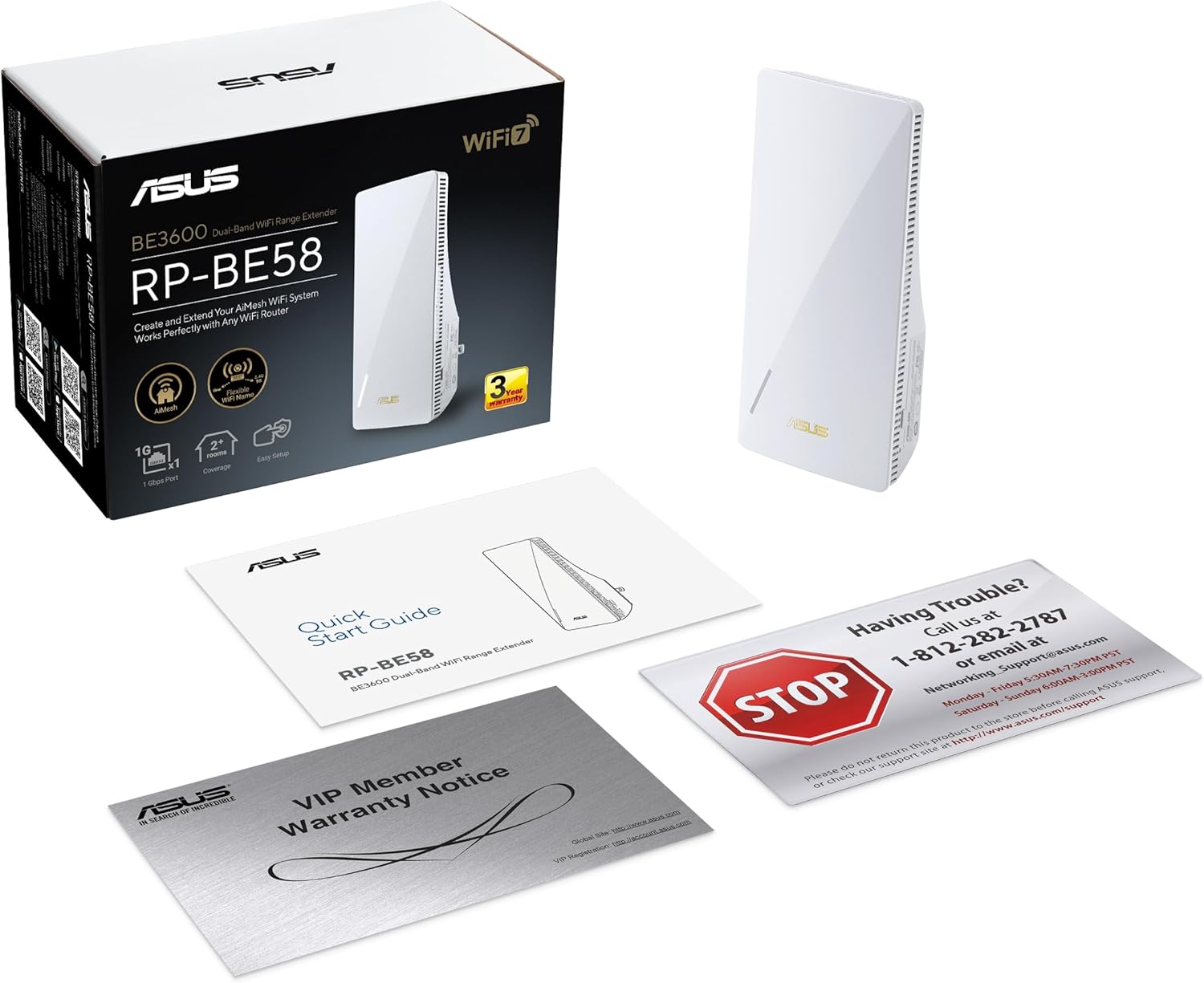
Image: The ASUS RP-BE58 Range Extender, Quick Start Guide, and Warranty Card as found in the product packaging.
3. สินค้าหมดview
The ASUS RP-BE58 is designed for discreet placement and efficient performance. Its compact form factor allows it to be plugged directly into a wall outlet, extending your WiFi coverage without clutter.

Image: The ASUS RP-BE58 Range Extender shown plugged into a standard wall outlet, highlighting its compact design.
The device features an indicator light on the front to show its status. It is engineered to eliminate WiFi dead zones, providing robust connectivity for activities like 8K streaming and HDR gaming.

Image: The RP-BE58 extending WiFi coverage to an office area, demonstrating its ability to eliminate dead zones and support high-bandwidth activities like content creation on a monitor and laptop.

Image: The RP-BE58 ensuring strong WiFi signal for an 8K television, illustrating its capability to handle high-resolution streaming.
4. คำแนะนำในการตั้งค่า
Setting up your ASUS RP-BE58 is a straightforward process, primarily done through a mobile application.
4.1 การวางตำแหน่งเริ่มต้นและการเปิดเครื่อง
- Unpack the RP-BE58 from its box.
- Plug the RP-BE58 into a power outlet in a location where you want to extend your WiFi coverage. Ensure it is within range of your existing router.
- Wait for the device to power on and its indicator light to show a stable status (refer to the Quick Start Guide for specific LED indications).
4.2 Mobile App Configuration
The RP-BE58 can be set up as a standalone WiFi range extender or integrated into an ASUS AiMesh system.
- For Range Extender Mode: ดาวน์โหลดและติดตั้ง ASUS Extender App บนอุปกรณ์เคลื่อนที่ของคุณ
- For AiMesh Node Mode: ดาวน์โหลดและติดตั้ง แอพ ASUS Router บนอุปกรณ์เคลื่อนที่ของคุณ

Image: A mobile phone screen showing the ASUS Extender App and ASUS Router App icons, indicating the two primary methods for device setup.
Follow the on-screen instructions within the chosen app to connect the RP-BE58 to your existing WiFi network. This typically involves selecting your network, entering the password, and allowing the app to configure the extender.
4.3 AiMesh Setup (if applicable)
If you have an ASUS AiMesh compatible router, the RP-BE58 can be added as an AiMesh node to create a unified mesh WiFi system. This provides seamless roaming and extended coverage.
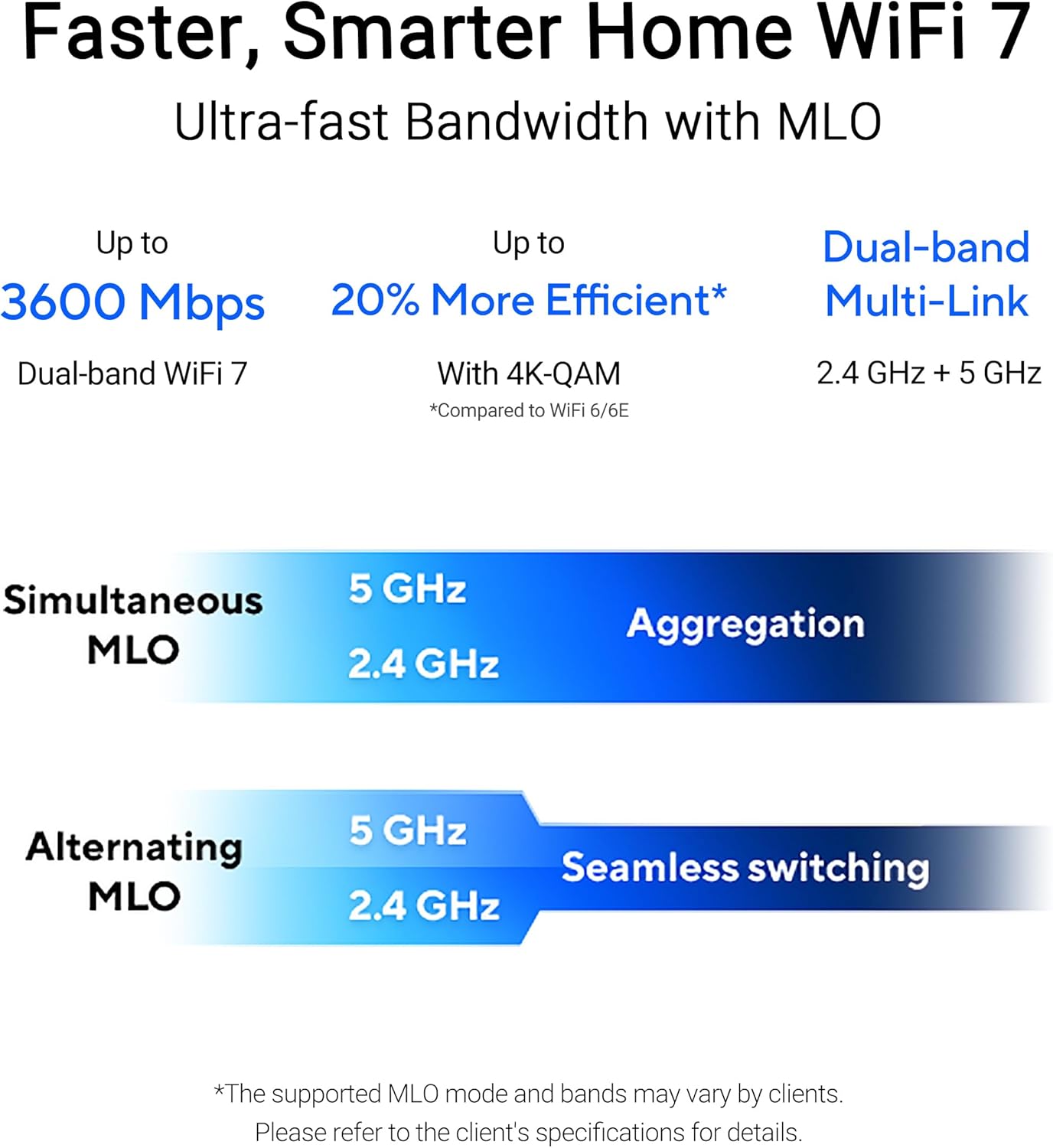
Image: A diagram illustrating the RP-BE58 as an AiMesh node, extending WiFi coverage throughout a multi-story home in conjunction with an ASUS AiMesh Compatible Router and ASUS ZenWiFi System.
For detailed visual guidance on setting up an ASUS ZenWiFi mesh network, which shares similar principles with adding an RP-BE58 to an AiMesh system, please refer to the video below:
Video: An official ASUS video demonstrating the setup process for an ASUS ZenWiFi Mesh Network using the ASUS Router App. While specific to ZenWiFi, the steps for adding a node to an AiMesh system are similar and provide helpful visual cues for RP-BE58 users.
5. คู่มือการใช้งาน
Once set up, the ASUS RP-BE58 operates automatically to extend your WiFi signal. For optimal performance, consider the following:
- ความแรงของสัญญาณ: The RP-BE58's indicator light will typically show the signal strength from your main router. A strong signal ensures better extended coverage.
- การทำงานแบบหลายลิงก์ (MLO): The WiFi 7 standard enables MLO, allowing the extender to use multiple frequency bands (2.4 GHz and 5 GHz) simultaneously or alternately for improved stability and speed. This is managed automatically by the device.
- AiMesh Roaming: In an AiMesh system, your devices will automatically switch to the strongest WiFi signal as you move around your home, ensuring a seamless connection without manual intervention.
วิดีโอ: ผู้ใช้รายหนึ่งview demonstrating the ASUS RP-BE58 in operation, highlighting its effectiveness in extending WiFi coverage and improving network performance in various areas of a home.
6. การบำรุงรักษา
To ensure the longevity and optimal performance of your ASUS RP-BE58, regular maintenance is recommended:
- อัพเดตเฟิร์มแวร์: Periodically check for and install firmware updates through the ASUS Router or Extender app. Updates often include performance improvements, security patches, and new features.
- ตำแหน่งที่เหมาะสมที่สุด: Ensure the extender is placed in an open area, away from obstructions like large metal objects, thick walls, or other electronic devices that could cause interference.
- การทำความสะอาด: Gently wipe the exterior of the device with a soft, dry cloth to remove dust. Do not use liquid cleaners or abrasive materials.
- วงจรไฟฟ้า: If you experience intermittent connectivity issues, try power cycling the device by unplugging it from the outlet for 10-15 seconds and then plugging it back in.
7 การแก้ไขปัญหา
If you encounter issues with your ASUS RP-BE58, try the following steps:
- ไม่มีไฟฟ้า: Ensure the extender is securely plugged into a working electrical outlet. Check if the outlet is receiving power.
- ไม่มีการเชื่อมต่ออินเทอร์เน็ต: Verify that your main router has an active internet connection. Check the connection between the RP-BE58 and your main router (refer to the app for status).
- สัญญาณอ่อน: Relocate the RP-BE58 closer to your main router or to a more central location within the desired coverage area. Avoid placing it near large electronic appliances.
- การเชื่อมต่อไม่ต่อเนื่อง: Try power cycling both your main router and the RP-BE58. Ensure both devices have the latest firmware.
- รีเซ็ตเป็นค่าเริ่มต้นจากโรงงาน: If problems persist, you may need to reset the RP-BE58 to its factory default settings. This is usually done by pressing and holding a small reset button on the device (refer to the Quick Start Guide for exact location and procedure). After a reset, you will need to reconfigure the device.
If these steps do not resolve the issue, please contact ASUS customer support for further assistance.
8. ข้อมูลจำเพาะ
| แบบอย่าง | RP-BE58 |
| ประเภทไร้สาย | 802.11.be, 802.11ac, 802.11ax, 802.11g, 802.11n |
| อัตราการถ่ายโอนข้อมูล | 2882 เมกะบิตต่อวินาที |
| ระดับย่านความถี่ | ดูอัลแบนด์ |
| ความครอบคลุม | พื้นที่สูงสุดถึง 2,200 ตร.ฟ. |
| ขนาดสินค้า (กxยxส) | 2.8 x 3.4 x 5.9 นิ้ว |
| น้ำหนักสินค้า | 8 ออนซ์ |
| สี | สีขาว |
| คุณสมบัติพิเศษ | Alexa Compatible, Flexible Backhaul Connection, Network standard: IEEE 802.11a, IEEE 802.11b, IEEE 802.11g, WiFi 4 (802.11n), WiFi 5 (802.11ac), WiFi 6 (802.11ax), WiFi 6E (802.11ax), WiFi 7 (802.11be), IPv4, IPv6, Whole home mesh |
9. การรับประกันและการสนับสนุน
The ASUS RP-BE58 comes with a warranty. Please refer to the included Warranty Card in your product packaging for detailed information regarding warranty terms, conditions, and duration.
For technical support, troubleshooting assistance, or warranty claims, please contact ASUS customer support. Contact information can typically be found in the Quick Start Guide or on the official ASUS support webเว็บไซต์.
Online resources and FAQs are also available on the ASUS support website, which can be accessed via เว็บไซต์ www.asus.com/support/.


