1. บทนำ
This manual provides essential information for setting up, operating, and maintaining your NIMO 15.6-inch FHD Laptop. Please read this guide thoroughly to ensure optimal performance and longevity of your device. Keep this manual for future reference.
2. อะไรอยู่ในกล่อง
- แล็ปท็อป NIMO N155 จำนวน 1 เครื่อง
- 1 x ที่ชาร์จเร็ว Type-C 65W PD
- 1 x คู่มือผู้ใช้
- ระบบปฏิบัติการ Windows 11 Home (ติดตั้งมาแล้ว)
- รับประกัน 2 ปี, ข้อมูลการคืนสินค้า 90 วัน
3. สินค้าหมดview
The NIMO 15.6-inch FHD Laptop is designed for efficiency and convenience, featuring a robust AMD Ryzen 5 processor, ample memory, and fast storage. Its sleek design and comprehensive connectivity options make it suitable for various tasks.
3.1. ส่วนประกอบของแล็ปท็อป

Figure 1: NIMO 15.6-inch FHD Laptop (Rose Gold variant)
This image displays the NIMO 15.6-inch FHD Laptop in Rose Gold, showcasing its full-size keyboard, large touchpad, and the vibrant display. Key features like fingerprint sensor, Type-C PD charger, and backlit keyboard are highlighted on the screen.
3.2. พอร์ตและขั้วต่อ

Figure 2: NIMO Laptop Ports Diagram
This diagram illustrates the available ports on the NIMO laptop, including Micro SD card reader, USB 2.0, USB 3.2 Gen1, Audio Jack, Kensington Lock on one side, and Type-C, USB 3.2 Gen1 Full-function, HDMI 1.4, and a Charge LED on the other side.
- พอร์ต USB 3.0: For high-speed data transfer and connecting peripherals.
- พอร์ต USB 2.0: สำหรับเชื่อมต่ออุปกรณ์ USB มาตรฐาน
- พอร์ต Type-C: Supports 65W Power Delivery (PD) for fast charging and data transfer.
- HDMI1.4: สำหรับเชื่อมต่อกับจอแสดงผลภายนอก
- เครื่องอ่านการ์ด Micro SD: สำหรับการขยายพื้นที่เก็บข้อมูลหรือการถ่ายโอน fileจากการ์ดหน่วยความจำ
- แจ็คเสียง: สำหรับการเชื่อมต่อหูฟังหรือลำโพงภายนอก
- สล็อตล็อคเคนซิงตัน: เพื่อความปลอดภัยทางกายภาพของอุปกรณ์
4. การตั้งค่า
4.1. การเปิดเครื่องครั้งแรก
- แกะแล็ปท็อปและอุปกรณ์เสริมทั้งหมดออกจากกล่อง
- Connect the 65W Type-C PD Fast Charger to the laptop's Type-C port and a power outlet.
- Open the laptop lid. The laptop may power on automatically. If not, press the power button located on the top right of the keyboard.
- ปฏิบัติตามคำแนะนำบนหน้าจอเพื่อดำเนินการตั้งค่า Windows 11 Home ให้เสร็จสิ้น รวมถึงภาษา ภูมิภาค การเชื่อมต่อเครือข่าย และการสร้างบัญชีผู้ใช้
4.2. การเชื่อมต่อกับเครือข่าย
During the initial setup or at any time, you can connect your NIMO laptop to a Wi-Fi network:
- คลิกไอคอน Wi-Fi ในถาดระบบ (มุมล่างขวาของหน้าจอ)
- เลือกเครือข่าย Wi-Fi ที่คุณต้องการจากรายการ
- หากระบบถาม ให้ป้อนรหัสผ่านเครือข่าย แล้วคลิก 'เชื่อมต่อ'
5. คู่มือการใช้งาน
5.1. การจัดการพลังงาน
- เปิดเครื่อง: กดปุ่มเปิด/ปิด
- โหมดสลีป: ปิดฝาหรือกดปุ่มเปิด/ปิดสั้นๆ
- ปิดระบบ: คลิกปุ่มเริ่ม จากนั้นคลิกเปิด/ปิดเครื่อง > ปิดเครื่อง
- เริ่มต้นใหม่อีกครั้ง: คลิกปุ่มเริ่ม จากนั้นคลิกเปิด/ปิดเครื่อง > เริ่มระบบใหม่
5.2. คีย์บอร์ดและทัชแพด
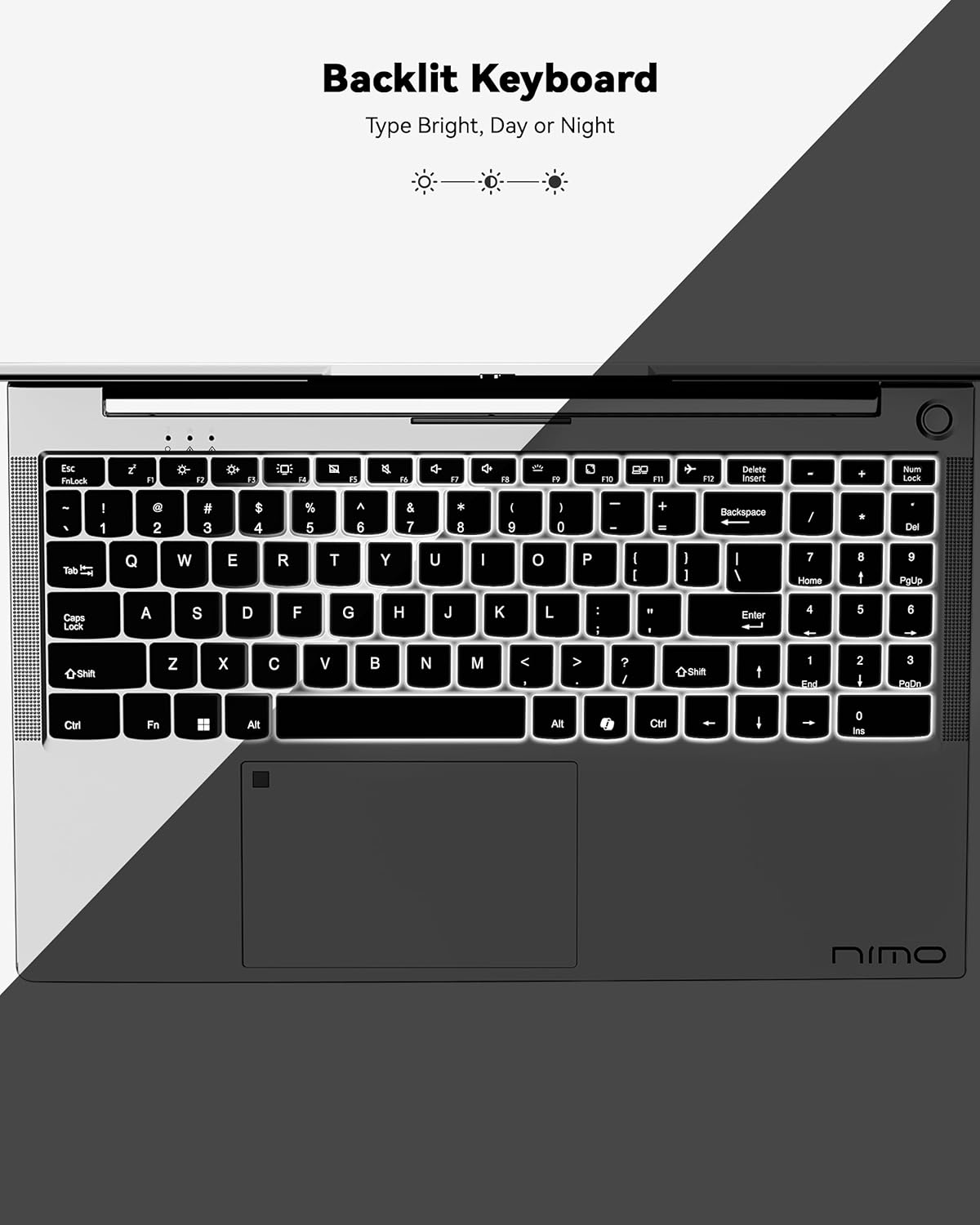
Figure 3: Backlit Keyboard
This image highlights the backlit keyboard feature of the NIMO laptop, demonstrating how the keys illuminate for typing in low-light conditions.
- แป้นพิมพ์พร้อมไฟแบ็คไลท์: กด Fn+F5 (or the key with the keyboard backlight icon) to toggle the backlight on/off or adjust brightness.
- ทัชแพด: Supports multi-touch gestures for scrolling, zooming, and navigation. Refer to Windows settings for customization.
- เซ็นเซอร์ลายนิ้วมือ: Located on the touchpad for secure and instant login. Set up your fingerprint in Windows Settings > Accounts > Sign-in options.

Figure 4: Fingerprint Sensor on Touchpad
This image shows a close-up of the NIMO laptop's touchpad, clearly indicating the integrated fingerprint sensor for quick and secure access.
5.3. Webลูกเบี้ยว
The laptop features a 2MP webcam for video calls and conferences. Ensure proper lighting for best image quality.
5.4. เสียง
The integrated speakers provide clear audio. You can also connect headphones or external speakers via the audio jack.
6. คุณสมบัติหลัก
- Vivid 15.6" Full HD Display: Enjoy stunning visuals with the 15.6" Full HD (1920x1080) IPS anti-glare display, featuring an 85% screen-to-body ratio and micro-edge design.
- ประสิทธิภาพอันทรงพลัง: Equipped with an AMD Ryzen 5 processor, 16GB DDR4 RAM, and a 1TB PCIe SSD for fast boot-ups, seamless multitasking, and efficient handling of applications.
- Upgradable Components: The RAM and SSD slots are expandable, allowing for future memory and storage upgrades.
- 65W USB-C PD Fast Charger: The included charger provides rapid power delivery, offering 2 hours of use from just 15 minutes of charging. It is also versatile for charging other compatible devices.
- Secure & Instant Login: Integrated fingerprint reader on the touchpad ensures quick and secure access to your device.
- Ergonomic Backlit Keyboard: Work comfortably in any environment with the backlit keyboard, featuring adjustable brightness.
- การเชื่อมต่อแบบไร้รอยต่อ: Features Wi-Fi 6 and Bluetooth 5.2 for stable, high-speed wireless connections, along with multiple USB 3.0 ports and HDMI for versatile peripheral connections.
Video 1: NIMO Laptop - Perfect for Work and Study, Anytime, Anywhere
This video demonstrates the NIMO laptop's versatility for various tasks, highlighting its portability and performance for work, study, and entertainment in different settings.
Video 2: NIMO 15.6 FHD Laptop for Students Home Work
This video showcases the NIMO 15.6 FHD laptop as an ideal device for students, home users, and professionals, emphasizing its suitability for educational and work-related tasks.
7. การบำรุงรักษา
- การทำความสะอาด: ใช้ผ้าเนื้อนุ่มที่ไม่เป็นขุยเช็ดทำความสะอาดหน้าจอและภายนอก หลีกเลี่ยงสารเคมีรุนแรง
- การดูแลแบตเตอรี่ เพื่อยืดอายุการใช้งานแบตเตอรี่ ควรหลีกเลี่ยงการใช้แบตเตอรี่จนหมดบ่อยๆ เก็บแล็ปท็อปไว้ในที่แห้งและเย็น
- การอัปเดตซอฟต์แวร์: อัปเดตระบบปฏิบัติการและไดรเวอร์ Windows ของคุณเป็นประจำเพื่อให้มั่นใจถึงประสิทธิภาพและความปลอดภัยที่เหมาะสมที่สุด
- การระบายอากาศ : Ensure the laptop's ventilation openings are not blocked to prevent overheating. Use on a hard, flat surface.
8 การแก้ไขปัญหา
- แล็ปท็อปไม่เปิดเครื่อง: Ensure the charger is securely connected and the battery has sufficient charge. Try a different power outlet.
- หน้าจอว่างเปล่า: Connect to an external monitor to check if the display is the issue. Restart the laptop.
- ปัญหาการเชื่อมต่อ Wi-Fi: Restart your router and the laptop. Check Wi-Fi settings and ensure airplane mode is off.
- ประสิทธิภาพช้า: Close unnecessary applications, check for malware, and ensure sufficient free storage space. Consider upgrading RAM or SSD if performance remains an issue.
- แป้นพิมพ์หรือทัชแพดไม่ตอบสนอง: Restart the laptop. Check for driver updates in Device Manager.
For persistent issues, please refer to the support section or contact NIMO customer service.
9. ข้อมูลจำเพาะ
| คุณสมบัติ | ข้อมูลจำเพาะ |
|---|---|
| ขนาดการแสดงผลหน้าจอยืน | 15.6 นิ้ว |
| ความละเอียดหน้าจอ | 1920 x 1080 พิกเซล (ฟูลเอชดี) |
| โปรเซสเซอร์ | AMD Ryzen 5 (3.7 GHz) |
| แรม | หน่วยความจำ DDR4 16 GB (สามารถอัปเกรดได้) |
| ความเร็วหน่วยความจำ | 4800 เมกะเฮิรตซ์ |
| ฮาร์ดไดรฟ์ | 1024 GB SSD (Upgradable) |
| โคโปรเซสเซอร์กราฟิก | AMD Integrated graphics |
| ระบบปฏิบัติการ | วินโดวส์ 11 โฮม |
| ประเภทไร้สาย | 802.11a/b/g/n/ac (Wi-Fi 6) |
| บลูทูธ | บลูทูธ 5.2 |
| จำนวนพอร์ต USB 2.0 | 1 |
| จำนวนพอร์ต USB 3.0 | 3 |
| อายุการใช้งานแบตเตอรี่โดยเฉลี่ย | 9 ชั่วโมง |
| น้ำหนักสินค้า | 5 ปอนด์ |
| ขนาดสินค้า | 14.07 x 8.98 x 0.76 นิ้ว |
| หลัง Webความละเอียดของกล้อง | 2 MP |
| คุณสมบัติพิเศษ | คีย์บอร์ดเรืองแสง, เครื่องอ่านลายนิ้วมือ, ระบบเสียง HD, แป้นตัวเลข |
10. การรับประกันและการสนับสนุน
แล็ปท็อป NIMO ของคุณมาพร้อมกับ... การรับประกันจากผู้ผลิต 2 ปี. Additionally, NIMO offers a 90-day hassle-free return and exchange policy. Our dedicated support team is available to assist with any issues or replacements.
10.1. ติดต่อฝ่ายสนับสนุน
- For product-related questions or technical assistance, please contact NIMO customer service via their official webเว็บไซต์ อีเมล์ หรือโทรศัพท์
- Contact information can typically be found on the NIMO official webหน้าเว็บไซต์หรือหน้าผลิตภัณฑ์
11. ข้อมูลด้านความปลอดภัย
- Use only original chargers and regularly inspect cables for damage.
- Handle the laptop by its base and consider using a protective case. Avoid placing heavy objects on it.
- Place the laptop on a hard, flat surface to ensure proper ventilation and prevent overheating. Keep it away from extreme temperatures and moisture.
- Do not overcharge the battery. Discontinue use if the battery swells or shows signs of damage.
- Set strong passwords, keep software updated, use antivirus protection, and regularly back up your data.
- In case of liquid spills, immediately unplug the laptop and allow it to dry completely before attempting to power it on.
- For any technical issues, consult qualified professionals. Do not attempt to disassemble or repair the device yourself.
12. การปฏิเสธความรับผิดทางกฎหมาย
This laptop is provided "as is," with no express or implied warranties except for the manufacturer's limited warranty (if applicable). Implied warranties of merchantability or fitness for a specific purpose are disclaimed. NIMO is not liable for damages resulting from misuse (e.g., non-approved chargers, unauthorized repairs), physical damage, or failure to follow safety guidelines, including data loss or business interruption. Users are responsible for regularly backing up their data. This disclaimer does not exclude liability for manufacturing defects or violations of mandatory local laws. By using the NIMO laptop, you accept these terms, which are governed by applicable jurisdiction laws.


