1. บทนำ
This manual provides detailed instructions for the installation, setup, and operation of your Ctronics 4K Outdoor Security Camera, model CTIPC-950 (950C-4KB). Please read this manual thoroughly before using the product to ensure proper functionality and safety. Keep this manual for future reference.
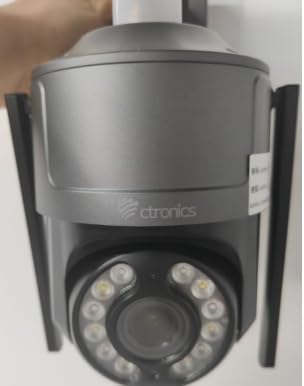
Figure 1: Ctronics 4K Outdoor Security Camera (Model CTIPC-950)
2. คุณสมบัติของผลิตภัณฑ์
- True 4K Ultra HD with Starlight Lens: Experience superior image clarity day and night. Features vivid color night vision up to 30 meters.
- Advanced AI Detection & Auto Tracking: Accurately detects humans, vehicles, and pets. Automatically tracks moving targets to minimize false alarms.
- Powerful Red & Blue Strobe Light with Siren Alarm: Deters intruders effectively with visual and audible alerts.
- 8 Preset Positions & 4 Custom Detection Zones: Configure specific camera positions for quick patrols and define areas for focused surveillance.
- Privacy Masking Feature: Protect sensitive areas by masking them from surveillance.
- Flexible Installation & Multi-Device Remote Access: Supports wall or ceiling mounting. Manage up to 36 cameras via the Ctronics app on mobile or PC, with split-screen viewing, group management, and multi-user sharing.
- Wi-Fi ดูอัลแบนด์: Supports both 2.4GHz and 5GHz Wi-Fi for reliable and stable connection.
- กันฝนระดับ IP66: Durable metal construction ensures reliable operation in various outdoor conditions.
3. เนื้อหาบรรจุภัณฑ์
ตรวจสอบว่ามีรายการทั้งหมดอยู่ในแพ็คเกจ:
- Ctronics 4K Security Camera (CTIPC-950 / 950C-4KB)
- คู่มือการใช้งาน (เอกสารนี้)
- สกรูยึดและปลั๊กผนัง
- อะแดปเตอร์แปลงไฟ
4. การตั้งค่า
4.1 Initial Power-On and Network Configuration
- เชื่อมต่อพลังงาน: Plug the power adapter into the camera's power jack and then into a power outlet. The camera will power on and perform a self-test.
- Download the Ctronics App: ค้นหา "Ctronics" in your mobile device's app store (iOS or Android) and download the official application.
- ลงทะเบียน/เข้าสู่ระบบ: เปิดแอปพลิเคชันและสร้างบัญชีใหม่ หรือเข้าสู่ระบบด้วยบัญชีที่มีอยู่แล้ว
- เพิ่มกล้อง: Tap the "+" icon in the app to add a new device. Select "Wireless Installation" or scan the QR code located on the camera body.
- เชื่อมต่อกับ Wi-Fi: Follow the on-screen prompts to connect the camera to your home's dual-band (2.4GHz or 5GHz) Wi-Fi network. Ensure your phone's volume is turned up to maximum during sound-based configuration.
Video 1: Wi-Fi Setting via Sound (S20-G model, similar process for CTIPC-950)
This video demonstrates the Wi-Fi setup process using sound configuration, which is applicable to various Ctronics camera models including the CTIPC-950. It shows how to power on the camera, open the rubber cover, and use the mobile app to connect to your home Wi-Fi network by entering the password and allowing the phone to transmit sound signals to the camera for configuration.
5. การติดตั้ง
5.1 ตำแหน่งการติดตั้ง
Choose a suitable outdoor location for mounting. The camera supports both wall and ceiling installation. Ensure the chosen spot provides a clear view of the area you wish to monitor and has access to a power source.
5.2 ขั้นตอนการติดตั้ง
- ทำเครื่องหมายรูเจาะ: Use the provided mounting template or the camera's base to mark the positions for drilling on the wall or ceiling.
- เจาะรู: Drill pilot holes at the marked positions. Insert wall plugs if mounting on masonry or concrete.
- ยึดฐานให้แน่น: Attach the camera's mounting base to the wall or ceiling using the provided screws.
- ติดกล้อง: Securely attach the camera unit to the mounted base.
6. คู่มือการใช้งาน
6.1 สด View และการควบคุมแพน/เอียง
Access the live feed through the Ctronics app. Use the on-screen controls to pan the camera horizontally up to 355° and tilt vertically up to 90° to adjust the viewมุมอิง
Video 2: Ctronics 4K Security Camera Overview (Model 930C, similar features for CTIPC-950)
วิดีโอนี้มีเนื้อหาเกี่ยวกับview of a Ctronics 4K security camera, highlighting its 355° pan and 90° tilt capabilities, 4K UHD resolution, starlight lens for night vision, AI detection for humans, pets, and vehicles, and the red and blue alarm light with siren. It also shows the metal body, IP67 weatherproof rating, 24/7 recording, dual-band Wi-Fi, and cloud/SD card storage options.
6.2 AI Detection and Auto Tracking
The camera's advanced AI can differentiate between humans, vehicles, and pets. When motion is detected, the camera can automatically track the moving object and send real-time notifications to your linked devices.
6.3 โหมดการมองเห็นตอนกลางคืน
กล้องมีตัวเลือกการมองเห็นในเวลากลางคืนหลายแบบ:
- การมองเห็นสีกลางคืน: Utilizes the starlight lens to provide full-color images in low-light conditions up to 30 meters.
- กล้องมองกลางคืนอินฟราเรด (IR): Provides clear black-and-white images in complete darkness.
6.4 ฟังก์ชั่นปลุก
Upon detection of an intruder, the camera can activate its red and blue strobe lights and a loud siren to deter unwanted visitors. You will also receive instant alerts on your mobile device.
6.5 Preset Positions and Detection Zones
Configure up to 8 preset camera positions for quick navigation to frequently monitored areas. Define up to 4 customizable motion detection zones to focus surveillance on critical areas and reduce irrelevant alerts.
6.6 เสียงสองทาง
Use the built-in microphone and speaker to communicate with visitors or deter intruders directly through the app.
7. ข้อมูลจำเพาะ
| คุณสมบัติ | คำอธิบาย |
|---|---|
| ชื่อรุ่น | CTIPC-950 (950C-4KB) |
| การใช้งานภายใน/ภายนอกอาคาร | กลางแจ้ง |
| ความละเอียดในการจับภาพวิดีโอ | 3840 (4K UHD) |
| ความละเอียดของภาพนิ่งที่มีประสิทธิภาพ | 8 MP |
| ช่วงการมองเห็นตอนกลางคืน | 50 Meters (Color Night Vision up to 30m) |
| เทคโนโลยีการเชื่อมต่อ | Wireless (Dual-Band Wi-Fi: 2.4GHz, 5GHz), Ethernet, ONVIF, RTSP |
| แหล่งพลังงาน | เครื่องใช้ไฟฟ้าแบบมีสาย (12 โวลต์, 12 วัตต์) |
| ประเภทตัวควบคุม | Ctronics APP |
| ประเภทการติดตั้ง | ติดผนัง, ติดเพดาน |
| การให้คะแนนการคุ้มครองระหว่างประเทศ | IP66 (ทนฝนและแดด) |
| วัสดุ | โลหะ |
| ขนาดรายการ (ยาว x กว้าง x สูง) | 5.91 x 5.91 x 5.91 นิ้ว |
| น้ำหนักสินค้า | 2.2 ปอนด์ |
| ตัวเลือกการจัดเก็บข้อมูล | Micro SD (up to 256GB), FTP, NAS, Cloud Storage |
8. การบำรุงรักษา
- การทำความสะอาดปกติ: ทำความสะอาดเลนส์และตัวเรือนกล้องเป็นระยะด้วยผ้านุ่มๆamp ใช้ผ้าสะอาดเช็ดเพื่อให้ได้ภาพที่คมชัด ห้ามใช้สารเคมีรุนแรง
- อัพเดตเฟิร์มแวร์: Check the Ctronics app regularly for firmware updates to ensure optimal performance and security.
- การตรวจสอบแหล่งจ่ายไฟ: Ensure the power adapter and cable are free from damage and properly connected.
- ความเสถียรของเครือข่าย: Verify your Wi-Fi network is stable to maintain continuous camera operation.
9 การแก้ไขปัญหา
- กล้องไม่ได้เชื่อมต่อกับ Wi-Fi:
- ตรวจสอบให้แน่ใจว่ากล้องอยู่ในระยะของเราเตอร์ Wi-Fi ของคุณ
- ตรวจสอบว่ารหัสผ่าน Wi-Fi ถูกต้อง
- Try restarting the camera and your router.
- Ensure your router supports 2.4GHz or 5GHz bands and that the camera is attempting to connect to the correct band.
- คุณภาพของภาพต่ำ:
- ทำความสะอาดเลนส์กล้อง
- Check your network connection speed. A slow connection can affect streaming quality.
- ตรวจสอบให้แน่ใจว่าไม่มีสิ่งกีดขวางปิดกั้นกล้อง view.
- สัญญาณเตือนที่ผิดพลาด:
- Adjust the sensitivity settings for motion detection in the app.
- Configure detection zones to exclude areas with frequent irrelevant motion (e.g., moving trees).
- Ensure AI detection for humans/vehicles/pets is enabled to filter out other movements.
- ไม่มีไฟฟ้า:
- Check if the power adapter is securely plugged into both the camera and the power outlet.
- ทดสอบปลั๊กไฟด้วยอุปกรณ์อื่นเพื่อให้แน่ใจว่าใช้งานได้ปกติ
10. การรับประกันและการสนับสนุน
Your Ctronics 4K Outdoor Security Camera is covered by a manufacturer's warranty. For specific warranty terms and conditions, please refer to the documentation included with your purchase or visit the official Ctronics website. For technical support, troubleshooting assistance, or any product-related inquiries, please contact Ctronics customer service through the contact information provided on their website or within the Ctronics app.


