1. ข้อมูลด้านความปลอดภัยที่สำคัญ
Please read and understand all instructions before assembly and use of this product. Failure to follow these instructions may result in injury or damage to the product.
- อุปกรณ์ป้องกันทิป: Always ensure the stand is securely attached to the wall using the provided anti-tip devices. This prevents accidental tipping, which can cause serious injury.
- ความจุน้ำหนัก: Do not overload the shelves. The maximum static load capacity per level is 20 กก. (44 ปอนด์)กระจายน้ำหนักให้เท่าๆ กัน
- การประกอบ: Assemble the product on a soft, clean surface to prevent scratches. Ensure all screws and fasteners are tightened securely before use.
- การจัดวาง: Place the stand on a level and stable surface. Avoid placing it in areas with high humidity or direct sunlight.
- เด็ก: เก็บชิ้นส่วนขนาดเล็กและวัสดุบรรจุภัณฑ์ให้ห่างจากเด็กในระหว่างการประกอบ
2. สินค้าหมดview
The HOOBRO 4-Layer Audio Media Stand (Model BF38CJ01) is designed to organize and display your audio and media equipment. Its robust construction and thoughtful design make it suitable for various devices.
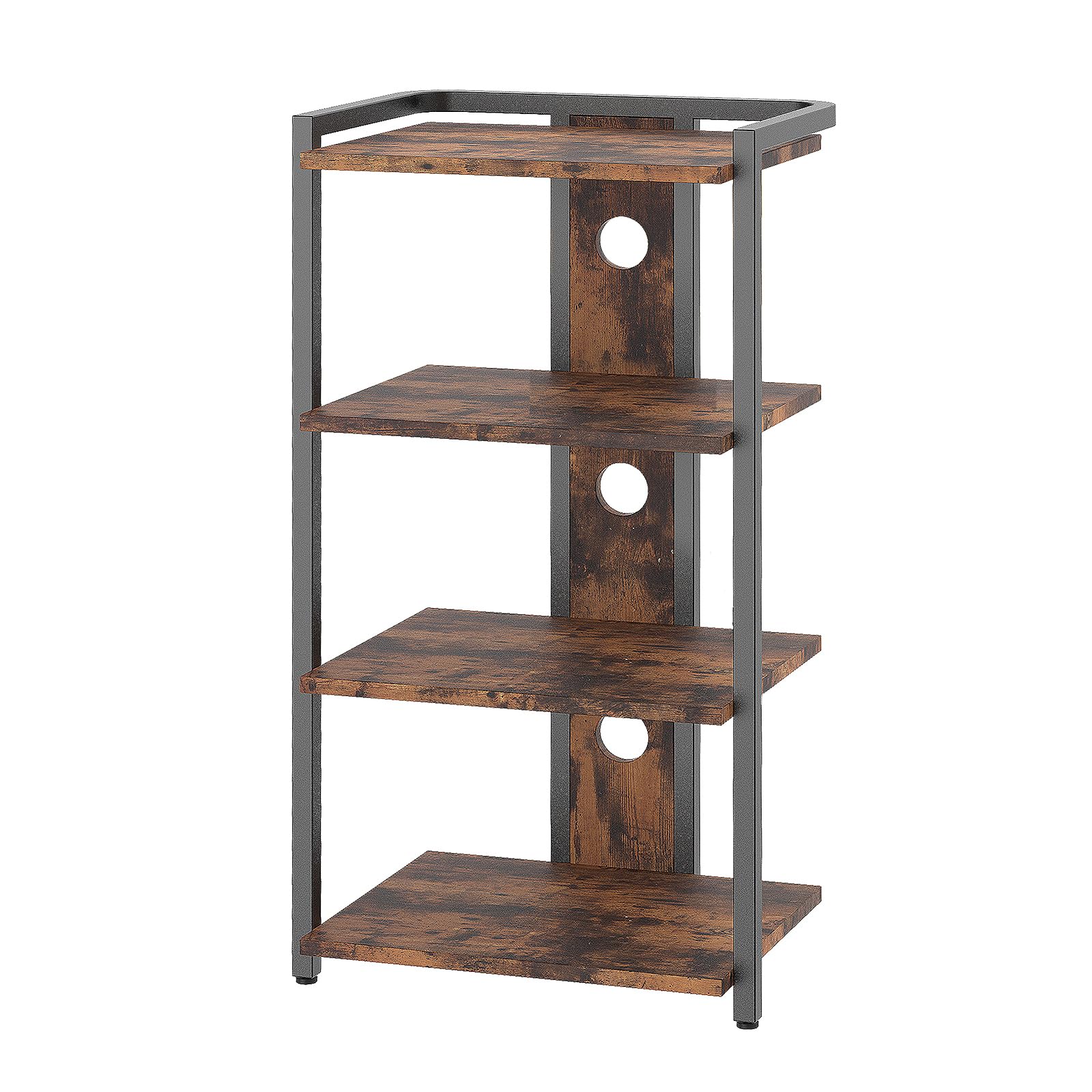
Figure 2.1: Assembled HOOBRO 4-Layer Audio Media Stand. This image shows the stand with four shelves, suitable for various media devices, and its rustic brown and black finish.
คุณสมบัติหลัก:
- 4 Spacious Shelves: จัดเตรียมให้ ample space for game consoles, speakers, turntables, projectors, Wi-Fi routers, and other media devices. The open design promotes heat dissipation.
- การจัดการสายเคเบิล: Features 3 cable management openings on the rear panel to help organize and conceal cables, maintaining a tidy setup.
- โครงสร้างทนทาน: Made from high-quality chipboard and a sturdy metal frame, ensuring stability and longevity. Each shelf supports up to 20 kg.
- การออกแบบที่หลากหลาย: The minimalist, industrial aesthetic complements various room decors, making it suitable for living rooms, hallways, or bedrooms.
- Anti-Tilt Bracket: Includes a bracket for securing the stand to the wall, enhancing stability and safety.
3. เนื้อหาบรรจุภัณฑ์
ก่อนเริ่มการประกอบ โปรดตรวจสอบให้แน่ใจว่าส่วนประกอบทั้งหมดที่ระบุไว้ด้านล่างนี้อยู่ในสภาพสมบูรณ์และไม่มีความเสียหาย หากมีชิ้นส่วนใดสูญหายหรือเสียหาย โปรดติดต่อฝ่ายสนับสนุนลูกค้า
- 1 x Multimedia Stand (disassembled components)
- 1 x Accessory Set (screws, nuts, tools, etc.)
- 1 x Anti-Tilt Bracket Set
- 1 x คู่มือผู้ใช้ (เอกสารนี้)
Note: The accessory set typically includes all necessary hardware and a basic tool for assembly.
4. คำแนะนำในการประกอบ
Assembly of the HOOBRO 4-Layer Audio Media Stand is designed to be straightforward. Follow the step-by-step instructions provided in the included illustrated guide. Ensure you have a clean, soft surface to work on to prevent damage to the components.
ขั้นตอนการประชุมสมัชชาใหญ่:
- แกะส่วนประกอบ: นำชิ้นส่วนทั้งหมดออกจากบรรจุภัณฑ์อย่างระมัดระวังและวางเรียงไว้ ตรวจสอบกับรายการสิ่งของบนบรรจุภัณฑ์อีกครั้ง
- ระบุชิ้นส่วน: Each component and hardware piece is typically labeled. Refer to the illustrated instructions to identify each part.
- ประกอบโครง: Begin by assembling the metal frame components according to the diagrams. Do not overtighten screws initially.
- ติดชั้นวาง: Secure the chipboard shelves to the assembled frame. Ensure they are oriented correctly.
- ขันสกรูยึดทั้งหมดให้แน่น: Once all parts are in place, gradually tighten all screws and fasteners to ensure a stable structure.
- Install Anti-Tilt Bracket: This is a critical safety step. Attach the anti-tilt bracket to the top rear of the stand and then securely fasten it to a wall stud using appropriate hardware. Refer to the specific instructions for your wall type.
- ปรับเท้า: The stand may include adjustable feet. Adjust them to ensure the stand is level and stable on your floor.
For detailed, illustrated instructions, please refer to the separate assembly guide included in your package.
5. คู่มือการใช้งาน
This section provides guidance on how to effectively use your HOOBRO Audio Media Stand.
- การจัดวางอุปกรณ์: Place your audio and media devices on the shelves. Distribute the weight evenly across each shelf and avoid exceeding the 20 kg maximum load capacity per shelf.
- การจัดการสายเคเบิล: Utilize the three cable management openings located on the rear panel. Route power cords, audio cables, and network cables through these openings to keep them organized and out of sight. This helps prevent tangles and improves the aesthetic of your setup.
- การระบายอากาศ : The open design of the stand promotes air circulation around your devices, aiding in heat dissipation. Ensure that devices are not placed in a way that obstructs their ventilation ports.
- การตรวจสอบเสถียรภาพ: Periodically check the stability of the stand, especially after moving it or rearranging devices. Ensure the anti-tilt bracket remains securely fastened to the wall.
6. การบำรุงรักษา
Proper maintenance will help prolong the life and appearance of your media stand.
- การทำความสะอาด: เช็ดพื้นผิวด้วย d . ที่อ่อนนุ่มamp ผ้า หลีกเลี่ยงการใช้สารเคมีรุนแรง น้ำยาทำความสะอาดที่มีฤทธิ์กัดกร่อน หรือน้ำยาขัดเงาที่อาจทำลายพื้นผิว
- ปัดฝุ่น: ควรปัดฝุ่นชั้นวางและกรอบรูปเป็นประจำเพื่อป้องกันคราบสะสม
- การตรวจสอบตัวยึด: ตรวจสอบสกรูและตัวยึดทั้งหมดเป็นระยะเพื่อให้แน่ใจว่าขันแน่น ขันให้แน่นอีกครั้งหากจำเป็น
- หลีกเลี่ยงความชื้น: Protect the stand from excessive moisture and spills. Wipe up any liquids immediately.
7 การแก้ไขปัญหา
หัวข้อนี้จะกล่าวถึงปัญหาทั่วไปที่คุณอาจพบเจอ
| ปัญหา | สาเหตุที่เป็นไปได้ | สารละลาย |
|---|---|---|
| ขาตั้งโยกเยกหรือไม่มั่นคง |
|
|
| ชิ้นส่วนขาดหายระหว่างการประกอบ |
|
|
| Shelves appear scratched or damaged. |
|
|
8. ข้อมูลจำเพาะ
| หมายเลขรุ่น: | BF38CJ01 |
| ยี่ห้อ: | ฮูบรู |
| ขนาดสินค้า (กว้าง x ยาว x สูง) : | 42 x 30 x 80 ซม. (16.5 x 11.8 x 31.5 นิ้ว) |
| น้ำหนักผลิตภัณฑ์: | 7.2 กก. (15.9 ปอนด์) |
| Maximum Static Load per Level: | 20 กก. (44 ปอนด์) |
| วัสดุ: | Chipboard, Metal Frame |
| สี: | สีน้ำตาลชนบท + สีดำ |
| จำนวนชั้นวาง : | 4 |
| คุณสมบัติพิเศษ: | Cable management openings, adjustable feet, anti-tilt bracket |
9. การรับประกันและการสนับสนุนลูกค้า
For warranty information, please refer to the documentation provided with your purchase or visit the official HOOBRO website. If you have any questions, require assistance with assembly, or need to report missing/damaged parts, please contact HOOBRO customer support directly.
You can often find contact details on the product packaging, the HOOBRO brand store on Amazon, or their official webเว็บไซต์.


